When Banner moves to Ellucian Platform (SaaS), the integration layer your team built over the last decade moves with it, except most of it was never designed to survive that transition.
Direct database access ends. Stored procedures need a supported posting path. SQL scripts that quietly enforced eligibility rules for years need to become documented, testable business logic. And your IT team is often expected to figure all of this out while also managing the migration itself.

This guide is written for higher-ed leaders, ERP/SIS owners, functional stakeholders, and modernization teams who need a decision-level understanding of how to modernize Banner On-Premises integrations for Ellucian Platform (SaaS).
It gives you a practical map for Banner integration modernization: how to classify what you have, where business logic is likely hiding, and what questions to ask before choosing a future-state architecture. Start here, then move to the pattern-specific guides for the integration types that look familiar.
The pattern-specific guides serve a different role. Use them when a particular integration pattern looks familiar and you want more focused guidance on that scenario. Each deep-dive guide explains one common modernization pattern, shows typical current-state and future-state models, summarizes lessons from real ABCloudz projects, and includes a focused questionnaire for reviewing that type of integration in more detail.
- Direct database integrations
- Stored procedure integrations
- CSV and SFTP integrations that rely on manual handoffs
- Middleware integrations such as Boomi jobs
- Full-export integrations for changed-record synchronization
- One large legacy Banner integration with multiple business flows
- Integrations with hidden SQL logic
Start with this pillar guide to understand the full modernization framework. Then move into the pattern-specific guides when you need to review a particular integration type.
Why Banner On-Premises integrations need a SaaS-compatible modernization path
Banner On-Premises gave institutions deep control over the technical environment around Banner. Teams could query the Oracle database directly, create custom views, run local jobs, generate files, write stored procedures, and connect middleware tools to database objects.
Over time, those mechanisms became more than technical shortcuts. A simple SQL export could grow into a process with eligibility rules, term filters, validation, error handling, and manual review. A stored procedure could become responsible for financial aid updates or student account changes. A middleware job could turn into a portfolio of scripts moving data in both directions.
Ellucian Platform (SaaS) changes those assumptions.
Direct database access is no longer the integration foundation. Local jobs and scripts need review. Stored procedures that update Banner tables need a supported posting path. Middleware workflows that depend on Banner Oracle access need reassessment. Routine manual file handoffs need to become automated, monitored, or limited to exception handling.
The risk is not just technical. Without proper discovery, teams may rebuild the visible connector while losing the business logic behind it.
Moving Banner integrations to SaaS?
Start with discovery.
ABCloudz helps higher education teams map direct database access, stored procedures, SQL scripts, middleware jobs, CSV/SFTP workflows, and hidden business rules before choosing a SaaS-compatible modernization path.
Request Banner Integration AssessmentA practical framework for Banner integration modernization
Before choosing a future-state architecture, teams need a simple way to review what the current Banner integration actually does.
The framework below turns integration discovery into seven practical steps. The goal is to understand the business outcome, map the current state, identify hidden logic, classify the modernization pattern, and define a SaaS-compatible direction before implementation planning begins.
1. Identify the business outcome
Start with the process the integration supports. Does it handle student communication, financial aid verification, advising, accessibility services, bookstore credits, insurance waiver processing, alumni records, placement management, timetabling, admissions, or reporting?
This matters because each process carries a different risk profile. An outbound feed may cause downstream delays. An inbound posting flow may update Banner records incorrectly if validation is weak. A student-facing notification process may need faster timing than an administrative file exchange.
2. Map the current state
Document how the integration works today. Capture source and target systems, data direction, files, APIs, scripts, jobs, middleware, database objects, schedules, manual steps, validation rules, error handling, owners, and known failure points.
This step often shows that a “single integration” is not actually single. It may contain several datasets, schedules, directions, and business owners inside one legacy process.
3. Extract hidden business rules
Many Banner integrations contain business logic inside SQL scripts, stored procedures, views, middleware mappings, and file-generation logic.
A query may decide which students should be included. A stored procedure may define matching and validation rules. A view may hide joins across multiple Banner tables. A file layout may reflect a target-system contract that no one documented separately. Those rules need to become explicit before the future state is designed.
4. Classify the modernization pattern
Once the current state is clear, the integration usually fits one or more recurring modernization patterns. A workflow may be a direct database integration, a CSV/SFTP process, a middleware workflow, a full-export integration, and a hidden SQL logic case at the same time.
These patterns can overlap. That is expected. Classification helps teams ask the right questions and avoid one-size-fits-all modernization.
5. Design the SaaS-compatible future state
The future-state architecture should follow the pattern, business process, data direction, target-system constraints, and risk profile. Possible components may include Ellucian Ethos APIs, Ellucian Data Connect, approved access patterns, Ethos Change Notifications, Amazon S3, automated SFTP, supported loaders, supported posting mechanisms, Ellucian Experience notifications, Ellucian Insights reports, structured logs, validation outputs, and failed-record handling.
Different integrations require different combinations of supported mechanisms. The future state should show how the right business outcome will work in Ellucian Platform (SaaS).
6. Decide what to preserve, redesign, split, or retire
Future State Architecture Design should also clarify what should happen to the old logic. Some rules should be preserved because they represent current institutional policy. Some should become configurable. Some should move into validation. Some flows should be split into separate pipelines. Some obsolete rules should be retired.
Technical teams can identify scripts, fields, APIs, and procedures. Functional owners need to confirm which rules still support the business process.
7. Define validation, observability, and support ownership
A SaaS-ready integration should be easier to support than the legacy process. The future-state design should define what makes a record valid, what happens when validation fails, who reviews exceptions, whether audit mode is needed, where logs and status reports live, and how failed records can be retried safely.
This gives the team a practical foundation for the later steps of the broader methodology, including effort estimation, project planning, solution documentation, implementation, testing, and post-production support.
Turn your Banner integration inventory into
a modernization plan
We can help your team classify current integrations, identify hidden logic, prioritize high-risk workflows, and define future-state options using Ethos APIs, Data Connect, approved access patterns, Amazon S3, automated SFTP, or other supported paths.
Plan Banner SaaS ModernizationTools we recommend for discovery
For Banner integration modernization, we recommend using Ellucian Modernization Studio during the discovery stage.
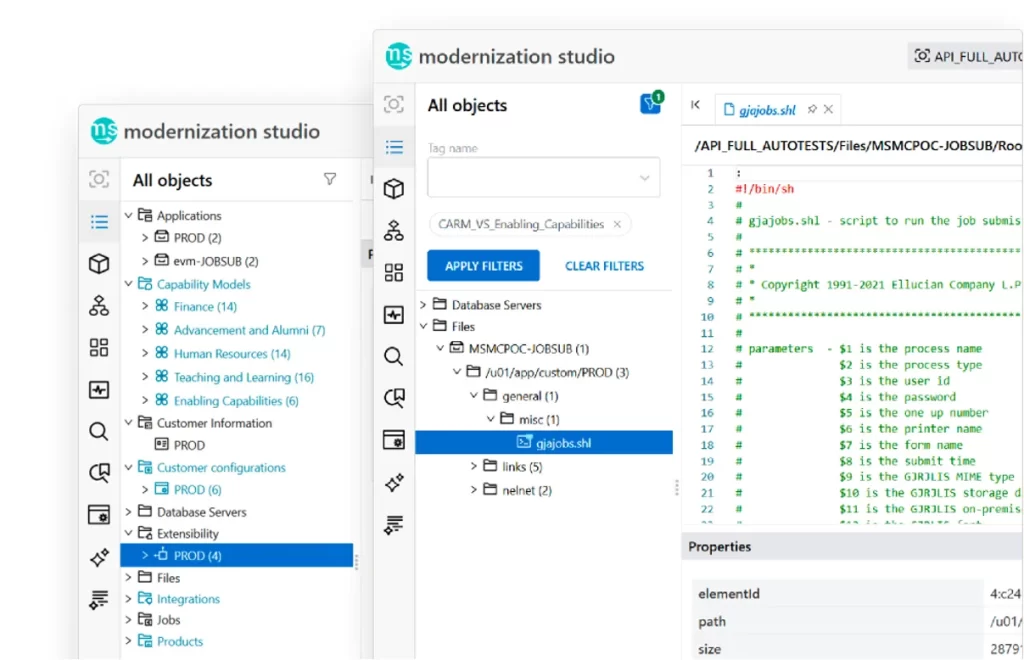
Modernization Studio helps accelerate AI-assisted discovery by scanning legacy ERP environments, assessing complexity, mapping dependencies, and generating modernization recommendations. We use it as an accelerator, not a substitute for expert review. The tool helps surface dependencies faster, while our team validates the business logic, integration patterns, and SaaS-compatible design decisions.
We also rely on our Integration Knowledge Hub framework to apply lessons from previous Ellucian integration projects across different institutions. When we have already worked through a similar pattern for another customer, that experience can make discovery faster while ensuring that the final recommendations still reflect the current institution’s specific environment, requirements, and constraints.
Depending on the current state, discovery may also include middleware inventories, Oracle database object review, scheduler logs, file-transfer records, source repositories, support tickets, and existing runbooks.
Common Banner integration modernization patterns
Every institution has its own Banner environment, but the same integration problems tend to appear in recognizable forms. Based on our work across Ellucian modernization projects, ABCloudz groups these recurring scenarios into practical modernization patterns.
Use the summaries below to recognize which pattern may match your current integration, then continue with the related deep-dive guide for a more focused review. Each pattern also includes related ABCloudz case studies that show how this modernization scenario appears in real Ellucian integration projects.
Pattern 1. Banner direct database integrations
This pattern applies when an integration reads directly from Banner tables, uses SQL scripts, ODS views, custom views, local jobs, or database-level joins and filters. The modernization task is to replace direct database access with supported SaaS-compatible access while preserving the business logic behind the old queries.
Deep-dive guide: How to modernize Banner direct database integrations for Ellucian Platform (SaaS).
Related case studies: ClockWorks, timetabling, BMET, placement systems, SARS Anywhere, and student accessibility data.
Pattern 2. Banner stored procedure integrations
This pattern applies when an integration updates Banner records through stored procedures, staging tables, direct database updates, or similar inbound posting logic. The modernization task is to replace that model with a supported posting path that includes validation, matching, audit, failed-record handling, and operational visibility.
Deep-dive guide: How to modernize Banner stored procedure integrations for Ellucian Platform (SaaS).
Related case studies: PowerFAIDS, Arthur Gallagher, Follett, and Salesforce EDA.
Pattern 3. Banner CSV and SFTP integrations with manual handoffs
CSV and SFTP are not automatically problems. The issue is manual handoff. This pattern applies when staff create, format, upload, download, check, or troubleshoot files manually. The modernization task is to keep the file contract where it still makes sense while replacing manual execution with automated, validated, and monitored workflows.
Deep-dive guide: How to modernize Banner CSV and SFTP integrations that rely on manual handoffs for Ellucian Platform (SaaS).
Related case studies: Remind, ProVerify, alumni management, and Follett.
Pattern 4. Banner middleware integrations such as Boomi jobs
This pattern applies when Banner integrations run through Boomi or a similar middleware layer that depends on Banner Oracle access, custom views, staging tables, stored procedures, local files, or email-based error handling. Middleware itself is not the problem. The modernization task is to decide which workflows should remain in middleware, move to native Ellucian capabilities, split into smaller flows, or retire.
Deep-dive guide: How to modernize Banner middleware integrations such as Boomi jobs for Ellucian Platform (SaaS).
Related case studies: Salesforce EDA and Arthur Gallagher.
Pattern 5. Banner full-export integrations
This pattern applies when an integration sends complete datasets repeatedly, even when only a few records changed. The modernization task is to decide whether the future state should separate baseline loading, changed-record synchronization, exception handling, and reconciliation. Changed-record synchronization does not automatically mean real-time delivery. It may be notification-triggered, scheduled, timestamp-based, near-real-time, or based on another supported method.
Deep-dive guide: How to modernize Banner full-export integrations for changed-record synchronization in Ellucian Platform (SaaS).
Related case studies: student accessibility data, alumni management, placement systems, timetabling, and Remind as a supporting incremental-processing example.
Pattern 6. One large legacy Banner integration
This pattern applies when one job, vendor connection, file exchange, or middleware workflow contains several business flows inside it. The modernization task is to identify those flows and decide whether the future state should remain one process or become multiple purpose-built pipelines with clearer ownership, schedules, validation, and support paths.
Deep-dive guide: How to modernize one large legacy Banner integration into multiple purpose-built pipelines for Ellucian Platform (SaaS).
Related case studies: BMET, Follett, Salesforce EDA, PowerFAIDS, and Remind.
Pattern 7. Banner integrations with hidden SQL logic
This pattern is the methodology layer underneath the rest of the series. It applies when SQL scripts, joins, filters, views, stored procedures, triggers, or local jobs contain business rules that are not documented anywhere else. The modernization task is to translate that hidden logic into explicit, testable, SaaS-ready business rules before rebuilding the integration.
Deep-dive guide: How to modernize Banner integrations with hidden SQL logic for Ellucian Platform (SaaS).
Related case studies: SARS Anywhere, timetabling, student accessibility data, BMET, PowerFAIDS, Salesforce EDA, and ClockWorks.
Download the Banner integration modernization questionnaire
Use the general questionnaire below to capture the broader integration context, current-state risks, ownership, dependencies, and future-state questions. For deeper analysis, open the related pattern-specific deep-dive guide listed above and use the questionnaire included in that article.
Banner integration modernization questionnaire
This general questionnaire gives your technical and functional teams a simple way to prepare for a more focused discovery conversation.
You can use it for internal planning or share it with ABCloudz so we can understand your Banner integration faster and support your team with better context.
Talk to ABCloudz about your Banner integration modernization
Not sure where to start? We can help you map your current Banner integrations, identify which patterns apply, and prioritize what needs attention before your SaaS go-live date.
ABCloudz is an Ellucian Service Partner with more than 10 years of experience helping institutions modernize within the Ellucian ecosystem.
Talk with us about your Banner integration modernization path.