Universities cannot afford delays or manual work when student health insurance data has to move between systems. In this project, the ABCloudz team automated the full bidirectional integration between Ellucian Banner SaaS and Arthur J. Gallagher, the university’s insurance partner, while replacing Dell Boomi jobs with native Ellucian Data Connect pipelines.

For the customer, this project was not only part of the move from an on-prem Banner database to Banner SaaS (Ellucian Student). It was also an opportunity to retire an extra integration platform, simplify the architecture, and reduce ongoing integration costs.
Arthur J. Gallagher supports the university as an external insurance partner in the student health insurance process. In this integration, Gallagher receives enrollment data for eligible students and returns waiver data that must stay synchronized with Banner SaaS.
In this blog post, we show how the ABCloudz team converted existing Boomi jobs into native Data Connect pipelines, preserved the existing enrollment and waiver process, and added more transparent monitoring and error handling. If you are planning a Banner SaaS modernization and want to reduce dependence on third-party integration tooling where native Ellucian capabilities are sufficient, this case shows what that transition can look like in practice.
Are you looking for a reliable partner to develop a complex data integration in your Ellucian software environment? You can trust ABCloudz to deliver this project for you. As an Ellucian Service Partner, our company knows all about the data integration needs that higher education institutions have. Read more success stories on our blog and contact us to get started.
Current-state architecture
Let us start with an overview of the existing architecture used to exchange student health insurance data between the customer’s Banner environment and Arthur J. Gallagher. The solution includes separate inbound and outbound Dell Boomi jobs that support enrollment and waiver processing. The following image shows the current-state architecture.
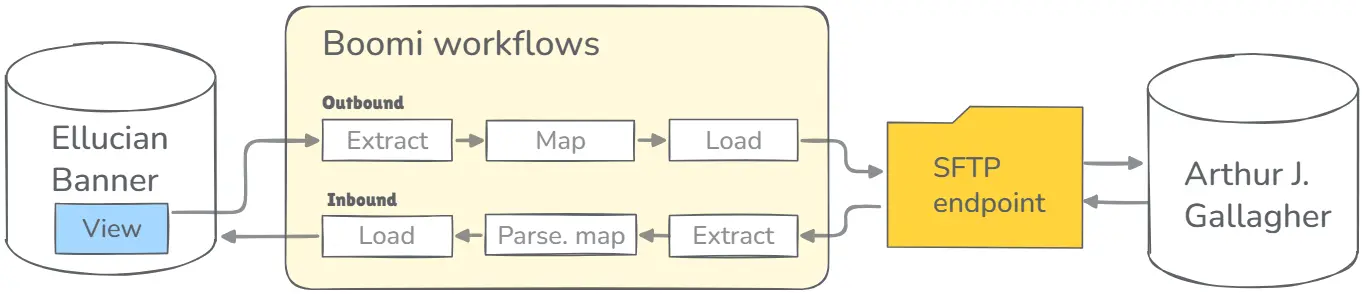
The outbound job enrolls students into Arthur J. Gallagher. A Boomi script connects directly to the custom view in the Banner database, gets data from 34 fields, maps this data to appropriate fields, writes it to disk, and sends it to Gallagher via SFTP.
In the opposite direction, the inbound job retrieves the waiver file from Arthur J. Gallagher through the SFTP server. This file includes a cumulative waiver feed, which a Boomi script parses into individual records. Boomi maps these records to student identifiers and loads data to a staging table in the Banner database. Following, a custom database procedure updates data in the Banner database and creates an error log table.
These Boomi jobs run every morning on a business day. Both jobs interact with various database objects, such as views, procedures, and tables, to retrieve, transform, and load the student data between the two systems. For example, the Banner database maintains a custom view to provide a centralized and enriched data source for the integration process, along with a special table for data integration purposes.
The ABCloudz approach
In the cloud-based Ellucian Banner SaaS environment, data integration pipelines can’t interact with database objects. For all data extraction and loading operations, the native Data Connect pipelines interact with the Ethos API on the Ellucian Banner SaaS side. On the partner side, the Data Connect pipelines use files on an Amazon S3 bucket or SFTP server. This approach ensures data security and integrity. At the same time, the implementation of this approach requires a totally different data integration architecture.
Relying on its previous successful experience in decommissioning Boomi jobs, the ABCloudz team created native Data Connect pipelines to replace the existing Boomi jobs. By replacing third-party jobs with native Ellucian pipelines, the customer could align the integration architecture with the SaaS target state, simplify support, and reduce ongoing platform costs.
This native data integration eliminates the need for additional tables and views, which the Boomi jobs use to synchronize data. Also, this new data integration provides an advanced error-handling process, where administrators can find information about errors that occurred during data transfer. With native Banner SaaS functionality, administrators can see notifications in the Experience dashboard and effectively resolve errors, if any.
Replacing Boomi jobs with Data Connect pipelines
To streamline the development of Ellucian Data Connect pipelines, the ABCloudz team uses fittings. The idea of fittings is similar to Lego bricks. These fittings ensure an ideal connection between each other. In the Ellucian Data Connect ecosystem, each fitting performs a specific data management task, providing the following fitting with the expected output.
Let us take a closer look at the job that transfers data into Arthur J. Gallagher. As we already mentioned, this job gets the data from 34 fields of the custom view in the Banner database. This information includes the following data.
- Personal data such as student identifiers, names, date of birth, gender, contacts, and addresses.
- Student data such as level, term, status, campus, residency, and expected graduation date.
- Health insurance registration data.
This outbound pipeline prepares and sends the student enrollment data that Gallagher needs to process health insurance coverage for eligible students.
Following, the Boomi job maps this extracted data, writes it to disk, and sends the data to Gallagher via SFTP.
Using fittings in Data Connect pipelines
At the higher level, the architecture of a similar Data Connect pipeline includes the following fittings or building blocks.
- Custom API fitting. This Data Connect serverless API pulls data from Ethos resources. Also, this fitting consolidates cross-resource joins and transforms data according to the specified rules.
- File writer fitting. This fitting writes the transformed data into a CSV file according to the mapping rules.
- SFTP target fitting. This fitting uploads the generated CSV file to an SFTP server. The Data Connect pipeline uses this element when the customer configures access to an SFTP server.
- Amazon S3 archive fitting. This fitting uploads the generated CSV file to an Amazon S3 bucket. The Data Connect pipeline uses this element when the customer configures access to an Amazon S3 bucket.
As a result, this Data Connect pipeline mirrors the existing logic. The ABCloudz team implemented the same approach for the inbound job that retrieves waiver data from Arthur J. Gallagher. In this case, the pipeline receives the inbound file through SFTP, saves an archive copy to Amazon S3, transforms the records, and sends the updates to Banner SaaS through the Ethos API.
Future-state architecture
The following image shows the future-state architecture with two Data Connect pipelines.
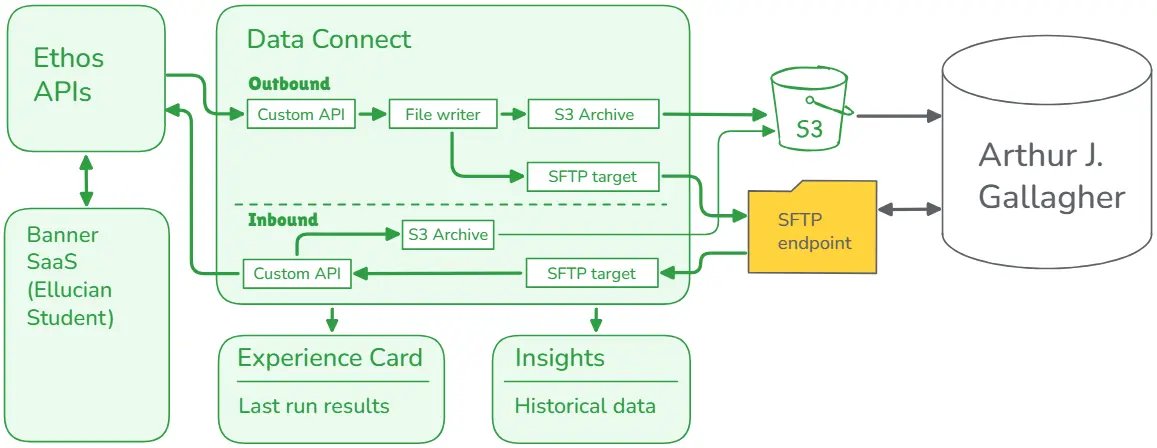
These pipelines connect Banner SaaS and Arthur J. Gallagher through native Ellucian capabilities instead of Dell Boomi. They use the Ethos API to securely interact with Banner SaaS data and support configurable parameters, native notifications, and Data Connect run logs.
The outbound pipeline transfers enrollment data from Ellucian Banner SaaS to Arthur J. Gallagher. Administrators configure parameters such as term code, full-time threshold hours, and target paths. After the run, this Data Connect pipeline uploads CSV files with transformed data to an SFTP server and saves an archive copy to an Amazon S3 bucket.
The inbound pipeline uses a waiver CSV file received from Arthur J. Gallagher through SFTP as an input. Following, the pipeline parses this file, transforms data, and prepares the updates for student data records in the Banner SaaS platform. The pipeline uses a special fitting to send these updates to the Ethos API and receive error messages, if any. This pipeline also supports parameters that administrators can configure in the UI.
Also, the new solution provides the customer with native reporting tools. For example, an Experience card displays information about the last run, such as status, number of records, and so on. For deeper insights, administrators can use an Insights dashboard with historical data that includes success data transfer rates and volumes.
Benefits and results
The ABCloudz team successfully delivered this bidirectional data integration for the university in the US. As a result, our customer has a comprehensive and accurate record of each student’s health insurance status. Arthur J. Gallagher can easily provision health insurance for eligible students and automatically load student waiver data into the Banner SaaS platform.
From the technical and operational point of view, the benefits of this project include full automation of data synchronization, SaaS-ready native integration pipelines, and lower ongoing integration overhead after retiring the Boomi layer for this process. As a result, our customer and Gallagher can take full advantage of the Ellucian Banner SaaS platform and its cloud capabilities.
This native Ellucian-based solution improves data security, meets compliance requirements, and enhances user experience for administrators involved in the project. On the other hand, the ABCloudz team can reuse this proven solution in other projects where customers need sophisticated data integration pipelines.
Streamline your integrations with a team of experts
As an Ellucian Service Partner, our company has deep technical expertise in Banner, Colleague, Ethos, Data Connect, Insights, and other Ellucian technologies. We delivered hundreds of automated and highly cost-effective modernization and integration projects for higher education institutions across the globe. Read the following customer stories to see how our clients benefit from comprehensive, integrated solutions across their entire data and application landscapes.
Do you plan to start an integration project for your Ellucian data environment? Let ABCloudz help you. Contact us today for more information.