Placement scores from learning assessment platforms should not travel by hand.
McGraw-Hill ALEKS, an adaptive online learning and assessment platform, helps institutions understand what students know and what they are ready to learn next. In higher education, institutions use ALEKS to support placement, remediation, and mastery-based learning, especially in areas such as mathematics and chemistry. But the value of that score depends on what happens after the assessment. Advisors, registrars, faculty, and admins need the result in the student record, not parked somewhere else waiting for manual handling.

For this project, ABCloudz rebuilt that path as a SaaS-ready integration for Ellucian Student. We used Ellucian Data Connect as the main orchestration layer, with supported Ellucian SaaS integration patterns for retrieving ALEKS data, applying institution-specific score rules, loading results into student records, and producing clear operational reports.
The goal was simple: make the score arrive where it belongs, with less manual effort and a much clearer story of what happened along the way.
Looking for another Ellucian SaaS modernization example?
We have delivered many other third-party integration modernization projects for Colleague and Banner. You can also explore our broader Ellucian SaaS portfolio to see case studies from other types of projects.
ALEKS score import challenge
ALEKS assessment results are useful because they help institutions make better placement decisions. A student completes an assessment, ALEKS returns score data and related details, and institutional staff can use that information to place the student into the right academic path.
That process only works well when the data gets into the student information system cleanly.
In the previous state, ALEKS and Ellucian Colleague were separate points in the process. ALEKS produced the assessment data. The Colleague system needed that data in student records. When movement between the two depends on manual transfer or manual entry, the process becomes slower, easier to mistype, harder to review, and harder to support.
The diagram below shows the current-state architecture: ALEKS holds the assessment results, the Colleague system needs them in student records, and manual handling sits between the two systems.
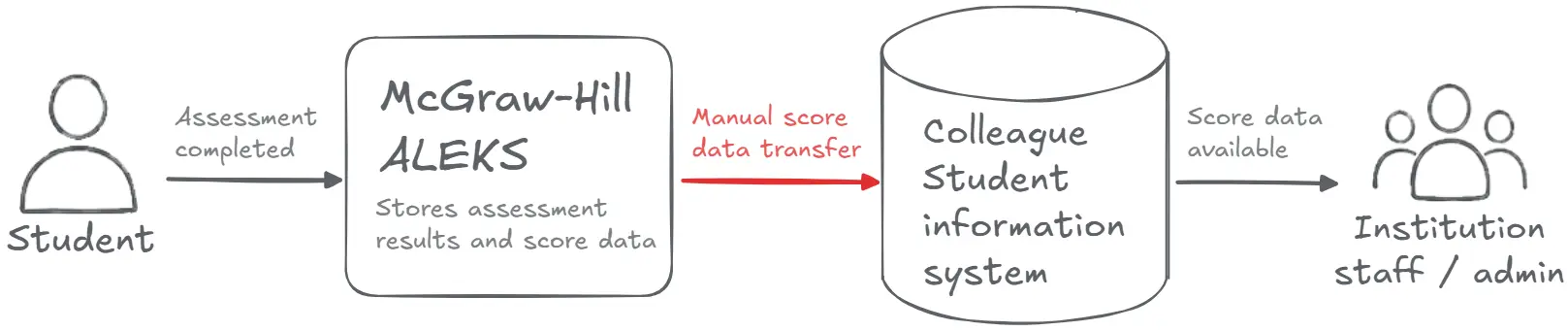
In practice, that means every student ID, score, test code, and date has to land exactly where it should. The more human steps sit between ALEKS and Colleague, the more room there is for delay, inconsistency, and support guesswork.
The project focused on creating a cleaner, SaaS-ready route for ALEKS scores into Ellucian Student.
How we rebuilt the score import with Data Connect
Our team implemented the integration as an Ellucian Data Connect pipeline. Data Connect became the orchestration layer that controls the flow from score retrieval to final reporting.
A reliable integration should check its foundation before it starts moving student data. Otherwise, one missing setting can turn a routine run into a scavenger hunt for admins and support teams.
That is why the pipeline first validates the required setup. It checks whether the necessary connection details, processing parameters, delivery options, and reporting paths are available. This includes items such as ALEKS access settings, Ellucian environment configuration, class and date filters, file delivery settings, and email notification details.
After the setup is validated, the pipeline securely connects to ALEKS and retrieves the relevant placement score data for the selected academic scope. The pipeline can use configured filters, such as class and date range, so the institution can process the right group of assessment records instead of pulling everything at once.
The request to ALEKS is built dynamically. Instead of hardcoding the API call, the pipeline uses configured parameters to shape the request for the selected institution, assessment context, and extraction window. This keeps the process adaptable without turning each run into a custom development exercise.
Once the scores are retrieved, the next task is translation. ALEKS score data has to be interpreted in a way Ellucian Student can use consistently. For that, the pipeline applies a Data Connect Crosswalk, which stores the institution-specific mapping logic outside the core pipeline.
This is a small architectural choice with a large operational payoff. Score interpretation does not get buried inside custom code. It remains structured, reviewable, and easier to adjust when institutional rules change.
The pipeline also validates the student context before loading the score. It checks whether the corresponding student record can be found in the Ellucian Student environment, then submits valid score data through the supported integration flow. If the student cannot be matched or the score cannot be posted, the record moves into the error path instead of disappearing into a silent failure.
Ellucian SaaS target architecture
In the future-state architecture, ALEKS remains the source of assessment results, Data Connect manages the integration flow, and Ellucian Student receives the score updates through supported SaaS integration patterns.
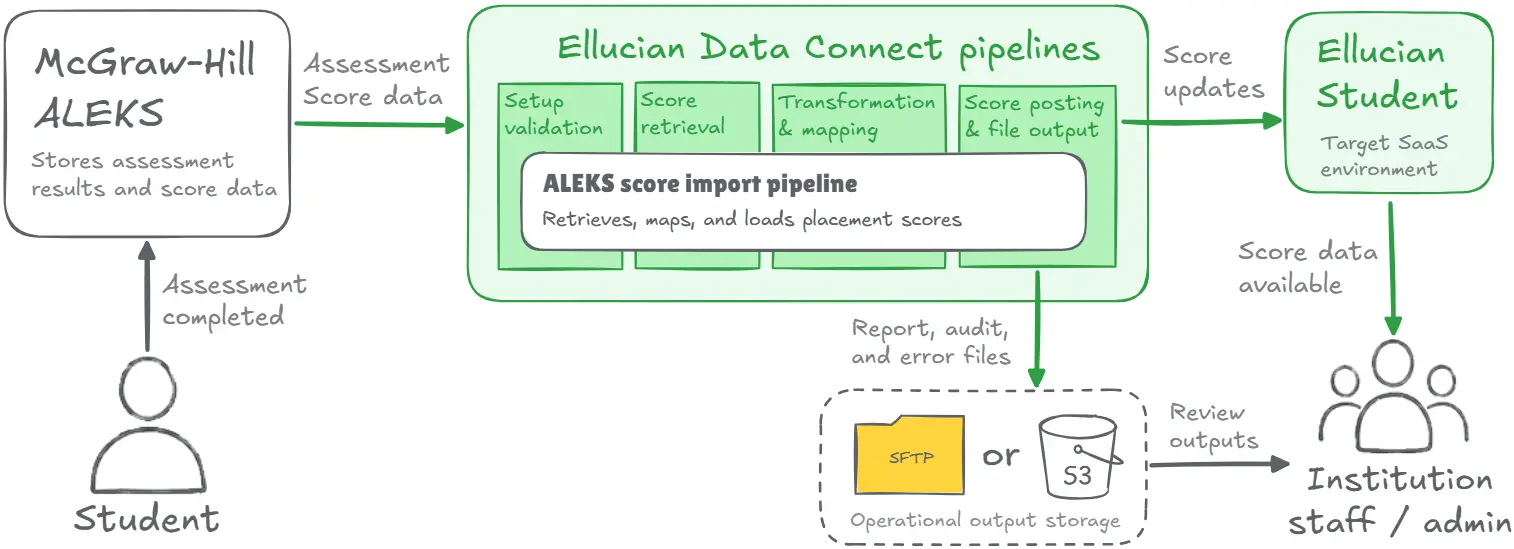
The diagram shows one controlled path from ALEKS to Ellucian Student. Data Connect handles the main steps: validating the run setup, retrieving ALEKS score data, applying score mapping rules, checking the student context, loading valid results, and generating operational outputs.
On the reporting side, the architecture includes Amazon S3, SFTP, and Data Connect Preview for report, audit, and error files. Email notification closes the loop by informing users whether the run succeeded or failed.
The important point is not only that data moves. It moves through a process that can be configured, reviewed, and supported.
Making every run reviewable instead of mysterious
An integration that moves data but leaves everyone guessing is only half finished.
That is why this pipeline generates operational outputs after each run. The report file contains successfully processed records. The audit file includes records, statuses, metadata, and summary counts. The error file captures records that failed validation or posting.
These files can be delivered through SFTP or Amazon S3, depending on institutional configuration. Data Connect Preview can also be used when enabled. After execution, the pipeline sends an email notification with the run status and relevant attachments when applicable.
The error handling covers the practical cases that usually create support headaches: missing parameters, ALEKS authentication failures, missing crosswalk matches, no returned ALEKS data, student records not found in Ellucian Student, posting failures, file delivery configuration issues, and email notification problems.
This is the difference between “the job ran” and “we know what the job did.”
For admins and support teams, that difference matters. They can see what was processed, what succeeded, what failed, and where to look next. The process becomes easier to support because the integration leaves behind a trail instead of a shrug.
SaaS-ready integration results
The result is a SaaS-ready ALEKS score import process for Ellucian Student.
ALEKS scores now have an automated route into the Ellucian Student environment through Data Connect. Score interpretation becomes more consistent because mapping logic is centralized. Student score loading follows supported SaaS integration patterns. Admins receive report, audit, and error outputs instead of a black-box process.
The modernization also reduces dependence on manual score movement as the normal operating pattern. That benefit comes directly from the SaaS-ready design: Data Connect coordinates the flow, supported APIs handle controlled system interaction, and operational files make each run easier to review.
The score still means what it meant before. The path it takes is now cleaner, more controlled, and easier to review.
Rebuild integrations for Ellucian SaaS with ABCloudz
As an Ellucian Service Partner with hundreds of Ellucian ecosystem modernization engagements, ABCloudz helps institutions rebuild third-party integrations for the Ellucian SaaS model. Schedule a meeting with us to discuss how we can help your institution move its integrations into a SaaS-ready model.