Custom SQL scripts and ODS views against Banner tables do more than extract data. They filter which students are included, apply term logic, join course and instructor context, and enforce eligibility rules that exist nowhere else in writing.
Banner SaaS removes direct Oracle access. Moving these integrations to SaaS means deciding which of that logic belongs in the future state: what to preserve in a supported pipeline, what to configure, and what to retire.

This guide is written for higher-ed leaders, ERP/SIS owners, functional stakeholders, and modernization teams who need a decision-level understanding of how to modernize Banner direct database integrations for Ellucian Platform (SaaS).
It can help you look past the old database connection and define what the integration is actually meant to accomplish before your team chooses a supported SaaS-compatible path.
This guide belongs to our Banner integration modernization series for Ellucian Platform (SaaS). If you are starting your assessment, begin with the Banner integration modernization framework guide for Ellucian Platform (SaaS). That guide explains the overall approach we use to classify integration patterns, document current-state risk, and prepare better questions before choosing a future-state architecture.
Other deep-dive guides in this series walk through these common Banner On-Premises integration patterns:
- Stored procedure integrations
- CSV and SFTP integrations that rely on manual handoffs
- Middleware integrations such as Boomi jobs
- Full-export integrations for changed-record synchronization
- One large legacy Banner integration with multiple business flows
- Integrations with hidden SQL logic
Keep reading if your current integration reads from Banner tables, Operational Data Store (ODS) views, custom views, stored procedures, SQL scripts, or local jobs and you need a clearer way to discuss its SaaS-compatible modernization path.
Why direct database integrations need a SaaS-compatible access model
Banner direct database access became common because it gave institutions practical control over integration logic.
Technical teams could query the Oracle database, join tables, create Operational Data Store (ODS) views or custom views, apply filters, run scheduled jobs, generate CSV files, and deliver data to downstream systems through SFTP or shared file locations.
That model worked in Banner On-Premises because the institution controlled the database environment around Banner. Over time, many direct database integrations became more than extraction jobs. A nightly export could start to include term filters, eligibility rules, student status checks, course context, instructor logic, custom formatting, and exception handling.
This is where the SaaS challenge appears. The old integration may look like “just a query,” but the current execution model may depend on direct Oracle access, local scripts, local schedules, database objects, and rules that live inside SQL.
An active Banner integration usually needs a SaaS-compatible modernization path when its current state uses:
- SQL queries against Banner tables
- Operational Data Store (ODS) views or custom database views
- stored procedures
- local shell scripts or scheduled jobs
- database-level joins and filters
- direct Oracle access from third-party tools
- CSV exports generated from local infrastructure
- manual review of server logs or output files
The key question is not whether this integration should be reviewed. Any Banner On-Premises integration needs review before the move to Ellucian Platform (SaaS). The useful question is more specific:
Which parts of the old direct database model are pure data access, which parts contain business logic, and what supported SaaS-compatible path can preserve the right outcome?
Some flows may use Ellucian Ethos APIs, Ellucian Data Connect, approved access patterns, Amazon S3, automated SFTP, or another supported mechanism. Some rules may become configuration. Some obsolete logic may be retired. Some large database-driven flows may need to be split before rebuild.
Typical current state
A typical direct database integration starts with Banner On-Premises as the source of truth. The architecture may look like a file export. In practice, it may contain years of institutional rules, local infrastructure assumptions, and undocumented support habits.

A SQL script, Operational Data Store (ODS) view, custom view, stored procedure, local scheduler, or third-party tool extracts data directly from the Banner Oracle database. The process transforms the data into a required format, often CSV, then delivers it to a target system through SFTP, a shared folder, or another local transfer method.
Examples include:
- timetabling exports for programs, courses, sections, and registrations;
- placement system feeds for students, programs, and placement details;
- accessibility data exports filtered through SQL rules;
- advising or reporting feeds that depend on student, course, instructor, and section context.
These are examples, not a complete list. The same pattern can appear anywhere a downstream system depends on data extracted directly from Banner database objects.
The key task before choosing a replacement technology is separating pure data extraction from the business rules that grew inside the SQL over time. A query that looks like a data pull may actually be defining who qualifies, which term applies, and what gets excluded. Those decisions need to survive the migration. The question is where they land in the future state.
Still relying on Banner SQL before moving to SaaS?
ABCloudz helps higher education teams review SQL scripts, ODS views, custom views, stored procedures, and local jobs to identify hidden business logic and define a SaaS-compatible modernization path.
Request Banner SQL ReviewWhat to review before replacing direct database access
After the current-state architecture is mapped, the next step is to separate the old database dependency from the business outcome it supports.
A direct database integration may include several layers that need different treatment. One part of the SQL may simply retrieve fields. Another part may define who qualifies for the output. A custom view may combine data the target system depends on. A local job may generate a CSV file that still needs to exist in the future state. Logs may sit on a server that only a technical owner knows how to check.
Before mapping the integration to Ethos APIs, Data Connect, or another supported access pattern, teams should clarify:
- Which SQL queries, ODS views, custom views, procedures, scripts, or jobs are involved?
- Which parts of the SQL are pure extraction?
- Which joins, filters, or conditions represent business rules?
- Which fields are required by the target system?
- Which outputs still need to be delivered as files?
- Which delivery method is required: Amazon S3, SFTP, target API, or another path?
- Which rules should be preserved, changed, configured, or retired?
- Which errors should stop the run, and which should move to review?
- Which team owns the business rules after modernization?
- What visibility should administrators have after each run?
This review also helps identify overlap with other patterns in the series. A direct database integration may also be a full-export integration, a CSV/SFTP workflow, a large legacy integration, or a hidden SQL logic case.
The strongest future-state design comes from understanding those layers before choosing the implementation. Replacing database access solves only part of the problem. The modernization work also needs to preserve the right rules, expose the right failures, and give the future support team a process they can understand without reading old SQL.
Typical future state
A SaaS-compatible future state replaces direct database access with supported access, managed orchestration, validation, and visibility.
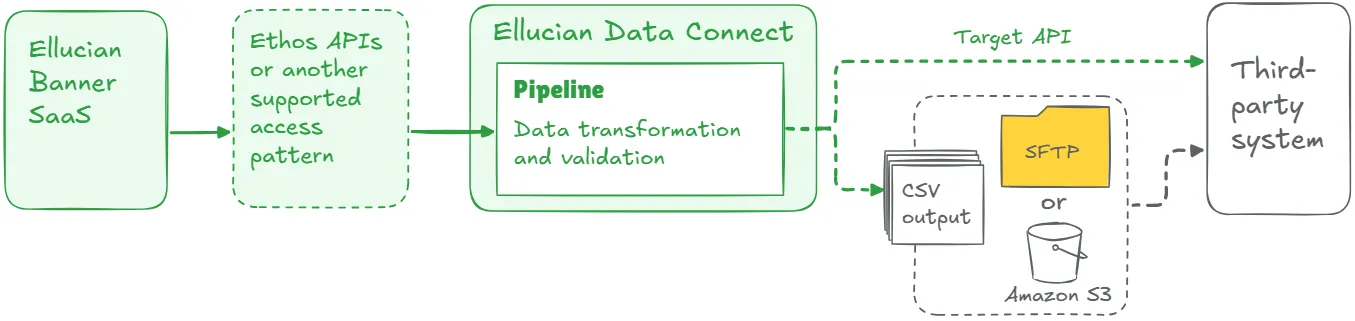
The future state may still produce CSV files. Many third-party systems still expect files or SFTP delivery. The improvement is how the file is created, validated, delivered, logged, and supported.
Key elements of a strong future-state design may include:
- supported access to Banner data through Ellucian Platform;
- transformation logic inside a managed pipeline;
- validation before delivery;
- structured error handling;
- logs, reports, alerts, or status outputs;
- secure credential handling;
- configurable parameters where functional teams need flexibility;
- documentation of rules that previously lived only in SQL.
This list is a starting point, not a complete architecture checklist. The final design depends on the current-state logic, target-system requirements, data access options, and operational risk.
The goal is to preserve the right business outcome while replacing the old technical foundation.
Across direct database integrations ABCloudz has modernized, a recurring finding appears: SQL is not just infrastructure. It is often the most complete description of what the integration was supposed to do. Treat every join, filter, and condition as a candidate business requirement until review proves otherwise.
Lessons learned from real projects
Across Banner direct database integration modernization projects, several lessons repeat.
1. The old SQL often carries business meaning
SQL scripts may select the right student population, apply term logic, join academic context, filter by status, or shape the output for a vendor. Treat each meaningful join, filter, and condition as a possible business requirement until technical and functional review proves otherwise.
2. File delivery can remain
SaaS modernization does not require every target system to move to APIs. If a downstream system expects CSV or SFTP, the future state can still generate files. The key change is that files are created through supported access, managed transformations, validation, secure delivery, and observable logs.
3. API coverage needs early review
Required fields may be available through standard APIs. Some flows may need another approved access pattern, a custom API approach, or review with Ellucian. This discovery should happen early. A missing field can change the future-state design.
4. Validation should become explicit
Legacy workflows often relied on informal checks. A SaaS-compatible design should define required fields, record counts, formats, mapping rules, failure conditions, and retry paths. Administrators should see what ran, what succeeded, and what needs attention.
5. Documentation is part of modernization
When logic lives only in SQL, support depends on whoever understands the script. Modernization is an opportunity to turn hidden logic into documented rules, test cases, configuration, and support procedures.
6. Patterns can overlap
A direct database integration may also be a full-export integration, a CSV/SFTP workflow, a large legacy integration, or a hidden SQL logic case. Pattern classification helps teams ask better questions. The final architecture still depends on the full current state.
Turn hidden Banner integration logic into
a SaaS-ready plan
We can help your team document fields, filters, joins, file delivery rules, validation needs, and support requirements before rebuilding Banner integrations with Ethos APIs, Data Connect, Amazon S3, SFTP, or another supported path.
Discuss Banner SaaS ModernizationRelated ABCloudz examples
This pattern appears in multiple ABCloudz projects focused on Banner integration modernization.
In ClockWorks, the legacy process depended on SQL scripts, Operational Data Store (ODS) views, nightly SFTP transfers, direct database access, and locally managed servers. The future state replaced that model with Data Connect and Ethos APIs, with validation and reporting added for better transparency.
In the timetabling integration, SQL scripts and local jobs exported course, program, section, and registration data. The SaaS-compatible version rebuilt that logic with Data Connect and Ethos APIs, supporting both bulk load and change data capture.
In BMET, the legacy integration used SQL scripts, stored procedures, direct Oracle access, local file servers, custom schedulers, CSV files, and SFTP. The new model split the process into independent Data Connect pipelines for contracts, contract history, expenses, and vendors.
In SARS Anywhere, SQL queries, term filters, instructor context, course details, and eligibility rules had to be re-expressed as user stories before the future-state flow could be rebuilt through Ethos APIs and Data Connect.
In the placement systems pattern, local scripts and stored procedures that generated nightly CSV files were replaced with a reusable SaaS-compatible framework using Data Connect, Ethos, Change Notifications, JavaScript transformations, Amazon S3, and file delivery.
In student accessibility data, SQL jobs and direct database logic were replaced with a change-based process where Ethos Change Notifications trigger Data Connect pipelines to process updated student records.
These examples show the same principle: the institution can preserve the integration outcome while replacing database-level execution with a supported SaaS-compatible model.
How Modernization Studio and Integration Knowledge Hub help discovery
ABCloudz uses Ellucian Modernization Studio during discovery to accelerate AI-assisted analysis of legacy ERP environments. For direct database integrations, it helps surface database objects, dependencies, complexity, and modernization recommendations earlier. Our specialists then validate the findings because SQL dependencies are technical, while the rules inside them are often functional.
We also use our Integration Knowledge Hub approach to reuse integration knowledge from prior Ellucian projects across different institutions. When a similar integration pattern has already been handled for another customer, that experience can help speed up discovery while still keeping the final recommendations specific to the current institution.
Download the direct database integration questionnaire
Use this focused questionnaire to review one Banner integration that still depends on direct database access.
Banner direct database integration modernization questionnaire
The worksheet helps technical and functional teams document the current state, find hidden SQL logic, check supported access options, and prepare for a more useful modernization discussion.
You can complete it for internal planning or share it with ABCloudz so we can understand your integration faster and support your team with better context.
Talk to ABCloudz about your Banner direct database integrations
If your integration reads from Banner tables, ODS views, or custom Oracle objects, you likely have business logic hidden in that SQL. We can help you find it, document it, and design a supported SaaS-compatible replacement without losing the rules that make the integration meaningful.
ABCloudz is an Ellucian Service Partner with long-standing experience across the Ellucian ecosystem.
Connect with us to discuss your Banner direct database integration modernization path.