A notification reaches students late. A financial aid verification file misses the provider’s window. Alumni records drift during graduation. Bookstore credits appear after students need course materials.
These are the consequences of manual file handoffs: not system failures, but timing and dependency failures. Staff generated the file, uploaded it, checked the log, and it still did not arrive when it needed to.
CSV and SFTP can stay in a SaaS integration. The manual work around them is what needs to change.

This guide is designed for higher-ed leaders, ERP/SIS owners, functional stakeholders, and modernization teams who need a decision-level understanding of how to modernize Banner CSV and SFTP integrations that rely on manual handoffs for Ellucian Platform (SaaS).
The goal is to help you decide which parts of the workflow should remain file-based, which staff-dependent steps should become automated, validated, monitored, archived, or handled as exceptions, and how to discuss file timing, vendor constraints, target-system requirements, and support ownership without reducing the issue to an upload script.
This guide sits within our Banner integration modernization series for Ellucian Platform (SaaS). If you want the full orientation first, begin with the Banner integration modernization framework guide for Ellucian Platform (SaaS). That introductory guide explains the overall approach we use to classify integration patterns, document current-state risk, and prepare better questions before choosing a future-state architecture.
The related pattern guides address these common Banner On-Premises integration scenarios:
- Direct database integrations
- Stored procedure integrations
- Middleware integrations such as Boomi jobs
- Full-export integrations for changed-record synchronization
- One large legacy Banner integration with multiple business flows
- Integrations with hidden SQL logic
Continue through this guide if your current integration uses CSV files, SFTP transfers, staff-triggered scripts, manual uploads, manual downloads, or manual file checks and you need a clearer way to discuss its supported modernization path.
Why CSV and SFTP handoffs need a controlled SaaS operating model
CSV and SFTP can remain valid parts of a modern integration.
Many third-party systems still expect files. Some vendors still require SFTP. Some data exchange patterns are intentionally file-based because the target platform is built around scheduled intake.
The SaaS challenge appears when file exchange depends on routine manual execution. In Banner On-Premises environments, staff could often run local reports, trigger scripts, adjust spreadsheets, upload files, download response files, check logs, and troubleshoot failures around local infrastructure.
That model may keep the process moving, but it also makes timing, quality, and support visibility depend on people. A file can be generated late. A staff member can upload the wrong version. A required field can be missing. A transfer can fail without clear visibility. A downstream platform can reject a file while the error waits inside a log nobody checks.
In student-facing or business-critical workflows, those details matter. A notification may reach students late. A financial aid verification file may miss the provider’s expected window. Alumni records may drift during graduation periods. Bookstore credits may appear after students need course materials.
A Banner CSV or SFTP integration usually needs a SaaS-compatible modernization path when its current state uses:
- staff-generated CSV files
- manual formatting or spreadsheet editing
- staff-triggered extraction scripts
- manual SFTP uploads or downloads
- manual retrieval of response files
- informal credential handling
- manual review of logs or status
- email-based troubleshooting
- repeated staff checks after every run
The key question is not whether the file-based workflow should be reviewed. Any Banner On-Premises integration needs review before the move to Ellucian Platform (SaaS). The useful question is more specific:
Which parts of the file workflow should remain file-based, and which routine manual steps should become automated, validated, monitored, archived, or handled as exceptions?
The future state may still deliver CSV files through SFTP or Amazon S3 when the target system requires it. The modernization work is to make the file workflow controlled, visible, repeatable, and supportable in the SaaS operating model.
Still managing Banner CSV and SFTP workflows manually?
ABCloudz helps higher education teams review staff-generated files, manual uploads, SFTP transfers, response files, validation gaps, timing risks, and support ownership before moving Banner integrations to SaaS.
Request File Workflow AssessmentTypical current state
A typical CSV and SFTP integration starts with Banner On-Premises as the data source.

Staff or a local job generates a CSV file. The file may contain student records, notification data, financial aid information, alumni data, course registration details, bookstore credit information, or another dataset required by a third-party system.
The current flow may include several manual or semi-manual steps: running a report, triggering an export, executing a local script, reviewing the output, renaming the file, adjusting the format, uploading it through SFTP, confirming receipt, and troubleshooting rejections.
Bidirectional workflows add another layer. Staff may also retrieve response files from the third-party system and bring the results back into Banner or another institutional process.
The architecture may look like a simple file exchange. In practice, it may support a business-critical student, financial, or administrative process.
The goal is not to eliminate files. Many target systems still require them, and that is fine. The goal is to eliminate the manual steps that make file-based workflows fragile: staff-triggered scripts, informal credential handling, email-based troubleshooting, and recovery procedures that depend on individual knowledge.
What to automate and what to keep file-based
After the current-state file workflow is mapped, the next step is to separate the file contract from the manual work around it.
The target system may still need a CSV file. It may still require SFTP delivery. It may still expect a specific file name, layout, delimiter, schedule, or response-file process. Those requirements should be preserved when they are still valid.
The routine staff work around the file needs a separate review. A manual step may exist because the target system requires human approval, because the old process lacked automation, or because the team never had a better place to handle exceptions.
Before designing the future state, teams should clarify:
- What data does the file contain?
- How is the file generated today?
- Which fields are derived through SQL, scripts, reports, or manual edits?
- Which manual steps are part of routine execution?
- Which manual steps should become exception handling?
- What format, naming convention, and delivery schedule does the target system require?
- Does the target system send response files back?
- What makes the file or record invalid?
- How are rejected files detected, corrected, and retried?
- Who owns file review, exception handling, and support after modernization?
This review also helps identify overlap with other patterns in the series. A manual CSV/SFTP workflow may depend on direct database integrations, contain hidden SQL logic, include stored procedure integrations, run through middleware integrations such as Boomi jobs, or belong to one large legacy Banner integration with multiple business flows.
The strongest redesign usually keeps the file contract where the vendor still needs it and removes avoidable manual effort around generation, formatting, transfer, logging, and status review. The result is a file-based integration that behaves more like a managed process than a staff-dependent handoff.
Typical future state
A SaaS-compatible future state keeps file exchange where it still makes sense and removes routine manual execution around it.
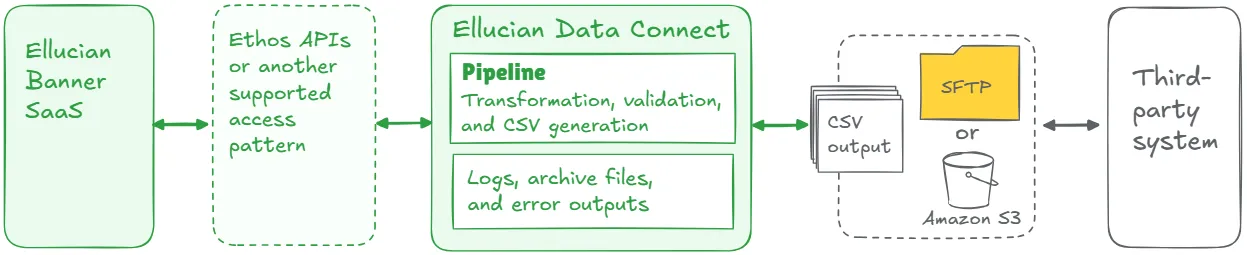
In this model, the workflow becomes a managed pipeline. Data is extracted through a supported access method. The pipeline applies transformations, validates required fields, generates the required file, and delivers it securely. Credentials move into controlled configuration. Logs and status outputs make each run visible.
Key elements of a strong future-state design may include:
- automated extraction from Ellucian Platform;
- approved access pattern where standard APIs do not expose required fields;
- scheduled or event-driven pipeline execution;
- transformation and formatting inside a managed pipeline;
- validation before file delivery;
- automated CSV generation;
- secure SFTP or Amazon S3 delivery;
- archive files for traceability;
- status files, run reports, or structured error logs;
- notifications for failed runs;
- manual review for exceptions instead of routine execution.
This list is a starting point, not a complete architecture checklist. The final design depends on target-system requirements, data sensitivity, timing, validation rules, and operational risk.
The goal is to make file-based integration reliable enough for the SaaS operating model.
The distinction between file delivery and manual work is the central insight in this pattern. Keep the file contract where the vendor needs it. Remove the human dependency from everything around it.
Lessons learned from real projects
Banner CSV and SFTP integration modernization projects consistently point to several important lessons.
1. File-based integration can remain
Files and APIs serve different purposes. If a third-party system expects CSV or SFTP, keeping file delivery may be practical and correct. The modernization work focuses on controlled generation, validation, secure transfer, archiving, and monitoring.
2. Manual work is often the real risk
Manual file handling creates dependency on timing, staff availability, and informal checks. In Remind, waitlist notification files required manual generation, custom batch scripts, manual delivery, and frequent oversight. Ellucian Data Connect pipelines later automated extraction, transformation, secure delivery, logging, and error handling.
3. Timing should follow the business process
Different file exchanges need different schedules. Student notifications may need frequent processing. Financial aid verification may depend on provider deadlines. Alumni updates may matter most around graduation. The future-state schedule should follow business timing rather than the old script schedule by default.
4. Standard APIs may need review
Manual file workflows often exist because the institution previously solved extraction with local scripts or SQL. During modernization, the team needs to confirm how each required field will be accessed. Some flows may use standard APIs. Others may need an approved access pattern, custom fitting, or Ellucian gap review.
5. Automation alone is incomplete
A pipeline that moves a fragile file faster still leaves the institution with risk. The future state needs validation, ownership, timing, error handling, and operational visibility. That is especially important when the file supports student communication, financial aid, bookstore credits, alumni records, or another high-impact process.
6. Manual review should become exception handling
Routine staff checks should give way to managed automation. Staff should step in when validation fails, a transfer fails, a file is rejected, or a business rule requires human approval. This turns manual work into exception management instead of routine file handling.
7. Functional owners need to confirm the rules
CSV files may look technical, but their fields and timing rules belong to real business processes. Financial Aid, Student Accounts, Registrar, Alumni Relations, Student Services, Accessibility Services, or another functional team should confirm required fields, timing rules, missing-data behavior, and review requirements.
8. Patterns can overlap
A CSV/SFTP workflow may also be a direct database integration, stored procedure integration, full-export integration, middleware workflow, or large legacy integration. The right architecture depends on the full current state.
Turn manual file handoffs into managed Banner SaaS workflows
We can help your team preserve required CSV and SFTP file contracts while automating extraction, formatting, validation, secure delivery, archiving, status reporting, failed-run alerts, and exception handling.
Discuss CSV/SFTP ModernizationRelated ABCloudz examples
Several ABCloudz Banner integration projects show how this pattern applies to file-based workflows with CSV, SFTP, and manual handoffs.
In Remind, the institution needed to modernize a manual CSV and SFTP notification workflow into a SaaS-compatible Banner integration. The modernized solution used Data Connect pipelines, a custom API for waitlist data where standard APIs did not expose all required fields, automated schedules, JavaScript transformations, secure SFTP delivery, and structured logging.
In ProVerify, the legacy financial aid verification workflow depended on manual Automic scripts, manual SFTP upload of activation files, manual retrieval of verification results, and reactive troubleshooting. The future state used Data Connect and a custom API to automate extraction, transformation, validation, CSV generation, SFTP delivery, and status/error outputs.
In alumni management, administrators previously ran SQL scripts, manually formatted CSV files, and uploaded them to the alumni system through SFTP. The future-state design split the process into a bulk-load pipeline and a change data capture pipeline, using Data Connect, Ethos Consume Change Notifications, transformation fittings, SFTP delivery, and Amazon S3 error logs.
Follett is a broader bidirectional example with financial impact. The project included manual data exchange between Banner and the bookstore platform, while the future-state design used multiple Data Connect pipelines for student registration, financial aid credits, sales transactions, credit reversals, and electronic book purchases.
These examples show the same principle: CSV and SFTP can remain part of the integration when the target system requires them, while manual handoffs should become automated, validated, and observable processes.
How Modernization Studio and Integration Knowledge Hub help discovery
ABCloudz uses Ellucian Modernization Studio during discovery to accelerate AI-assisted assessment of legacy ERP environments. For CSV and SFTP integrations, it helps identify file dependencies, local jobs, integration touchpoints, complexity, and modernization opportunities. Our team then validates the findings because manual file workflows often mix technical steps, staff habits, vendor rules, and timing requirements.
We also use our Integration Knowledge Hub approach to reuse integration knowledge from prior Ellucian projects across different institutions. Similar file-based integrations handled for other customers can provide useful context for discovery, while the actual modernization path still depends on the current institution’s workflow.
Download the CSV and SFTP integration questionnaire
Use the questionnaire below to evaluate a Banner integration that relies on CSV files, SFTP transfers, and manual handoffs.
Banner CSV and SFTP integration modernization questionnaire
The worksheet helps technical and functional teams capture the current file workflow, identify manual risk points, clarify target-system requirements, and prepare for a more practical modernization discussion.
You can use it during internal discovery or share it with ABCloudz so we can understand your CSV and SFTP workflow faster and support your team with better context.
Talk to ABCloudz about your Banner file workflows
If your team is manually generating, uploading, or checking files as part of a Banner integration, that process carries timing and reliability risk that grows as you move to SaaS. We can help you identify which steps to automate, which file contracts to preserve, and what a controlled, monitored replacement looks like.
ABCloudz is an Ellucian Service Partner with more than 10 years of experience helping institutions modernize within the Ellucian ecosystem.
Talk to us about your Banner CSV and SFTP integration modernization path.