The most important requirements in a Banner integration are often never written down.
They live in WHERE clauses that decide which students qualify. In JOIN conditions that pull the right term context. In stored procedures that handle matching, validation, and error routing. In custom views that combine tables the way the business process actually works, not the way the data model was designed.
The architecture may look like a technical script. In practice, it may be the most complete description of the business process.
When Banner moves to SaaS, direct database access ends. If those rules are not found first, they do not migrate. They disappear. This guide explains how to find them.

This guide is crafted for higher-ed leaders, ERP/SIS owners, functional stakeholders, and modernization teams who need a decision-level understanding of how to modernize Banner integrations with hidden SQL logic for Ellucian Platform (SaaS).
Treat this guide as one deep dive in our Banner integration modernization series for Ellucian Platform (SaaS). If you are starting your assessment, begin with the Banner integration modernization framework guide for Ellucian Platform (SaaS). That guide explains the overall approach we use to classify integration patterns, document current-state risk, and prepare better questions before choosing a future-state architecture.
Other deep-dive guides in this series give dedicated treatment to these common Banner On-Premises integration patterns:
- Direct database integrations
- Stored procedure integrations
- CSV and SFTP integrations that rely on manual handoffs
- Middleware integrations such as Boomi jobs
- Full-export integrations for changed-record synchronization
- One large legacy Banner integration with multiple business flows
Continue reading if your current integration depends on SQL queries, Procedural Language/SQL (PL/SQL) scripts, custom views, Operational Data Store (ODS) views, stored procedures, triggers, local jobs, or database logic that contains undocumented business rules.
Why hidden SQL logic needs business-rule discovery
In this context, “hidden SQL logic” means Banner integration logic that lives inside SQL queries, Procedural Language/SQL (PL/SQL) scripts, custom views, Operational Data Store (ODS) views, stored procedures, triggers, local jobs, or surrounding database processes instead of clear business documentation.
This pattern is different from the others in the series because it is both a discovery pattern and an architecture concern. Hidden SQL logic may appear inside direct database integrations, stored procedure flows, file-based workflows, middleware jobs, full exports, or large legacy integrations.
The SaaS challenge appears when the old code is treated as a technical object to replace rather than a source of business rules to understand.
Many Banner On-Premises integrations used SQL as the fastest way to answer operational questions:
- Which students should be included?
- Which term should be used?
- Which course, section, or instructor belongs in the output?
- Which student status is eligible?
- Which financial aid record should post?
- Which bookstore transaction should reverse a credit?
- Which accessibility record should move downstream?
- Which admissions decision should update another system?
Over time, those answers became joins, filters, CASE statements, views, stored procedures, and scripts. The integration may now depend on logic that no one describes in business language, even though the downstream process still relies on it.
A Banner integration usually needs hidden-logic discovery when its current state includes:
- SQL queries that join multiple Banner tables;
- custom database views or Operational Data Store (ODS) views;
- stored procedures that validate, transform, or update records;
- filters that include or exclude students, courses, terms, sections, or transactions;
- term-based, status-based, or eligibility-based rules;
- matching logic based on student IDs, Social Security numbers, A-numbers, usernames, or external IDs;
- formatting logic for third-party file layouts;
- triggers or local jobs that staff rarely review;
- undocumented assumptions built over several years;
- one or two technical owners who understand the process better than anyone else.
Any Banner On-Premises integration needs review before the move to Ellucian Platform (SaaS). For this pattern, the useful question is more specific:
What business rule does each part of the SQL logic represent, and does that rule still belong in the future-state integration?
The future state may preserve some rules, move some logic into Ellucian Data Connect transformations, turn some values into configuration, map some behavior to a supported Ellucian API or posting mechanism, and retire logic that no longer reflects the process. The first step is making the old logic understandable outside the old code.
Find hidden Banner SQL logic before SaaS modernization
ABCloudz helps higher education teams review SQL queries, PL/SQL scripts, ODS views, custom views, stored procedures, triggers, and local jobs to extract undocumented business rules before rebuilding Banner integrations for SaaS.
Request SQL Logic DiscoveryTypical current state
A typical Banner integration with hidden SQL logic starts with the Banner On-Premises database.
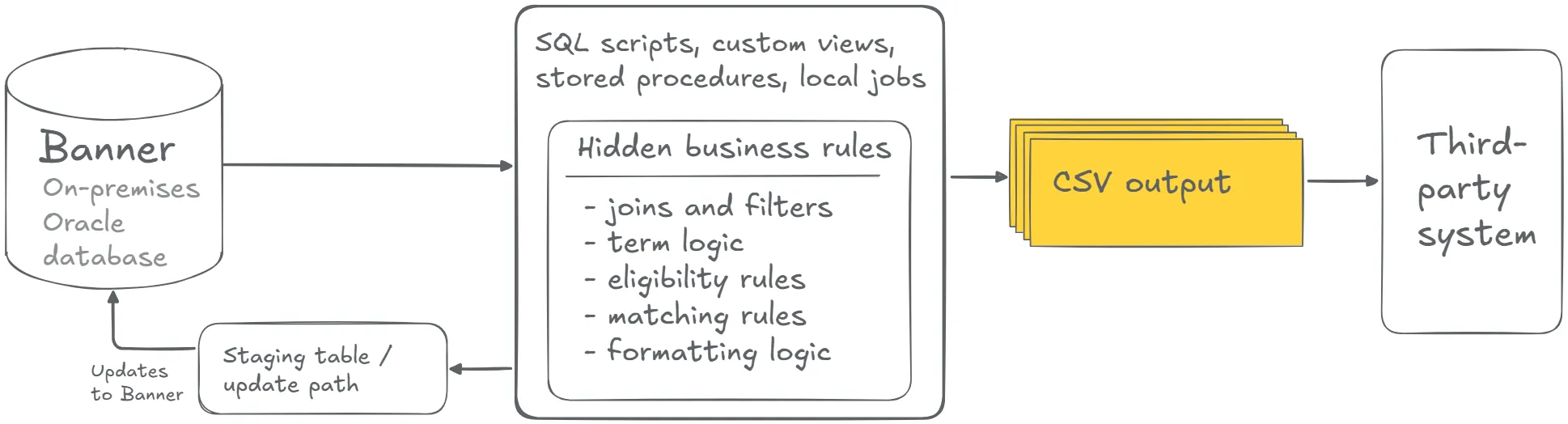
A SQL script, custom view, stored procedure, or local job extracts, transforms, validates, or updates data. The logic may join multiple Banner tables, calculate values, filter records, format fields, produce files, or prepare data for a third-party system.
The architecture may look like a technical script. In practice, it may be the most complete description of the business process.
That creates several modernization concerns. The logic may depend on direct database access. The rules may exist only as code. Functional owners may see the output but lack visibility into the rules that shaped it. Some logic may be obsolete. A literal rebuild can preserve old technical debt, while an oversimplified rebuild can lose institutional context.
What to discover before rebuilding SQL-heavy integrations
Once the current-state logic is visible, the next step is to translate technical behavior into decisions the business can review.
A file may look correct because SQL already filtered the population. A stored procedure may appear to post records cleanly because it already handled matching and validation. A middleware workflow may look like the main integration asset while a custom database view holds the rule that determines which records move.
Before redesigning an integration with hidden SQL logic, teams should clarify:
- Which parts of the logic extract data?
- Which parts transform data?
- Which parts validate data?
- Which parts update Banner or another system?
- Which joins and filters represent business rules?
- Which fields are used for display, matching, filtering, validation, posting, routing, or file formatting?
- Which rules are policy-driven?
- Which rules are legacy workarounds?
- Which rules can become configurable?
- Which rules should be retired?
- Which rules require functional approval and test cases?
- Which known legacy outputs should be used to verify the future-state behavior?
This review also helps connect hidden SQL logic to the rest of the series. Direct database integrations need it when SQL contains rules beyond field extraction. Stored procedure integrations need it when update logic includes validation, matching, audit, error handling, or posting decisions. CSV and SFTP workflows, middleware jobs, full-export integrations, and large legacy integrations may also depend on it when the old technical process is the only place where business logic is fully expressed.
The strongest redesign starts by turning hidden logic into explicit rules, user stories, test cases, ownership decisions, and future-state requirements. That protects the institution from rebuilding visible outputs while losing the logic that made those outputs meaningful.
Typical future state
A SaaS-compatible future state makes the old logic explicit before the integration is rebuilt.
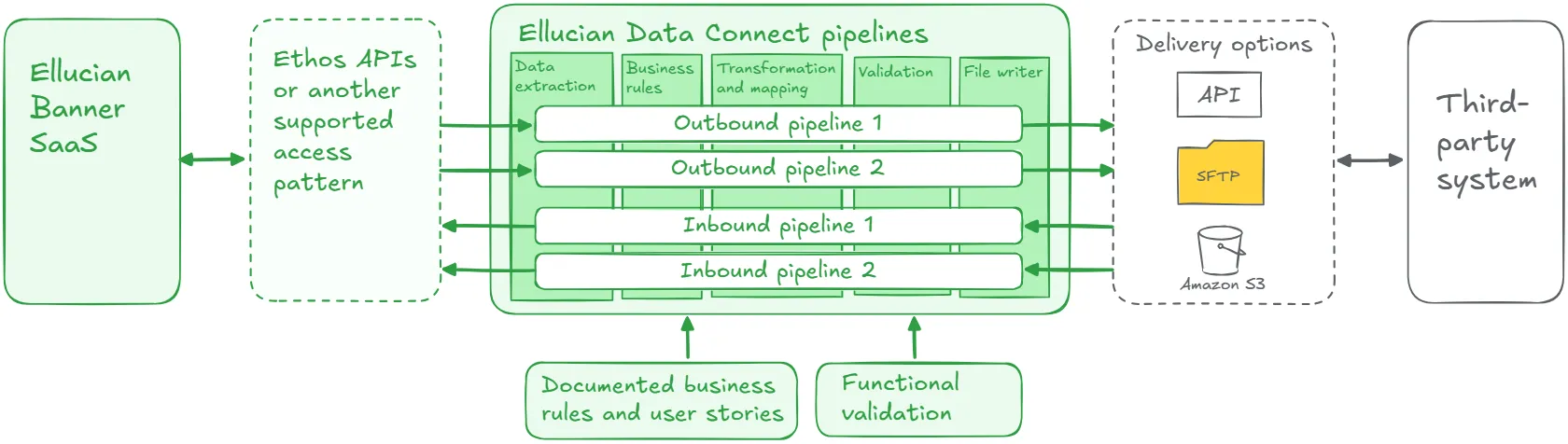
In this model, the team starts by extracting meaning.
- A SQL join becomes a data relationship that needs preservation or review.
- A WHERE clause becomes an inclusion or exclusion rule.
- A term filter becomes a configurable parameter or business rule.
- A stored procedure branch becomes a validation path.
- A failed-record table becomes an error-handling requirement.
- A file layout becomes a target-system contract.
Once the rules are clear, the team can decide where each rule belongs. Some logic may move into Data Connect transformations. Some may belong in a supported Ellucian API or posting mechanism. Some may become configuration. Some may require functional approval. Some may be retired because the process has changed.
Key elements of a strong future-state design may include:
- user stories extracted from legacy logic;
- functional review of business rules;
- separation of policy-driven rules from legacy workarounds;
- mapping from required data to supported Ellucian access or posting mechanisms;
- transformation logic in a managed pipeline where appropriate;
- configurable parameters for terms, statuses, thresholds, file locations, or run modes;
- validation rules and expected-output comparisons;
- failed-record handling;
- test cases based on known legacy outputs;
- logs, reports, or dashboards for operational visibility;
- documentation that future teams can understand without reading old SQL.
This list is a starting point, not a complete architecture checklist. The final design depends on the business rules, data access options, target-system requirements, posting needs, and operational risk.
The result should be a supportable integration where the institution understands what the logic does, why it exists, and where it belongs in the future state.
Lessons learned from real projects
Banner integration modernization projects with hidden SQL logic repeatedly show why discovery has to reach beyond the visible output.
1. Legacy SQL often contains the real requirements
In many projects, the most valuable requirements were inside SQL rather than a separate document. The old code answered practical questions the target system depended on: which students belong in the file, which term applies, which course or section context matters, which records are valid, and which records should be excluded. Treat each meaningful join, filter, condition, and output rule as a possible business requirement until functional and technical review confirms its role.
2. User stories should come before tool selection
Tool decisions come after discovery. Before choosing Data Connect, an Ethos API, a supported posting path, or file delivery, the team should translate legacy logic into user stories:
- As an advisor, I need SARS to receive students for the selected term.
- As a timetabling team, I need current course, section, and registration data.
- As an accessibility services team, I need only student records that meet required conditions.
- As a financial aid team, I need the integration to validate and post aid data correctly.
- As a downstream administrator, I need deterministic files that match the target layout.
Those stories help the team choose the right SaaS-compatible implementation.
3. Preserve the outcome, review every rule
Some SQL rules represent current policy. Some represent institutional process. Some exist because of the old database structure. Some are vendor workarounds. Some are obsolete. Some are duplicates. Some should become configurable. SaaS modernization should separate those categories. The goal is to preserve the right outcome while avoiding a line-by-line recreation of old technical assumptions.
4. Functional owners need to validate the rules
Technical teams can read SQL and identify joins, filters, and procedures. Functional owners need to confirm which rules still matter. That includes students or records to include, valid statuses or terms, required exceptions, human-review points, current policy rules, and logic that can be retired. This is especially important for advising, accessibility services, timetabling, financial aid, student accounts, admissions, insurance, bookstore operations, and reporting.
5. API mapping depends on business meaning
Field mapping alone gives an incomplete picture. A legacy SQL query may combine tables to answer a specific business question. The team needs to know whether a field is used for display, matching, filtering, validation, posting, routing, or file formatting. That meaning affects architecture, API mapping, transformation logic, and test cases.
6. Testing should compare known outcomes
A new SaaS-compatible integration should produce the right business result. For SQL-heavy integrations, testing may compare known legacy outputs with future-state outputs where the old behavior remains valid. Useful evidence may include sample files, record counts, included and excluded student examples, term-based cases, known edge cases, failed-record scenarios, and expected target-system behavior. Testing may also reveal obsolete rules or inconsistent assumptions. Those findings should go back to functional review.
7. Configuration should replace the right hardcoding
Old SQL often hardcodes values such as terms, dates, file names, output locations, run modes, status filters, thresholds, or mapping settings. Some of those values should become configurable so functional or support teams can manage the process safely. Configuration should be deliberate. Too much configuration can create new risk.
8. Observability replaces informal trust
Many legacy SQL integrations are trusted because they have run for years. A SaaS-compatible future state should show what ran, which parameters were used, which records were included, which records failed validation, which file was delivered, and whether the target process received what it needed. Visibility proves that hidden logic has become a controlled process.
9. Hidden SQL logic is a foundation for other patterns
A direct database integration may need SQL discovery before access is replaced. A stored procedure integration may need validation and matching logic extracted before posting is redesigned. A CSV/SFTP workflow may need file-generation rules documented before automation. A middleware workflow may depend on a custom view that hides the real rule. A full-export integration may need clarity on which records qualify. A large legacy integration may need the rules inside each flow named before decomposition.
This is why hidden-logic discovery should happen early.
Turn legacy Banner SQL into SaaS-ready business rules
We can help your team translate joins, filters, WHERE clauses, term logic, eligibility rules, matching logic, validation paths, and file-formatting assumptions into user stories, functional approvals, test cases, and a supported future-state design.
Discuss SQL-Heavy Integration ModernizationRelated ABCloudz examples
This discovery approach appears across ABCloudz Banner integration projects where SQL, procedures, views, or scripts carried business rules that had to be made explicit.
In SARS Anywhere, the legacy process used SQL queries to join Banner tables, apply term filters, resolve instructor and course context, and enforce eligibility rules. We treated that SQL as a set of user stories. Each join, filter, and eligibility rule answered a question SARS needed Banner to answer. The future-state design moved secure access to Ethos APIs and moved orchestration, filtering, and transformation logic into Data Connect pipelines.
In timetabling, the old workflow used SQL scripts and local jobs to export course, program, section, and student registration data. We reviewed SQL queries, export rules, and validation steps, then translated them into user stories for the SaaS-compatible version. The future state used Data Connect and Ethos APIs for bulk load and change data capture flows with validation and reporting.
In the student accessibility data integration, the On-Premises setup included SQL jobs and validation scripts that filtered student records based on academic programs, contact information, emergency details, admission status, and related conditions. We unpacked that logic, mapped the rules to supported Ethos API access, and rebuilt the behavior in Data Connect using transformations, Change Notifications, CSV output, and validation reports.
In BMET, the old integration used SQL scripts and direct database connections to move financial and vendor data. We analyzed the legacy scripts, identified SQL statements, filters, and business rules, and used those user stories as the blueprint for four independent SaaS-compatible pipelines.
In PowerFAIDS, the legacy process used custom jobs and stored procedures to update student account charges, credits, and anticipated aid records. The modernization work required explicit validation, matching, audit, and posting logic before the future state could update Banner safely.
In Salesforce EDA, the institution had 24 Boomi scripts across four workflows, with flows from Banner to Salesforce and from Salesforce back to Banner. We analyzed each legacy workflow before redesigning it as a native Data Connect pipeline, then optimized the structure, improved performance, removed unused business logic, and fixed issues found during testing.
In ClockWorks, the legacy process depended on SQL scripts, ODS views, nightly SFTP transfers, direct database access, and local servers. We reviewed the SQL queries and mapped the transformations before rebuilding the integration through Data Connect and Ethos APIs.
These examples show the same principle: a Banner integration can be rebuilt safely only after the institution understands what the old logic actually does.
How Modernization Studio and Integration Knowledge Hub help discovery
ABCloudz uses Ellucian Modernization Studio during discovery to support AI-assisted assessment of legacy ERP environments. For integrations with hidden SQL logic, it helps surface database objects, dependencies, code complexity, and modernization opportunities. Expert validation is critical because SQL may encode functional policy, exceptions, workarounds, target-system rules, and undocumented assumptions.
We also use our Integration Knowledge Hub approach to reuse integration knowledge from prior Ellucian projects across different institutions. Similar SQL-heavy integrations handled for other customers can help speed up discovery, while the meaning of each rule still has to be validated in the current institution’s context.
Download the hidden SQL logic questionnaire
Use the questionnaire below to evaluate one Banner integration where SQL, PL/SQL, views, procedures, triggers, or local jobs may contain hidden business rules.
Banner hidden SQL logic modernization questionnaire
The worksheet helps technical and functional teams document the current logic, identify business meaning, assign ownership, review API mapping, and define future-state validation.
You can use it for internal review or share it with ABCloudz so we can understand your hidden SQL logic faster and help your team with better modernization context.
Talk to ABCloudz about your hidden SQL logic before modernization
If you have a Banner integration where the important rules live in SQL and no one has written them down separately, that is one of the highest-risk integrations to rebuild without proper discovery. We can help you extract the business meaning, get functional validation, and design a future state that preserves the right outcomes.
ABCloudz is an Ellucian Service Partner with more than 10 years of experience helping institutions modernize within the Ellucian ecosystem. Connect with us to discuss your SQL-heavy Banner integration.