Your nightly Banner export sends 10,000 records. Three of them changed since yesterday.
The other 9,997 move again anyway because the old process was built for certainty, not efficiency. SaaS modernization is the right moment to rethink it.
The answer is not a faster full export. It is separating the concerns that full exports bundle together: the initial baseline load, ongoing changed-record synchronization, exception handling, and periodic reconciliation.

This guide is written for higher-ed leaders, ERP/SIS owners, functional stakeholders, and modernization teams who need a decision-level understanding of how to modernize Banner full-export integrations for changed-record synchronization in Ellucian Platform (SaaS).
It helps your team decide when a full baseline still matters, when changed-record synchronization is a better fit, and what to define around reconciliation, record removal, inactive records, and no-longer-eligible records before choosing a future-state design.
This guide forms part of our Banner integration modernization series for Ellucian Platform (SaaS). If you are starting your assessment, begin with the Banner integration modernization framework guide for Ellucian Platform (SaaS). That guide explains the overall approach we use to classify integration patterns, document current-state risk, and prepare better questions before choosing a future-state architecture.
Other deep-dive guides in this series examine these common Banner On-Premises integration patterns:
- Direct database integrations
- Stored procedure integrations
- CSV and SFTP integrations that rely on manual handoffs
- Middleware integrations such as Boomi jobs
- One large legacy Banner integration with multiple business flows
- Integrations with hidden SQL logic
Stay with this guide if your current integration sends complete files on every run, moves large volumes of unchanged Banner data, or needs a clearer way to discuss baseline load, changed-record updates, reconciliation, and record removal.
Why full-export integrations need a clearer synchronization model
Here, “full-export integrations” refers to Banner integrations that repeatedly send complete datasets, even when the target process mainly needs records that changed since the last successful run.
This model was often practical in Banner On-Premises environments. A scheduled job could pull every relevant student, course, registration, placement, alumni, or accessibility record from Banner. The target system received a complete file and refreshed its data from that file.
The SaaS challenge appears when the same export model is treated as the default future-state requirement.
A full export may still be valid for an initial load, a vendor-mandated replacement file, or periodic reconciliation. But when the downstream system mainly needs new, updated, removed, inactive, or no-longer-eligible records, repeated full exports can create unnecessary data movement, larger files, slower troubleshooting, and limited visibility into what actually changed.
A Banner full-export integration usually needs a SaaS-compatible modernization path when its current state includes:
- full nightly exports;
- complete comma-separated values (CSV) files on every run;
- SQL scripts that extract all relevant records;
- local jobs that refresh downstream systems in bulk;
- direct database access to identify and export data;
- repeated movement of unchanged records;
- manual review of large output files;
- limited visibility into which records changed;
- no clear separation between initial load and ongoing updates;
- unclear handling for removed, inactive, or no-longer-eligible records.
The key question is not whether the integration should be reviewed. Any Banner On-Premises integration needs review before the move to Ellucian Platform (SaaS). The useful question is more specific:
Which data needs a full baseline, which data should move through ongoing changed-record synchronization, and when does the target system still need reconciliation or full replacement?
The future state may combine baseline loading, changed-record synchronization, periodic reconciliation, file delivery, Amazon S3, SFTP, Ellucian Data Connect, Ethos Change Notifications, timestamp tracking, or another supported change-detection method. The right model depends on the business process, target-system behavior, timing requirements, and operational risk.
Still sending full Banner exports after moving to SaaS?
ABCloudz helps higher education teams review nightly exports, CSV files, SQL-based data pulls, unchanged records, baseline loads, changed-record synchronization, reconciliation needs, and target-system constraints before redesigning Banner integrations for SaaS.
Request Full-Export ReviewTypical current state
A typical full-export integration starts with Banner On-Premises as the source of truth.

A local SQL job, script, stored procedure, or scheduler pulls a complete dataset from the Banner database. The process transforms that data into a file, usually CSV, then sends it to a downstream system through Secure File Transfer Protocol (SFTP), Amazon S3, a shared location, or another delivery method.
Examples include:
- accessibility services feeds;
- timetabling exports;
- placement management data;
- alumni management records;
- student notification data;
- advising or student support feeds.
These are examples, not a complete list. The pattern can appear anywhere a downstream system receives the same broad Banner dataset again and again.
The architecture may look like a simple scheduled export. In practice, it may be a synchronization process that needs a more precise future-state model.
Before designing the future state, separate four concerns that full exports typically bundle together: baseline load, ongoing synchronization, exception handling, and reconciliation. Baseline load defines the initial state the target system needs. Ongoing synchronization handles records that changed since the last run. Exception handling covers records that failed or were rejected. Reconciliation confirms that Banner and the downstream system still match. Each concern needs a different design decision.
What to define before moving from full exports to changed-record synchronization
After the current-state export flow is mapped, the next step is to separate four concerns that often get bundled into one repeated full file: baseline loading, ongoing synchronization, exception handling, and reconciliation.
A full export may create the initial baseline. A changed-record flow may keep the target current after that baseline exists. Reconciliation may confirm that Banner and the downstream system still match after missed runs, rejected records, corrected errors, or downstream processing issues. Exception handling determines what happens when a selected record cannot move successfully.
Before designing the future state, teams should clarify:
- What business process does the full export support?
- Which records truly need to move every run?
- Does the target system support partial updates?
- Does the target system require full replacement files in some scenarios?
- What counts as a meaningful change?
- Which fields or events should trigger downstream updates?
- How should removed, inactive, or no-longer-eligible records be handled?
- Does the process need a separate baseline load?
- Is periodic reconciliation required?
- What state tracking is needed to avoid missed records or duplicates?
- How will administrators know what changed, what failed, and what needs review?
This review also helps identify overlap with other patterns in the series. A full-export workflow may also be a direct database integration, a CSV and SFTP integration with manual handoffs, an integration with hidden SQL logic, or part of one large legacy Banner integration with multiple business flows.
The strongest redesign treats “full export” as one possible tool, not the default answer. The real requirement may be baseline accuracy, current downstream data, vendor reconciliation, operational confidence, or a combination of those needs.
Typical future state
A SaaS-compatible future state often separates baseline loading from ongoing synchronization.
The initial load establishes the target system’s baseline. After that, changed-record synchronization keeps the target current by sending relevant new, updated, removed, inactive, or no-longer-eligible records.
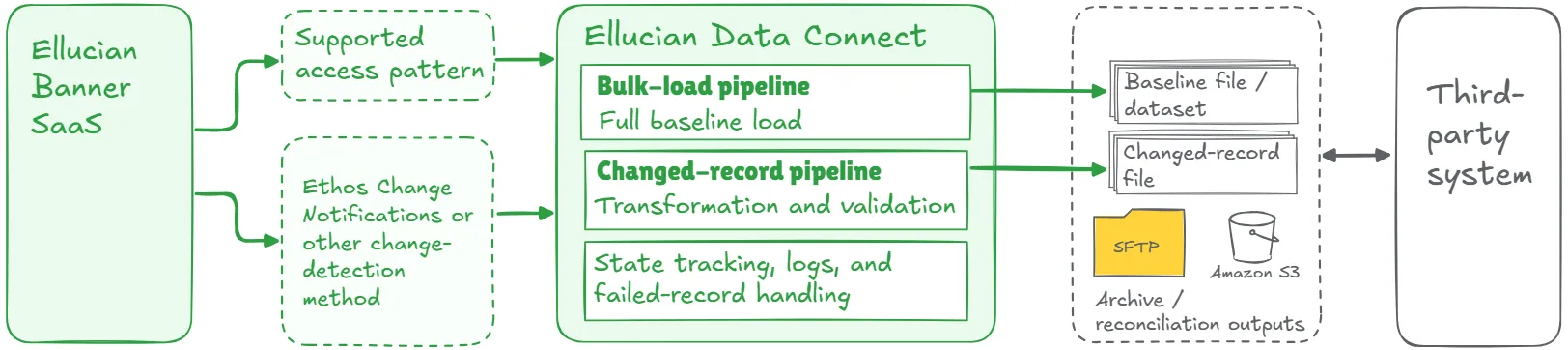
Changed-record synchronization does not automatically mean real-time delivery. Depending on the process, it may be notification-triggered, scheduled, timestamp-based, near-real-time, or based on another supported change-detection method.
Key elements of a strong future-state design may include:
- one-time or periodic baseline load;
- separate changed-record synchronization flow;
- supported access to Banner data through Ellucian Platform;
- Ellucian Ethos Change Notifications or another approved change-detection method;
- timestamp, checkpoint, or state tracking;
- transformation and validation logic;
- file or application programming interface (API) delivery based on target-system requirements;
- clear handling for empty runs;
- rules for removed, inactive, or no-longer-eligible records;
- failed-record handling;
- structured logs and confirmation reports;
- periodic reconciliation where needed;
- functional review of which changes matter;
- recovery strategy after missed runs.
This list is a starting point, not a complete architecture checklist. The final design depends on data access options, target-system behavior, reconciliation needs, timing requirements, and operational risk.
The future state may still produce files. The improvement is that the file contains the data that needs to move, instead of the entire dataset by default.
A common finding in this pattern is simple: full exports often exist because they were easy to build, not because the downstream process truly needs the full dataset every run. Modernization gives the team a reason to verify that assumption.
Lessons learned from real projects
Banner full-export modernization projects show several recurring lessons about synchronization, timing, and downstream data alignment.
1. Full exports can be a habit, not a requirement
Many full exports exist because they were easy to build in the On-Premises model. When the integration needs to be rebuilt for Ellucian Platform (SaaS), the team should confirm whether the target process truly needs a full dataset every time. In many cases, the real business need is simply to keep the downstream system current.
2. Baseline load and ongoing updates need separate thinking
The initial load creates the baseline. It may need a full file, broader validation, and a controlled run window. Ongoing synchronization keeps that baseline current. It usually needs smaller updates, state tracking, failed-record handling, and a schedule that follows the business process. Combining both concerns into one repeated full export can make the integration heavier than needed.
3. Changed-record synchronization has its own timing model
Changed-record synchronization means the process focuses on relevant changes. It does not define a single timing pattern. A time-sensitive notification workflow may need frequent updates. An alumni synchronization process may work on a daily rhythm. A timetabling process may follow academic scheduling cycles. The timing model should follow the operational need and the target system’s capabilities.
4. Reconciliation may still belong in the design
The strongest architecture may combine baseline load, changed-record synchronization, and periodic reconciliation. Reconciliation helps confirm that the target system remains aligned with Banner after missed changes, rejected records, corrected errors, or downstream processing issues.
5. “Changed” needs a business definition
Technical teams can detect updates. Functional teams need to decide which updates matter. A meaningful change may involve status, contact information, term, course, placement, award, accessibility condition, eligibility, removal, or deactivation. Those rules should be explicit before the changed-record flow goes live.
6. Target-system constraints shape the design
Some target systems accept partial updates. Others expect full replacement files. Some need separate files for initial load and incremental updates. Some require periodic reconciliation. The future state should respect what the downstream platform can actually consume.
7. State tracking is part of the integration
Changed-record synchronization usually needs a timestamp, notification checkpoint, last processed file, last successful run, or another marker that controls what has already been handled. That state must be reliable. Weak state tracking can lead to missed records or duplicates.
8. Validation matters more when fewer records move
A changed-record flow sends selected records, which makes each record more important. The pipeline should validate required fields, mapping rules, eligibility, output format, and failed-record behavior before delivery. Administrators should know whether a run processed no changes, completed successfully, or produced records that need attention.
9. The value is operational, not only technical
Changed-record synchronization can reduce file size, shorten processing windows, improve timeliness, isolate errors faster, and make each run easier to understand. For student-facing or operational processes, those improvements can matter more than the file size reduction itself.
10. Patterns can overlap
A full-export integration may also be a direct database integration, CSV/SFTP workflow, hidden SQL logic case, or large legacy integration. The right modernization path depends on the full current state.
Move from full exports to smarter Banner synchronization
We can help your team separate baseline loading, changed-record synchronization, exception handling, record removal rules, inactive-record handling, reconciliation, and recovery strategy using Data Connect, Ethos Change Notifications, Amazon S3, SFTP, or another supported SaaS-compatible approach.
Discuss Banner Synchronization DesignRelated ABCloudz examples
ABCloudz has applied this pattern in Banner integration projects where repeated full exports needed a clearer baseline, update, and reconciliation model.
In the student accessibility data integration, the old process moved large amounts of redundant data by sending complete datasets even when only a few records changed. The future-state design uses Ellucian Ethos Change Notifications to signal Data Connect when a student record is created or updated. Data Connect then retrieves the latest student details through supported APIs, applies JavaScript transformations, and stores CSV output in Amazon S3.
In the alumni management system, the institution needed to keep alumni records current. The future-state design split the process into a bulk-load pipeline for the initial baseline and a daily update pipeline. The update flow uses Ethos Consume Change Notifications, transformations, file generation, and SFTP delivery.
In placement, institutions had relied on local scripts and stored procedures to generate nightly CSV files with student, program, and placement details. The future-state model uses Data Connect for extraction, transformation, validation, and delivery. Ethos Change Notifications help export only updated records, while JavaScript transformations and file-writer fittings produce timestamped CSV files for downstream placement systems.
In timetabling, the old process used SQL scripts and local jobs to export programs, courses, sections, and student registrations. The SaaS-compatible version separated bulk load for the current academic year from a change data capture flow that processes daily updates through Ethos notifications.
Remind is a supporting example. It is primarily a notification workflow, but it shows the same changed-record principle in a time-sensitive context. A custom API captured new and modified waitlist records, while timestamps stored in Amazon S3 helped each pipeline run identify the relevant changes.
These examples show the same principle: when a full dataset is only needed for the baseline, the future state can separate initial load, changed-record synchronization, and reconciliation while preserving the right business outcome.
How Modernization Studio and Integration Knowledge Hub help discovery
ABCloudz uses Ellucian Modernization Studio during discovery to accelerate AI-assisted assessment of legacy ERP environments. For full-export integrations, it helps surface batch jobs, data dependencies, database objects, complexity, and modernization opportunities. Expert review is important because full exports can combine extraction logic, inclusion rules, target-system constraints, and reconciliation needs.
We also use our Integration Knowledge Hub approach to reuse integration knowledge from prior Ellucian projects across different institutions. If similar export or synchronization patterns were solved for other customers, that experience can inform discovery without replacing analysis of the current institution’s requirements.
Download the full-export integration questionnaire
Use the questionnaire below to evaluate a Banner integration that repeatedly sends complete datasets.
Banner full-export integration modernization questionnaire
It helps technical and functional teams document the current export model, define what counts as a meaningful change, assess target-system constraints, and decide whether the future state needs baseline load, changed-record synchronization, reconciliation, or a combination of all three.
You can use it for internal planning or share it with ABCloudz so we can understand your full-export integration faster and support your team with stronger context.
Talk to ABCloudz about your Banner full-export integrations
If your Banner integration sends complete files on every run while your downstream process mainly needs new or changed records, SaaS modernization is the right moment to redesign it. We can help you separate baseline loading from changed-record synchronization and choose the right approach for your timing, target system, and operational needs.
ABCloudz is an Ellucian Service Partner with more than 10 years of experience helping institutions modernize within the Ellucian ecosystem. Start a conversation with us about your Banner full-export integration.