A custom PL/SQL stored procedure may look like database code. In practice, it can validate financial aid data, match students, check amounts, and decide what is safe to post to Banner.
In Ellucian Platform (SaaS), custom Oracle stored procedures cannot remain the integration posting model. Modernizing that logic means deciding what to keep, what to redesign, and what to retire before the future-state path is chosen.

This guide is written for higher-ed leaders, ERP/SIS owners, functional stakeholders, and modernization teams who need a decision-level understanding of how to modernize Banner stored procedure integrations for Ellucian Platform (SaaS).
It helps you examine the responsibilities behind the procedure, not the procedure as code: which validation, matching, audit, and posting decisions the old process handled, which rules need functional review, and what should be clarified before a supported SaaS-compatible path is chosen.
This article is one pattern-specific chapter in our Banner integration modernization series for Ellucian Platform (SaaS). If you are starting your assessment, begin with the Banner integration modernization framework guide for Ellucian Platform (SaaS). That guide explains the overall approach we use to classify integration patterns, document current-state risk, and prepare better questions before choosing a future-state architecture.
Other deep-dive guides in this series focus on these common Banner On-Premises integration patterns:
- Direct database integrations
- CSV and SFTP integrations that rely on manual handoffs
- Middleware integrations such as Boomi jobs
- Full-export integrations for changed-record synchronization
- One large legacy Banner integration with multiple business flows
- Integrations with hidden SQL logic
Read on if your current integration uses Oracle stored procedures, staging tables, direct database updates, local jobs, or inbound posting logic and you need a clearer way to discuss its supported modernization path.
Why stored procedure integrations need a supported posting model
Here, we use “stored procedure integrations” as practical shorthand for inbound Banner integrations where posting, validation, matching, or update logic lives in Oracle stored procedures, staging tables, or surrounding database jobs.
These flows often support sensitive operations:
- financial aid posting;
- student account updates;
- waivers;
- charges and credits;
- admissions data;
- bookstore transactions;
- other records that need to land back in Banner accurately.
The SaaS challenge appears because the old model joined two responsibilities inside the database environment: it moved data into Banner and decided whether that data was safe to post.
That model worked in Banner On-Premises because the institution controlled the database layer, staging tables, procedures, scripts, and production runs around Banner. In Ellucian Platform (SaaS), inbound updates need a supported path, and the logic previously handled by stored procedures needs to be understood before it can be placed correctly.
A stored procedure integration usually needs a SaaS-compatible modernization path when its current state includes:
- third-party source files;
- SFTP input or manual file retrieval;
- preprocessing scripts;
- staging files or staging tables;
- Oracle stored procedures;
- direct Banner database updates;
- database error tables;
- manual production runs;
- staff review before or after posting.
The key question is not whether the stored procedure should be reviewed. Any Banner On-Premises integration that updates Banner records needs careful review before the move to Ellucian Platform (SaaS). The useful question is more specific:
What must be validated, matched, audited, reviewed, and posted safely before this process can run through a supported SaaS-compatible model?
The future state may use Ellucian Data Connect, a supported Ellucian API, a loader, a supported posting pattern, Amazon S3 audit outputs, SFTP input, or another approved path depending on the data, process, and customer environment. The goal is to preserve the right business outcome while moving validation, matching, audit, orchestration, and posting into a traceable and supportable architecture.
Modernizing Banner stored procedures for SaaS?
ABCloudz helps higher education teams review PL/SQL procedures, staging tables, SFTP inputs, matching rules, validation logic, audit outputs, and posting requirements before choosing a supported SaaS-compatible path.
Request Stored Procedure ReviewTypical current state
A typical stored procedure integration starts outside Banner.
A third-party system produces a file with financial aid data, waiver records, bookstore transactions, admissions updates, or another dataset that needs to update Banner. A local process retrieves the file, preprocesses records, loads data into a staging table, and calls an Oracle stored procedure to validate and update Banner.

This architecture may look stable because it has worked for years. Under the surface, it often depends on components that need review for Ellucian Platform (SaaS): local jobs, local storage, Python or shell scripts, staging tables, stored procedures, direct updates, database error logs, and manual production steps.
The stored procedure may also contain hidden logic. It may decide which records are valid, how to match a person, which transaction code to use, whether a record should post or fail, and how the error output should be created.
That logic is often just as important as the data movement itself.
What to clarify before replacing stored procedure posting
After the current-state architecture is mapped, the next step is to separate the stored procedure from the responsibilities it performs.
A stored procedure may do more than update a record. It may match a person, check identifiers, validate amounts or terms, assign transaction codes, prevent duplicates, decide whether a record should post, create an error output, or support manual review before production processing.
Posting, in this context, means writing approved changes into Banner through a supported mechanism. That mechanism may be a supported Ellucian API, loader, supported posting pattern, or another approved path depending on the data and customer environment.
Before selecting the future-state posting path, teams should clarify:
- Which records does the integration update?
- Which person does each record belong to?
- Which identifier should be used for matching?
- Is the amount, term, waiver, transaction code, or status valid?
- Is the record new, already processed, duplicated, or ready for review?
- Which rules decide whether the record should post, fail, or move to audit output?
- Which failed records can be corrected and retried?
- Which rules are policy-driven, and which are legacy workarounds?
- Which functional team owns the validation and posting rules?
- What evidence should administrators see before and after production posting?
This review also helps identify overlap with other patterns in the series. A stored procedure integration may also be a direct database integration, a CSV/SFTP workflow, a middleware workflow, a large legacy integration, or a hidden SQL logic case.
A one-to-one replacement can carry old technical debt forward. The stronger approach is to define what should be preserved, configured, validated, redesigned, audited, or retired before the new posting path is selected.
Typical future state
A SaaS-compatible future state replaces direct stored procedure updates with a controlled integration flow.
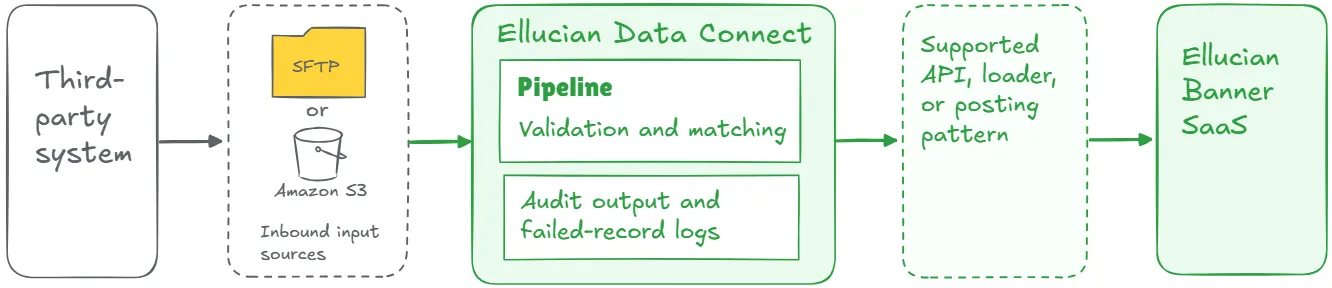
In this model, Data Connect can retrieve source files, read configuration, apply transformations, validate records, prepare payloads, and route records by status. Successful records follow a supported posting path. Failed records create clear outputs for review.
A strong future-state design may include two modes:
- Audit mode, where the pipeline processes source data and creates reviewable output without updating Banner.
- Production mode, where validated records move through the approved posting path.
This separation is especially useful for financial aid, student account records, waivers, admissions data, and other flows where incorrect posting can create downstream impact.
Key elements of a strong future-state design may include:
- configurable source and target locations;
- reusable transformation rules;
- validation and matching logic;
- audit outputs;
- failed-record logs;
- secure credential management;
- production posting controls;
- run status reporting;
- dashboards or notifications where appropriate.
This list is a starting point, not a complete architecture checklist. The final design depends on the current-state logic, posting requirements, API or loader options, data sensitivity, and operational risk.
The result should be a safer, clearer, and more supportable way to manage inbound updates.
Lessons learned from real projects
Banner stored procedure integration modernization projects often reveal the same practical lessons.
1. Inbound updates need stronger controls
Stored procedure integrations often touch business-critical records. A delayed or incorrect financial aid or student account update can affect what students see, how accounts are calculated, and how staff manage exceptions. Data movement matters. Validation, matching, auditability, and failed-record handling matter just as much.
2. Record matching must become explicit
Legacy stored procedures often handled matching inside database logic. A SaaS-compatible future state should document and test the matching rule before production posting. One flow may match by institutional ID. Another may match by SSN, student identifier, or external system ID. The correct rule depends on the process and the available data.
3. Audit mode can reduce risk
Audit mode gives staff a controlled way to review processed output before Banner is updated. This is especially useful when replacing long-running procedures that staff trust but no longer fully understand line by line.
4. Useful upstream preprocessing can stay
Some legacy flows include upstream preprocessing that still works and still supports the business process. The modernization scope may focus on replacing the database update portion with Data Connect orchestration and a supported posting path while preserving useful upstream boundaries.
5. Functional owners need to confirm the rules
Stored procedure logic often sits between technical implementation and functional policy. Financial Aid, Student Accounts, Admissions, Registrar, Insurance, or another business team may own the rule that the procedure enforces. Functional owners should confirm which rules remain policy-driven, which rules are operational preferences, and which rules were created for old technical constraints.
6. Posting gaps need early review
A stored procedure may update fields or records that are unavailable through the expected mechanism. The future state may require a supported loader, another API option, a supported posting pattern, or an Ellucian gap review. Finding that early protects the project plan.
7. Error handling should be designed
Stored procedure integrations often rely on database error tables or logs that only technical teams know how to interpret. A SaaS-compatible design should define where failed records go, who reviews them, which details the error output contains, whether failed records can be retried, and what administrators need to see.
8. One integration may contain several flows
A stored procedure integration may include several business flows inside one process. Financial aid disbursement and anticipated aid may need separate logic. Bookstore credits, transactions, reversals, and eBook charges may need separate pipelines. Insurance enrollment and waiver updates may move in different directions. Splitting those flows can make the future state safer and easier to support.
Make inbound Banner posting safer before SaaS go-live
We can help your team redesign stored procedure-based update flows with validation, matching, audit mode, production posting controls, failed-record handling, Data Connect, Ethos APIs, Amazon S3, SFTP, or another supported posting mechanism.
Discuss Banner Posting ModernizationRelated ABCloudz examples
ABCloudz has used this approach in several Banner integration projects involving stored procedures, staging logic, and inbound updates.
In PowerFAIDS, the customer needed to replace custom Oracle jobs and stored procedures that updated student account charges, credits, and anticipated aid records. The future state used configurable Data Connect pipelines with audit and production modes. Audit outputs were stored on Amazon S3 for review, while production mode sent validated data through a supported mechanism.
In Arthur Gallagher, the inbound waiver flow retrieved a waiver file through SFTP, parsed records through Boomi, loaded data into a staging table, and used a custom database procedure to update Banner. The new SaaS-compatible model replaced that database-dependent flow with Data Connect pipelines, Ethos API interaction, SFTP and Amazon S3 handling, configurable parameters, and improved visibility.
In Follett, the project included outbound data from Banner to the bookstore platform and inbound flows for sales transactions, credit reversals, and electronic book purchases. Those inbound flows affected student account records, so they required careful pipeline design, financial controls, and administrative visibility.
In Salesforce EDA, inbound workflows for new contacts, applications, and updated applications were reimplemented through native Ellucian capabilities, using Data Connect, Ethos APIs, Amazon S3, Ellucian Experience notifications, Ellucian Insights reports, and structured error outputs.
These examples show the same principle: the stored procedure may disappear, but its responsibilities still need a supported, traceable, and testable future-state design.
How Modernization Studio and Integration Knowledge Hub help discovery
ABCloudz uses Ellucian Modernization Studio to support AI-assisted discovery of legacy ERP environments. For stored procedure integrations, it helps identify procedures, staging-table dependencies, complexity, and possible modernization paths. Expert validation remains essential because stored procedures often combine update logic with validation, matching, audit, and posting rules.
We also use our Integration Knowledge Hub approach to reuse integration knowledge from prior Ellucian projects across different institutions. If a similar inbound integration has been handled before, that knowledge can make discovery faster while the final design remains tailored to the current customer’s process and data.
Download the stored procedure integration questionnaire
Use this questionnaire to assess a Banner integration that relies on stored procedures, staging tables, or database update logic.
Banner stored procedure integration modernization questionnaire
It helps technical and functional teams document the current process, identify validation and matching requirements, assess posting risk, and prepare for a more focused modernization conversation.
You can use it for internal planning or share it with ABCloudz so we can understand your stored procedure integration faster and guide your team with clearer context.
Talk to ABCloudz about your Banner stored procedure integrations
If your Banner process updates financial aid, student accounts, waiver records, or other sensitive data through stored procedures or staging tables, the modernization scope goes beyond replacing the database update. We can help you identify the validation, matching, and posting requirements before the future-state design begins.
ABCloudz is an Ellucian Service Partner with more than 10 years of experience helping institutions modernize within the Ellucian ecosystem.
Talk with us about your Banner stored procedure integration modernization path.