It started as one integration. Then another dataset was added. Then a return file appeared. Then financial data joined the same workflow. Then a new department asked for a related extract.
Now it is one job, five business flows, three functional owners, and one failure point. If that process breaks, nobody knows which part failed or who to call first.
This guide helps you look inside a large legacy Banner integration before rebuilding it, so you can name the flows, set the right boundaries, and design a future state that is cleaner than what it replaced.

This guide is prepared for higher-ed leaders, ERP/SIS owners, functional stakeholders, and modernization teams who need a decision-level understanding of how to modernize one large legacy Banner integration into multiple purpose-built pipelines for Ellucian Platform (SaaS).
For planning purposes, the important distinction is whether the current process is truly one integration or several business flows bundled into one job, vendor connection, middleware workflow, or file exchange. This guide helps you discuss flow boundaries, ownership, timing, dependencies, validation, and support risk before the future-state architecture is defined.
This guide is a pattern-specific part of our Banner integration modernization series for Ellucian Platform (SaaS). If you are starting your modernization assessment, begin with the Banner integration modernization framework guide for Ellucian Platform (SaaS). That guide explains the overall approach we use to classify integration patterns, document current-state risk, and prepare better questions before choosing a future-state architecture.
Other deep-dive guides in this series detail these common Banner On-Premises integration patterns:
- Direct database integrations
- Stored procedure integrations
- CSV and SFTP integrations that rely on manual handoffs
- Middleware integrations such as Boomi jobs
- Full-export integrations for changed-record synchronization
- Integrations with hidden SQL logic
Continue here if your current integration looks like one job, one vendor connection, one middleware workflow, or one file exchange, but may contain several datasets, directions, schedules, owners, and risk levels inside.
Why one large legacy integration needs flow-level review
For this pattern, “one large legacy integration” means a Banner integration where a single job, script, middleware workflow, or file exchange has grown into several business processes inside one technical implementation.
This usually happens gradually. A team builds a feed for one dataset. Later, another dataset is added. Then a return file appears. Then financial data joins the same workflow. Then a vendor changes a layout. Then a new department asks for a related extract.
Over time, one technical process becomes a container for different business requirements.
That shape could keep working in Banner On-Premises because the institution controlled the surrounding environment. A local job could run one large script. A middleware workflow could route several files. A stored procedure could process multiple inputs. The architecture may have been difficult to explain, but the operating team knew how to keep it running.
The SaaS challenge appears when that old shape is treated as the future-state default.
A large legacy Banner integration usually needs a SaaS-compatible modernization path when its current state includes:
- one script that handles several datasets;
- one job that produces multiple files;
- inbound and outbound logic in the same process;
- financial and non-financial data in the same workflow;
- several schedules forced into one run;
- shared error handling for unrelated flows;
- hidden rules inside SQL, middleware, or stored procedures;
- several functional owners depending on one technical process;
- one failure point that can disrupt multiple business functions.
Any Banner On-Premises integration needs review before the move to Ellucian Platform (SaaS). For this pattern, the useful question is more specific:
Which business flows are inside the current integration, and which of them need their own purpose-built pipeline, schedule, validation model, owner, or support path?
The future state may preserve some shared orchestration, split some flows into separate Data Connect pipelines, keep a middleware layer where it still fits, or retire flows that no longer support the business process. The right answer depends on what the current integration actually contains.
Is one Banner integration hiding multiple business flows?
ABCloudz helps higher education teams decompose large legacy Banner integrations into clear flows, ownership areas, schedules, dependencies, validation needs, and SaaS-compatible modernization options.
Request Integration Flow ReviewTypical current state
A typical large legacy integration starts as one technical process around Banner On-Premises.
It may be a scheduled SQL job, stored procedure package, Boomi process, local script, or file-based exchange with a vendor. From a distance, it may look like one connection between Banner and another system. Inside, it may include several flows.
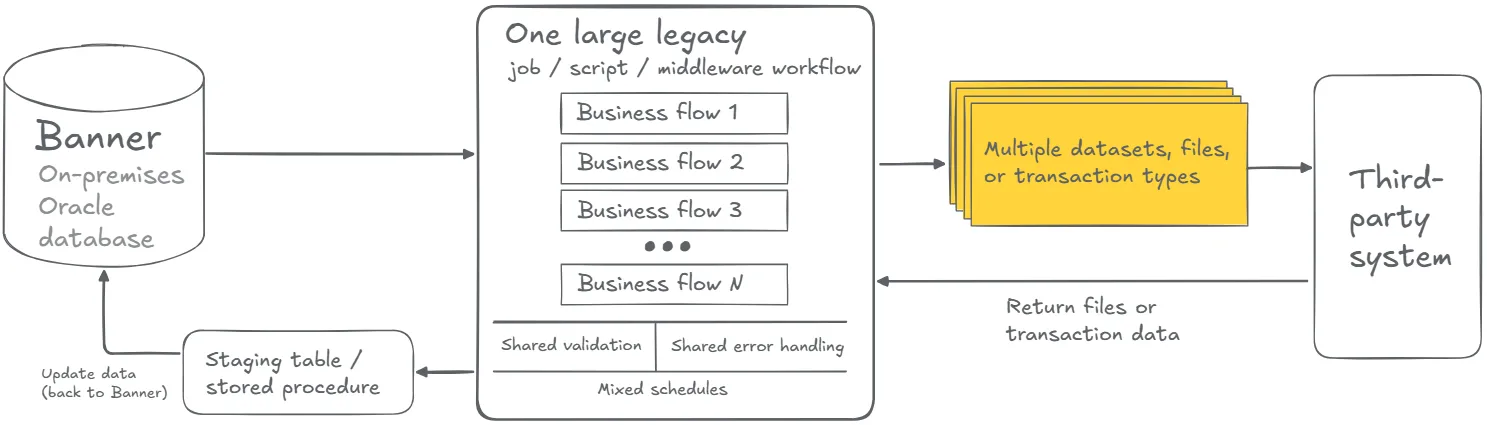
One part may send student registration data. Another may send financial aid credit data. Another may receive sales transactions. Another may reverse credits or update charges. Another may generate error files for staff review.
Add side elements for mixed schedules, shared error handling, hidden rules, unclear ownership, and one failure point affecting multiple flows.
This architecture can feel efficient because one process handles everything. During modernization, it can also hide important differences. One flow may be low-risk and outbound only. Another may update Banner records. One may need daily timing. Another may run during a financial aid cycle. One may need simple formatting. Another may require matching, audit, and supported posting.
The old integration may be one technical object. The future state may need several purpose-built processes.
The first task is naming what is inside the integration, not designing what replaces it. Until each flow is visible, the team cannot decide what to preserve, redesign, split, or retire. A financial aid credit flow and a sales transaction flow may connect to the same vendor system but still require completely different validation, timing, and posting controls.
How to decompose one legacy integration before redesign
After the current-state architecture is mapped, the next step is decomposition.
Decomposition means identifying the business flows inside the current process before deciding how the future state should be built. It does not mean splitting everything automatically. It means understanding which parts belong together, which parts should stand apart, and which parts may no longer be needed.
A large legacy integration may contain flows with different purposes and risk levels. One flow may only export reference data. Another may update Banner records. One may support daily operations. Another may run during a financial aid cycle, graduation period, term transition, or vendor processing window. One may need simple formatting. Another may need matching, audit, failed-record handling, or supported posting.
Before choosing pipeline boundaries, teams should clarify:
- Which business flows are inside the current process?
- Which flows are outbound from Banner?
- Which flows are inbound into Banner?
- Which flows update Banner records?
- Which flows support financial, student, academic, vendor, or reporting processes?
- Which flows need separate validation, schedules, logs, or owners?
- Which flows depend on another flow completing first?
- Which flows share configuration, mapping, delivery, or error-handling logic?
- Which flows should be preserved, simplified, split, or retired?
- Which functional owners should approve the proposed boundaries?
This review also helps identify overlap with other patterns in the series. A large legacy integration may include direct database integrations, stored procedure integrations, CSV and SFTP integrations with manual handoffs, middleware integrations such as Boomi jobs, full-export integrations, or hidden SQL logic.
The strongest redesign treats “one integration” as a starting observation, not a final architecture decision. The real modernization work is in flow boundaries, direction, timing, validation, ownership, dependencies, and support visibility.
Typical future state
A SaaS-compatible future state may replace one large legacy integration with several purpose-built pipelines.
Each pipeline should have a clear purpose where possible: one business flow, dataset, direction, schedule, validation model, owner, and support path.
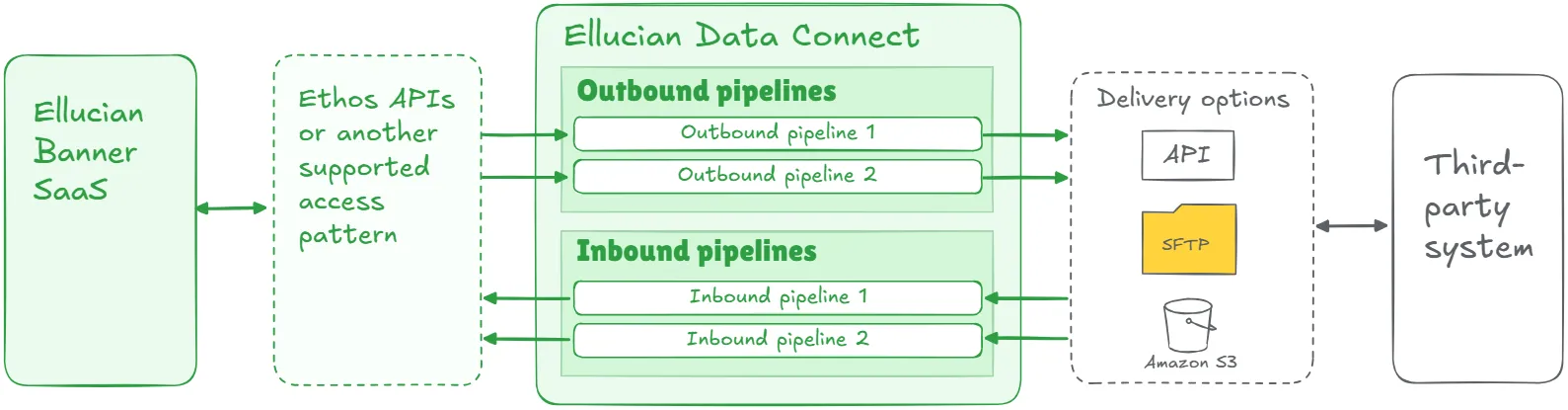
Example pipeline groups may include:
- student registration pipeline;
- financial aid credit pipeline;
- sales transaction pipeline;
- credit reversal pipeline;
- vendor data pipeline;
- contract data pipeline;
- expense data pipeline;
- notification pipeline.
Add side elements for separate schedules, validation rules, logs, error handling, functional ownership, administrator visibility, and orchestration where flows depend on each other.
Key elements of a strong future-state design may include:
- current-state flow inventory;
- separation between inbound and outbound flows;
- separate pipelines by business object or transaction type;
- supported access to Banner data through Ellucian Platform;
- supported posting mechanisms for inbound updates;
- Amazon S3, Secure File Transfer Protocol (SFTP), or application programming interface (API) delivery based on target-system needs;
- independent schedules and triggers;
- orchestration for dependent flows;
- configurable parameters;
- flow-specific validation and error handling;
- audit mode for high-risk updates;
- operational reports, logs, notifications, or dashboards;
- functional review of rules and ownership;
- reusable mapping, validation, logging, or delivery patterns where appropriate.
This list is a starting point, not a complete architecture checklist. The final design depends on the business flows inside the legacy process, their risk level, target-system constraints, dependency order, and support model.
Multiple pipelines do not automatically mean more complexity. Designed well, they reduce complexity by giving each flow a clearer purpose, owner, schedule, validation model, and support path.
The most important design principle from every large legacy integration ABCloudz has modernized is this: pipeline boundaries should follow business function, not only source and target systems. Two flows that connect Banner to the same vendor may need separate pipelines because they run on different schedules, carry different risk, and are owned by different teams.
Lessons learned from real projects
Large Banner integration modernization projects often reveal why flow boundaries matter.
1. One integration often hides several business processes
A single vendor connection may include registration data, financial aid data, transactions, reversals, and purchases. A single financial integration may include contracts, contract history, expenses, and vendors. A communication integration may include notification data, student data, and institutional reference data. The first modernization task is to name those flows. Until each flow is visible, the team cannot decide what to preserve, redesign, split, or retire.
2. Pipeline boundaries should follow business function
Splitting by source and target alone can miss the real boundary. A better boundary often follows what the flow does, who owns it, how often it runs, what risk it carries, and what happens if it fails. A financial aid credit flow and a sales transaction flow may both connect Banner and the same bookstore platform. They still require different validation, schedules, controls, and support procedures.
3. Inbound and outbound flows need separate treatment
Outbound flows read from Banner and send data elsewhere. Inbound flows bring data back and may update Banner records. Inbound updates need stronger validation, matching, audit, failed-record handling, and supported posting mechanisms. Outbound flows still need supported access, transformation, delivery, and monitoring.
4. Schedules should follow business timing
One large job often forces several processes into the same schedule. Some flows may run daily. Some may need frequent updates. Some may run only during financial aid cycles, graduation periods, term transitions, or vendor processing windows. Purpose-built pipelines let timing follow the business process instead of the old job structure.
5. Pipeline dependencies need explicit design
Some flows depend on other flows. A baseline load may need to run before changed-record updates. Reference data may need to arrive before transaction files. An outbound file may need to be generated before a related inbound response can be processed. The team should decide whether pipelines run independently, sequentially, or under shared orchestration. It should also define what happens when one pipeline succeeds and another fails.
6. Separate error handling improves support
In one large legacy process, a formatting issue in one file may delay unrelated outputs. A failed inbound transaction may make the whole job look broken. Purpose-built pipelines can produce flow-specific logs, validation errors, retry paths, and status outputs. Staff can see which process failed and which records need attention without treating the entire integration as one black box.
7. Some old flows should be retired
Large integrations often contain obsolete logic. Some flows exist because of old technical constraints. Some duplicate functionality now available elsewhere. Some support a process that changed years ago. Some have no clear owner. Modernization should decide what to preserve, configure, simplify, redesign, or retire.
8. Functional owners need to validate the split
Technical teams can identify datasets, scripts, files, and APIs. Functional owners need to confirm whether the proposed boundaries make sense for the business process. Registrar, Financial Aid, Student Accounts, Alumni Relations, Procurement, and partner-facing teams may each care about different parts of the same legacy integration. Their input helps prevent a technically clean future state that misses operational reality.
9. Modularization can improve reuse
Purpose-built pipelines can share patterns without becoming duplicates. A student data extraction flow, vendor file delivery flow, changed-record synchronization flow, or audit/production posting flow may provide reusable structure for other integrations. Common mapping logic, validation patterns, delivery mechanisms, configuration structures, and logging approaches can reduce future effort.
10. Patterns can overlap
A large legacy integration may also be a direct database integration, stored procedure integration, manual file workflow, middleware integration, full-export integration, or hidden SQL logic case. The right modernization path depends on the full current state.
Turn one large Banner job into purpose-built SaaS pipelines
We can help your team separate inbound and outbound flows, define pipeline boundaries, assign functional owners, design flow-specific validation, logs, schedules, dependencies, audit controls, and supported posting or delivery paths.
Discuss Pipeline ModernizationRelated ABCloudz examples
Several ABCloudz Banner integration projects show how one large legacy process can be analyzed, separated, and rebuilt around purpose-built flows.
In BMET, the legacy integration supported several financial and project-related data flows. The SaaS-ready design split the solution into four independent outbound Ellucian Data Connect pipelines: Contracts, Contract history, Expenses, and Vendors. Each pipeline had its own extraction logic, transformation rules, CSV output, SFTP delivery, validation, and monitoring.
In Follett bookstore, the integration covered multiple flows between Banner and the bookstore platform: student registration, financial aid, sales transactions, credit reversal, and electronic book purchases. The future-state design used five Data Connect pipelines so each flow could handle its own direction, data requirements, transaction logic, and financial impact.
In Salesforce EDA, the customer had 24 Boomi scripts organized around four workflows. Two moved data from Banner to Salesforce, and two moved data from Salesforce to Banner. The modernization effort redesigned the old middleware portfolio into native Ellucian-compatible workflows using Data Connect, Ellucian Ethos APIs, Amazon S3, Ellucian Experience notifications, Ellucian Insights reporting, and structured error handling.
In PowerFAIDS, the legacy process covered two financial aid flows: disbursement authorization and anticipated aid. Those flows had different matching and validation needs. The modernized design used configurable Data Connect pipelines with audit and production modes so the institution could review outputs before production posting where needed.
In Remind, the solution separated waitlist notifications, student data, and institutional data into distinct flows. This allowed the modernized integration to support frequent notification processing while managing supporting data feeds in a controlled way.
These examples show the same principle: when a legacy integration contains several business flows, the future state can make those flows clearer, safer, and easier to support.
How Modernization Studio and Integration Knowledge Hub help discovery
ABCloudz uses Ellucian Modernization Studio during discovery to accelerate AI-assisted analysis of legacy ERP environments. For large legacy integrations, it helps surface related jobs, database dependencies, middleware touchpoints, complexity, and modernization opportunities. Our specialists validate the findings because one legacy integration may contain several flows, owners, schedules, risk levels, and hidden dependencies.
We also use our Integration Knowledge Hub approach to reuse integration knowledge from prior Ellucian projects across different institutions. Similar projects can provide useful reference points for discovery, while flow boundaries and future-state decisions still need to be confirmed for the current institution.
Download the large legacy integration questionnaire
Use the questionnaire below to evaluate one Banner integration that may contain several business flows inside a single technical process.
One large legacy Banner integration modernization questionnaire
It helps technical and functional teams document flow inventory, data direction, pipeline boundaries, dependencies, timing, validation, ownership, and modernization scope.
You can use it to organize internal discovery or share it with ABCloudz so we can understand your large legacy integration faster and support your team with better context.
Talk to ABCloudz about your large Banner integrations
If you have a Banner integration that touches multiple systems, directions, or functional areas inside one process, the first modernization step is understanding what is inside it, not rebuilding it as-is. We can help you decompose the flows, identify the risks, and design purpose-built pipelines that are easier to own and support after go-live.
ABCloudz is an Ellucian Service Partner with more than 10 years of experience helping institutions modernize within the Ellucian ecosystem. Talk with us about your large Banner integration modernization path.