Your Boomi jobs may connect Banner to third-party systems, read from Oracle views, transform records, deliver files through SFTP, and handle routing or error logic that has worked reliably for years.
Banner SaaS removes direct Oracle access. A Boomi job that depended on it cannot run in the same form. The modernization question is not whether to review it. It is which workflows belong in Data Connect, which should stay in middleware through supported interfaces, and which can be retired altogether.

This guide is created for higher-ed leaders, ERP/SIS owners, functional stakeholders, and modernization teams who need a decision-level understanding of how to modernize Banner middleware integrations such as Boomi jobs for Ellucian Platform (SaaS).
The purpose is to help your team understand when a Banner-centered Boomi job or similar middleware workflow is really a candidate for replacement with Ellucian Data Connect, Ethos APIs, Ellucian Experience, Ellucian Insights, or another SaaS-compatible approach.
This guide is one of the pattern-focused resources in our Banner integration modernization series for Ellucian Platform (SaaS). If you want the full series foundation first, start with the Banner integration modernization framework guide for Ellucian Platform (SaaS). That guide explains the overall approach we use to classify integration patterns, document current-state risk, and prepare better questions before choosing a future-state architecture.
Other deep-dive guides in this series unpack these common Banner On-Premises integration patterns:
- Direct database integrations
- Stored procedure integrations
- CSV and SFTP integrations that rely on manual handoffs
- Full-export integrations for changed-record synchronization
- One large legacy Banner integration with multiple business flows
- Integrations with hidden SQL logic
Read further if your current Banner integration runs through Boomi or another middleware layer and depends on Banner Oracle access, database objects, local files, staging tables, stored procedures, or mixed inbound and outbound workflows.
Why legacy middleware workflows need a SaaS replacement review
For this pattern, “middleware integrations” means Banner integrations where an intermediate platform, such as Boomi or another workflow layer, sits between Banner and other systems.
In Banner On-Premises environments, this model often made sense. Middleware could centralize workflows, move data between systems, transform records, route files, call services, handle errors, and support bidirectional synchronization.
The SaaS challenge appears when the middleware workflow is built around On-Premises assumptions. A Boomi job may look like a modern integration asset, but it may still depend on direct Banner Oracle access, custom database views, staging tables, stored procedures, local files, disk writes, email alerts, or manual remediation.
That is the modernization issue. The middleware platform may be current, while the Banner integration model around it remains tied to On-Premises execution.
A Banner middleware integration usually needs a SaaS-compatible replacement review when its current state includes:
- direct Banner Oracle access;
- custom database views;
- staging tables;
- Oracle stored procedures;
- local files or disk writes;
- Secure File Transfer Protocol (SFTP) transfers outside controlled pipelines;
- email-based error alerts;
- manual remediation after failed runs;
- mixed inbound and outbound logic;
- accumulated jobs with unclear ownership.
The key question is not whether middleware is good or bad. The useful question is more specific:
Can this Banner-centered middleware workflow be replaced with Ellucian Data Connect and other SaaS-compatible Ellucian capabilities, while preserving the business outcome and reducing unnecessary integration layers?
In many Banner modernization scenarios, the answer may be yes. Data Connect can often take over extraction, transformation, validation, file generation, delivery, logging, and workflow visibility for Banner-centered flows. Ethos APIs, Amazon S3, SFTP, Ellucian Experience, Ellucian Insights, supported posting paths, or approved access patterns may also become part of the new architecture.
External middleware may still remain in the enterprise architecture for selected orchestration needs. But it should remain because it has a clear future-state role, not because the old Boomi job happened to be there before SaaS modernization.
Do your Boomi jobs still depend on Banner Oracle?
ABCloudz helps higher education teams review Banner-centered Boomi jobs, custom views, staging tables, stored procedures, SFTP flows, local files, routing logic, and error handling before moving to Ellucian Platform (SaaS).
Request Boomi Workflow ReviewTypical current state
A typical middleware integration starts with Banner On-Premises as the source or target system.
A middleware platform, such as Boomi, runs one or more jobs that exchange data between Banner and a third-party application. One job may pull data from Banner through direct database access, read from a custom view, transform fields, write files, and send them through SFTP. Another job may retrieve partner files, parse records, map identifiers, load staging tables, and call a stored procedure that updates Banner.
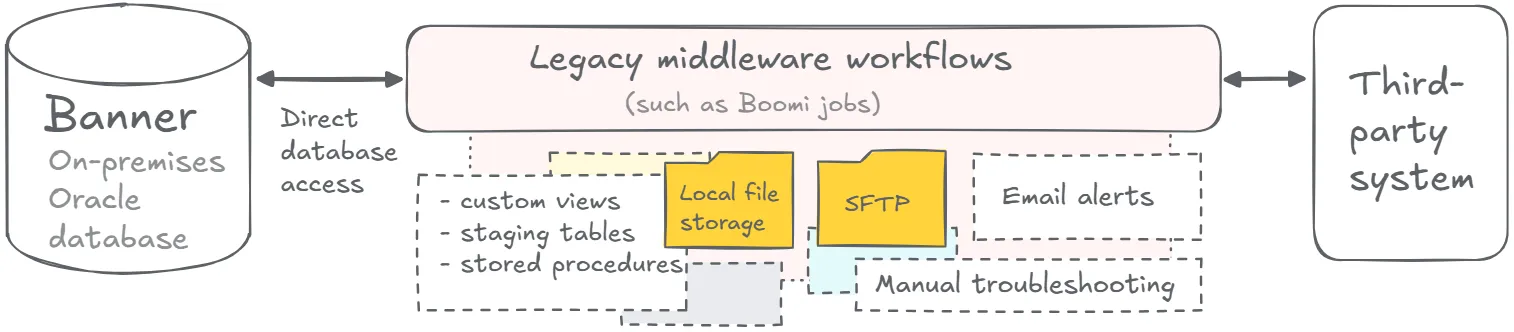
This architecture may look organized because the middleware platform gives the team one place to manage workflows. Under that surface, the integration may still depend on database access, scattered job logic, mixed data directions, email-based support, and old rules that have not been reviewed in years.
The middleware platform may be current. The Banner integration model around it may still be tied to On-Premises execution.
Start with an inventory before touching anything. A middleware platform may contain workflows that are business-critical, obsolete, duplicated, or quietly broken. Without knowing which is which, modernization can become a blind migration of old complexity into a new environment.
What to assess before replacing middleware workflows
After the current-state middleware architecture is mapped, the next step is to decide whether each workflow still needs middleware at all.
A middleware job may include extraction, transformation, routing, logging, retries, file delivery, inbound updates, or several of those responsibilities at once. It may also contain matching rules, eligibility filters, term logic, status checks, or error-handling decisions.
Before choosing the future-state path, teams should clarify:
- Which jobs connect to Banner today?
- Which jobs read from Banner Oracle?
- Which jobs depend on custom views, staging tables, or stored procedures?
- Which workflows are outbound, inbound, or bidirectional?
- Which workflows update Banner records?
- Which transformations and routing rules still matter?
- Which jobs duplicate other workflows?
- Which jobs exist because of old technical constraints?
- Which jobs can move to Ellucian Data Connect?
- Which workflows can be replaced with Ethos APIs, S3, SFTP, Experience, Insights, or supported posting paths?
- Which workflows should be split into smaller purpose-built flows?
- Which workflows have a clear reason to remain in external middleware?
- Who owns each workflow after modernization?
This review also helps identify overlap with other patterns in the series. A middleware workflow may also be a direct database integration, a stored procedure integration, a CSV and SFTP integration with manual handoffs, an integration with hidden SQL logic, or part of one large legacy Banner integration with multiple business flows.
The strongest redesign starts by challenging the assumption that a middleware workflow should remain a middleware workflow. Once the responsibilities and dependencies are clear, the team can decide what Data Connect can absorb, what native Ellucian capabilities can handle, what should become a separate pipeline, and what still requires external middleware.
If external middleware remains, it should connect through supported SaaS-compatible interfaces, avoid direct Banner database dependencies, and have a clear role that Ellucian-native tools do not cover better.
Typical future state
A SaaS-compatible future state often replaces legacy Banner middleware workflows with Ellucian-native or Ellucian-compatible integration flows.
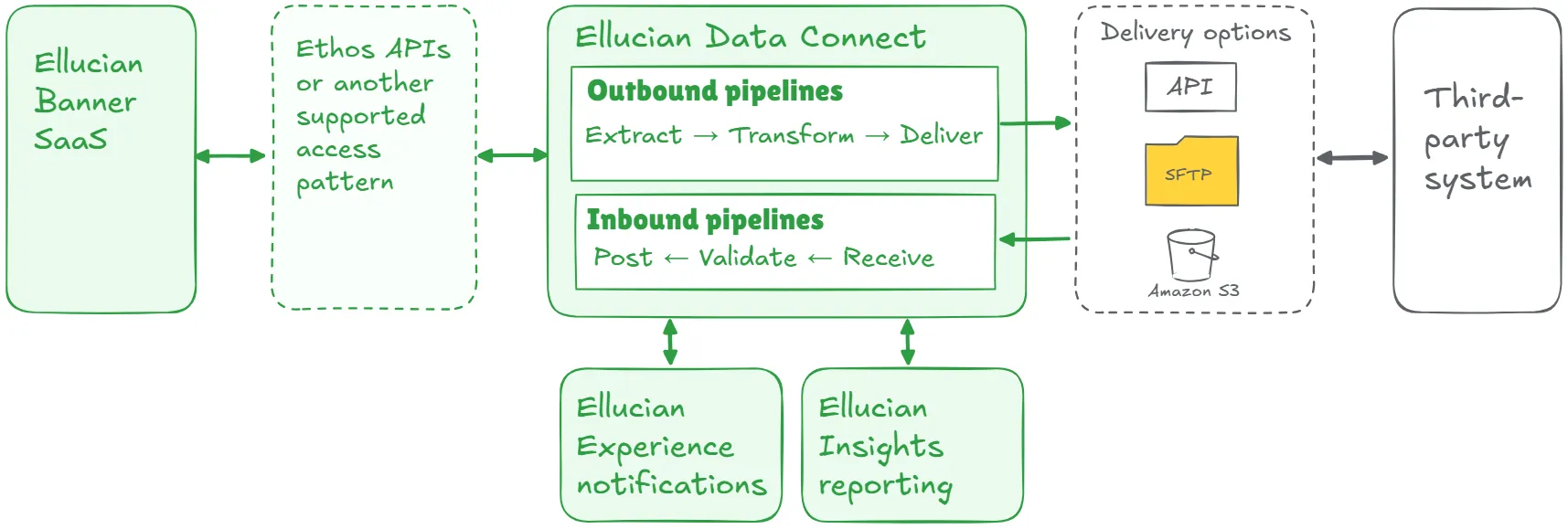
For many Banner-centered workflows, the target model is not “the same Boomi job pointed at SaaS.” The better target model is a supported flow where Data Connect, Ethos APIs, Amazon S3, SFTP, Experience notifications, Insights reporting, and approved posting paths handle the responsibilities that used to sit inside middleware.
A strong future-state design may include:
- workflow-by-workflow inventory;
- identification of middleware replacement candidates;
- supported access to Banner data through Ellucian Platform;
- Data Connect pipelines for Banner-centered extraction, transformation, validation, file generation, delivery, and logging;
- Ethos APIs or other approved access and posting patterns;
- controlled Amazon S3 or SFTP exchange;
- separation of inbound and outbound flows where needed;
- explicit validation and matching rules;
- configurable parameters;
- structured error handling;
- operational reporting or notifications;
- clear ownership for each workflow;
- documented decisions on what to replace, split, simplify, retain, or retire;
- external middleware only when it has a clear future-state role.
This list is a starting point, not a complete architecture checklist. The final design depends on what each middleware job does, what it depends on, how much risk it carries, what the target system requires, and which teams support the process.
The result should be a cleaner integration architecture with fewer legacy dependencies, fewer unnecessary handoffs, clearer ownership, and better operational visibility.
Lessons learned from real projects
Banner middleware integration modernization projects usually bring the same core lessons into view.
1. Middleware inventory comes before replacement
A middleware platform may contain many jobs. Some are business-critical. Some are old workarounds. Some duplicate other flows. Some still depend on Banner Oracle access. Start by identifying each workflow, connected systems, data direction, records affected, owners, schedules, dependencies, and support path. Without that inventory, modernization can become a blind migration of old complexity into a new environment.
2. A one-to-one Boomi migration can preserve cost and complexity
A Boomi job may contain useful logic, obsolete rules, temporary fixes, and assumptions that no longer apply. Rebuilding every job as another middleware workflow can preserve licensing, support overhead, hidden dependencies, and technical debt. Modernization creates a chance to decide which responsibilities belong in Data Connect, which should move to other Ellucian capabilities, which should be split, and which can be retired.
3. Database-dependent middleware is the real issue
The middleware platform is usually not the deepest problem. The deeper issue is what the workflow depends on: direct Banner Oracle access, custom views, staging tables, stored procedures, local files, or database-side business logic. Those dependencies need discovery before the future state can be designed.
4. Data Connect can replace many Banner-centered workflows
When a middleware job mainly extracts Banner data, transforms records, generates files, delivers them through SFTP or Amazon S3, logs results, and supports administrator visibility, Data Connect may be a better fit for Ellucian Platform (SaaS). This does not mean every middleware workflow disappears. It means Banner-centered workflows should be evaluated for replacement instead of remaining in middleware by default.
5. Inbound and outbound flows need separate treatment
Outbound workflows usually read from Banner and send data elsewhere. Inbound workflows bring data back and may update Banner records. Inbound flows need stronger validation, matching, audit, failed-record handling, and supported posting mechanisms. Outbound flows still need supported access, transformation, delivery, and monitoring. Splitting those directions often makes replacement easier and support safer.
6. Native Ellucian capabilities can reduce integration layers
If Data Connect, Ethos APIs, Amazon S3, SFTP, Experience, Insights, and supported posting mechanisms can cover the workflow, the institution may not need the extra middleware layer for that Banner process. Fewer layers can mean fewer places to troubleshoot, fewer handoffs to support, fewer hidden dependencies, and clearer accountability after go-live.
7. Retaining middleware requires a reason
External middleware may still make sense when a workflow spans many non-Ellucian systems, fits an institution’s enterprise iPaaS strategy, requires orchestration outside the Ellucian domain, or depends on capabilities that Data Connect is not intended to replace. In that case, the middleware workflow should use supported SaaS-compatible interfaces, avoid old Banner database assumptions, and have a clearly documented role in the future-state architecture.
8. Error handling should become visible
Email alerts and scattered logs can leave administrators guessing what happened. A modernized workflow should show run status, failed records, error files, delivery results, retry paths, and ownership. This is especially important when the flow affects student records, applications, financial data, waivers, or other sensitive processes.
9. Functional owners need to validate the workflow
Middleware often crosses functional areas. One workflow may support admissions, student records, insurance, financial aid, student accounts, academic data, or external partner processes. Technical teams can analyze jobs and mappings. Functional owners need to confirm which rules still reflect policy, which steps are operational preferences, and which logic exists because of old technical constraints.
10. Patterns can overlap
A middleware workflow may also be a direct database integration, stored procedure integration, manual file workflow, large legacy integration, full-export integration, or hidden SQL logic case. The right modernization path depends on the full current state.
Replace legacy Boomi complexity with a cleaner Banner SaaS architecture
We can help your team inventory middleware workflows, identify database-dependent jobs, separate inbound and outbound flows, and decide which processes can move to Data Connect, Ethos APIs, Amazon S3, SFTP, Experience, Insights, or supported posting paths.
Discuss Middleware ModernizationRelated ABCloudz examples
This replacement-oriented approach appears in several ABCloudz projects where middleware workflows had to be reviewed, simplified, or moved to native Ellucian capabilities.
In Salesforce EDA, the customer had 24 Boomi scripts across four workflows. Two moved data from Banner to Salesforce, and two moved data from Salesforce to Banner. The Boomi jobs handled detection, transformation, routing, error handling, and logging, but they interacted with the Banner Oracle database and could not be reused in that form.
The future-state solution replaced those legacy Boomi workflows with native Ellucian-compatible capabilities. Data Connect pipelines handled the integration logic, Ethos APIs provided supported data exchange, Amazon S3 supported file exchange and error outputs, and Experience and Insights added notifications and reporting. After the redesign, ABCloudz also optimized the structure, improved performance, removed unused business logic, and fixed issues found during testing.
In Arthur Gallagher, the legacy architecture used separate inbound and outbound Boomi jobs. The outbound job pulled enrollment data from a custom Banner database view, wrote data to disk, and sent it to Gallagher through SFTP. The inbound job retrieved waiver files, parsed records, loaded data into a staging table, and used a custom database procedure to update Banner.
The modernized solution replaced those database-dependent Boomi jobs with Data Connect pipelines. The new architecture used Ethos API interaction, SFTP and Amazon S3 handling, configurable parameters, Data Connect run logs, Experience visibility, and Insights reporting. In this case, the move to Ellucian Platform (SaaS) also reduced the need for an extra integration layer for that process because native Ellucian capabilities were sufficient.
These examples show the same principle: middleware jobs should be evaluated by what they do and what they depend on. If the workflow mainly exists to connect Banner database objects, files, scripts, and procedures, SaaS modernization may be the right moment to replace it with a cleaner Ellucian-compatible design.
How Modernization Studio and Integration Knowledge Hub help discovery
ABCloudz uses Ellucian Modernization Studio during discovery to support AI-assisted analysis of legacy ERP environments. For middleware integrations such as Boomi jobs, it helps surface workflow dependencies, connected database objects, complexity, and modernization opportunities. Our specialists validate the findings because middleware workflows may combine platform logic, database dependencies, business rules, vendor requirements, and support habits.
We also use our Integration Knowledge Hub approach to reuse integration knowledge from prior Ellucian projects across different institutions. Experience from similar middleware modernization projects can help accelerate discovery, while each workflow still needs customer-specific review.
Download the middleware integration questionnaire
Use this questionnaire to review a Banner integration that runs through Boomi or another middleware layer.
Banner middleware integration modernization questionnaire
The questionnaire helps technical and functional teams document workflow inventory, Banner dependencies, data direction, business logic, ownership, error handling, and replacement options.
You can use it during internal discovery or send it to ABCloudz so we can understand your middleware integration faster and provide more relevant guidance.
Talk to ABCloudz about your Banner middleware integrations
If your Boomi jobs or middleware workflows connect to Banner Oracle, depend on custom views, or call stored procedures, they need a replacement review before SaaS go-live, not just a pointed-at-SaaS migration. We can help you evaluate which workflows Data Connect can absorb and which still need external middleware.
ABCloudz is an Ellucian Service Partner with more than 10 years of experience helping institutions modernize within the Ellucian ecosystem. Connect with us to discuss your Banner middleware integration modernization path.