Modernizing ALEKS test score imports for Ellucian Banner SaaS
03 July 2026
ABCloudz modernized an existing McGraw-Hill ALEKS score import for an institution moving from on-premises Ellucian Banner to Ellucian Student powered by Banner.
McGraw-Hill ALEKS is an online learning and assessment platform that helps educators understand each student’s knowledge and learning progress. The institution already used ALEKS scores in its Banner student records, but the existing integration was tied to the on-premises Banner environment. As the institution moved to Banner SaaS, that score import had to be rebuilt around supported SaaS-compatible patterns.
Watch the 1-minute case study
ABCloudz rebuilt the ALEKS-to-Banner import as a one-way inbound flow using Ellucian Data Connect, supported APIs, and reviewable audit and error outputs. After the modernization, ALEKS remains the source of assessment results, while Ellucian Data Connect coordinates retrieval, staging, transformation, student-context validation, score posting, and operational outputs. Valid score data moves into Ellucian Banner SaaS through supported APIs, while audit and error files give admins a clear way to review each run.
Similar ALEKS modernization work for Ellucian Colleague
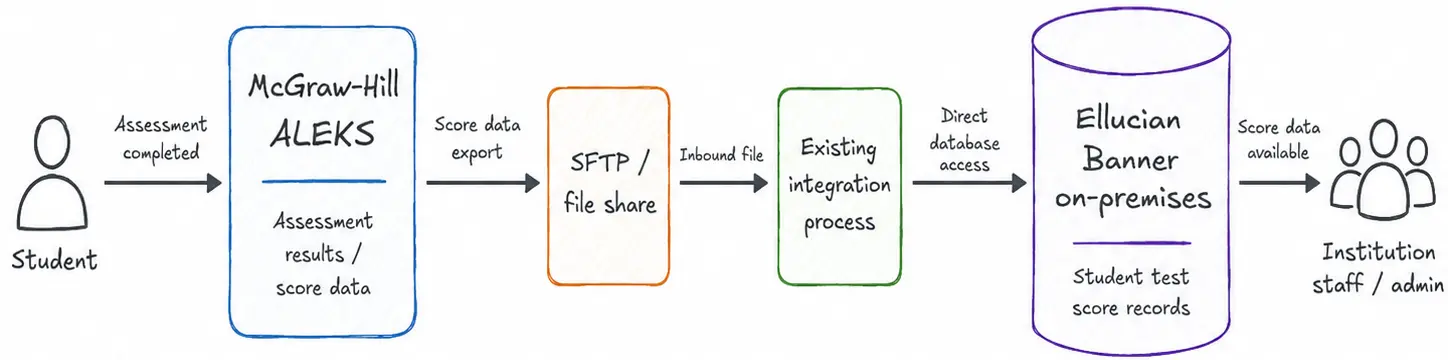
The original ALEKS-to-Banner integration moved assessment scores from McGraw-Hill ALEKS into on-premises Ellucian Banner through a file-based path and direct database update. It supported the right business process, but it was tied to the old Banner environment and had to change as the institution moved to SaaS.
The current-state architecture shows the original ALEKS-to-Banner integration before the institution’s move to SaaS. McGraw-Hill ALEKS held the assessment results, and the on-premises Ellucian Banner environment needed those scores in student records.
In this state, the ALEKS score import followed a file-based integration path. Assessment data was exported from ALEKS, transferred through an SFTP or file-sharing step, and then processed through an existing integration path that updated the on-premises Ellucian Banner database directly.
After a student completed an assessment in ALEKS, the resulting score had to reach Ellucian Banner so institutional users could work with that information in the student record. The process also had to support updates when a score changed in ALEKS.
The existing integration was tied to the on-premises Banner environment. As the institution moved to Banner SaaS, the data path had to change as well. The new model needed to preserve the ALEKS score import process while using SaaS-compatible ways to retrieve, transform, validate, and load assessment data.
Why the integration model had to change
Moving to Ellucian Banner SaaS changed the integration boundary. ALEKS scores still needed to become Banner student test score records, but retrieval, validation, posting, and review had to follow supported SaaS-compatible patterns instead of the old on-premises path.
Moving from on-premises Ellucian Banner to Ellucian Banner SaaS changed the integration boundary. The institution still needed the same outcome: ALEKS scores had to become Banner student test score records. What changed was the way those records could be retrieved, validated, posted, and reviewed.
For this project, the ALEKS import had to move to a supported SaaS-compatible model. That meant using Ellucian Data Connect to coordinate the inbound flow, supported APIs to check the student context and post score data, and Amazon S3 or SFTP outputs to make audit and error results available for review.
How we rebuilt the import with Ellucian Data Connect
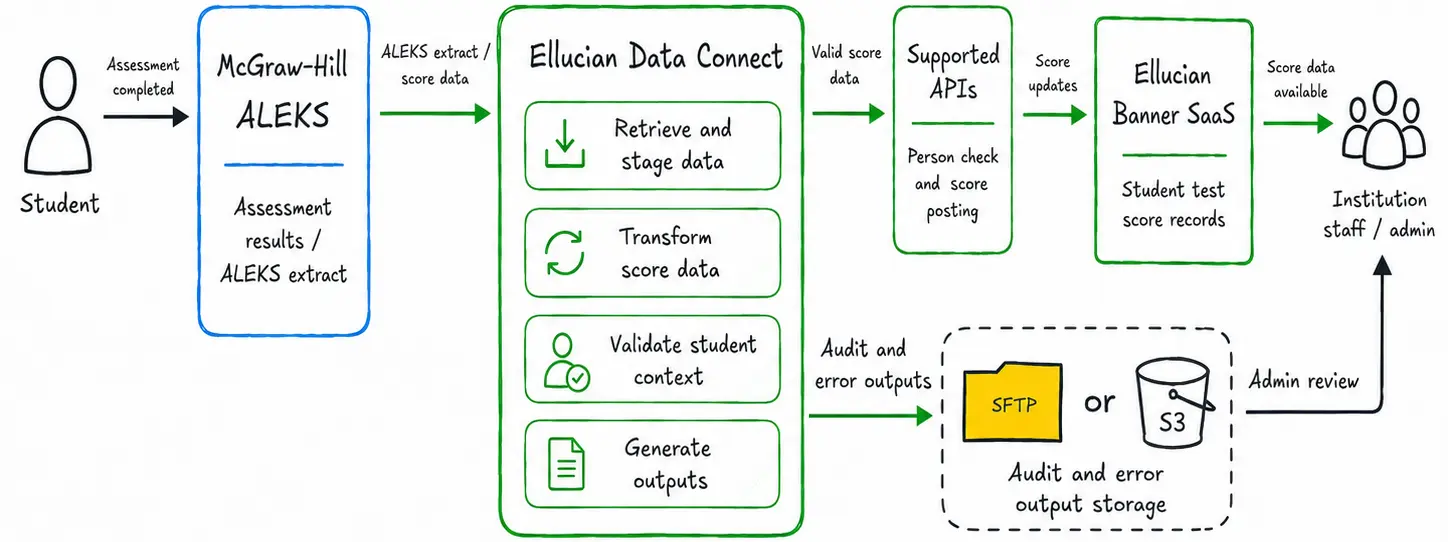
ABCloudz rebuilt the import as a one-way inbound Ellucian Data Connect flow. ALEKS provides completed or updated score data, Data Connect stages and transforms the extract, supported APIs post valid records to Banner SaaS, and audit/error outputs give admins a review path.
ABCloudz rebuilt the integration as a one-way inbound process from ALEKS to Ellucian Banner SaaS.
Ellucian Data Connect became the orchestration layer for the new import path. The pipeline retrieves ALEKS assessment data from the configured source, stages it through Amazon S3 or SFTP depending on institutional setup, transforms the ALEKS extract into the Banner test score structure, and prepares valid records for loading through supported APIs.
The diagram shows the SaaS-compatible replacement for the original on-premises integration path.
ALEKS remains the source of assessment results. Data Connect coordinates retrieval, staging, transformation, validation preparation, and output generation. Supported APIs provide the controlled path into Ellucian Banner SaaS, while a separate review branch stores audit and error outputs for administrative follow-up.
At a practical level, the new flow covers six main steps:
ALEKS provides completed or updated assessment data.
Data Connect retrieves and stages the ALEKS extract through the configured path.
The pipeline transforms ALEKS data into the Banner test score structure.
The integration checks whether the Banner person exists.
Valid score data is posted through the supported API flow.
Audit and error outputs are generated for administrative review.
The run pattern can be configured around institutional needs. The documentation identifies event-driven, scheduled batch, and on-demand options. The actual fetch timing depends on how often the institution wants to pull assessment records into Banner, with examples such as hourly, daily, or monthly schedules.
This structure preserves the original purpose of the ALEKS score import while replacing the on-premises integration path with a model that fits Ellucian Banner SaaS.
Validating student context and scores
Before posting score data, the new flow validates that each result is connected to the right Banner person and prepared for the correct test score context. Unmatched or incomplete records move into the review path instead of becoming silent data issues.
An ALEKS import has to do more than move an extract into Banner. It has to make sure each score is connected to the right student and prepared for the correct Banner test score context.
In the new flow, Ellucian Data Connect transforms the ALEKS data and uses supported APIs to validate the student context before posting score information. At the implementation level, this includes the persons API for checking the Banner person record and the test-score-information API for score posting and validation.
For institutional teams, the value is practical: incomplete or unmatched records can move into the review path instead of becoming silent data issues. Valid records continue into Banner, while exceptions remain visible for follow-up.
Making imports easier to review
Each run produces audit and error outputs so admins can see what loaded, what failed, and what needs follow-up. This review layer also supports score updates, helping teams verify that changed ALEKS results are reflected correctly in Banner.
The import also needed to be supportable after each run. Moving data into Banner would not be enough if admins could not see which records loaded, which records failed, and where to look next.
For that reason, the integration generates audit and error outputs. The audit report gives staff a record of import activity, while the error output captures issues such as missing Banner person context, incomplete data, missing configuration, or records that could not be posted. These files are stored in the configured Amazon S3 or SFTP location.
This review layer also supports score updates. When a student’s test score changes in ALEKS, the corresponding Banner record should reflect the updated result, and admins should still have the reporting trail needed to verify the run and investigate exceptions.
Results
The result is a SaaS-compatible ALEKS score import for Banner SaaS.
The institution can continue moving assessment results from ALEKS into Banner, but without relying on the old on-premises integration model. Data Connect provides the pipeline layer for retrieval, staging, transformation, and processing. Supported APIs handle the person check and score posting flow. Amazon S3 or SFTP provides a place for audit and error outputs.
For faculty and administrative teams, the value is simple: ALEKS scores become available in Banner for student performance analysis and review. For admins, the process becomes easier to operate because each run produces outputs that help explain what happened.
The assessment data did not change. The path into Banner did. It is now structured for Banner SaaS, easier to review, and better aligned with supported Ellucian integration patterns.
If your institution is preparing to move Ellucian Banner or Colleague integrations into a SaaS-ready architecture, contact ABCloudz. We can help you assess the existing integration path, redesign it around supported Ellucian patterns, and keep the original business process working in the new SaaS environment.