Some of the most important rules in a Colleague integration may not appear in formal requirements documentation.
They live in reports that decide which records qualify. In file layouts that turn local meaning into vendor-ready fields. In mappings and crosswalks that translate institutional values. In schedules, manual checks, and staff knowledge that quietly decide whether data is safe to send, load, or trust.
When Colleague moves toward Ellucian Platform (SaaS), those rules do not migrate unless the team finds them first.

This guide is written for higher-ed leaders, ERP/SIS owners, functional stakeholders, and modernization teams who need a decision-level view of how to modernize Colleague integrations with hidden business rules for Ellucian Platform (SaaS).
Use it to prepare for future-state conversations when an existing Colleague integration works, but the logic behind it is hard to explain outside scripts, reports, file layouts, vendor specifications, mappings, crosswalks, schedules, manual checks, or staff knowledge.
This guide is one pattern-specific deep dive in our Colleague integration modernization series for Ellucian Platform (SaaS). If you are beginning the assessment, start with the Colleague integration modernization framework guide for Ellucian Platform (SaaS). That guide explains how we classify legacy integration patterns, identify current-state risks, and prepare better questions before future-state architecture work begins.
Other deep-dive guides in this series cover these Colleague On-Premises integration patterns:
- Colleague direct data access and local job integrations
- Colleague file-based integrations
- Colleague integrations into purpose-built Data Connect pipelines
Continue with this guide if the integration you are reviewing contains rules that are important to the business process but difficult to find, document, test, or explain.
Hidden rules can break SaaS modernization
If critical Colleague logic lives inside reports, scripts, mappings, file layouts, or staff knowledge, ABCloudz can help your team uncover it before the future-state design begins.
Find hidden integration rulesWhy hidden business rules need discovery before redesign
Hidden business rules are the decisions inside the integration.
They decide who is included, who is excluded, which record wins, which code gets mapped, which file gets generated, which score becomes part of the student record, which charge gets created, which relationship moves downstream, or which error should stop the process.
In Colleague On-Premises, those rules often lived close to the work. A local report selected students. A script formatted names and phone numbers. A file layout forced a particular field order. A vendor specification defined required codes. A staff member checked the output because “that is how we have always caught the problem.”
That may have worked. It may still be the most accurate description of the process. But it is not enough for SaaS modernization.
Ellucian Platform (SaaS) changes the execution model. Direct data access may move to governed access through Ellucian Ethos application programming interfaces (Ethos APIs). Local jobs may move into Ellucian Data Connect. File generation, validation, delivery, and reporting may become managed pipeline behavior. Before that happens, the team needs to know which rules the old process was carrying.
The SaaS risk is not only that an old script, report, or file workflow stops working. The larger risk is rebuilding the visible output while losing the decision logic that made the old process correct.
A Colleague integration typically needs hidden business rule discovery when its current state includes:
- local scripts or reports that select records;
- file layouts that define meaning, not only formatting;
- mappings or crosswalks that convert institutional values into vendor values;
- filters for active students, enrollment, terms, groups, roles, eligibility, scores, or transactions;
- manual checks that decide whether a file is safe to send or load;
- vendor specifications that shape file layouts, required fields, codes, and import behavior;
- schedules that reflect business timing, not only technical convenience;
- error handling that depends on staff judgment;
- support knowledge held by one or two people.
The goal is not to document every old detail forever. The goal is to decide which rules should be preserved, which should become configurable, which should move into validation, which need functional approval, and which should be retired.
Typical current state
A typical Colleague integration with hidden business rules may not look mysterious at first.
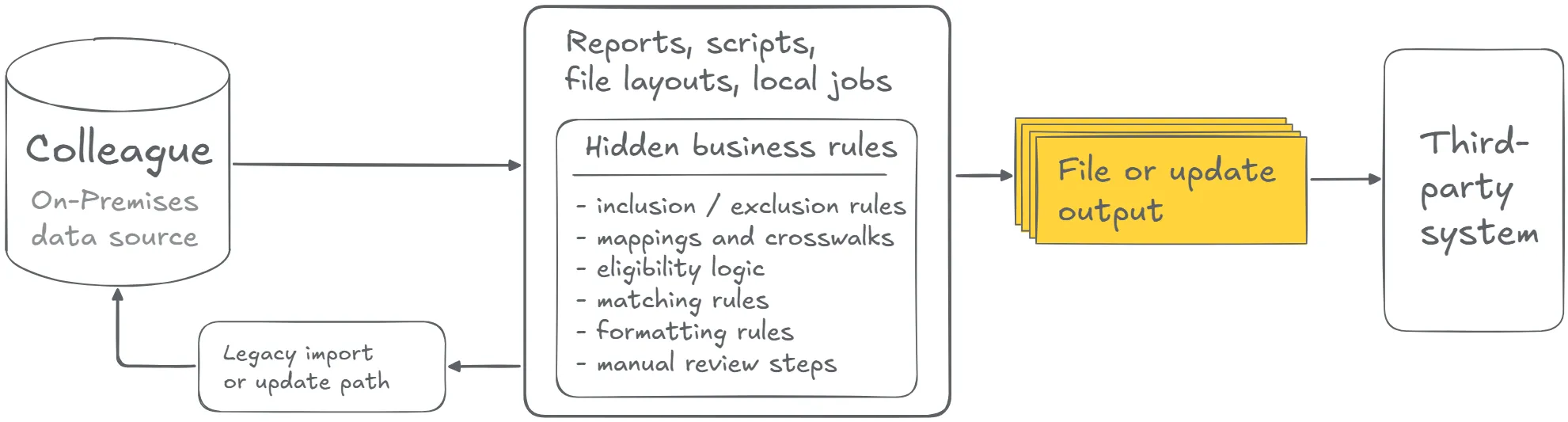
It may look like a file feed, a scheduled export, a local report, a vendor connection, or a small job that has been running for years. The output arrives. The vendor accepts it. Staff trust it. That trust can hide how many decisions happen before the data ever leaves the institution.
One part of the process may decide which students qualify. Another may map course, section, term, role, or status values. Another may transform phone numbers, names, scores, dates, or identifiers. Another may decide whether a rejected record is ignored, corrected, retried, or escalated.
The most important rule may not be in code at all. It may live in a file naming convention, a spreadsheet step, a vendor guide, a support runbook, or a person who knows what a “normal” output looks like.
The old process may produce the right result. The modernization risk is rebuilding the visible output while losing the logic that made it right.
The first task is not to copy the old rule into a new pipeline. It is to translate the old behavior into business language so functional owners can decide whether that rule still belongs in the future state.
What to discover before rebuilding hidden rules
After the current-state process is visible, translate technical behavior into business language.
A filter is not just a filter. It may be an eligibility rule. A code mapping is not just a transformation. It may decide how another team sees a student, employee, course, transaction, or relationship. A manual check is not just a human step. It may be an informal control that was never written down.
Before redesigning the integration, teams should clarify:
- Which rules decide who or what is included?
- Which rules decide who or what is excluded?
- Which rules come from institutional policy?
- Which rules come from vendor requirements?
- Which rules are legacy workarounds?
- Which fields are used for matching, filtering, grouping, validation, routing, formatting, or posting?
- Which rules affect student records, financial activity, scores, holds, charges, refunds, or access rights?
- Which rules should become Data Connect mappings, crosswalks, validation logic, configuration, or test cases?
- Which rules require functional approval?
- Which legacy outputs should be used to prove that the future-state behavior is correct?
This review often overlaps with the other patterns in the series. Hidden rules may live inside direct data access and local jobs. They may shape file-based integrations. They may also determine where one vendor connection should be split into several purpose-built Data Connect pipelines.
The strongest modernization work starts when the team stops treating the old integration as a black box and starts treating it as a source of requirements.
Turn old logic into clear requirements
Before rebuilding a Colleague integration, your team needs to separate current policy from legacy workarounds, vendor rules, mappings, filters, validation logic, and manual checks.
Map your business rulesTypical future state
A SaaS-compatible future state makes the hidden rules explicit before the integration is rebuilt.
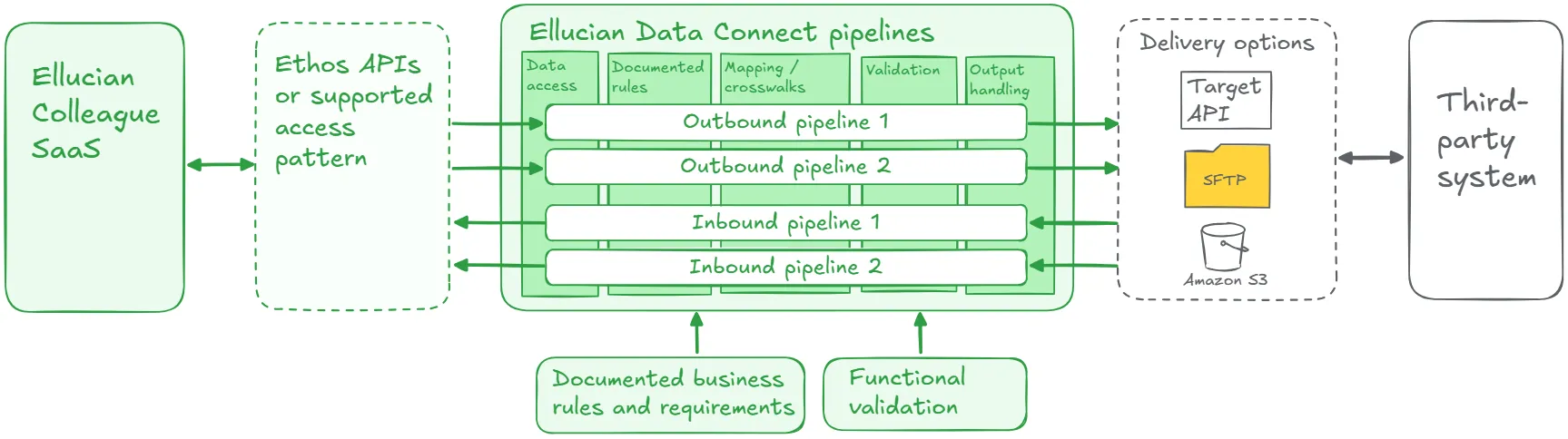
Some rules may become Data Connect transformations. Some may become Data Connect Crosswalks, or configurable mapping structures, rather than hardcoded logic. Some may become validation checks. Some may become test cases. Some may need to stay in vendor-specific file logic. Some may be removed because they no longer match the business process.
Colleague data or data from another relevant Ellucian SaaS application may be accessed through Ethos APIs or another supported access pattern. Data Connect can then orchestrate extraction, mapping, transformation, validation, file generation, delivery, reporting, and error handling.
The future state should make every important rule reviewable. That does not mean every old rule survives. It means every rule is visible enough to preserve, configure, validate, redesign, or retire deliberately.
Lessons learned from real projects
Colleague modernization projects show that hidden rules are often the real integration asset.
1. Selection logic is business logic
In the Maxient project, the team had to determine which students should be included in each export. The integration also needed field-level customization, including name formatting, phone formatting, and GPA rounding. Those details were not side work. They shaped whether Maxient received useful, accurate student and schedule data.
2. User stories help translate old behavior into SaaS design
In Handshake, ABCloudz traced the legacy behavior back to real user stories before rebuilding the feed with Ethos APIs and Data Connect. That matters because the old export was not just a CSV. It carried student demographic, academic, contact, and identifier logic that Handshake needed to recognize students and support career services.
3. Advising and tutoring rules need academic context
In AdvisorTrac and TutorTrac, the integrations depended on student profiles, enrollment data, section context, and instructor information. The modernization task was to preserve the advising and tutoring outcome while making the underlying rules clearer, more modular, and easier to support in Data Connect.
4. Full exports can still hide filters and mappings
In the TeamDynamix project, the future-state pipeline generated full demographic exports because that matched the target system’s import model. Even when the output is a full file, the integration still needs rules for which records qualify, which fields matter, how values map, and how errors become visible.
5. Financial and transaction flows need controlled rule ownership
In the Barnes & Noble Adoption project, outbound academic and eligibility data supported course materials and first-day access workflows. Inbound transaction files supported billing activity, including charges and refunds. Those rules affect operational and financial outcomes. They need validation, approval, and a supported processing path, not just a rebuilt file exchange.
6. Separate files often reflect separate business rules
In the BMTX BankMobile project, Enrollment, Demographics, and Remittance traveled as separate CSV outputs. That separation was meaningful. Each file had its own purpose, rules, and target-system expectations. Preserving the old outcome required understanding why the separation existed.
7. Relationship data is not just another field group
In the Blackbaud Raiser’s Edge project, the integration had to preserve graduate records, parent and family relationships, and employee updates for advancement work. Those flows depended on rules about identity, relationship meaning, timing, and downstream use. Making those rules explicit made the future-state design easier to support.
8. Crosswalks make institution-specific rules easier to review
The ALEKS project shows this clearly. Score interpretation was handled through a Data Connect Crosswalk, keeping institution-specific mapping logic outside the core pipeline. That is the kind of architectural choice that makes business rules easier to review, adjust, and support when institutional requirements change.
Make Colleague rules reviewable before SaaS
ABCloudz can help your team uncover hidden business rules, validate them with functional owners, and redesign Colleague integrations so the right outcomes survive the move to Ellucian Platform SaaS.
Discuss your rule discovery pathHow Modernization Studio and Integration Knowledge Hub support discovery
For this pattern, discovery is less about finding one broken component and more about finding the rules that everyone depends on but no one wants to own blindly. Ellucian Modernization Studio helps ABCloudz surface scripts, reports, dependencies, and local execution clues that may contain hidden business logic.
Our Integration Knowledge Hub approach helps compare those findings with lessons from previous Ellucian projects. That gives the team sharper discovery questions, while the final rule decisions still come from expert review with technical and functional stakeholders.
Download the hidden business rules questionnaire
Use the focused questionnaire below to review one Colleague integration where important rules may live inside scripts, reports, file layouts, vendor specifications, mappings, crosswalks, schedules, manual review steps, or staff knowledge.
Colleague hidden business rules modernization questionnaire
The questionnaire helps technical and functional teams identify where rules live, separate current policy from old workarounds, assign rule ownership, define validation, and prepare for a more useful future-state design discussion.
You can complete it for internal planning or share it with ABCloudz so we can understand your Colleague integration faster and support your team with better context.
Talk to ABCloudz about your Colleague hidden business rules
If a Colleague integration works because the old process knows things the documentation does not, it should not be rebuilt as a black box. We can help you uncover the rules, validate them with the right owners, and design a SaaS-ready process that preserves the right outcomes.
ABCloudz is an Ellucian Service Partner with more than 10 years of experience helping institutions modernize within the Ellucian ecosystem. Talk with us about your Colleague hidden business rules modernization path.