One Colleague vendor connection can look like one integration until the team opens it and finds student profiles, enrollment data, group mappings, return files, remittance records, transaction files, and several owners inside the same wrapper.
The modernization risk is rebuilding that old wrapper as one new pipeline. The better path is to name the flows first, then decide which ones need their own purpose, schedule, validation model, output, owner, and support path.

This guide is written for higher-ed leaders, ERP/SIS owners, functional stakeholders, and modernization teams who need a decision-level view of how to modernize Colleague integrations into purpose-built Ellucian Data Connect pipelines for Ellucian Platform (SaaS).
Use it to prepare for future-state conversations when a Colleague vendor connection, file exchange, report package, local job, or legacy integration may contain several different business flows inside it.
This guide is one pattern-specific deep dive in our Colleague integration modernization series for Ellucian Platform (SaaS). If you are beginning the assessment, start with the Colleague integration modernization framework guide for Ellucian Platform (SaaS). That guide explains how we classify legacy integration patterns, identify current-state risks, and prepare better questions before future-state architecture work begins.
Other deep-dive guides in this series cover these Colleague On-Premises integration patterns:
- Colleague direct data access and local job integrations
- Colleague file-based integrations
- Colleague integrations with hidden business rules
Continue with this guide if one current Colleague integration seems to carry multiple datasets, files, schedules, validation rules, delivery paths, or business owners inside the same vendor connection.
Is one Colleague integration hiding multiple flows?
A single vendor connection may contain several datasets, schedules, file outputs, return files, and owners. ABCloudz can help your team identify which flows need separate Data Connect pipeline boundaries before modernization begins.
Review your pipeline boundariesWhy one vendor connection may need several pipeline boundaries
A single vendor connection can be a convenient container. It can also hide a lot of different work.
In Colleague On-Premises, one integration could grow gradually. A team starts with a student profile feed. Later, enrollment data is added. Then instructor context appears. Then a second file is needed. Then a return file arrives. Then financial or transaction data joins the same exchange. Over time, one connection starts carrying several different flows.
That may be fine while the institution controls the surrounding environment. Local scripts, scheduled jobs, shared folders, and support routines can hold the pieces together. The operating team may know the sequence, the exceptions, and the “don’t touch this part during registration week” rules.
Ellucian Platform (SaaS) changes the design conversation.
The future-state architecture should not automatically copy the old shape. A Colleague integration typically needs flow-level review when its current state includes:
- one vendor connection with several datasets;
- one job or report package that produces multiple files;
- outbound and inbound flows in the same process;
- student, academic, financial, employee, or advancement data mixed together;
- different schedules forced into one run;
- shared error handling for unrelated files or records;
- hidden rules inside scripts, reports, file layouts, mappings, or staff knowledge;
- several functional owners depending on one technical process;
- one failure point that can disrupt several business activities.
The question is not “How many pipelines can we create?” The better question is which flows need their own purpose, schedule, validation model, output, owner, and support path.
Good pipeline boundaries do not add complexity for its own sake. They make the complexity that already exists easier to see, test, monitor, and support.
Typical current state
A typical Colleague integration in this pattern looks like one connection from the outside.
It may be one vendor setup, one SFTP folder, one scheduled job, one report process, one script package, or one support routine. But inside that connection, several flows may be moving at once.
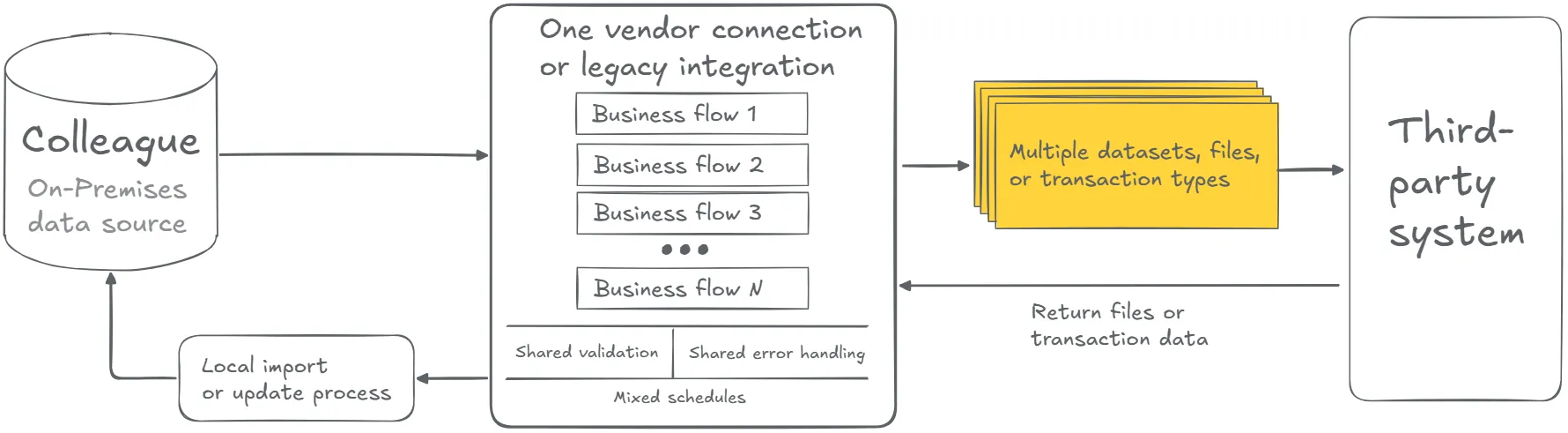
One file may carry student demographics. Another may carry enrollment or section context. Another may map users to groups. Another may contain remittance data. Another may return charges, refunds, holds, scores, or error outputs. Some flows may be outbound only. Others may come back into the institution and affect student records or financial processes.
The old integration may still work. The risk is that its internal boundaries are not clear enough for SaaS modernization.
A single failure may stop several business activities. A change to one file may affect another flow. One team may own the vendor relationship, another may own the data, and a third may support the script. When that happens, the integration depends less on architecture and more on institutional memory doing overtime.
The first task is not to split the integration. It is to create a flow inventory. Until each flow is visible, the team cannot decide what should be preserved, separated, combined, redesigned, or retired.
How to define pipeline boundaries before redesign
After the current-state architecture is mapped, the next step is not to split everything. The next step is to name the flows.
A flow is a meaningful unit of integration behavior. It may be a dataset, file, direction, schedule, validation model, business process, or support responsibility. Some flows belong together. Some should stand apart. Some may no longer be needed.
Before designing the future state, teams should clarify:
- Which business flows are inside the current integration?
- Which flows are outbound from Colleague?
- Which flows are inbound into Colleague or another Ellucian SaaS process?
- Which flows only provide reference or profile data?
- Which flows affect student records, financial activity, scores, holds, refunds, or account data?
- Which flows have different schedules or timing constraints?
- Which flows require different validation rules?
- Which flows produce different file types or delivery outputs?
- Which flows have different functional owners?
- Which flows depend on another flow completing first?
- Which rules, mappings, or file contracts are shared?
- Which flows should be preserved, redesigned, split, combined, or retired?
This review often overlaps with other modernization patterns. A multi-flow integration may also be file-based, depend on direct data access and local jobs, or contain hidden business rules. That overlap is normal. Pipeline boundaries help teams decide where those concerns belong.
The strongest future-state design starts with a simple discipline: do not let the old wrapper define the new architecture.
Name the flows before you rebuild
Before moving a legacy Colleague integration into Data Connect, your team should understand which flows are outbound, inbound, high-risk, reusable, vendor-specific, or owned by different functional teams.
Map your Colleague integration flowsTypical future state
A SaaS-compatible future state may replace one legacy connection with several coordinated Data Connect pipelines.
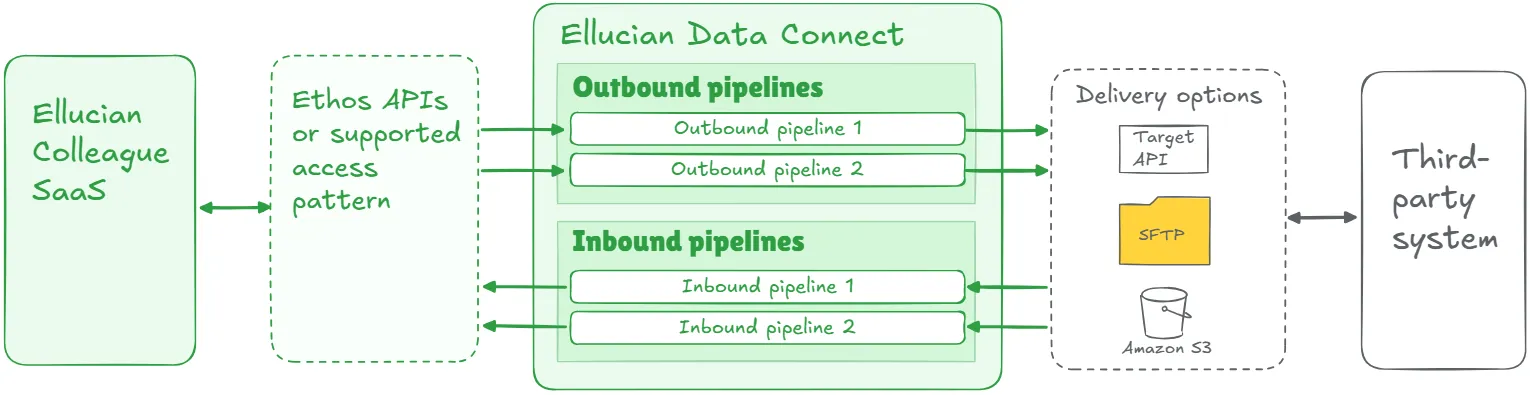
Each pipeline should have a clear job where possible: one flow, one main data domain, one direction, one schedule, one validation model, one output, and one support path. That does not mean every small step needs its own pipeline. Some flows may still belong together when they share the same schedule, owner, validation model, and support path. The point is to make future-state boundaries intentional.
Colleague data or data from another relevant Ellucian SaaS application may be accessed through Ellucian Ethos application programming interfaces (Ethos APIs) or another supported access pattern. Data Connect can then orchestrate extraction, transformation, mapping, validation, delivery, reporting, and error handling.
Depending on the target system, the future state may deliver files through Secure File Transfer Protocol (SFTP), Amazon S3, a target-system API, or another approved path. Where flows depend on each other, orchestration should make that dependency visible instead of hiding it inside a local job.
The most useful design principle in this pattern is simple: pipeline boundaries should follow business function, not only source and target systems. Two flows may connect Colleague to the same vendor and still need separate pipelines because they run on different schedules, carry different risk, or belong to different functional owners.
Lessons learned from real projects
Colleague integration modernization projects show that pipeline boundaries matter most when one connection is doing more than people remember.
1. Separate datasets often need separate pipelines
In the Maxient project, the integration needed demographic data and course schedules. Those outputs served the same target platform, but they had different structures and transformation needs. Building dedicated pipelines for demographics and schedules made each flow easier to validate, maintain, and reuse.
2. Pipeline boundaries should follow how the data is consumed
A vendor may receive several files, but each file may answer a different business question. In the BMTX BankMobile project, Enrollment, Demographics, and Remittance moved as separate outputs. The future state preserved that separation because each file supported a distinct part of the BankMobile process.
3. Advancement data is not one generic feed
In the Blackbaud Raiser’s Edge project, the future state needed to preserve graduate records, parent and family relationships, and employee updates. Those flows supported different advancement outcomes. Separate pipeline boundaries made the logic clearer and gave each dataset a better support path.
4. User context and group context may not belong in the same flow
In the Rave Alert project, one pipeline handled student and staff extract data, while another handled group mapping. That separation matters because contact details and group membership answer different operational questions. Treating them as distinct flows makes the alert integration more flexible and reusable.
5. Advising and tutoring integrations often have layered academic context
In AdvisorTrac and TutorTrac, the integrations had to carry student profiles, enrollment data, section context, and instructor information. The useful modernization move was not to flatten that logic into one generic feed. It was to keep the advising or tutoring outcome intact while giving the flows clearer responsibilities inside Data Connect.
6. Bidirectional integrations need boundaries by direction and risk
Some vendor connections move data out and bring data back. The Barnes & Noble Adoption project included outbound academic, user, and eligibility data, plus inbound transaction files for billing activity. The outbound and inbound sides carried different risk levels, so they needed different validation and support thinking.
7. Reuse works better when the reusable unit is clear
A reusable integration is easier to adapt when the reusable unit is not a vague vendor connection, but a clearly named pipeline with a defined purpose. Across these projects, ABCloudz did not simply move old jobs into a new tool. We analyzed the flows, preserved the useful behavior, and rebuilt the execution model so similar institutions could start from a cleaner pattern instead of a pile of local assumptions.
Design cleaner Data Connect pipelines
ABCloudz can help you split legacy Colleague vendor connections into purpose-built Data Connect pipelines with clearer schedules, validation rules, outputs, ownership, and support paths.
Discuss your Data Connect designHow Modernization Studio and Integration Knowledge Hub support discovery
For this pattern, discovery is about finding the seams inside a familiar connection. Ellucian Modernization Studio helps ABCloudz surface jobs, dependencies, reports, scripts, and execution clues that may point to separate flows hiding inside one legacy setup.
Our Integration Knowledge Hub approach then helps compare those findings with similar Ellucian integration patterns we have already seen. That gives the team sharper starting questions, while the final pipeline design still depends on the institution’s data domains, vendor rules, timing, risk, and ownership model.
Download the purpose-built Data Connect pipelines questionnaire
Use the focused questionnaire below to review one Colleague vendor connection or legacy integration that may contain several datasets, files, schedules, directions, rules, owners, or risk levels.
Colleague purpose-built Data Connect pipelines modernization questionnaire
The questionnaire helps technical and functional teams identify flow boundaries, review dependencies, separate inbound and outbound concerns, assign ownership, and prepare for a more useful Data Connect design discussion.
You can complete it for internal planning or share it with ABCloudz so we can understand your Colleague integration faster and support your team with better context.
Talk to ABCloudz about purpose-built Data Connect pipelines for Colleague
If a Colleague vendor connection looks simple from the outside but contains several datasets, files, directions, schedules, owners, or risk levels inside, the first modernization step is not rebuilding the old wrapper. We can help you name the flows, define the right pipeline boundaries, and design a SaaS-ready model that is easier to validate and support.
ABCloudz is an Ellucian Service Partner with more than 10 years of experience helping institutions modernize within the Ellucian ecosystem. Talk with us about your Colleague Data Connect pipeline modernization path.