A file-based Colleague integration can look stable until a return file is downloaded late, a rejected record sits in a folder no one checks, or a transaction file affects student accounts without enough validation.
The file is often still the right contract. The risk is the uncontrolled work around it: local extraction, manual formatting, SFTP handling, inbound loading, error review, and staff knowledge.

This guide is written for higher-ed leaders, ERP/SIS owners, functional stakeholders, and modernization teams who need a decision-level view of how to modernize Colleague file-based integrations for Ellucian Platform (SaaS).
Use it to decide which file contracts should stay, which manual steps should become automated or exception-based, and what needs to be validated, monitored, archived, and supported before future-state architecture work begins.
This guide is one pattern-specific deep dive in our Colleague integration modernization series for Ellucian Platform (SaaS). If you are beginning the assessment, start with the Colleague integration modernization framework guide for Ellucian Platform (SaaS). That guide explains how we classify legacy integration patterns, identify current-state risks, and prepare better questions before future-state architecture work begins.
Other deep-dive guides in this series cover these Colleague On-Premises integration patterns:
- Colleague direct data access and local job integrations
- Colleague integrations into purpose-built Data Connect pipelines
- Colleague integrations with hidden business rules
Continue with this guide if your current integration sends, receives, formats, uploads, downloads, imports, checks, or troubleshoots files as part of a Colleague business process.
Unsure which file workflows are at risk?
File-based integrations can look stable until a late return file, rejected record, or manual upload breaks the process. ABCloudz can help your team identify which Colleague file workflows need review before SaaS modernization.
Review your file-based integration risksWhy file-based integrations need a controlled SaaS operating model
File exchange is not automatically legacy thinking.
In higher education, files often remain the practical contract between systems. A conduct platform may need student and course files. A parking system may exchange eligibility files and violation records. A library platform may need XML patron updates. A bookstore platform may send transaction files back for billing. A placement tool may provide score files that need to land in student records.
The SaaS challenge appears when the file is treated as the whole integration.
In Colleague On-Premises, a file-based workflow could depend on local reports, custom scripts, staff-formatted spreadsheets, local folders, SFTP credentials, manually retrieved return files, and informal checks after each run. That model may have worked because the institution controlled the surrounding environment. It also left a lot of responsibility in places that are hard to monitor and harder to scale.
That is where file-based modernization becomes a risk conversation, not just a transfer-method conversation. A file can arrive late. A staff member can upload the wrong version. A vendor can reject a file while the error waits in a log. An inbound file can be loaded before the right validation happens.
A Colleague file-based integration typically needs review when it relies on:
- staff-generated CSV, TXT, XML, or report files;
- local jobs or scripts that create files;
- manual formatting, renaming, upload, download, or import;
- SFTP folders, shared folders, vendor portals, or vendor-managed file locations;
- inbound return files, transaction files, score files, hold files, or error files;
- unclear file layouts, schedules, or ownership;
- manual review of logs, rejected records, or downstream errors;
- file delivery that depends on one server, one account, or one person who knows the process.
The question is not “file or no file.” The better question is what each file is responsible for, which parts of the workflow should stay file-based, and which parts should become automated, validated, monitored, and supportable in the SaaS model.
Typical current state
A typical Colleague file-based integration starts with a familiar business need: another system needs Colleague data, or Colleague needs a file from another system.

In an outbound flow, staff or a local job may extract data from Colleague, format it into CSV, TXT, XML, or another structured file, then deliver it through SFTP, a shared folder, a vendor portal, or a vendor-managed location. The file may contain student profiles, enrollment records, course schedules, parking eligibility, library patron data, advising context, demographic records, remittance details, or advancement data.
Inbound and bidirectional flows add more risk. A third-party system may send violations, holds, charges, refunds, placement scores, transaction records, or error outputs back to the institution. Staff may retrieve those files, check them, correct records, and load or post results into the relevant Ellucian SaaS process.
From a distance, this can look like “just file transfer.” In practice, the file may carry the rules that keep a student service, financial process, support workflow, or campus operation running.
What to automate and what to keep file-based
After the current-state file workflow is mapped, separate the file contract from the work around it.
The file contract may still be required. The target system may expect a specific layout, delimiter, name, folder, schedule, replacement model, or return-file process. If that contract is still valid, modernization should preserve it.
The routine work around the file needs a harder look. Manual formatting may exist because the old process never had a better place to transform data. Manual upload may exist because SFTP was configured around staff credentials. Manual review may be useful for exceptions, but risky as a normal operating model.
Before designing the future state, teams should clarify:
- What does each file contain?
- Is the file outbound, inbound, or part of a bidirectional exchange?
- Which system owns the file layout and import rules?
- Does the target system require a full replacement file, partial update file, or changed-record feed?
- Which fields are derived from scripts, reports, mappings, crosswalks, or manual edits?
- Which manual steps are routine execution, and which should become exception handling?
- What makes a file or record invalid?
- How are rejected files, missing records, duplicates, and partial failures detected?
- Which files should be archived for audit or troubleshooting?
- Who owns the file rules, exception review, and support after modernization?
This review often reveals overlap with other modernization patterns. A file-based integration may also depend on direct data access and local jobs. It may need several future-state Data Connect pipelines. It may also contain hidden business rules in file layouts, vendor specifications, mappings, crosswalks, or staff knowledge.
The strongest redesign usually keeps the file where the vendor still needs it and removes avoidable fragility around generation, validation, delivery, loading, logging, and status review.
Keep the file. Fix the workflow.
Many vendors still need CSV, TXT, XML, or return files. The opportunity is to modernize how those files are generated, validated, delivered, monitored, archived, and supported.
Map your file workflowTypical future state
A SaaS-compatible future state keeps file exchange where it still makes sense and rebuilds the workflow around it.
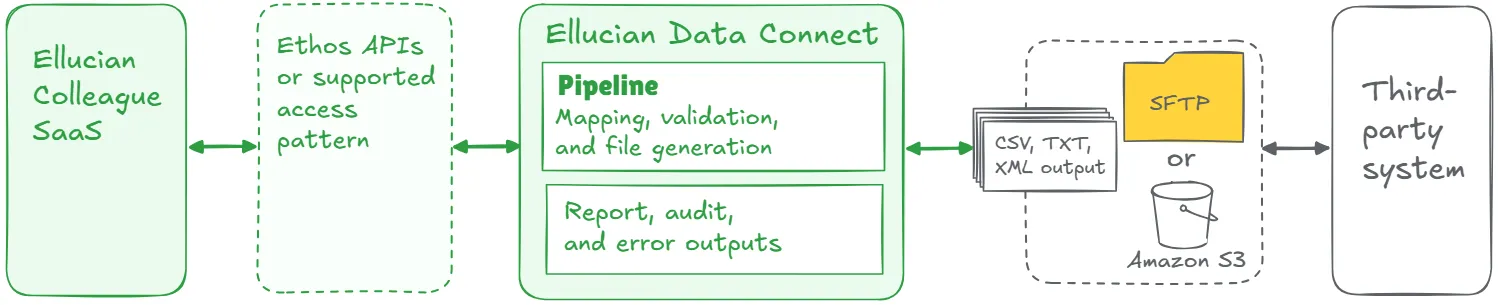
In this model, Ellucian Data Connect can orchestrate extraction, retrieval, transformation, validation, file creation, file delivery, and operational outputs. Colleague data or data from another relevant Ellucian SaaS application may be accessed through Ellucian Ethos application programming interfaces (Ethos APIs) or another supported access pattern. Files can be delivered through SFTP, Amazon S3, a target-system API, or another approved path depending on the target system.
For inbound or bidirectional workflows, the future state should also define how return files are retrieved, validated, routed, reported, and loaded or posted through a supported SaaS path.
The central distinction is simple: keep file delivery where the business or vendor still needs it, but remove the human dependency from everything around it. File generation, validation, transfer, archiving, error handling, and run visibility should behave like a managed process, not a recurring manual handoff.
Lessons learned from real projects
Colleague file-based modernization projects show the same pattern in different campus systems: the file often stays, while the process around it changes.
1. File exchange can remain the right contract
Some third-party systems are built around scheduled file intake. Keeping that file contract can be the practical choice. In the Maxient project, the future state still produced structured text files for demographics and course schedules. The improvement was not removing files. It was automating extraction, transformation, validation, secure delivery, audit logging, and error notification.
2. Bidirectional file workflows need extra care
Outbound files are one thing. Return files that affect institutional records raise the stakes. In the T2 Systems project, the workflow included student and employee data going out and violation or hold data coming back. The future state needed separate handling for outbound delivery, inbound retrieval, validation, imports, monitoring, and alerts.
3. File format is usually a business requirement, not a technical detail
CSV, TXT, XML, delimiter rules, naming conventions, and schedules often reflect how the vendor system actually works. In the Ex Libris Alma project, the legacy workflow used XML files for patron records. The future state preserved the need to provide Alma-ready data while moving extraction and transformation into Data Connect pipelines aligned with Ellucian SaaS.
4. Manual work should move toward exception handling
Manual review is not always wrong. Routine manual execution is the risk. In Handshake, the future-state pipeline produces the CSV Handshake needs, supports flexible delivery, and adds audit and error outputs. Staff should not have to guess whether the feed ran or where it failed.
5. One vendor connection may contain several file flows
A file-based integration may look like one vendor connection, but the files may serve different purposes. In BMTX BankMobile, Enrollment, Demographics, and Remittance moved as separate CSV outputs. Treating those files as distinct flows made the future state clearer and easier to support.
6. Inbound files need validation before they affect records
When files update student records, scores, holds, charges, refunds, or account activity, validation cannot be an afterthought. The Barnes & Noble Adoption project included outbound academic and eligibility files, plus inbound transaction files for billing activity. The future state needed controlled retrieval, validation, and supported processing for charges and refunds.
The ALEKS project shows the same principle for placement scores. Score data needs mapping, student matching, supported loading, and report, audit, and error outputs so the process is reviewable.
7. Visibility is part of the integration, not a nice-to-have
A file workflow is not finished when the file moves. Teams still need to know what ran, what changed, what failed, and what needs review. In the TeamDynamix project, Data Connect produces demographic exports with audit files, error logs, and notifications. That visibility turns a file feed into a supportable process.
Make Colleague file workflows SaaS-ready
ABCloudz can help your team preserve the file contract where it still matters and redesign the surrounding process for validation, visibility, error handling, and SaaS-compatible support.
Discuss your file-based integration pathHow Modernization Studio and Integration Knowledge Hub support discovery
For file-based integrations, discovery often starts with a folder, a script, or a file name that everyone recognizes but few people fully own. Ellucian Modernization Studio helps ABCloudz surface related jobs, dependencies, file touchpoints, and local execution clues faster.
Then our Integration Knowledge Hub approach helps compare those findings with patterns we have seen in previous Ellucian projects. That gives the discovery team better starting questions, while the actual recommendations still depend on the institution’s file rules, vendor constraints, data sensitivity, and support model.
Download the file-based integration questionnaire
Use the focused questionnaire below to review one Colleague integration that sends, receives, loads, or exchanges files as part of an institutional process.
Colleague file-based integration modernization questionnaire
The questionnaire helps technical and functional teams document file types, layouts, delivery methods, manual steps, validation rules, inbound update risks, target-system requirements, and support ownership.
You can complete it for internal planning or share it with ABCloudz so we can understand your Colleague file-based integration faster and support your team with better context.
Talk to ABCloudz about your Colleague file-based integrations
If your Colleague file workflow still depends on local jobs, manual handling, SFTP folders, vendor files, return files, or unclear error review, the file may not be the problem. We can help you preserve the file contract where it matters and redesign the surrounding workflow so it is validated, visible, and supportable in SaaS.
ABCloudz is an Ellucian Service Partner with more than 10 years of experience helping institutions modernize within the Ellucian ecosystem. Talk with us about your Colleague file-based integration modernization path.