When a Colleague integration still depends on local scripts, reports, schedulers, or direct data access, the risk is not just that the old job stops running.
The larger risk is that no one has separated the business outcome from the local machinery that produced it: record selection, timing, formatting, credentials, delivery, error handling, and support knowledge.
This guide is created for higher-ed leaders, ERP/SIS owners, functional stakeholders, and modernization teams who need a decision-level view of how to modernize Colleague direct data access and local job integrations for Ellucian Platform (SaaS).
Use it to understand what the old local execution model really does before your team chooses a supported SaaS-compatible replacement path.
This guide is one pattern-specific deep dive in our Colleague integration modernization series for Ellucian Platform (SaaS). If you are beginning the assessment, start with the Colleague integration modernization framework guide for Ellucian Platform (SaaS). That guide explains how we classify legacy integration patterns, identify current-state risks, and prepare better questions before future-state architecture work begins.
Other deep-dive guides in this series cover these Colleague On-Premises integration patterns:
- Colleague file-based integrations
- Colleague integrations into purpose-built Data Connect pipelines
- Colleague integrations with hidden business rules
Continue with this guide if the integration you are reviewing still relies on Colleague data access outside the SaaS model, local reports, scheduled scripts, local integration hosts, or other institution-managed execution logic.
Still relying on Colleague direct access?
Local scripts, reports, and scheduled jobs may look small, but they often carry critical business logic. ABCloudz can help your team identify which dependencies need review before moving to Ellucian Platform SaaS.
Review your Colleague direct access risksWhy direct data access and local jobs need a SaaS-compatible execution model
Colleague direct data access and local jobs became common because they gave institutions control over integration behavior.
In Colleague On-Premises, teams could extract data, run local scripts or reports, generate files, and deliver them to downstream systems using infrastructure they managed themselves.
That model often worked well. The problem is that it belonged to the environment around Colleague, not only to the integration logic. Once the institution moves to Ellucian Platform (SaaS), direct data access, local schedulers, custom scripts, and institution-managed servers often need to be replaced with supported, managed alternatives.
A Colleague direct data access or local job integration typically needs review when it relies on:
- direct access to Colleague data;
- locally scheduled jobs;
- local scripts or custom extract logic;
- local reports used as integration sources;
- institution-managed integration servers;
- local file generation and delivery;
- staff-managed credentials;
- manual monitoring or support processes.
The key question is not how to replace a script or server. The better question is what business outcome the integration supports and how to deliver that outcome through a SaaS-compatible design.
Typical current state
A typical direct data access or local job integration starts with Colleague On-Premises as the system of record. A local script, report, scheduled job, query, export process, or integration host extracts data from Colleague. The process may transform the data, apply filters, split records into files, format output fields, and deliver the result to a third-party system through Secure File Transfer Protocol (SFTP), a vendor-managed location, a shared folder, or another local delivery method.

At first glance, the flow may look like a routine scheduled export. During discovery, it may reveal business rules, vendor file contracts, timing assumptions, staff review steps, local credentials, and support routines that were never documented separately.
The old output may still be correct. The modernization challenge is the path that produces it.
The first task is not to find a new place to run the old job. It is to identify which responsibilities the old job carried and decide where those responsibilities belong in the future state.
What to review before replacing direct access and local jobs
After the current-state architecture is mapped, separate the old execution model from the business outcome it supports.
Many local jobs do more than run on a schedule. They may filter data, apply business rules, generate files, deliver outputs, and manage exceptions. The job may be small. The responsibility may not be.
Before mapping the integration to Ellucian Ethos application programming interfaces (Ethos APIs), Ellucian Data Connect, or another supported access, orchestration, delivery, or posting approach, teams should clarify:
- What business process does the integration support?
- Which systems exchange data?
- Is the flow inbound, outbound, or bidirectional?
- Which local scripts, reports, jobs, or servers are involved?
- Which Colleague data and business rules are used?
- Which fields and formats does the target system require?
- Is file generation still needed?
- How should data be delivered: SFTP, Amazon S3, target-system API, or another path?
- How should errors and exceptions be handled?
- Who owns the business rules after modernization?
- What reporting, audit, or notification outputs are required?
This review also helps identify overlap with other modernization patterns. A direct data access or local job integration may also be file-based, split across several future-state Data Connect pipelines, or dependent on hidden business rules.
The objective is not simply to remove the local job. It is to preserve the useful behavior in a model the future support team can understand, monitor, and maintain.
Separate the business outcome from the old job
Before replacing a local script or scheduler, your team needs to understand what the job actually controls: data rules, file formats, delivery steps, exceptions, and support ownership.
Map your local job dependenciesTypical future state
A SaaS-compatible future state replaces local execution with supported access, managed orchestration, validation, delivery, and operational visibility.
The output may still be a file if the target system requires it. Many SaaS-ready integrations still deliver CSV, TXT, or XML files. The difference is that file creation, delivery, and support move into a controlled model.
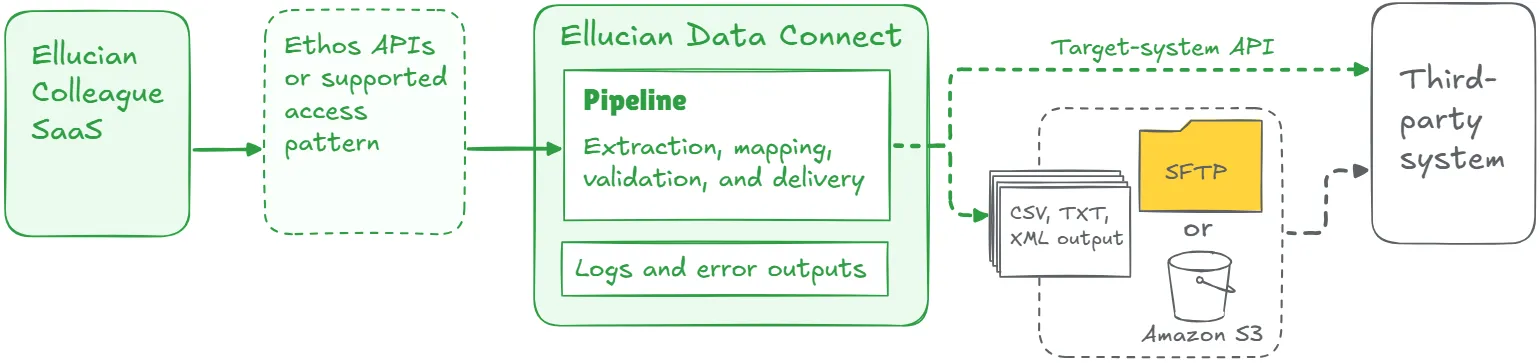
Typically, Colleague SaaS, Ellucian Student, or another relevant Ellucian SaaS application becomes the governed source. Data is accessed through Ethos APIs or another supported method. Data Connect can then manage extraction, transformation, validation, delivery, and reporting.
The final design depends on current-state logic, target-system requirements, available supported mechanisms, data sensitivity, timing requirements, and operational risk.
A recurring finding in this pattern is that “local job” is rarely one responsibility. It often combines access, transformation, scheduling, security, delivery, monitoring, and support into one fragile execution point. SaaS modernization is the moment to separate those responsibilities and rebuild them deliberately.
Lessons learned from real projects
Colleague direct data access and local job modernization projects often reveal the same practical lessons.
1. The old integration may be functionally correct but architecturally outdated
In projects such as AdvisorTrac and TutorTrac, the legacy integrations already delivered the advising or tutoring data that downstream systems needed.
The modernization task was not to reinvent the business outcome. It was to rebuild the execution model using Ethos APIs, Data Connect, and supported SaaS patterns.
2. Local jobs often contain more logic than teams expect
A scheduled export may filter students, group enrollment records, select instructor context, split files, format output fields, or create error outputs.
In the BMTX BankMobile project, the old flow produced separate enrollment, demographic, and remittance outputs. Preserving the outcome required understanding why those files existed separately and how each one supported the target process.
3. Direct access replacement is also business-rule discovery
Moving from direct data access to supported SaaS access is not only a technical substitution. Teams also need to understand which rules the old access model carried.
In the Blackbaud Raiser’s Edge project, the future state had to preserve advancement outcomes such as graduate records, family relationships, and employee updates. That required translating the old behavior into clear flows that Data Connect could run and support.
4. The file may stay, but the local infrastructure should not
Many SaaS-ready integrations still produce files because the target system expects them. The file is not the problem. The fragile part is the local machinery around it.
For Handshake and Rave Alert, the future state preserved the need to deliver usable data to the target platform while replacing direct database-style access and local execution with SaaS-native orchestration.
5. Visibility matters as much as automation
A modernized integration should make run status, validation results, errors, and exceptions easier to understand.
The TeamDynamix project shows this clearly. The rebuilt flow uses Data Connect to generate student demographic exports and provide audit files, error logs, and notifications, so failures are visible instead of being discovered downstream.
Make Colleague local jobs SaaS-ready
ABCloudz can help you review direct data access, scheduled jobs, reports, and local execution logic, then redesign them into a supportable SaaS-compatible integration path.
Discuss your local job modernizationHow Modernization Studio and Integration Knowledge Hub support discovery
For this pattern, the hardest part is often finding where the old execution logic really lives. Ellucian Modernization Studio helps ABCloudz speed up that discovery by surfacing jobs, dependencies, scripts, reports, and local execution signals that need review before the SaaS design is finalized.
ABCloudz then combines those findings with our Integration Knowledge Hub approach, using lessons from previous Ellucian projects to ask sharper questions sooner. The tools help us move faster, but the final recommendations still come from expert review of the institution’s logic, risks, and future-state options.
Download the direct data access and local job integration questionnaire
Use the focused questionnaire below to review one Colleague integration that still depends on direct data access, local reports, local scripts, scheduled jobs, local servers, or other institution-managed execution logic.
Colleague direct data access and local job integration modernization questionnaire
The questionnaire helps technical and functional teams document the current execution model, identify local dependencies, uncover rules inside scripts or reports, and prepare for a more useful modernization discussion.
You can complete it for internal planning or share it with ABCloudz so we can understand your Colleague integration faster and support your team with better context.
Talk to ABCloudz about your Colleague direct access and local job integrations
If a Colleague integration still depends on local scripts, reports, scheduled jobs, direct data access, or local servers, the modernization question is bigger than where to run it next. We can help you separate the business outcome from the old execution model and design a SaaS-compatible path that keeps the process supportable.
ABCloudz is an Ellucian Service Partner with more than 10 years of experience helping institutions modernize within the Ellucian ecosystem. Talk with us about your Colleague direct access and local job modernization path.