Modernizing a Point and Click Solutions immunization integration for Ellucian SaaS
17 Aug 2026
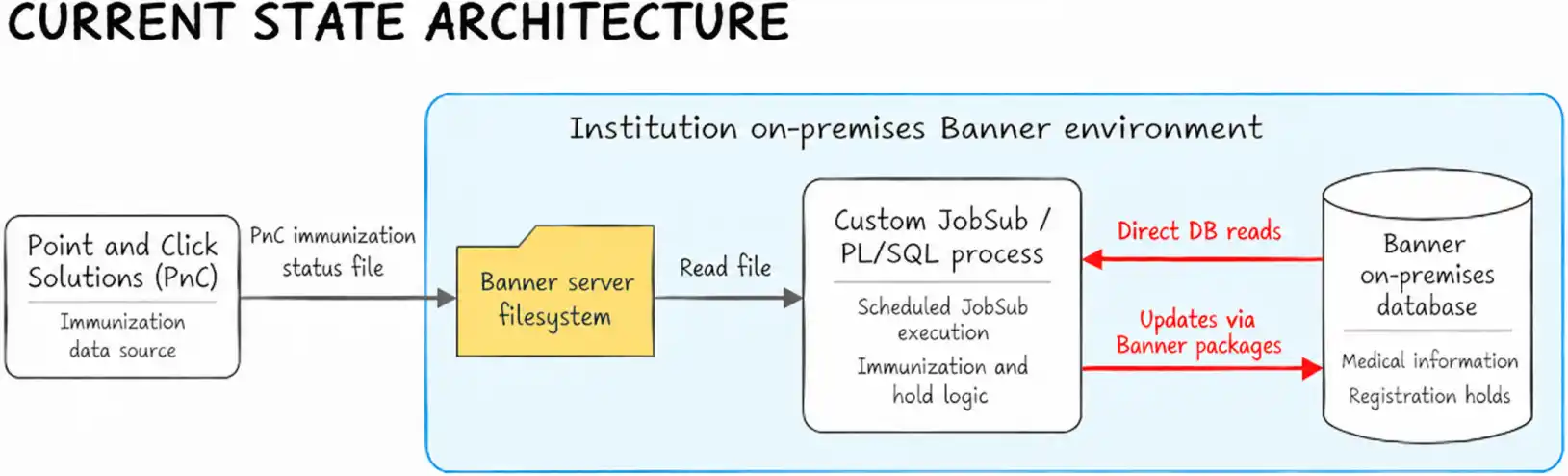
A higher-education institution relied on a custom Banner process to import student immunization compliance data from Point and Click Solutions and manage registration holds. As Banner moved to SaaS, that workflow could no longer depend on its existing Banner Job Submission (JobSub) process, PL/SQL, Oracle’s procedural extension to SQL, direct database access and the Banner server filesystem.
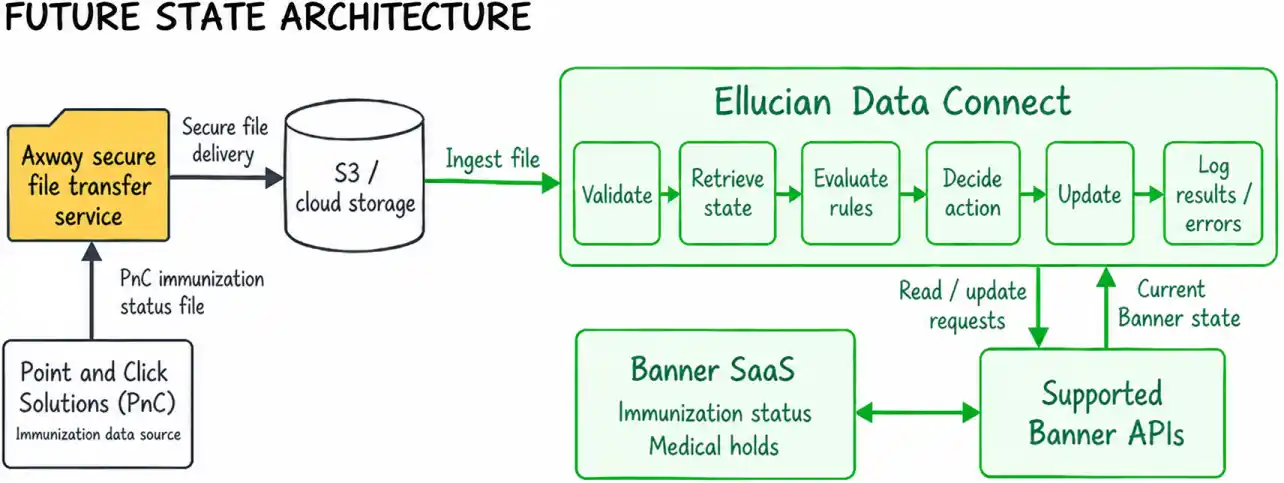
ABCloudz redesigned the integration as an API-driven Ellucian Data Connect pipeline, preserving Point and Click Solutions as the upstream source while using an Axway secure file transfer service to deliver the file into cloud storage for Data Connect processing. The new architecture moved integration logic into Ellucian’s data orchestration environment while preserving the institution-specific rules that determined when a student should be marked compliant, exempt or incomplete and when a medical hold should be created or released.
The project involved more than moving a file between systems. The legacy process encoded business rules for immunization status, academic terms, student-specific part terms, configurable grace periods and hold management. Those rules had to be separated from the legacy implementation and rebuilt in a SaaS-compatible architecture.
Replace the legacy Banner JobSub workflow with a SaaS-compatible Point and Click Solutions integration while preserving the institution’s immunization compliance and registration-hold rules.
RELATED BLOG POST: For a different approach to modernizing a third-party Banner integration, where the existing external workflow was retained while its database-dependent Banner boundary was replaced with supported APIs, see Modernizing a Perceptive Content Financial Aid Integration for Banner SaaS.
Why the existing immunization workflow could not move to Banner SaaS unchanged
The institution used Point and Click Solutions (PnC), a campus electronic health record and practice management platform, as the upstream source of student immunization compliance data. The legacy Banner process received the Point and Click flat file and translated each student’s immunization status into Banner medical information. A Complete status became compliant in Banner, an Exempt status remained exempt and an Incomplete status became non-compliant.
The customization also handled registration holds. When a student became compliant, the process could release an existing medical hold. When a student remained incomplete, it evaluated additional conditions before placing a registration hold, including an incoming hold flag, academic term rules and a grace period calculated from the student’s part-term start date.
A business-critical compliance workflow was implemented through a custom on-premises Banner execution model that depended on JobSub, PL/SQL, database packages, direct table access and Banner server files.
The migration challenge came from the institution-specific automation layered around the standard Banner data model and the business decisions embedded in that custom process.
The project had to reproduce the workflow’s decision logic in a supported SaaS architecture, not merely replace its file transfer or scheduler.
Rebuilding the Point and Click Solutions integration as an API-driven Data Connect pipeline
The future-state architecture moves integration orchestration into Ellucian Data Connect. Point and Click Solutions continues to generate the immunization status file. An Axway secure file transfer service delivers that file to S3 cloud storage, where Data Connect ingests and processes the records before using supported Banner APIs for the required updates.
The pipeline breaks the workflow into explicit stages: validate the file and records, identify the student in Banner, retrieve relevant current-state information, apply the institution’s business rules, determine the required action, perform only the necessary API operations and record the processing result.
Invalid records and student identifiers that cannot be matched in Banner are logged and skipped without stopping the rest of the file. The pipeline also compares the desired state with current Banner data before performing an update. This avoids unnecessary writes, redundant changes and duplicate hold creation.
In SaaS modernization, the behavior the business still needs is the unit of migration, not the legacy database procedure that happened to implement it.
See how Data Connect processes Point and Click records and avoids unnecessary Banner updates
The Data Connect pipeline does more than move the Point and Click file into Banner. Each incoming record goes through a state-based decision process.
1. Validate and identify the student
The pipeline first validates the Point and Click input file structure and record content. The expected input is pipe-delimited, uses double-quoted values and contains the student identifier, MediCode, hold flag, comment and term.
For each valid record, the pipeline attempts to find the corresponding student in Banner.
If the student cannot be matched, the record is logged and skipped.
Processing continues with the next record rather than terminating the entire run.
2. Translate the incoming compliance state
The incoming Point and Click status is converted into the Banner medical status:
PnC status code
Meaning
Desired Banner status
C
Complete / compliant
Y
I
Incomplete / non-compliant
N
X
Exempt
X
The input comment is also carried into the medical-information update, while user and activity timestamp values are supplied by the integration/API context.
3. Retrieve the current Banner state
Before deciding what to write, the pipeline retrieves the current information needed for the record, including the student’s existing immunization status and relevant medical hold state.
This current-state lookup allows the pipeline to choose among several possible operations rather than issuing the same update for every record.
4. Determine the desired state
The pipeline derives the required Banner outcome from the incoming record and the applicable business rules.
Incoming state
Desired outcome
Possible action
Complete
Student is compliant
Create or update medical status; release the configured medical hold if it exists
Exempt
Student is exempt
Create or update medical status; do not create a new hold
Incomplete
Student is non-compliant
Create or update medical status; separately evaluate hold eligibility
Invalid or unmatched
No Banner change
Log and skip
5. Compare current and desired state
If the required Banner state already matches the incoming information, the pipeline does not perform a redundant update.
The same comparison prevents duplicate hold creation. A compliant record can trigger release of an existing configured medical hold, while an incomplete record enters the separate hold-eligibility decision path.
A simplified representation of the logic is:
validate record

find student


if student not found:

    log and continue


map incoming status to desired Banner status

retrieve current immunization and hold state


if medical record needs to change:

    create or update it


if status is COMPLETE:

    release matching hold if required


if status is INCOMPLETE:

    evaluate hold eligibility

    create hold only if required and not already present


log the result
This pseudocode is a simplified representation of the documented processing logic rather than source code.
6. Preserve operational visibility
Each run records operational results such as:
successfully processed records
medical-status creates and updates
medical holds created or released
unmatched student identifiers
invalid records
processing errors
final processing totals and completion status
This preserves the operational visibility that staff previously received from the legacy job output while moving that responsibility into the Data Connect workflow.
Preserving the decision logic behind immunization holds
The Point and Click-to-Banner compliance crosswalk is straightforward: C → Y, I → N and X → X. The more involved logic begins after that mapping.
A Complete record can update the student to compliant and release an existing medical hold. An Exempt record updates the medical status without creating a new hold. An Incomplete record updates the student to non-compliant, but that status alone does not automatically block registration.
When should an incomplete immunization record actually result in a registration hold?
RELATED BLOG POST: For another Data Connect modernization tied directly to student registration operations, this time focused on reconciling section and cross-list enrollment against actual registration records, see Modernizing custom Banner enrollment reconciliation for Ellucian SaaS.
The pipeline evaluates several conditions. The incoming record must explicitly indicate that a hold is required. The term must fall within the applicable Spring or Fall rules rather than Summer. The incoming term cannot be later than the current Banner term. Finally, the institution’s configured grace period must have elapsed from the relevant student part-term start date.
The grace period and medical hold code are pipeline parameters rather than fixed values in the control flow. The documented defaults are 20 days and hold code 25.
See how the pipeline calculates hold eligibility for an incomplete student
For an Incomplete record, the medical-status update and the hold decision are separate operations. A student can therefore be marked non-compliant even when the conditions for placing a registration hold have not yet been met.
Status update comes first
When a Point and Click record arrives with MediCode = I, the desired Banner medical status becomes N, representing incomplete or non-compliant.
The pipeline can create the medical record if one does not exist or update it when the incoming data differs from the current state.
Hold eligibility is then evaluated independently.
Hold eligibility requires multiple conditions
The documented logic requires all of the following conditions:
The incoming record has Flag = H.
The incoming term corresponds to the institution’s Spring or Fall term pattern, represented in the source logic by term codes ending in 01 or 03.
The incoming term is less than or equal to the current Banner term.
The configured grace period has elapsed relative to the student’s applicable part-term start date.
An Incomplete record without the hold flag still updates the medical status but does not create a hold.
Likewise, if the grace period has not yet elapsed, the student remains non-compliant in Banner while hold creation is deferred.
Calculating the grace-period threshold
The legacy business rule derives the timing from the student’s own part-term information rather than from one generic date applied to every student.
The documented sequence is:
Use the incoming student identifier and term to identify the student’s applicable part-term code.
Retrieve the start date associated with that part term.
Where the student has applicable part-term information, use the earliest relevant start date.
Add the configured gracePeriodDays value.
Treat the resulting date as the earliest date when the medical hold can be placed.
With the documented default configuration, that rule can be represented as:
The hold can be created only when the current date has reached that threshold and the other term and flag conditions are also satisfied.
Creating the hold
When all conditions are met, the pipeline creates the configured medical hold. The documented mapping includes:
the configured medical hold code, default 25
reason: Non Compliant Immunization
current date as the hold start date
12/31/2099 as the documented hold end date
integration/API-managed user and activity timestamp values
A simplified decision model is:
if status == INCOMPLETE:

    update medical status to NON_COMPLIANT


    if holdFlag == H

       and term is eligible

       and incomingTerm <= currentBannerTerm

       and today >= earliestPartTermStart + gracePeriodDays:

        create the configured hold if it is needed
This separation between compliance status and registration enforcement matters because the two represent different decisions. An incomplete status records the student’s compliance state, while a registration hold is applied only after the additional eligibility rules are satisfied.
What the SaaS-ready workflow changes for the institution
The institution now has a SaaS-compatible execution model for a workflow that previously depended on custom Banner JobSub processing, PL/SQL execution, server filesystem access and direct database interactions.
The business behavior remains automated in the new architecture. Point and Click Solutions continues to supply the immunization status file, Axway delivers it to S3 cloud storage and Data Connect translates the incoming statuses into Banner state. Existing holds can be released when a student becomes compliant and incomplete students receive holds only when the institution’s eligibility rules are satisfied.
Data Connect also makes each processing stage explicit. Validation, current-state retrieval, business-rule evaluation, state comparison, API actions, error isolation, logging and processing totals are handled within the integration workflow.
The institution retained its automated Point and Click Solutions immunization feed and registration-hold processing while replacing the legacy database-dependent Banner implementation with a SaaS-compatible Data Connect workflow.
Frequently asked questions
Why couldn’t the existing Banner JobSub simply be moved to Banner SaaS?
The workflow depended on an on-premises execution model that used custom JobSub processing, PL/SQL and Banner database packages, direct database interaction and Banner server files. The required business behavior therefore had to be reimplemented through a SaaS-supported integration architecture.
How does Point and Click Solutions connect to Banner SaaS in the new architecture?
Point and Click Solutions generates the immunization status file. An Axway secure file transfer service delivers it to S3 cloud storage, Data Connect ingests and evaluates the records and supported Banner APIs apply the required immunization and medical-hold changes.
How are Point and Click Solutions immunization statuses mapped to Banner?
The incoming Point and Click Complete status maps to Y, Incomplete maps to N and Exempt maps to X. Hold processing is a separate decision that occurs after the medical status has been determined.
Does every incomplete immunization record create a registration hold?
No. The record must also carry the hold flag, meet the applicable Spring/Fall term rules, refer to a term that is not later than the current Banner term and reach the configured grace-period threshold based on the student’s applicable part-term start date.
What happens when a student ID from the input file cannot be found in Banner?
The record is logged and skipped. Processing continues with the remaining records rather than stopping the entire pipeline.
How does the pipeline avoid duplicate holds or unnecessary Banner updates?
It retrieves relevant current Banner state and compares it with the desired state derived from the incoming record. API operations are performed only when an immunization or hold state needs to change.
What happens if an input record is invalid?
Invalid records are logged and skipped without terminating the complete pipeline run, allowing valid records in the same file to continue processing.
How is the grace period for a medical hold calculated?
The pipeline identifies the student’s applicable part-term information, uses the relevant earliest part-term start date and adds the configured gracePeriodDays value. The documented default is 20 days.
Modernizing a custom Banner workflow for SaaS?
Custom Banner integrations with third-party platforms can contain business logic and external dependencies that are easy to overlook when reviewing legacy code. SaaS modernization requires identifying which integrations and behaviors must remain, separating them from obsolete implementation dependencies and rebuilding them through supported architecture patterns.
ABCloudz helps higher-education institutions modernize custom Banner workflows and third-party integrations, design SaaS-compatible replacements and implement the integration paths needed to preserve required business processes.
Contact ABCloudz to discuss your Banner SaaS modernization project.