Modernizing a Fidelity-connected retirement benefits workflow for Banner in Ellucian SaaS
27 Aug 2026
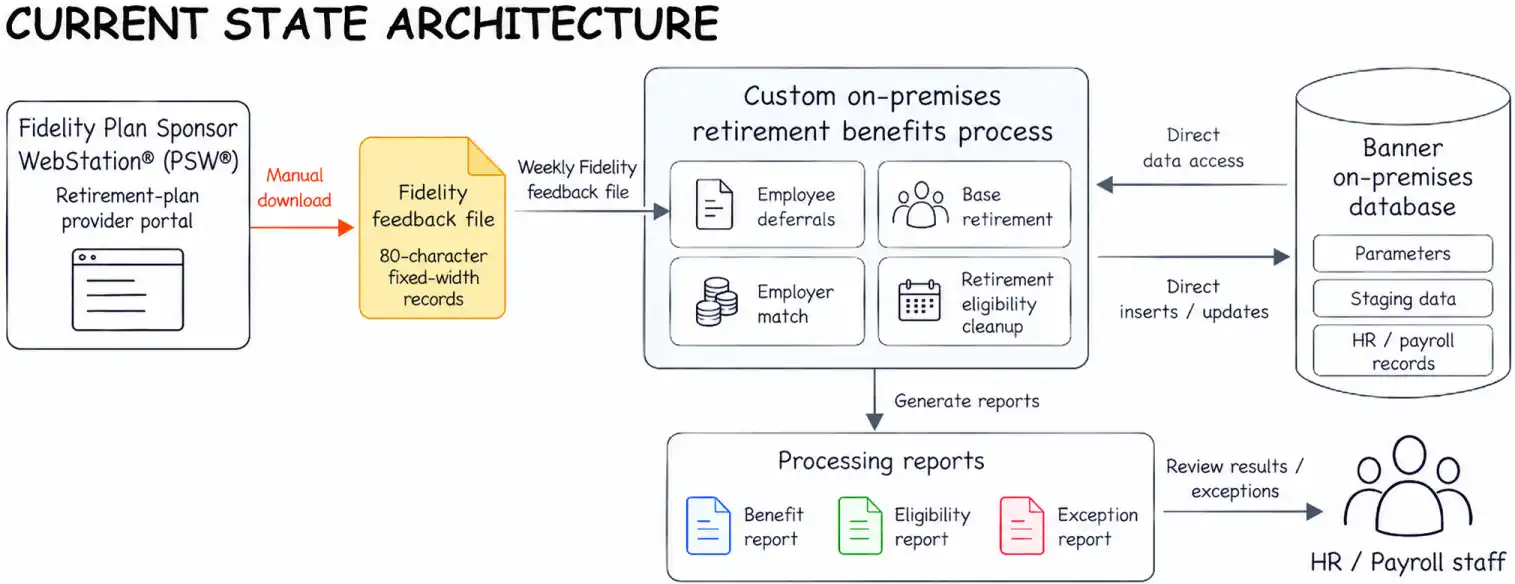
As a higher-education institution prepared to move its on-premises Banner environment to Ellucian SaaS, it needed to modernize a custom retirement benefits process that depended on direct Banner operations and a weekly feedback file from Fidelity Plan Sponsor WebStation® (PSW®), its retirement-plan provider portal.
The process updated regular and Roth deferrals under a 403(b) retirement plan, a U.S. retirement plan used by public schools and certain tax-exempt organizations. It also set up base retirement benefits, calculated employer match, applied contribution rules and removed future retirement eligibility dates for terminated employees. Moving this workflow to SaaS therefore required rebuilding it in a supported architecture while preserving the business behavior HR and payroll depended on.
The project involved much more than moving a file between systems. ABCloudz had to identify the business rules embedded in the legacy process, separate them from the way the process had been implemented and reproduce the required behavior through Ellucian Data Connect and Banner SaaS APIs.
Move the institution’s custom retirement benefits workflow to Banner SaaS while preserving the business rules and operational controls the process depended on.
When one legacy job carries an entire retirement benefits workflow
The existing process combined file handling, business logic, direct Banner data operations and reporting inside one custom on-premises job. A weekly Fidelity feedback file in an 80-character fixed-width format, where each field occupies predefined character positions, was manually downloaded from the Fidelity portal and supplied employee deferral changes. The job also handled several functions beyond file ingestion.
It identified employees eligible for base retirement benefits, maintained regular and Roth deferral deductions, calculated employer match, applied contribution limits and cleaned up retirement eligibility dates after termination. The process also depended on Banner parameters, staging data and direct interaction with payroll and employee records.
Each function had its own validation and effective-date logic. The team therefore had to determine which business behaviors the institution still needed, where the custom process depended on direct database access and how to implement those behaviors safely in the SaaS environment.
The legacy process was not simply a Fidelity file loader. It combined multiple retirement-plan workflows, validations, calculations and direct Banner data operations in one custom job.
Rebuilding the workflow as a modular Data Connect solution
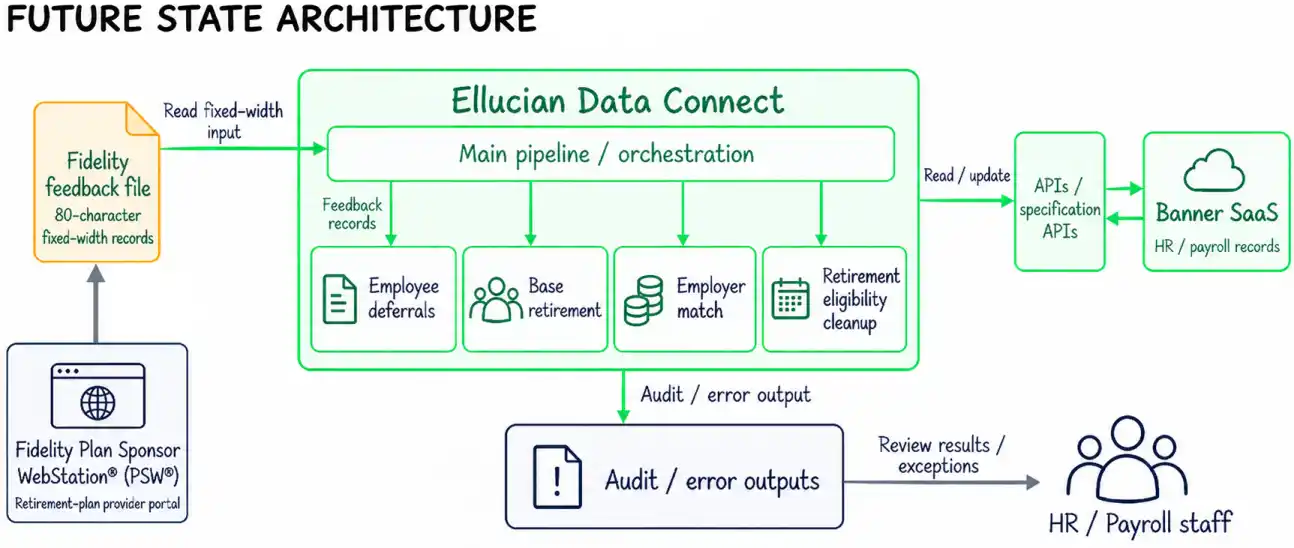
ABCloudz rebuilt the workflow as a modular Data Connect solution. A main pipeline opens the Fidelity feedback file and handles orchestration, while specialized sub-pipelines separate base retirement, employee deferral, employer match and retirement eligibility processing. Validation, audit, error handling and output generation are part of the same controlled pipeline lifecycle.
Banner data is retrieved and changed through APIs and specification APIs rather than through the direct database operations used by the legacy process. Framework-level parameters control execution behavior, while pipeline-specific parameters carry business configuration such as deduction codes, match settings, contribution limits, run mode and eligibility offsets.
This structure separates the major business responsibilities while preserving the end-to-end workflow. Each part of the process has its own validation and processing path, with shared orchestration and operational controls around them.
The custom behavior had to be rebuilt through SaaS-compatible APIs and Data Connect without treating the legacy implementation itself as the design.
See how the legacy workflow maps to the Data Connect solution
The migration required separating business responsibilities that had previously been embedded in one custom process. The resulting design maps each required behavior to a distinct part of the Data Connect solution.
Legacy responsibility
Required business behavior
Data Connect implementation
Fidelity feedback-file processing
Read employee deferral election changes from Fidelity
Main pipeline opens the Fidelity fixed-width input; deferral processing parses the feedback records, while the relevant sub-pipelines select the employee populations required for their own business flows
Base retirement processing
Identify eligible employees and establish the base retirement benefit
Dedicated base-retirement sub-pipeline performs eligibility and deduction validations before creating or updating the required records through Banner APIs
Regular and Roth deferrals
Apply employee election changes and related contribution rules
Deferral sub-pipeline processes the appropriate deduction type and evaluates existing deduction state before an update
Employer match
Calculate the employer contribution from employee deferrals under configured plan rules
Match sub-pipeline calculates the applicable percentage and creates or updates the employer match benefit
Retirement eligibility cleanup
Prevent terminated employees from retaining inappropriate future retirement eligibility dates
Eligibility sub-pipeline identifies qualifying terminated employees and clears the future eligibility value through the corresponding API operation
Audit and exceptions
Preserve visibility into processing decisions and failures
Shared audit and error handling collect results across the pipeline and produce structured operational output
The four business flows use some of the same employee and benefit data, but they make different decisions.
Base retirement processing first identifies employees within the configured eligibility window. It then evaluates whether the benefit code applies to the employee’s benefit category, whether the deduction is precluded, whether an active job exists and whether a conflicting future deduction already exists.
Deferral processing starts with election data from the Fidelity feedback file. It distinguishes regular and Roth values, associates them with the corresponding employee and deduction context and determines whether a new deduction state can be applied.
Employer match processing depends on employee deferrals but adds its own calculation path. The pipeline derives the applicable match and contribution-limit context before evaluating existing records and preparing the employer benefit update.
The termination flow starts with employment and retirement eligibility data rather than the incoming election record. It identifies terminated employees whose future retirement eligibility date should be removed.
The modular design reflects the business boundaries identified during analysis of the legacy customization. The common pipeline handles orchestration, validation infrastructure, audit and output, while each sub-pipeline owns the decisions specific to its retirement-benefit responsibility.
Preserving the business rules behind the legacy process
How do you preserve the behavior of a custom retirement process when its original database-driven implementation is no longer the target architecture?
The answer depended on preserving the decision logic behind each update. For base retirement, the pipeline derives an effective date from retirement eligibility, last-paid context and current hire date. It then validates benefit-category rules, preclusion rules that determine whether the proposed deduction is allowed for that employee at that effective date, active job status and existing or future deductions before preparing an update.
Deferral processing distinguishes regular and Roth 403(b) elections from the Fidelity feedback file, validates the employee against Banner data and applies the appropriate deduction behavior. Employer match processing uses employee deferrals together with a configurable multiplier, cap and contribution-limit rules. A separate termination flow identifies terminated employees whose future retirement eligibility dates should no longer remain active.
When an employee-level validation fails, the record is excluded from the update path and the reason is preserved for review.
See how effective dates and deduction conflicts are resolved before an update
Effective-date handling shows why this modernization required more than mapping old database operations to new API calls. A valid benefit update depends on both the proposed date and the employee’s existing Banner state.
For base retirement processing, the logic derives a new effective date using retirement eligibility and last-paid information, including cases where one of those values is absent. The resulting date cannot precede the employee’s current hire date. The process also derives the related effective date used by the downstream deduction logic by applying the established five-day offset.
A simplified representation of the decision logic is:
if benefit_code_is_not_valid_for_category(proposed_date):
reject_record()
if deduction_is_precluded(proposed_date):
reject_record()
if employee_has_no_active_job:
reject_record()
if conflicting_future_deduction_exists:
reject_record()
prepare_banner_update()
This is sanitized pseudocode that represents the documented decision sequence rather than literal implementation source.
The order of operations matters. The pipeline first gathers the Banner data needed for the decision, calculates the relevant dates, evaluates benefit-category and preclusion rules and retrieves existing deduction records. Only then does it determine whether an update is valid.
Existing and future-dated deductions require particular attention because a new record cannot be evaluated in isolation. The pipeline retrieves deduction details that include the deduction code, effective date, status, amount and option information. A conflicting future record or another failed validation sends that employee to the error path and skips the API write.
The same general pattern appears in the deferral and match flows, although their calculations differ. The system derives the variables required for the business process, evaluates the employee and deduction state and performs the API operation only after the record passes the applicable checks.
Modernizing a custom Banner process starts with decomposing its business behavior, not translating legacy code line by line.
Designing safe execution and traceable outcomes
Operational safety was part of the design. Pipeline-level configuration and credential failures can stop execution before processing begins, while employee-specific validation failures are captured at the record level so valid records can continue.
Audit mode provides a controlled preview path. The pipeline still parses, validates and calculates the intended changes, but it does not persist Banner updates. Update mode follows the same decision logic and then performs the approved API writes. Processing messages and errors are accumulated into audit and error outputs, giving HR and payroll teams traceability into what was evaluated, what changed and what was rejected.
See how audit mode preserves the legacy control without database rollback
The legacy process supported an audit mode based on database transaction behavior. In the SaaS-oriented design, the same operational purpose is retained through a different execution pattern.
Both modes share the processing path up to the persistence decision:
read input

    ↓

parse records

    ↓

retrieve Banner context

    ↓

validate employee and deduction state

    ↓

calculate effective dates and amounts

    ↓

prepare intended changes

    ↓

audit or update?
At that point, execution branches.
Audit mode
When the pipeline runs in audit mode, it performs the calculations and validations needed to determine what the process would do, but it does not execute inserts or updates.
The run can surface the same types of business issues that matter during an update, including invalid employee data, conflicting future deductions, benefit-category validation failures, preclusion conditions and other record-level exceptions.
The resulting processing information is collected through the audit and error mechanisms instead of relying on a database transaction that is later rolled back.
Update mode
Update mode follows the same validation and calculation path. Records that pass their business checks proceed to the API operations that create or update the appropriate Banner deduction, benefit or employee data.
Successful processing contributes to the audit trail. Failed API operations or validation failures contribute error information with enough processing context for follow-up.
The underlying mechanism changed while the operational control remained: users can evaluate the processing outcome without persisting the proposed changes.
A SaaS-compatible retirement benefits workflow with built-in controls
The completed design moves the institution’s custom retirement benefits workflow, including weekly Fidelity feedback-file processing, into a Banner SaaS-compatible architecture while retaining the full scope of the process. The solution preserves the four major business flows, applies required validations before Banner records are changed, separates responsibilities into modular Data Connect sub-pipelines and replaces direct database-oriented processing with API-driven operations.
It also retains the operational controls needed for a sensitive payroll-related process. Audit execution can evaluate intended changes without persistence, employee-level exceptions remain visible for follow-up and the output layer records processing results and validation failures.
The institution gained a modular SaaS-compatible workflow for Fidelity-driven deferral changes and related retirement-benefit processing, with the required business rules, validation controls, audit execution and exception visibility built into the new architecture.
Frequently asked questions
Can custom Banner retirement benefits logic be preserved when moving to Banner SaaS?
Yes. The first step is to identify the business behavior implemented by the customization and redesign that behavior using supported SaaS integration patterns. In this project, the required base retirement, deferral, employer match, eligibility, validation and audit logic was separated from its legacy database-oriented implementation and rebuilt in Data Connect.
Can Ellucian Data Connect process Fidelity fixed-width feedback files?
Yes. In this solution, Data Connect processes a weekly Fidelity feedback file with 80-character fixed-width records containing employee deferral election information. The parsed values become inputs to employee lookup, validation, calculation and Banner API processing.
How do you replace database rollback in a SaaS integration?
The same business purpose can be implemented through a different execution model. Here, audit mode runs the parsing, validation and calculation logic but skips Banner inserts and updates. Update mode follows the same decision path and persists approved changes through APIs.
What happens when one employee fails validation?
Employee-level failures do not automatically stop processing for every other employee. The affected record is excluded from the update path, the reason is added to the error information and other valid records can continue through the pipeline.
How are regular and Roth 403(b) elections handled?
The Fidelity feedback format contains separate regular and Roth deferral values and identifies the corresponding election type. The pipeline maps those values to the appropriate deduction context, validates the employee and existing deduction state and applies the corresponding processing rules.
How can employer match rules remain configurable after modernization?
The solution uses pipeline parameters for business values such as the employer match multiplier, maximum match percentage and contribution limits. Match processing combines those configured rules with the employee’s applicable deferral information before preparing the employer benefit update.
How are future-dated deductions handled during retirement benefit processing?
Existing deduction information is retrieved before a new update is made. When a future record conflicts with the proposed change or the employee fails another applicable validation, the update is skipped and the record is routed to the error path for review.
Why split the process into multiple Data Connect sub-pipelines?
The legacy job contained several related but distinct business responsibilities. Separating base retirement, deferrals, employer match and termination eligibility processing gives each responsibility its own logic and validation path while retaining shared orchestration, audit and error handling across the complete workflow.
Modernize custom Banner processes without losing critical business logic
If your Banner SaaS modernization depends on custom HR, payroll or other legacy processes, the first step is to understand the business behavior those customizations actually support. ABCloudz can help analyze that logic, redesign it for supported SaaS patterns and build the Data Connect workflows needed to carry it forward.
Contact ABCloudz to discuss your modernization project.