A higher-education institution relied on a custom Oracle-based Banner payroll process to update maximum annual 403(b) employee elective-deferral limits for active employees, with Fidelity NetBenefits serving as the plan’s primary administrative service provider. As part of its Banner SaaS modernization, that internal payroll process needed to move into Ellucian Data Connect.

The engineering work involved more than changing how the process accessed data. The new workflow also had to preserve the custom rules for selecting effective-dated records, applying age-based limits, calculating safe effective dates, handling future-record conflicts and maintaining auditability.

ABCloudz first broke down the legacy customization into the business behavior that still mattered and the database-specific implementation that did not need to carry forward. The required behavior was then rebuilt as an API-driven Data Connect workflow.

Move the custom 403(b) contribution-limit process from an Oracle-centric implementation to Ellucian Data Connect while preserving the business rules, controls and audit behavior required by the institution.

RELATED BLOG POST: For a broader look at modernizing Fidelity-connected retirement benefits in Banner, including employee deferrals, employer match and retirement eligibility processing, see Modernizing a Fidelity-connected retirement benefits workflow for Banner in Ellucian SaaS.

A custom 403(b) process tied to direct Banner database access

What the legacy customization was responsible for

The legacy process supported the institution’s 403(b) retirement-plan administration with Fidelity, but the customization itself operated inside Banner. For each applicable employee, it identified the current deduction record, determined the correct limit based on age, calculated an effective date for the new record, checked for future-dated conflicts and preserved the corresponding history and reporting information.

The customization also supported two operating modes. A report-only run evaluated the population and proposed changes without updating payroll data. A processing run applied the required changes.

RELATED BLOG POST: For another part of the institution’s Fidelity retirement processing, including employee and employer contribution aggregation, duplicate prevention and generation of the downstream Fidelity contribution file, see Modernizing a Banner-to-Fidelity retirement contribution process for SaaS with Ellucian Data Connect.

Why the process required modernization work

The business rules were implemented inside an Oracle-based PL/SQL process, using Oracle’s procedural extension of SQL, with direct reads and writes across Banner payroll, employment, person, payroll-calendar and payroll-history data. That implementation was institution-specific. The modernization work centered on the custom behavior built around these data dependencies, rather than the standard Banner platform itself.

A required payroll process depended on custom database-resident logic and direct access to multiple Banner data domains.

The migration had to preserve interconnected payroll rules, including effective-date selection, age-based limits, conflict detection, report-only execution and audit history, while moving the process into a different architectural model.
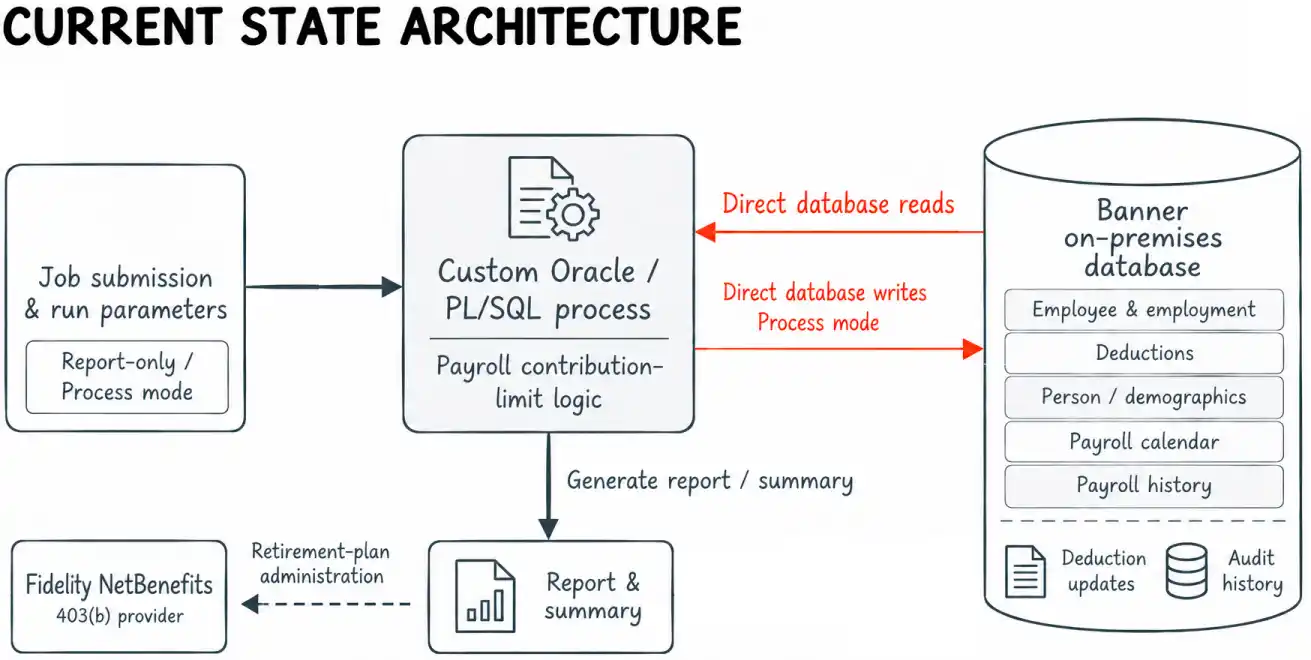
The current-state architecture focuses on the institution-side processing supporting the 403(b) retirement plan. The process generated report and summary outputs that supported the broader retirement-plan administration context with Fidelity, while its central technical dependency remained internal: business logic and direct Banner database access were tightly coupled inside the same custom process.

Rebuilding the workflow as an API-driven Data Connect pipeline

Separate data access from business-rule evaluation

ABCloudz rebuilt the process around a different execution pattern: Pull, Evaluate, Update.

Ellucian Data Connect retrieves the employee, deduction, demographic, employment, payroll-calendar and payroll-history information required by the workflow. Transformations evaluate the applicable business rules, while routing controls determine whether an employee requires no change, needs an update or must be handled as an exception.

This separates the information the process needs from the legacy database implementation that originally supplied it.

Keep report and processing paths explicit

The workflow retains the distinction between evaluation and modification. In report mode, it can calculate proposed changes and identify conflicts without writing payroll data. In process mode, qualifying updates continue through the API-based write path.
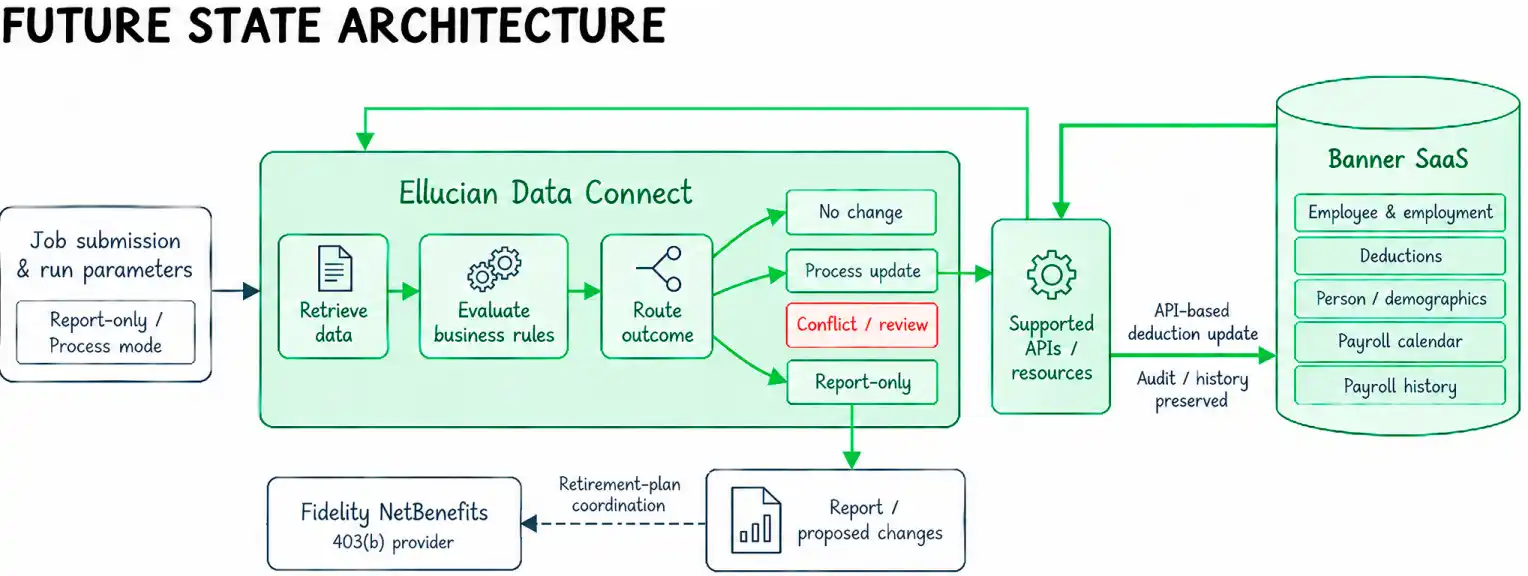
The same business process now runs through supported data access and explicit workflow logic rather than inside a database-resident program. Report and proposed-change outputs remain available for the broader retirement-plan coordination context involving Fidelity, while Banner updates follow the supported API-based path.

See how legacy Banner data dependencies were mapped to the Data Connect workflow

From database dependencies to business data domains

The legacy implementation worked directly with Banner data structures. In the Data Connect design, those dependencies were reframed around the information each rule actually required.

Legacy responsibility Information needed by the process Future State data domain Why the workflow needs it
Identify the employee and relevant personal attributes Employee identity and date-of-birth information Person and demographic data Supports employee matching and age-based limit selection
Read the current deduction Deduction code, current annual limit, effective date and related deduction information Employee deduction data Establishes the current state and whether an update is required
Confirm employment context Active employment and current hire date Employment data Supports population filtering and effective-date calculation
Establish payroll timing Relevant payroll year or start boundary Payroll-calendar data Prevents the new effective date from falling before the applicable payroll boundary
Determine the latest paid period Prior payroll activity and pay-period end dates Payroll-history data Supplies the last-paid-date input used in effective-date calculation

This mapping mattered because the target workflow did not need to reproduce the physical structure of the legacy program. It needed to reproduce the information dependencies behind the business rules.

The resulting Data Connect flow can retrieve each required data category independently, combine the results for evaluation and route the employee through the appropriate decision path.

Preserving the payroll rules behind the legacy program

How do you preserve a date-sensitive payroll process when the implementation model changes completely?

Apply the correct age-based limit

The workflow first determines which configured employee elective-deferral limit applies to the employee. The source process uses four age bands: under 50, 50 through 59, 60 through 63 and 64 or older.

The values remain parameters. The workflow applies the appropriate configured limit instead of embedding a specific annual amount in the process logic.

Select the right effective-dated record

Effective-dated data can contain multiple versions of the same business record, with the applicable version determined by when each record takes effect. The process therefore has to establish the employee’s current deduction state correctly. For the relevant employee and deduction, it selects the record with the latest effective date that does not exceed the applicable as-of date, meaning the date against which the employee’s current state is evaluated.

That matters because selecting the wrong version of an effective-dated record could change both the comparison and the subsequent update logic.

Calculate a safe new effective date

When a change is required, the workflow derives a new effective date from several pieces of payroll context. It considers the employee’s latest paid period, current hire date, the applicable payroll-period boundary and the effective date of the current deduction record.

The workflow then checks for an existing future-dated deduction record that would conflict with the proposed change. If it finds one, the update does not proceed automatically.

See the effective-date and conflict logic step by step

How the effective date is derived

The effective-date logic uses a sequence of safeguards rather than a single date calculation.

  1. The workflow looks for the employee’s latest qualifying paid period using payroll-history and payroll-calendar information.
  2. If a last paid date exists, the initial candidate becomes the following day.
  3. If that candidate is missing or does not fall after the current hire date, the candidate becomes the day after the hire date.
  4. If the candidate falls before the applicable payroll start boundary, it is moved forward to that boundary.
  5. If it still falls before the day after the current deduction record’s effective date, it is moved forward again.
  6. The process then checks for a future-dated deduction record that would conflict with the proposed update.
  7. If such a record exists, the employee is routed out of automatic processing for review rather than receiving a conflicting new record.

The last-paid-date lookup uses qualifying payroll-history entries associated with the payroll calendar, excludes voided activity and selects the latest applicable pay-period end date.

Sanitized decision logic

The following pseudocode represents the confirmed decision sequence. It illustrates the logic rather than reproducing source code.


if lastPaidDate exists:
    candidateDate = lastPaidDate + 1 day
else:
    candidateDate = null

if candidateDate is null
   or candidateDate <= currentHireDate:
    candidateDate = currentHireDate + 1 day

if candidateDate < payrollStartDate:
    candidateDate = payrollStartDate

if candidateDate < currentDeductionEffectiveDate + 1 day:
    candidateDate = currentDeductionEffectiveDate + 1 day

if a conflicting future-dated deduction record exists:
    route employee to review
else:
    continue through the applicable report or process path

This logic shows why the modernization required more than moving data between systems. The behavior depends on the relationship among several dates and on the state already present in the employee’s deduction history.

Preserve auditability and controlled failure handling

The API-based processing path also preserves the audit/history behavior associated with a successful deduction update. At the same time, the pipeline distinguishes normal no-change conditions from business conflicts, invalid inputs, lookup or data issues and processing errors.

This keeps operational exceptions visible instead of burying them in a single batch result.

The real migration unit was the business rule, not the stored procedure that happened to implement it.

See how the pipeline handles report mode, conflicts, and processing errors

Decision paths and exception handling

The workflow does not treat every employee as a write operation. Several conditions can end or redirect processing before an update occurs.

Condition Pipeline behavior Payroll data changed?
Current limit already matches the required limit No update is required No
Report mode is selected Evaluate and report the proposed outcome without applying the update No
A conflicting future-dated deduction record exists Do not create the automatic update; surface the employee for review No
Required run parameters are invalid Do not proceed with processing under the invalid configuration No
Required lookup or employee data cannot support a safe decision Capture and report the affected record as an exception No automatic change for that record
API or write processing fails Capture the processing failure and do not treat the affected employee as successfully completed Only successfully completed updates are treated as completed

Business conditions are separate from technical failures

A future-dated record represents a business-state conflict that the workflow is designed to recognize. An API error is a technical processing failure, so the two conditions follow different paths.

Likewise, an employee whose current contribution limit already matches the calculated limit is simply a no-change case.

Keeping these paths distinct makes the resulting report more useful because operational staff can distinguish:

  • records that required no change;
  • records evaluated in report-only mode;
  • business conflicts that require review;
  • data or lookup problems;
  • processing failures;
  • successfully processed updates.

The design therefore preserves the calculation logic along with the operational distinction between normal outcomes, exceptions and failures.

The resulting SaaS-compatible payroll process

The institution now has the custom contribution-limit process supporting its 403(b) retirement-plan administration with Fidelity implemented as an Ellucian Data Connect workflow rather than as an Oracle-resident program.

The Future State preserves the behavior that made the original customization useful: age-based limit selection, correct handling of effective-dated deduction records, guarded effective-date calculation, future-record conflict detection, report-only execution and audit/history preservation.

The process now retrieves and updates the required Banner information through supported API-driven patterns, with business rules and routing made explicit inside the workflow and reporting outputs supporting the broader retirement-plan coordination context.

A database-dependent payroll customization became a Data Connect workflow with supported data access, explicit decision logic, conflict controls, report-only execution and preserved auditability.

Frequently asked questions

Was this a standard Banner function or a custom institutional process?

This case study concerns an institution-specific payroll customization. The modernization work focused on understanding the behavior implemented by that custom process and rebuilding the required capability in the Future State.

What role does Fidelity play in this process?

Fidelity serves as a primary administrative service provider for the institution’s 403(b) retirement plan. The modernization described here focuses on the institution-specific Banner payroll logic used to maintain employee contribution limits. The core 403(b) contribution-limit processing remains within the institution’s Banner and Data Connect environment, while Fidelity appears in the architecture as part of the broader retirement-plan administration and coordination context rather than as a direct Data Connect API endpoint.

Why could the legacy 403(b) process not simply be moved as-is?

Its logic was implemented inside an Oracle-based process that directly read and updated several Banner data domains. The required business behavior had to be separated from that implementation and rebuilt within the Data Connect execution model.

How did Ellucian Data Connect replace direct database access?

The workflow obtains the required deduction, person, employment, payroll-calendar and payroll-history information through supported resources and APIs. Data Connect then combines that information, applies transformations and business rules and routes each employee through the appropriate outcome.

How are effective-dated Banner records handled in the new process?

For the relevant employee and deduction, the workflow identifies the latest applicable deduction record whose effective date does not exceed the as-of date. That record becomes the basis for comparison and subsequent effective-date logic.

What happens if a future-dated deduction record already exists?

The workflow detects the conflict before creating the proposed update. The employee does not continue through the automatic update path and can instead be handled as an exception requiring review.

Can the process be run without changing payroll data?

Yes. Report mode evaluates the population and proposed outcomes without performing inserts or updates. This preserves the legacy process’s ability to review potential changes before processing them.

How are annual employee elective-deferral limits handled without hard-coding them into the workflow?

The limits are provided as process parameters. The workflow selects the appropriate configured value based on the employee’s age band, allowing the business values to change without embedding a specific annual amount in the decision logic.

Does modernization require reproducing the original PL/SQL line by line?

No. The requirement is to preserve the business behavior that still needs to exist in the Future State. In this project, ABCloudz identified the information dependencies, decision rules, exceptions and operational controls behind the legacy process, then implemented those requirements using the target Data Connect architecture.

Need to modernize custom Banner logic for SaaS?

If your institution has custom Banner jobs, database-resident business rules or integrations that need to move into a SaaS-compatible architecture, ABCloudz can help identify what each customization actually does, separate required business behavior from legacy implementation details and rebuild the needed capability using supported Ellucian patterns.

Contact ABCloudz to review your custom Banner workload and plan a practical modernization path.
Ready to start the conversation?