Modernizing a Banner-to-Fidelity retirement contribution process for SaaS with Ellucian Data Connect
28 Aug 2026
A higher-education institution needed to move a custom Banner-to-Fidelity retirement contribution process into a SaaS-compatible operating model without losing the retirement contribution logic and downstream file requirements the process supported.
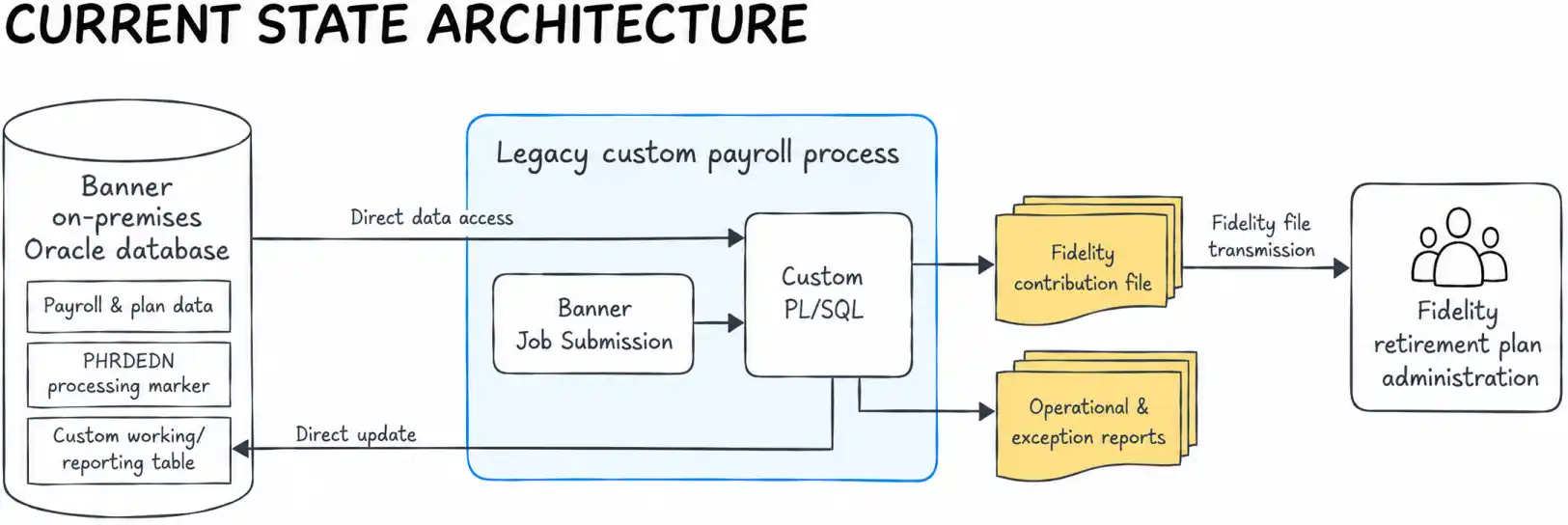
The existing solution prepared employee and employer contribution data for Fidelity to use in retirement plan administration, but that behavior was embedded in institution-specific Oracle PL/SQL, Oracle’s procedural extension to SQL for implementing database-side logic (Oracle PL/SQL documentation), custom database objects, direct Banner database access and Banner Job Submission, the batch framework used to run parameterized Banner reports and processes.
The migration work centered on understanding what the institution’s customizations actually did, which business rules and operational controls still needed to exist in the future state and how to reimplement that required behavior through supported SaaS patterns.
Why the custom payroll process required separate SaaS modernization
The legacy solution ran as a custom Banner Payroll Job Submission process backed by Oracle PL/SQL. It read payroll, identity, employment and retirement-plan configuration data directly from Banner tables, used a custom working table for reporting, generated Fidelity contribution files and operational reports and updated payroll deduction records to mark them as processed.
Standard vendor-delivered Banner functionality can follow the established path into the SaaS model. Institution-specific customizations require separate analysis. When custom database objects, modified processing logic, direct updates or custom integrations have been added over time, the team needs to determine what those customizations do and which business requirements they support.
For this process, that meant identifying which payroll records qualified, how contribution categories mapped to retirement plans, how amounts were aggregated, how previously processed records were recognized, how negative contributions were handled and which downstream outputs still had to be produced.
The migration challenge was the institution-specific business logic embedded in custom PL/SQL, database objects, direct Banner updates and Job Submission processing. That behavior fell outside the standard Banner migration path. It had to be separated from its legacy implementation, evaluated as a business process and rebuilt through supported SaaS mechanisms where it was still required.
This made the project a customization modernization effort within the broader Banner SaaS migration rather than part of the standard migration path. The business process still mattered, but the database-centric mechanisms that implemented it could not remain its foundation.
Rebuilding the process as an API-driven Data Connect pipeline
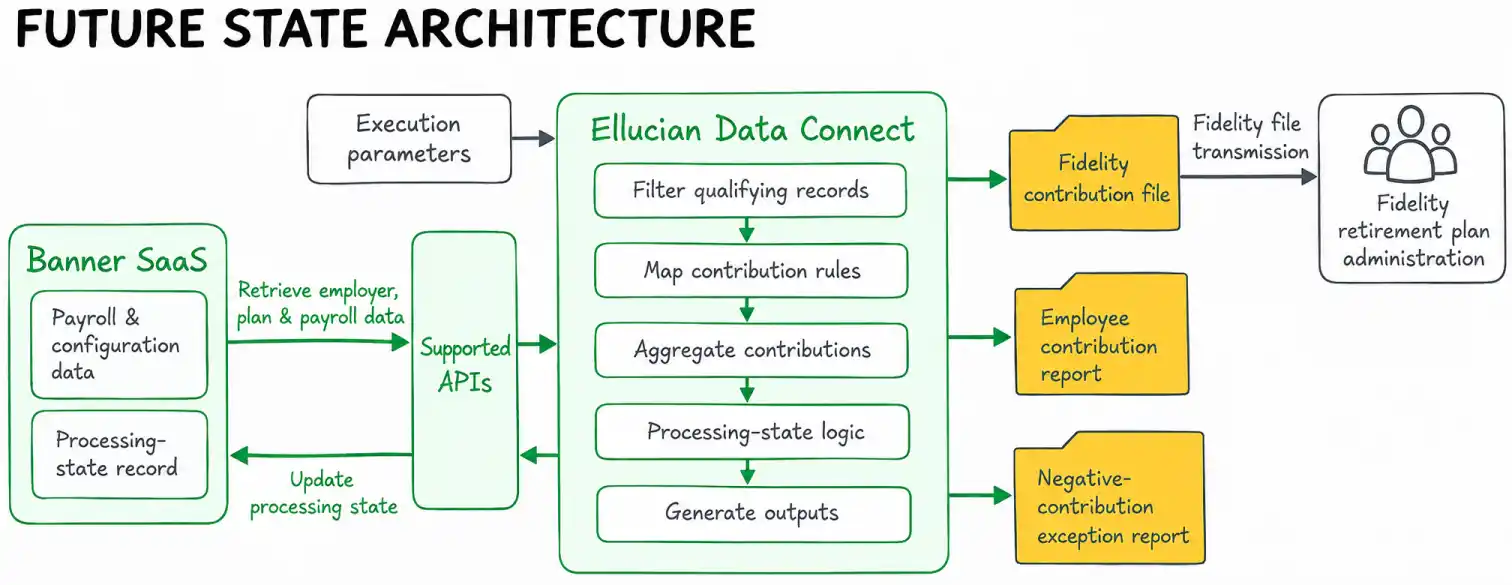
ABCloudz first broke the custom process into the business responsibilities it performed and identified which behaviors had to remain in the future state. The team then reimplemented those responsibilities through Ellucian Data Connect and supported APIs.
Replace the unsupported custom database dependencies with a SaaS-compatible, API-driven processing model while preserving the retirement contribution rules, operational controls and Fidelity contribution-file contract the institution still needed.
The pipeline captures execution parameters such as the reporting period, employer, payroll identifier, processing mode, Fidelity plan numbers and contribution codes. It then resolves employer and plan configuration, retrieves the required payroll contribution data through APIs, applies filtering and aggregation logic, maintains processing state and generates the required downstream outputs.
The pipeline also uses configuration to control processing. Retirement plans are associated with contribution codes and contribution classifications through crosswalk-style configuration, meaning mapping rules that connect internal contribution codes to the corresponding plan and source classifications. This keeps those relationships out of the pipeline logic itself.
When the pipeline runs in update mode, processing state is recorded through an API-supported extended payroll record used to store the processing marker rather than through direct database updates against the original Banner payroll table.
How plan configuration becomes contribution logic
The pipeline does not treat every contribution record the same way. Configuration determines which retirement plan a contribution belongs to, how a contribution code should be interpreted and whether an amount represents an employee or employer contribution.
A simplified relationship looks like this:
Retirement plan
Contribution code
Contribution class
Output meaning
Plan A
Code A
Employee
Employee base or elective contribution
Plan A
Code B
Employer
Employer base or matching contribution
Plan B
Code C
Employee
Roth contribution
The implementation obtains these relationships from configurable plan and crosswalk data. For each plan, the pipeline identifies the applicable contribution codes together with metadata that distinguishes employee-side and employer-side amounts.
The same payroll dataset contains multiple contribution categories, so the pipeline must determine which amount belongs in each downstream field rather than simply summing every deduction associated with an employee.
The processing sequence is:
Resolve the requested retirement plan.
Retrieve the contribution codes associated with that plan.
Retrieve the contribution classification and downstream source metadata associated with each code.
Select the corresponding employee or employer amount.
Aggregate the values that belong to the same employee and contribution category.
Pass those classified amounts into file and report generation.
Keeping these relationships in configuration separates retirement-plan setup from the core processing flow. The pipeline can apply the same processing pattern to the plan configuration supplied for a run without hardcoding every plan-to-contribution relationship into the transformation logic.
Preserving the business rules that matter
Replacing the legacy execution model required the new pipeline to reproduce the parts of the custom process that carried real business and operational meaning.
The engineering challenge was to preserve several interdependent behaviors at once: record selection, contribution aggregation, processing state, negative-contribution handling and a fixed downstream data contract.
For duplicate prevention, report-only and update processing behave differently. A report run can inspect qualifying payroll records without changing their processing state. An update run excludes records already marked as processed and records the processing date as part of update processing.
Employee and employer contribution amounts are aggregated by employee and contribution code. Negative amounts, which can represent reversals or corrections, are detected separately and can be excluded from the contribution file when they are not allowed. When applicable, the pipeline also generates a dedicated negative-contribution report.
The modernization also preserves the fixed-width Fidelity contribution format expected downstream. In this format, each field occupies a predefined character range. The output includes headers, individual contribution records, control totals and specialized totals for different contribution categories.
How the pipeline knows a payroll record was already processed
The legacy process prevented duplicate processing by writing a retirement date directly to the payroll deduction table. The Data Connect implementation preserves the same business safeguard through an API-based state check.
The logic begins by identifying payroll activity in the requested period and payroll cycle. Payroll deduction records are then joined to that payroll history and filtered for the requested employer and contribution codes.
The pipeline also retrieves processing-state records for the same logical payroll deductions. Matching uses multiple attributes rather than a single timestamp. The comparison includes the contribution code, employer, payroll identifier, status, payroll year, pay number, sequence number, employee identifier and effective date.
That produces two distinct execution paths.
for each qualifying payroll deduction:


    if processing mode is REPORT:

        include the record


    if processing mode is UPDATE:

        if no matching processed-state record exists:

            include the record

        else:

            skip the record


during UPDATE processing:

    write the current processing date through the supported API
This pseudocode is intentionally simplified, but it preserves the decision logic of the implemented selection process.
Report mode provides a repeatable view of qualifying data without changing processing state. Update mode treats the existence of a matching state record as evidence that the payroll deduction has already been handled.
Internal testing defined repeated non-update runs as producing the same outputs. In update mode, the state marker prevents the same qualifying record from being selected again.
Preserving the Fidelity retirement contribution file format
The Fidelity contribution file follows a fixed record structure required for downstream processing. The modernization therefore had to reproduce both the contribution data and the control information around it.
Header
Each Fidelity plan file begins with a header containing plan-level and employer-level information together with fixed fields required by the established format.
Contribution records
Each contribution record combines employee identification, contribution classification and a formatted monetary amount.
The amount transformation follows a specific sequence:
Retrieve the employee or employer contribution amount selected for the contribution category.
Convert the monetary value to integer cents.
Pad the value to the required fixed width.
For negative values, apply a COBOL-style overpunch representation, a signed-number convention in which the sign is encoded together with the final digit rather than stored as a separate character (IBM reference on overpunch encoding).
Write the formatted value into the contribution record.
Conceptually:
12345.67

→ 1234567 cents

→ zero-pad to required width

→ write as fixed-width contribution amount
A negative amount follows the same normalization and padding process, but its sign is encoded in the final character using the required overpunch convention rather than a separate minus sign.
Control totals
After contribution records are processed, the pipeline generates trailer records that provide totals and record counts.
The file contains separate control structures for:
grand totals across contribution categories;
totals and counts for selected contribution-source groups;
separate Roth contribution totals and counts.
These totals are derived from the same classified contribution records written to the file, preserving the control structure required for Fidelity contribution processing.
Operational reports
Alongside the Fidelity contribution file, the pipeline also produces human-readable operational reports.
The employee contribution report organizes amounts into categories such as employer base contributions, employee pre-tax contributions, Roth contributions and employer matching contributions, with overall totals.
A separate exception report lists negative employee or employer amounts when the configured negative-contribution handling requires that report.
Together, these outputs preserve the machine-readable downstream contract and the operational visibility provided by the custom process.
In a Banner SaaS modernization, start with the business behavior a customization provides. Determine whether that behavior still belongs in the future state, then implement the required functionality through supported SaaS patterns.
What the SaaS-ready design changed for the institution
The resulting design removes the retirement contribution process from its dependence on direct Banner database updates, custom PL/SQL and Job Submission as the execution foundation.
The institution retains the behavior that made the custom process necessary in the first place: configurable retirement-plan mappings, employee and employer contribution aggregation, report and update modes, record-level duplicate prevention, negative-contribution handling and the established Fidelity contribution format.
An institution-specific, database-bound Banner payroll process became an API-driven Ellucian Data Connect workflow that preserves the required retirement contribution logic and operational controls while replacing the custom database dependencies that stood outside the standard SaaS migration path.
The result is a SaaS-compatible implementation of a business-critical payroll process. The required custom behavior now runs through supported APIs, configuration and Data Connect processing instead of legacy database mechanisms.
FAQ
Why did this custom process require separate work during the Banner SaaS migration?
The issue was the institution-specific logic around the retirement contribution process. It depended on custom PL/SQL, database objects, direct database access and custom processing behavior. Those customizations had to be analyzed to determine what business functionality they provided, then reimplemented through supported SaaS mechanisms where that functionality was still required.
How do you decide what to do with a legacy Banner customization during SaaS modernization?
The first step is to understand the business process or integration the customization supports. From there, the institution can determine whether that behavior should remain unchanged, be redesigned or no longer exist in the future state. Required behavior can then be mapped to supported APIs, Data Connect pipelines, configuration and other SaaS-compatible patterns.
How can a Data Connect pipeline prevent the same payroll contribution from being processed twice?
The pipeline compares qualifying payroll deductions with processing-state records that identify contributions already handled. Report mode can inspect qualifying data without changing state, while update mode excludes previously processed records and records a processing date as part of update processing.
How do you preserve a Fidelity contribution file format during Banner SaaS modernization?
The implementation architecture can change while the downstream contract remains stable. In this project, the pipeline reproduces the fixed-width records, contribution classifications, amount formatting, control totals and trailer structures required for Fidelity contribution processing.
How are negative retirement contributions handled?
Negative amounts are treated as a distinct processing condition because they can represent reversals or corrections. The pipeline detects them, applies the configured inclusion behavior, formats permitted negative values according to the required file convention and generates a dedicated exception report when applicable.
Can the same process support multiple retirement plans or contribution types?
The implemented pipeline supports multiple plan numbers and uses plan and crosswalk configuration to associate contribution codes with the appropriate employee or employer classifications. This allows the core processing flow to operate from configuration rather than embedding every relationship directly into the pipeline.
Modernizing a custom Banner process?
If your institution is preparing custom Banner jobs, PL/SQL processes, Banner-to-Fidelity retirement contribution workflows or other institution-specific extensions for SaaS, ABCloudz can help identify what each customization supports, determine which behavior belongs in the future state and redesign the required functionality around supported Ellucian and Data Connect patterns.
Contact ABCloudz to discuss a Banner customization or integration that needs a SaaS-ready path forward.