A higher-education institution was preparing to move its on-premises Ellucian Banner environment to Ellucian SaaS. As part of that migration, it also needed to modernize a custom enrollment reconciliation process that kept section and cross-list enrollment counts aligned with actual student registrations.

The existing process depended heavily on the on-premises Banner database. It read Banner tables directly, executed custom PL/SQL logic, staged discrepancies in a custom table, and updated stored enrollment values through direct database operations. Those implementation patterns could not move to Banner SaaS unchanged, where direct database updates were no longer available and custom database packages and working tables could not simply be carried forward.

Move the institution’s custom Banner enrollment reconciliation process to a SaaS-compatible architecture while preserving the section and cross-list business rules it still needed.
To achieve this goal, ABCloudz needed to rebuild the capability as an Ellucian Data Connect pipeline that would orchestrate the reconciliation process, retrieve Banner data through Ellucian Ethos APIs, apply the institution’s section and cross-list business rules outside the Banner database, and submit controlled corrections through supported Banner SaaS APIs when updates were enabled.
RELATED BLOG POST: For a different modernization path for a custom Banner academic process, where institution-specific rules could be moved into delivered Banner functionality instead of rebuilt as a custom pipeline, see Modernizing Banner late graduation processing for Ellucian SaaS.
The legacy process depended on direct Banner database access
Banner stores enrollment-related values for individual sections and for cross-listed groups. Those stored values can become inconsistent with the underlying registration records because of timing, registration changes, and other processing conditions.
The institution addressed this with a custom Banner Job Submission process. Instead of trusting the stored aggregate values, the job recalculated enrollment from individual registration records whose statuses counted toward section enrollment.
For regular sections, the process:
- read student registration records;
- identified the registration statuses that counted toward enrollment;
- recalculated enrolled headcount and total credit hours;
- recalculated available seats;
- compared the calculated values with the values stored for the section;
- updated Banner when discrepancies were found.
Cross-listed sections required additional logic because several CRNs could share a single enrollment capacity. The process therefore aggregated qualifying registrations across the entire cross-list group before reconciling the stored group enrollment.
The implementation was tightly coupled to the on-premises Banner database. It read student registration records, registration-status rules, and cross-list mappings directly from Banner, then updated section and cross-list enrollment records through direct database operations. It also depended on a custom PL/SQL package, a custom working table for staging discrepancies, and database-oriented reporting.
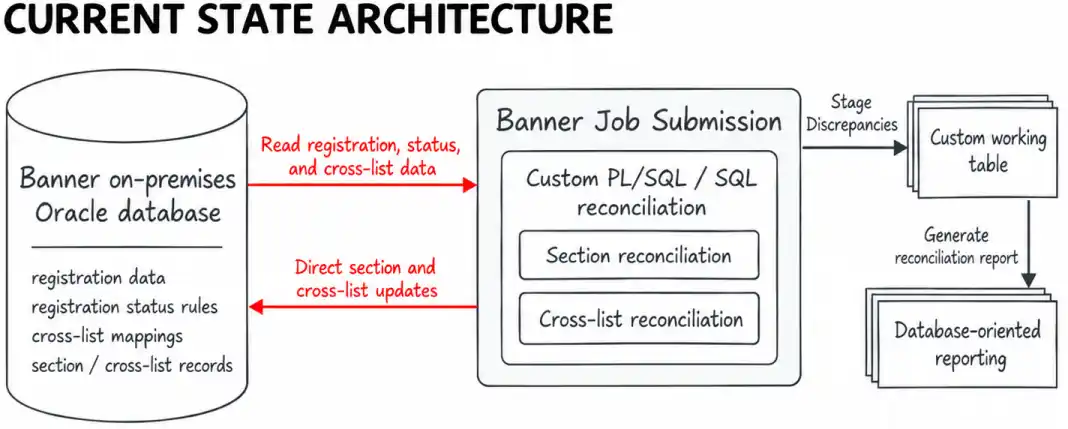

The business rule still mattered in Banner SaaS, but the implementation depended on capabilities that were specific to the on-premises database: direct DML, custom PL/SQL, and a custom database-resident working table.
Rebuilding the reconciliation process in Ellucian Data Connect
The modernization was not a one-to-one conversion of the existing SQL and PL/SQL code.
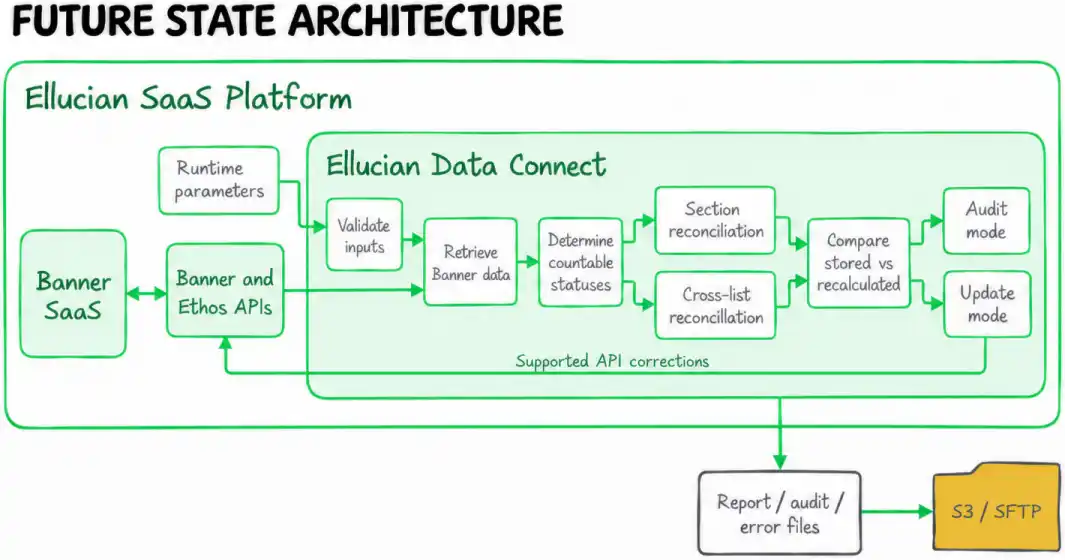
ABCloudz first separated the business behavior that had to survive from the database implementation that could not. The resulting design moved orchestration and reconciliation into Ellucian Data Connect and replaced direct database access with supported Banner and Ethos API interactions.
The new processing model is:
Pull → Evaluate → Compare → Correct when required
Data Connect receives the runtime configuration, validates the input, retrieves the required Banner data, determines which registration statuses count toward enrollment, recalculates section and cross-list values, compares those calculations with Banner’s stored values, and then follows either an audit-only or update path.
Preserve the business rule, not the database implementation
The institution did not need to preserve the original SQL statements, custom package calls, temporary-table operations, or direct table updates.
It needed to preserve the behavior:
- determine which registration statuses contribute to enrollment;
- calculate actual enrollment from registration records;
- calculate section credit totals and available seats;
- aggregate enrollment across cross-listed sections;
- identify discrepancies between stored and recalculated values;
- report those discrepancies;
- apply approved corrections when update processing is enabled.
The Data Connect pipeline expresses those rules using Banner SaaS resources rather than database tables.
It retrieves installation, academic-period, section, registration-status, registration, and cross-list information through Banner and Ethos APIs. The reconciliation logic executes in the pipeline rather than inside the Banner database.

A successful Banner SaaS modernization preserves the required business behavior without preserving the database implementation that originally delivered it.
Separate discrepancy detection from correction
One important change was to separate finding a discrepancy from changing Banner data.
The Data Connect pipeline supports two operating modes.
In audit mode, which is the default, the pipeline performs the reconciliation and reports discrepancies without submitting corrections.
In update mode, the same reconciliation logic identifies the discrepancies, but the pipeline is also permitted to submit supported API-based corrections.
This allows the institution to review reconciliation results without automatically changing Banner and then use the same pipeline when controlled updates are required.
The pipeline also produces separate report, audit, and error outputs. Depending on configuration, those files can be delivered to S3, SFTP, or both. Data Connect’s preview capability can also be used when configured for that workflow.
Recalculate enrollment from the records that actually count
The underlying section-level business rule did not change.
Actual enrollment still comes from individual registrations, but the Data Connect pipeline obtains those registrations and their status information through supported Banner resources instead of querying the registration tables directly.
RELATED BLOG POST: For another registration-related Data Connect modernization, where student-specific term rules and current Banner state determine when immunization-related registration holds should be created or released, see Modernizing a Point and Click Solutions immunization integration for Ellucian SaaS.
Only registration statuses configured to contribute to section enrollment are included.

Treat cross-listed courses as shared enrollment groups
Cross-listed courses required more than repeating the section calculation for each CRN.
Several sections can participate in one shared cross-list group, so the pipeline must reconcile the group collectively. Qualifying registrations across the member CRNs are aggregated before the recalculated group state is compared with the value currently represented in Banner.
Use specialized APIs where the baseline surface was not enough
Moving the reconciliation into Data Connect did not mean that every requirement could be implemented through one generic API surface.
The pipeline uses standard Banner and Ethos resources wherever those resources expose the information needed for reconciliation. Where the required update operation is not adequately supported through the baseline resource, the solution uses a targeted specialized API.

Data Connect provided the orchestration and processing layer, but the modernization still required identifying exactly which supported Banner API mechanism could replace each piece of legacy database behavior.
Make reconciliation observable instead of hiding it inside a database job
The Data Connect implementation also makes the operating behavior explicit.
Runtime parameters control the term and execution behavior. Audit mode determines whether discrepancies are only reported or can result in corrections. Additional configuration controls report, audit, and error output behavior.
The reconciliation report identifies the relevant CRN, the enrollment reported by Banner, the recalculated actual enrollment, and the resulting difference.
Audit output records processing results for section and cross-list reconciliation, while error output is produced when pipeline errors occur and error-file delivery is enabled.
Output delivery can be configured for S3, SFTP, both, or the Data Connect preview workflow as appropriate.
This is materially different from the legacy design, where reconciliation logic, staging, updates, and reporting were closely tied to the database job.
Results
The institution retained the custom enrollment reconciliation capability it depended on without carrying its on-premises implementation model into Banner SaaS.
The modernized solution:
- runs the reconciliation as an Ellucian Data Connect pipeline;
- removes direct DML against Banner database tables;
- removes the dependency on the custom PL/SQL package;
- removes the custom working-table dependency;
- retrieves the required Banner data through supported APIs;
- preserves the section and cross-list reconciliation rules;
- supports audit-first execution before corrections are submitted;
- uses controlled API-based section and cross-list correction paths;
- produces report, audit, and error outputs independently of the old SQL*Plus reporting model.

The institution retained its custom section and cross-list enrollment reconciliation process in an Ellucian Data Connect architecture, with audit-first control and supported API-based correction paths replacing the legacy direct database-update workflow.
Frequently asked questions
Modernizing a custom Banner process for SaaS?
Custom Banner processes often contain business behavior that still matters even when their original database implementation can no longer move forward.
ABCloudz helps institutions identify that business logic, separate it from database-specific dependencies, and rebuild the process around supported Banner SaaS patterns such as Ellucian Data Connect, Banner and Ethos APIs, and targeted specialized APIs where required.
If you are evaluating a custom Banner job, PL/SQL package, integration, or reporting process for SaaS modernization, contact ABCloudz.