Modernizing custom Banner student billing with TouchNet for Ellucian SaaS
14 Aug 2026
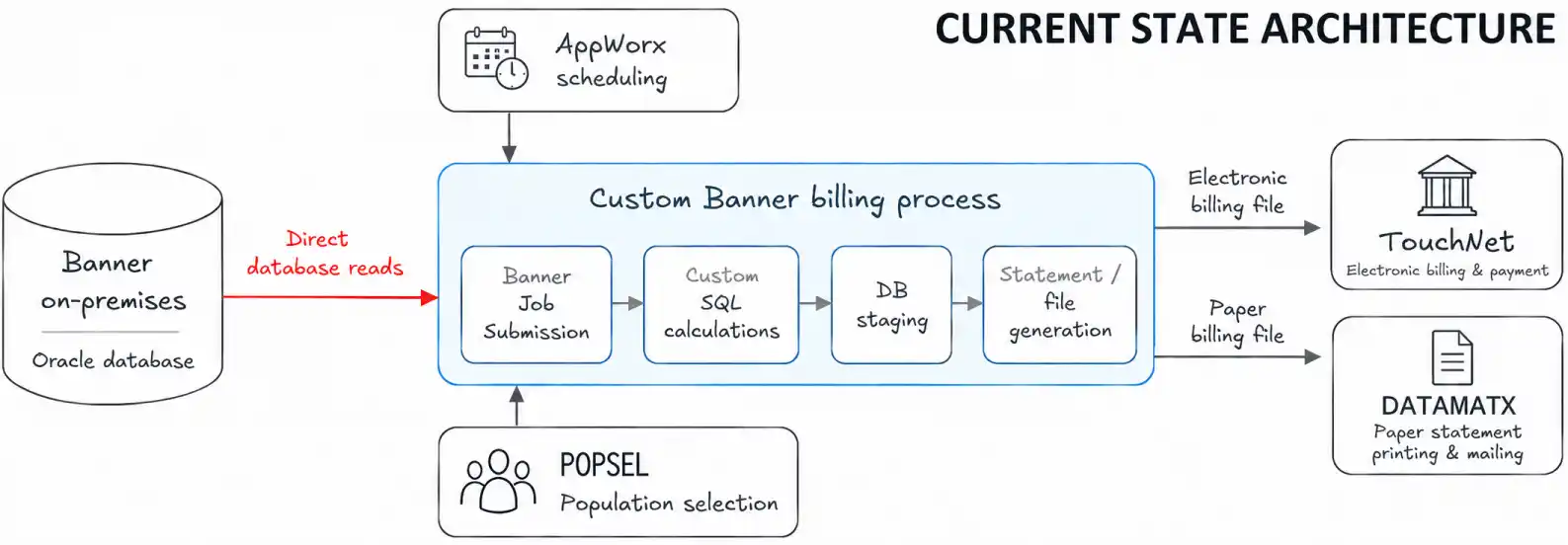
A higher-education institution relied on a custom billing process in Ellucian Banner, its higher-education enterprise and student information platform, to calculate student balances, generate statements and distribute them through TouchNet for electronic billing and DATAMATX for paper billing. The customization existed because the delivered Banner integration with TouchNet did not provide the required prior and future payment calculations or support the institution-specific output format required downstream. Moving this process to Ellucian SaaS required more than replacing database access with APIs.
The custom jobs combined financial calculations, population selection, statement rules, staging, reporting and distribution behavior. ABCloudz first had to determine which behaviors supported real business requirements, then rebuild those behaviors within a SaaS-supported architecture.
Move the custom Banner billing workflow to a SaaS-supported architecture while preserving the institution-specific billing behavior that still mattered.
RELATED BLOG POST: For a related Student Accounts modernization focused on third-party sponsor billing, including sponsor contracts, charge allocation, financial controls and TouchNet-related billing output, see Modernizing TouchNet third-party sponsor billing for Ellucian SaaS.
Why the custom billing process could not move to SaaS unchanged
The legacy workflow was built around custom Banner Job Submission processes, the batch framework used to run institution-specific jobs against the on-premises Oracle database. It read accounts receivable, financial aid, registration and related data directly from Banner tables, applied custom SQL transformations, staged intermediate data and produced statement files for TouchNet electronic billing and DATAMATX paper billing. TouchNet provided the electronic statement and payment channel, while DATAMATX produced and mailed paper statements for the applicable student population.
Banner Population Selection (POPSEL), the mechanism used to define which student records entered a batch process, determined the students included in each billing run. AppWorx, the workload automation scheduler used for these jobs, handled scheduling. The process also maintained custom logic for prior balances, deposits, authorized aid, memoed aid, amount-due calculations, reconciliation and the lockbox-compatible format, a fixed-position payment data structure required by downstream processing.
These dependencies mattered because they carried business behavior as well as technical implementation.
The migration challenge was to separate the institution-specific billing behavior from the database-centric custom jobs that implemented it, then determine how each required behavior should work in the SaaS environment.
The modernization therefore focused on reconstructing the billing process around the business behavior it still needed, rather than carrying the legacy implementation structure forward.
Rebuilding the billing logic outside the Banner database
What had to be preserved, and what could change?
Preserve the business behavior that mattered
ABCloudz broke the existing customization into the behaviors the future workflow still needed. These included student population rules, receivable categorization, prior balances, deposits, amount-due calculations, statement eligibility and downstream formatting requirements.
Financial aid required particular care. Authorized aid and memoed aid represented different billing concepts and could not be collapsed into a single generic credit amount. Memoed aid, for example, remained subject to rules such as eligible detail codes, expiration dates, billing indicators and run timing.
Move the logic into a SaaS-supported integration layer
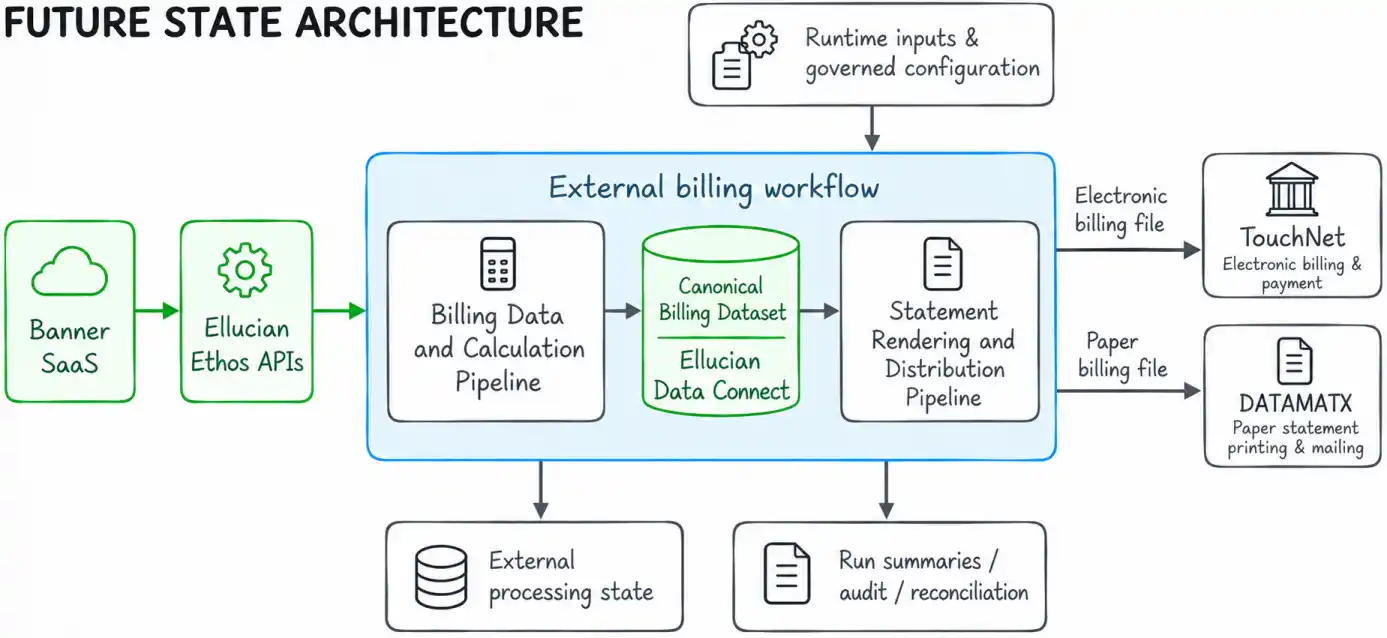
The future state retrieves relevant student, financial and academic data through Ellucian SaaS and Ellucian Ethos APIs, the supported integration interfaces used here to access Banner SaaS data. The institution-specific calculations then run in an external processing layer.
Population Selection was also redesigned. Rather than relying on legacy session and temporary-table behavior, the integration supports governed execution modes for all eligible students, an external dataset, filtered populations or a single student. Additional campus, college and other selection rules can be applied through configuration.
See how the billing calculation is reconstructed outside Banner
Runtime inputs and governed configuration
The future workflow separates values that change for a specific billing run from rules that should be maintained as configuration.
Runtime input
Role in processing
Academic period
Scopes receivable activity, aid and registration context
Billing run date
Supports date comparisons, aging logic and memo eligibility
Assessment date
Acts as a cutoff for eligible billing activity
Billing date range
Limits receivable transactions included in the run
Minimum and maximum amount due
Controls statement inclusion after calculations
Population filter type and value
Defines ALL, DATASET, FILTERED, or SINGLE execution
Billing mode
Controls the operational mode of the run
Address selection date
Supports effective address resolution
Optional memo detail codes
Overrides the default memoed-aid inclusion configuration
Governed configuration holds rules such as charge-category mappings, memoed-aid and authorized-aid inclusion logic, payment-plan rules, address priorities, population-selection rules, output formatting and lockbox construction.
Processing the selected student population
The billing calculation pipeline follows a controlled sequence.
Validate the run context. The workflow validates the academic period and other required execution parameters before processing students.
Resolve the population. The population can come from all eligible students, an external dataset, configured filters or one identified student. Include and exclude rules can narrow the population further.
Retrieve billing-relevant activity. For each student, the pipeline obtains identity context, receivable transactions, account information, authorized aid and memo-related activity from the SaaS-accessible source set.
Normalize financial activity. Detail codes and transaction characteristics are mapped into the business categories required by the billing process, including charges, payments or credits, miscellaneous activity, deposits, authorized aid and memoed aid.
Evaluate deposits and aid independently. Deposit balances are derived from deposit-related transaction activity, and only positive remaining balances are carried forward. Authorized aid is evaluated under its governed eligibility rules. Memoed aid is evaluated separately using memo detail codes, expiration dates, billing indicators and timing rules.
Calculate the billing result. The pipeline derives the values required downstream, including previous balance, balance till date, amount owed, adjusted due, minimum due and relevant statement indicators.
Apply inclusion rules. Minimum and maximum amount-due thresholds and other configured conditions determine whether the student is included in the billing output.
Create the canonical record. An included student is written to Ellucian Data Connect, the integration platform used here to hold the handoff between calculation and rendering, as a canonical billing record containing the financial result and the context required for statement generation.
Produce run-level evidence. The pipeline records processed, included, excluded and failed counts, aggregate billed amounts, execution status and trace information for reconciliation and operational review.
A simplified representation of the decision flow is:
selected student

    ↓

retrieve receivable and aid data

    ↓

categorize financial activity

    ↓

evaluate deposits

    ↓

evaluate authorized aid

    ↓

evaluate memoed aid

    ↓

calculate billing values

    ↓

apply amount and inclusion rules

    ↓

included?

   ↙     ↘

 yes     no

  ↓       ↓

canonical  exclusion recorded

billing

record
This separation makes the business rules explicit. The future workflow no longer depends on the physical structure of the legacy Banner tables to define how billing should behave.
Calculating once, then rendering from a canonical billing record
The billing pipeline owns the financial calculation
After processing an eligible student, the billing pipeline creates a canonical record containing the calculated values required downstream: categorized transactions, previous balance, deposits, authorized aid, memoed aid, adjusted amounts, minimum due, statement flags and run context.
That record becomes the authoritative handoff to statement generation. The rendering stage does not independently rebuild the core financial values.
See what moves between calculation and statement rendering
The canonical dataset creates an explicit data contract between the two stages of the solution.
Run and selection context
Each run carries enough context to identify how and why the record was produced, including:
run identifier and generation timestamp;
billing mode and processing status;
academic period;
selection and billing dates;
amount thresholds;
population-selection context.
This preserves information that would otherwise be implicit in a batch session or temporary database state.
Student and financial context
A sanitized representation of the handoff looks like this:
The record can carry several types of downstream information:
Record area
Purpose
billingSummary
Holds the financial result already calculated upstream
transactionDetails
Preserves categorized activity required on the statement
authorizedAidDetails
Keeps authorized aid distinct from memoed aid
memoedAidDetails
Carries pending-credit information and related eligibility results
depositDetails
Preserves remaining deposit activity
statementFlags
Controls optional sections or presentation behavior
addressContext
Carries address-resolution context
audit
Supports traceability and operational reporting
This contract defines ownership clearly. The calculation stage determines the financial result. The rendering stage consumes that result and adds presentation data without redefining it.
RELATED BLOG POST: For a technical deep dive into the same separation between processed billing data and document rendering, including how JasperReports-style invoice output was reconstructed in Data Connect, see How we reproduced JasperReports invoice output in Ellucian Data Connect.
The statement pipeline owns presentation and distribution
The statement pipeline enriches each canonical record with the information needed for presentation, such as identity, mailing address, academic context, registration information when required and configured statement messages.
It then assembles the statement and constructs the lockbox-compatible scanline, a machine-readable fixed-position payment line used by the downstream processor. The pipeline also applies fixed-width formatting and page controls, prepares distribution artifacts and sends them to TouchNet for electronic billing and DATAMATX for paper billing.
Calculate the financial result once, then treat it as the authoritative input for rendering and distribution.
See how legacy statement behavior is preserved
Separating rendering from calculation does not remove the institution-specific statement behavior. Several detailed rules remain part of the future state.
Address selection follows a configured hierarchy
The statement pipeline does not assume one fixed address type. It evaluates address types in configured priority order.
configured address priority

        ↓

first address type

        ↓

matching valid address?

   yes ↙       ↘ no

select            next priority

address               ↓

                 repeat lookup

                      ↓

             no valid address found

                      ↓

          institutional fallback address
The selected address is then formatted for the statement. Street lines, city, state, postal code and country are handled according to the output rules, with the default institutional address used only when no valid student address is available.
Transaction dates preserve the required display behavior
The displayed transaction date does not always come from the same source field. The future logic preserves the legacy business rule:
if transaction bill date == statement billing date:

    display transaction date or activity date

else:

    display effective date
This small implementation rule has visible consequences. Replacing it with a generic date mapping could change the ordering or dates students see on their statements.
Lockbox output retains the downstream data contract
The lockbox scanline remains a fixed-format structure:
Position
Content
1–2
Payment type
3
ID type
4–12
Normalized student/account ID
13–18
Academic period
19–26
Balance in cents, zero-padded
27
Check digit
The identifier is normalized when required by the downstream format. The balance is converted to the required cents representation, and the final check digit is calculated with the required modulo-10 checksum logic.
The rendering stage also preserves fixed-width statement requirements such as student boundary markers, page breaks, mailing-block placement, continuation handling for long detail sections and configured transaction ordering.
These rules explain why statement rendering remains its own engineering responsibility. The financial values come from the canonical dataset, while presentation and downstream compatibility for TouchNet electronic billing and DATAMATX paper billing are controlled separately.
What the modernized billing architecture gives the institution
The completed design replaces direct Banner database operations, custom SQL job dependencies and legacy staging with an API-driven billing workflow built around supported SaaS integration patterns.
Institution-specific financial behavior remains in an external calculation layer, while statement rendering and distribution operate from a clearly defined canonical billing record. TouchNet electronic billing and DATAMATX paper billing continue to share the same billing foundation without requiring every student to follow the same distribution path.
The workflow also produces structured run summaries, failed-record information, exception details, delivery status and trace metadata that support reconciliation, audit and operational troubleshooting.
The institution now has a SaaS-aligned billing architecture that separates financial calculation from statement rendering while preserving the custom billing rules and downstream outputs the process still requires.
Frequently asked questions
Why couldn’t the legacy Banner billing jobs simply be moved to SaaS?
The jobs did more than access Banner data. They contained institution-specific calculations, population rules, staging behavior, statement formatting and operational logic. The required business behavior had to be separated from those legacy implementation dependencies and rebuilt through SaaS-supported integration patterns.
What billing logic had to be preserved during the migration?
The future state preserves the business concepts required by the existing process, including receivable categorization, previous balances, deposits, authorized aid, memoed aid, amount-due calculations, statement inclusion rules, population selection and downstream formatting requirements.
Why are authorized aid and memoed aid handled separately?
They represent different billing concepts and follow different rules. Authorized aid is evaluated as its own governed financial input. Memoed aid represents pending credits and can depend on factors such as eligible detail codes, expiration dates, billing indicators and run timing. Combining them would lose behavior present in the original billing process.
Why did the solution separate billing calculation from statement rendering?
The separation gives the financial result a single owner. The billing pipeline performs the calculation and produces the canonical record. The statement pipeline renders that record and adds presentation context without independently recalculating the core financial values.
How is student population selection handled in the SaaS design?
The integration supports ALL, DATASET, FILTERED and SINGLE execution modes. Selection can also incorporate configured rules such as campus or academic grouping filters. This replaces the legacy dependency on Banner session and temporary-table behavior while retaining operational flexibility.
Does the modernized billing workflow still deliver to TouchNet and DATAMATX?
Yes. Both downstream systems receive outputs produced from the same underlying billing results. TouchNet supports the electronic billing channel, while DATAMATX supports paper billing for the applicable student population. Distribution rules determine which students or outputs go through each channel.
How does the solution preserve custom lockbox and statement requirements?
The rendering pipeline owns those concerns. It normalizes identifiers, formats the academic period and balance, calculates the required check digit, constructs the lockbox scanline and preserves fixed-width layout rules, page controls, address placement and other downstream statement requirements.
How does the new architecture support reconciliation and troubleshooting?
Each run can produce processing summaries, included and excluded counts, failed-record information, aggregate billing values, exception details, output locations and delivery status. These artifacts provide traceable evidence for operational review and reconciliation without depending on the legacy staging and reporting tables.
Modernizing a custom Banner process for SaaS?
Legacy Banner customizations often contain years of business rules alongside the SQL, batch jobs, staging tables and integrations that implement them. ABCloudz can help you identify that behavior, determine what the future process still needs and rebuild it using supported Ellucian SaaS integration patterns.
If you are preparing a custom Banner process for SaaS modernization, contact ABCloudz to discuss your project.