How we reproduced JasperReports invoice output in Ellucian Data Connect
13 Aug 2026
A higher-education institution was modernizing a custom third-party sponsor billing process for Banner SaaS and Ellucian Data Connect, Ellucian’s integration platform for building and managing data process flows. One requirement extended beyond the billing calculations themselves: the new pipeline still had to produce the sponsor invoice PDFs required by the business process.
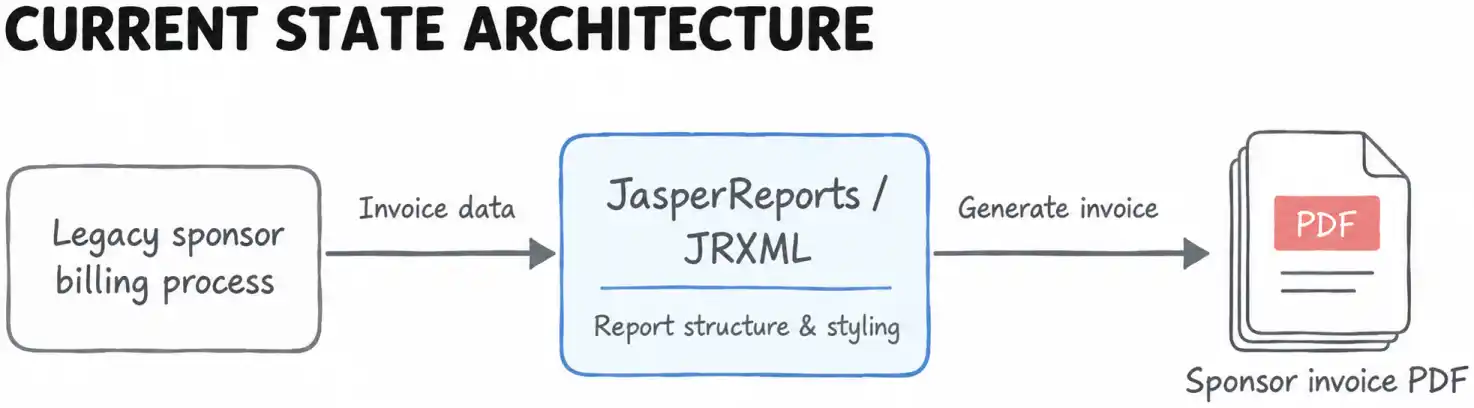
Those invoices had previously been generated from a JasperReports JRXML template, an XML-based report template that defines report layout and elements. The existing report could not simply be moved into Data Connect and executed there.
RELATED BLOG POST: The reporting challenge was one part of a broader Banner SaaS sponsor billing modernization. In a separate case study, we cover the overall architecture, contract processing logic, financial calculations and operational flow.
Here, the focus is narrower: how the reporting layer was reconstructed so Data Connect could generate the required invoice output.
Move sponsor invoice generation into Data Connect while preserving the required invoice output.
Why the JasperReports output became a migration problem
The legacy sponsor billing process already produced a defined business deliverable: a PDF invoice for the sponsoring organization. Its page structure, data placement, formatting and presentation were based on an existing JasperReports JRXML template.
That reporting behavior still mattered after the billing process moved to Data Connect. The JRXML-based report was part of the legacy implementation, while the modernized solution needed to generate the document through Data Connect.
The existing template therefore became the specification for what the new reporting layer had to reproduce.
The existing JRXML-based invoice could not simply be carried over and executed inside Data Connect.
Rebuilding the report structure from the JRXML template
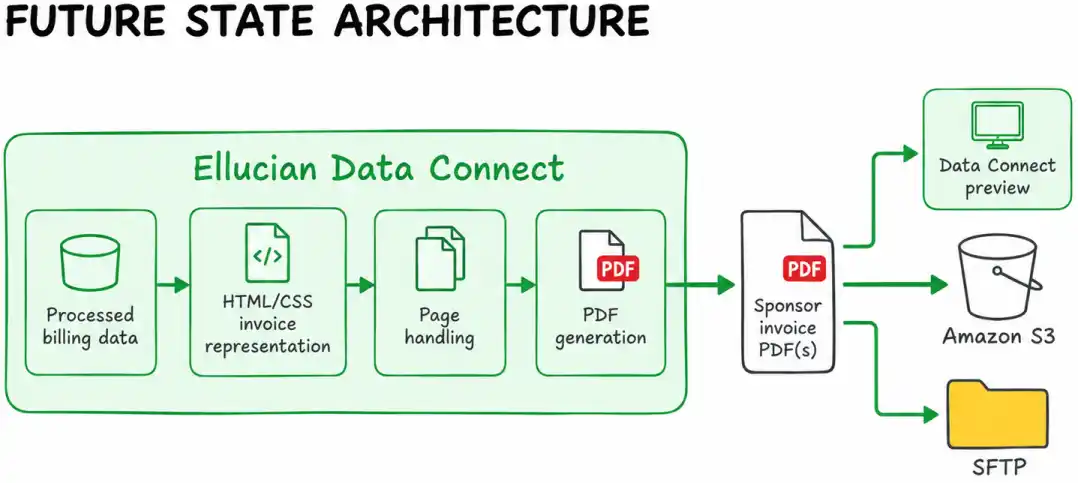
The first step was to understand what the existing Jasper report actually defined. The team examined the JRXML template, including its page structure, field arrangement, markup and styling requirements, then reconstructed that representation as HTML and CSS that Data Connect could use for PDF generation.
The resulting pipeline does not run the old Jasper report. It builds a fully styled HTML document whose structure and formatting are derived from the existing invoice design.
The goal was to preserve the business output that the legacy reporting engine had produced, without carrying that reporting engine into the new implementation.
The team also refined the reconstructed HTML and CSS to produce the required formatting in the rendered PDF.
When the original report engine cannot move with the application, the existing report can serve as the specification for the output that must be rebuilt.
Feeding processed billing data into the new report
Recreating the layout was only one part of the solution. The invoice also had to receive the data produced by the modernized billing pipeline.
By the time report generation begins, the upstream pipeline has already prepared the reporting dataset. The final document can draw values from three broad sources: the processed payload, meaning the structured data passed into the reporting stage, incoming execution parameters and values calculated or prepared internally during pipeline processing.
This separation keeps the reporting layer focused on document generation. The contract and financial logic runs earlier in the pipeline, while the reporting stage receives the values needed to assemble the final invoice.
Once the layout was rebuilt, how could the pipeline turn processed billing data into the same usable invoice document?
See how the report combines processed data, runtime inputs, and calculated values
The report is assembled from more than one data source inside the pipeline. The implementation specification identifies three categories that feed the final output.
Source
Role in the report
Processed payload
Supplies the primary student, sponsor, enrollment, contract and financial information prepared earlier in the pipeline
Runtime or request parameters
Supplies execution-specific values that affect the generated invoice, such as reporting parameters provided for the run
Internally prepared or calculated values
Supplies context values, labels, calculated amounts and other information produced during transformation and aggregation
This arrangement matters because the invoice does not have to recreate business logic that has already run upstream.
The processing stages prepare the financial dataset first. Report generation then consumes that prepared state and converts it into a document structure. In practical terms, the reporting layer acts as a presentation boundary between the processed billing data and the final sponsor-facing PDF.
The source data available to the reporting process includes several kinds of information:
student and sponsor identifiers and names;
contract metadata;
billing address information;
summarized student charges;
sponsor-related allocations;
credit or payment information;
enrollment and course details;
calculated balances and reporting values;
report-level parameters and context values.
Not every value originates in the same place. Some are retrieved from APIs, some are calculated by the pipeline and some are supplied as execution parameters. For the reporting layer, the important point is that these values have already been normalized into the report structure before the final HTML is rendered.
A simplified view of the data relationship is:
API and pipeline data

        |

        v

processed reporting payload

        |

        +---- runtime parameters

        |

        +---- calculated/context values

        |

        v

HTML invoice structure

        |

        v

PDF output
The JasperReports migration was therefore more than a file conversion exercise. The team had to reconstruct both sides of the reporting contract: the document structure users expected and the way the modernized pipeline supplied values to that structure.
Generating PDFs within Data Connect’s rendering constraints
Once the report structure and data were assembled, Data Connect generated the styled HTML used for PDF rendering.
The implementation had to account for one documented constraint: the generated HTML could not exceed 3 MB. The pipeline handled report content as pages rather than treating the entire output as one unconstrained document.
The flow proceeds from HTML generation to page handling, report file preparation and PDF creation. A single PDF can contain multiple invoices, while one pipeline run can also produce multiple PDF files when data volume or grouping requires it.
The generated files then follow the configured delivery path. The implementation supports Data Connect preview as well as file delivery through Amazon S3, AWS’s object storage service, or SFTP, an SSH-based protocol for transferring files securely.
Follow the report through the Data Connect PDF generation phase
The report generation phase consists of several distinct processing steps rather than a single PDF operation.
1. Prepare the report context
The pipeline first persists the information needed for the report header and carries forward the reporting context created earlier in processing.
A custom report transformation stage provides an extension point for shaping the report structure before final rendering.
2. Build the HTML document
The pipeline then creates the actual file content.
This step converts the report structure into fully styled HTML with embedded CSS and the required markup derived from the original JRXML design.
At this point, the processing boundary is clear:
JRXML design

    |

    v

reconstructed layout and styling

    |

    v

HTML + embedded CSS
The generated HTML must remain within the documented 3 MB limit.
3. Handle pages before PDF creation
The generated content is processed as individual pages. This lets the reporting flow treat the final document as a sequence of renderable units rather than one unrestricted HTML payload.
[TECHNICAL DIAGRAM: Data Connect PDF generation flow]
The implementation specification does not expose a detailed algorithm for deciding exactly where every split occurs. The confirmed behavior is the page-oriented processing itself, rather than a reconstructed splitting formula.
4. Create the report file
After the page content has been prepared, the pipeline wraps the generated report content, assigns the file information and invokes the PDF creation step.
The output can contain multiple invoices within one PDF. When input volume or grouping requires it, the same run can produce several PDF files.
5. Deliver and validate the output
After PDF creation, the file can follow one of the configured delivery paths:
Data Connect preview;
S3;
SFTP using the configured authentication method.
The pipeline also includes validation steps for SFTP delivery and collects page-level messages before the phase completes.
The result is a reporting flow that connects the reconstructed invoice presentation directly to Data Connect file generation and delivery while respecting the constraints of the rendering pipeline.
What the new reporting layer made possible
The completed reporting layer moved sponsor invoice generation into the modernized Data Connect process.
The required invoice design was reconstructed as HTML and CSS, populated with processed pipeline data, rendered into PDF and integrated with Data Connect file handling and delivery. The solution can support multiple invoices within one document and multiple PDF files within a run when the dataset requires it.
The reporting function no longer depends on the legacy JasperReports execution layer. The sponsor-facing output remains part of the broader SaaS-compatible billing architecture.
The modernized pipeline can produce the required sponsor invoice PDFs inside Data Connect without relying on the legacy JasperReports execution layer.
Frequently asked questions
Can an existing JasperReports template be reused directly in Ellucian Data Connect?
In this implementation, the existing JRXML report could not simply be moved into Data Connect as an executable Jasper report. The team used the existing template as the reference for reconstructing the required invoice structure and styling in HTML and CSS.
How did the team preserve the existing JasperReports invoice layout?
The JRXML template was analyzed for its page structure, field placement, markup and styling requirements. Those elements were then reproduced in the HTML representation used by Data Connect for PDF generation.
Where does the data in the generated PDF come from?
The final report combines the processed pipeline payload, execution parameters and values calculated or prepared internally during pipeline processing.
How did the solution handle larger invoice outputs?
The implementation generated HTML within a documented 3 MB constraint and processed the report as pages before PDF creation. One run can also produce multiple PDF files when data volume or grouping requires it.
Where can Data Connect send the generated PDF files?
The implementation supports Data Connect preview and configured delivery through S3 or SFTP.
How does this reporting work fit into the broader sponsor billing modernization?
Reporting is one technical layer of the larger modernization. The broader project moved the custom sponsor billing process into a SaaS-compatible Data Connect architecture, including contract processing, financial calculations, auditability and delivery. The broader Banner SaaS sponsor billing modernization is covered separately in the companion case study.
Modernizing a custom Banner reporting workflow?
Legacy reporting requirements can become a major part of SaaS modernization when the document itself supports an important business process. ABCloudz helps institutions analyze those custom dependencies, preserve the behavior that still matters and rebuild the reporting flow in a supported architecture.
If your Banner modernization includes custom reports, document generation or other legacy reporting dependencies, contact ABCloudz to discuss the migration.