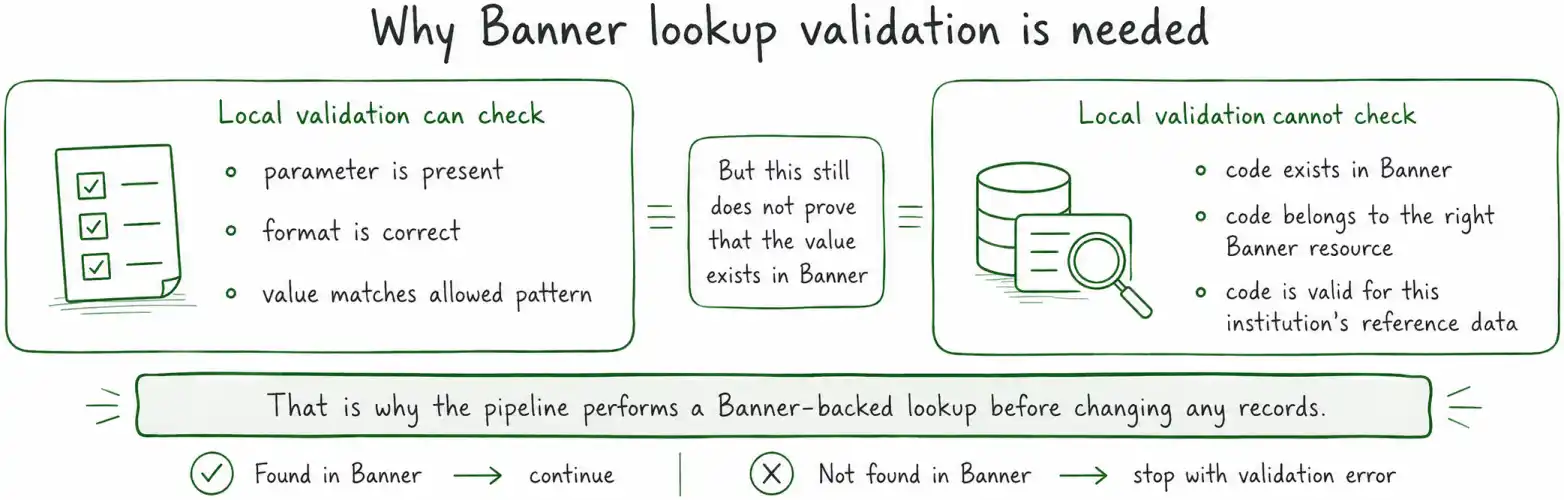
An Ellucian Data Connect pipeline may accept reason codes, employee classifications, or other runtime values that represent reference data maintained in Banner. These values cannot always be validated locally. A parameter may be present and have the correct format, but that still does not prove that the code actually exists in Banner or belongs to the expected Banner resource.
For example, jobChangeReasonCode = ‘TRM’ may look perfectly valid to a JavaScript format check and still be unusable because TRM does not exist in the relevant Banner reference data for that institution. The pipeline therefore needs to verify Banner-backed values before they reach the business logic and before any records are changed.
Framework v3.1 is Ellucian’s versioned extensibility framework for Data Connect pre-built integrations, built around reusable pipeline patterns and defined extension points. The framework terminology and implementation structure referenced in this article come from Ellucian’s authenticated Data Connect documentation for customers and partners, which is not publicly accessible or searchable.
In Framework v3.1, this check belongs to the integration-specific value-validation stage. A custom validation sub-pipeline identifies the supplied parameters that require Banner lookups, queries the appropriate Spec API or Ethos resource, distinguishes an API failure from a successful lookup with no matching record, and collects validation errors before deciding whether the main pipeline can continue.
This post explains how that pattern works through valueValidationParameters[], Banner-backed lookups, and shared validation state in message.header. The goal is to return one complete validation result and stop invalid reference values before business processing begins.
It is part of our Ellucian Data Connect tips and implementation patterns series, where it appears under the Framework v3.1 validation and output workflows section.
The lookup-validation pattern
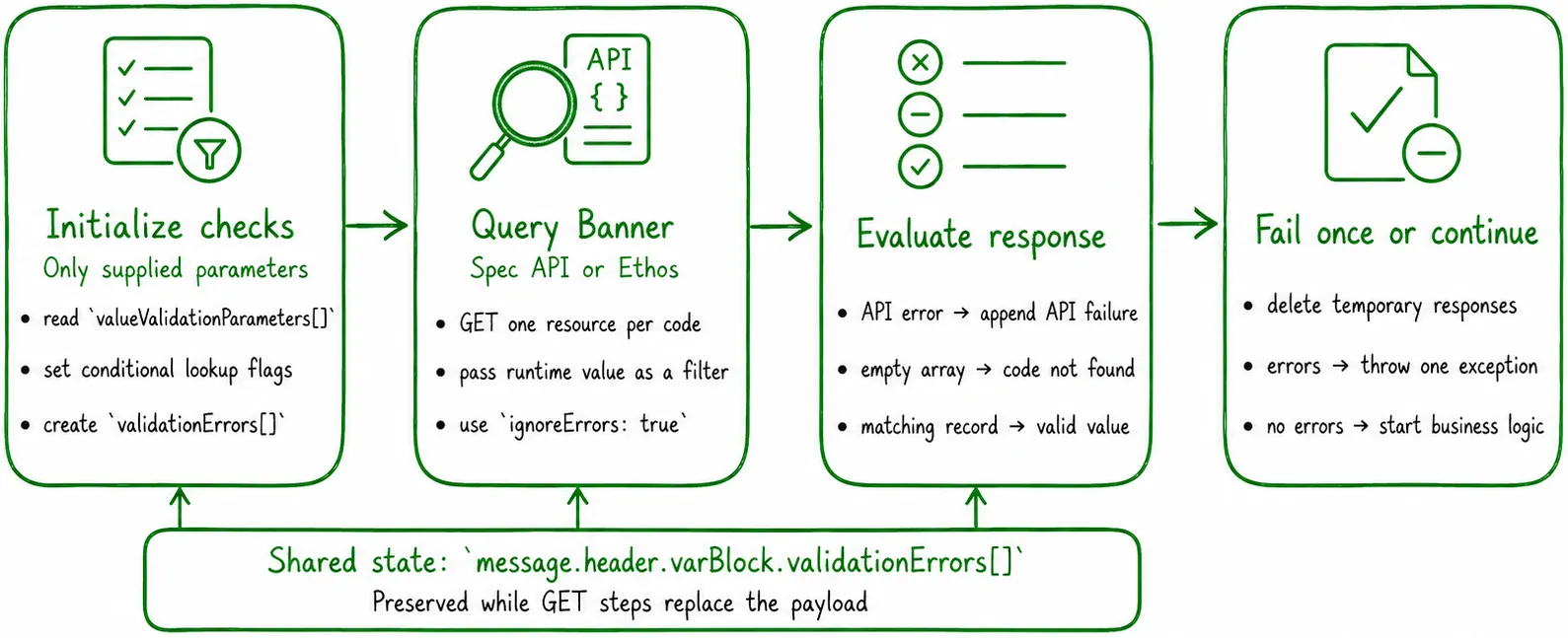
- Initialize the custom validation sub-pipeline and shared error state.
- Call the appropriate Banner lookup for each supplied parameter.
- Distinguish an API failure from a successful response with no matching records.
- Collect all validation errors, then fail once or continue to the business logic.
Step 1. Define a validation sub-pipeline
The lookup logic lives in a separate .pipeline file. An empty subPipelineDefinition object at the root identifies it as a sub-pipeline. The main pipeline calls this definition with isExtensible: false.
"name": "GW-PZPAMTJ-Validation-Sub",
"description":
"Value-level validation: lookup codes against Banner",
"subPipelineDefinition": {},
"parameters": [],
"pipeline": [
"JS - Init",
"GET - job-change-reason-codes",
"JS - Check jobChangeReasonCode",
"GET - termination-reason-codes",
"JS - Check terminationReasonCode",
"JS - Finalize validation"
],
"segments": {}
}
The sequence pairs each GET operation with a JavaScript check. This keeps the resource call and its validation rule easy to trace.
Step 2. Initialize shared validation state
The initialization step reads valueValidationParameters[] from context and creates validationErrors[] in message.header.varBlock. The header is used because each GET step can replace or reshape the current payload.
const valueParams =
context.get('valueValidationParameters') ?? [];
<pre><code>const useGWValidation =
context.get('gwPZPAMTJValidation') === true;
message.header = message.header ?? {};
message.header.varBlock = {
validationErrors: [],
proceed: true,
checkJobChange:
useGWValidation &&
valueParams.includes('jobChangeReasonCode') &&
!!context.get('jobChangeReasonCode'),
checkTermination:
useGWValidation &&
valueParams.includes('terminationReasonCode') &&
!!context.get('terminationReasonCode'),
};
return message;</code></pre>
}
Each flag combines three conditions: the integration-specific validation branch is active, the parameter is listed for value validation, and the caller supplied a non-empty value. An optional lookup is skipped when any condition is false.
The setup of valueValidationParameters[] and the difference between presence and value validation are explained in How to validate parameters in Ellucian Data Connect Framework v3.1.
Step 3. Query Banner reference data
For every required lookup, the sub-pipeline sends a GET request to the appropriate Spec API or Ethos resource. The runtime value is passed as a filter. Depending on the integration, this might query employee reason codes, termination reason codes, employee classifications, or another Banner-backed resource.
The GET step uses ignoreErrors: true so the sub-pipeline can process the result itself. Otherwise, the first API failure could terminate the run before the validation flow has collected the remaining parameter errors.
Step 4. Check the lookup response
The JavaScript check distinguishes two failure cases. An error object means the API call itself failed. An empty response array means the call succeeded, but Banner did not return a matching code.
const payload = message?.payload ?? {};
const varBlock = message.header.varBlock;
const paramValue =
context.get('jobChangeReasonCode');
<pre><code>if (!varBlock.checkJobChange) {
return message;
}
if (payload.jobChangeReasonError) {
varBlock.validationErrors.push(
'jobChangeReasonCode: API error: ' +
payload.jobChangeReasonError.message
);
} else if (
(payload.jobChangeReasonResponse ?? []).length === 0
) {
varBlock.validationErrors.push(
`jobChangeReasonCode: '${paramValue}' ` +
'not found in Banner'
);
}
delete message.payload.jobChangeReasonResponse;
return message;</code></pre>
}
A descriptive error is appended to validationErrors[], but the sub-pipeline does not throw yet. After the response has been evaluated, the temporary lookup data is removed from the payload. The same pattern can be repeated for each Banner-backed parameter.
Step 5. Fail once or continue
The final step reads the accumulated errors. If the array contains any entries, it throws one exception with the full list. If the array is empty, the main pipeline continues.
const errors =
message.header.varBlock.validationErrors ?? [];
<pre><code>if (errors.length === 0) return message;
const details = errors.map(
(error, index) => ` ${index + 1}. ${error}`
)
.join('\n');
throw new Error(
`Parameter validation failed:\n${details}`
);</code></pre>
}
Collecting all errors gives the operator one complete result from the run. It also ensures that invalid reference values stop the pipeline before any business data is modified.
After validation succeeds, the pipeline can execute its business logic and prepare report, audit, or error files. Output configuration is covered in How to configure output files in Ellucian Data Connect Framework v3.1.
Key implementation details
- Run a lookup only when the relevant integration flag is active and the parameter has a value.
- Keep shared validation state in message.header while GET steps change the payload.
- Use ignoreErrors: true when the validation flow must handle API failures itself.
- Treat an API error and an empty successful response as different conditions.
- Delete temporary lookup responses after evaluating them.
- Collect every validation error before throwing the final exception.
Related posts
- How to validate parameters in Ellucian Data Connect Framework v3.1
- How to configure output files in Ellucian Data Connect Framework v3.1
Need help with lookup validation in Data Connect?
ABCloudz helps institutions build Data Connect validation sub-pipelines, connect Spec APIs and Ethos resources, verify Banner reference data, collect actionable errors, and protect downstream business logic from invalid runtime values.