When an Ellucian Data Connect pipeline processes a candidate through multiple steps and sub-pipelines, each stage may need to add an audit message without overwriting messages created earlier. In the workflow covered here, storing the audit trail as a plain auditMessage string separated with ” | “ lets the pipeline preserve the message sequence, carry the value through reducer and merge processing, and write the final audit text directly into a report row.
The implementation follows a simple rule: every step reads the existing auditMessage, builds the next audit entry, and appends it with ” | “ only when a previous value already exists. When audit messages return from a sub-pipeline, the same separator is used to combine the non-empty values before they are merged back into the parent candidate. This keeps the audit state in one consistent format throughout the workflow.
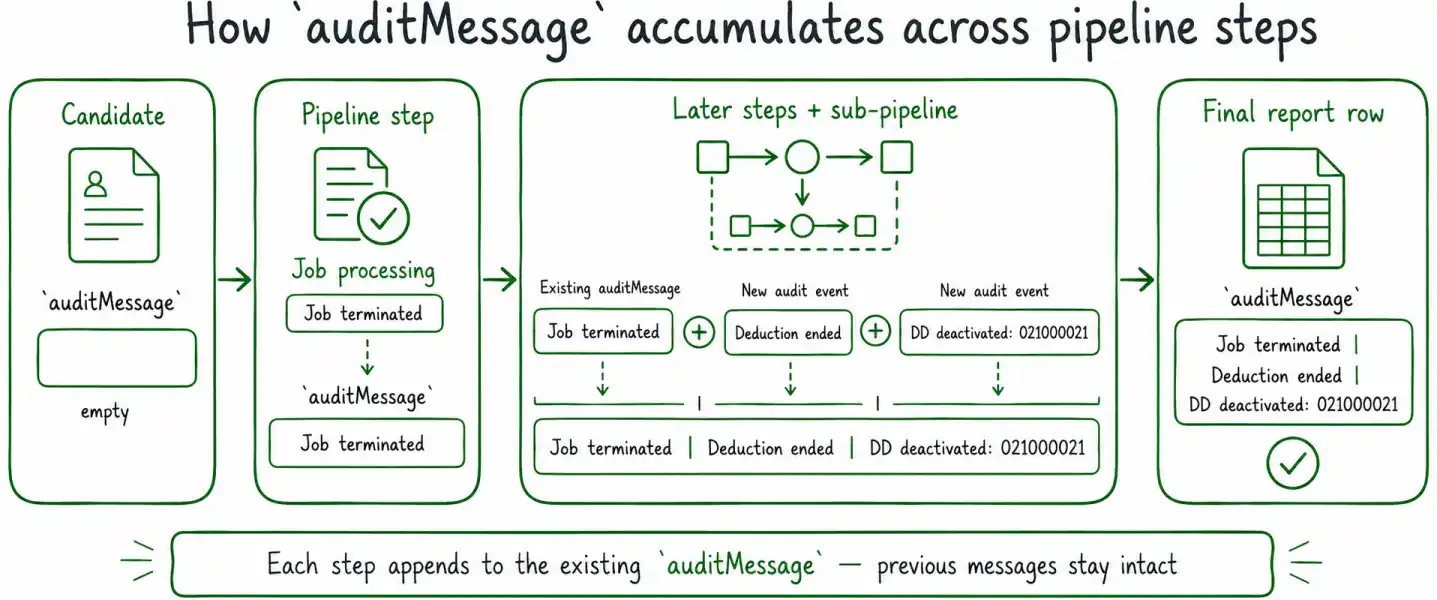
This article belongs to our Ellucian Data Connect tips and implementation patterns, where we document practical solutions drawn from real integration work. This entry focuses on keeping audit information intact as candidates move through multiple pipeline steps and sub-pipelines.
Why audit messages need to accumulate across pipeline steps
A candidate may pass through several processing stages before the pipeline produces its final report output. One step may update employee data, another may process deductions, and another may deactivate direct-deposit records. Each operation can produce information that should remain visible in the final audit result.
If every step simply assigns a new value to candidate.auditMessage, the message created by the previous step is lost.
For example, imagine that the candidate has already accumulated:
A later direct-deposit step then produces:
Replacing auditMessage would leave only the second message. The final report would no longer show that the job termination happened earlier in the same candidate-processing flow.
The implementation described here instead keeps one accumulated audit string:
The ” | “ separator makes each event distinct while keeping the entire audit trail in a single value.
That format is useful for this Data Connect workflow because the accumulated value can pass through reducer and merge processing and can later be written directly into a report column. The source implementation deliberately uses a string rather than an audit array for this reporting pattern.
Accumulate auditMessage with the ” | “ separator
The basic accumulation pattern has three parts:
- Read the current auditMessage.
- Build the next audit entry.
- Append the new entry with ” | “ only when an earlier message already exists.
The production pattern looks like this:
const next = 'DD deactivated: ' + r.bankRoutNum;
candidate.auditMessage = prev ? prev + ' | ' + next : next;
Read the existing value safely
The first line retrieves the audit state already attached to the candidate:
If candidate.auditMessage already contains one or more entries, prev receives that accumulated string.
If candidate.auditMessage is null or undefined, the nullish coalescing operator supplies an empty string instead.
This lets the same append logic work for both the first audit event and every later event.
Build the next audit entry
The next message is created independently:
This particular example comes from direct-deposit processing. The resulting audit entry contains the action and the routing number associated with the record.
The specific message will vary between steps. The reusable part of the pattern is that each step produces one new audit entry and then appends it to the existing candidate state.
Add the separator only when needed
The final assignment handles the first-message and subsequent-message cases:
If prev already contains an audit message, the new entry is appended after ” | “.
If prev is empty, next becomes the complete value.
That distinction avoids producing a leading separator such as:
Instead, the first message starts the string normally, and every later step extends it using the same separator convention.
Merge audit messages returned from a sub-pipeline
The pattern becomes more important when one parent candidate produces multiple items inside a sub-pipeline.
A sub-pipeline may return several records, and some or all of those records may contain their own auditMessage. The parent workflow then needs to bring those messages back together without losing the audit text that the parent candidate already accumulated.
The implementation does this in two stages.
First, collect the audit values returned by the sub-pipeline:
.map(d => d.auditMessage)
.filter(Boolean)
.join(' | ');
Then append the combined result to the existing parent audit message:
next.auditMessage =
(next.auditMessage ? next.auditMessage + ' | ' : '') + ddAudit;
}
In this merge snippet, next is the parent candidate object being prepared for the surrounding pipeline. It is separate from the next string variable used in the earlier accumulation example.
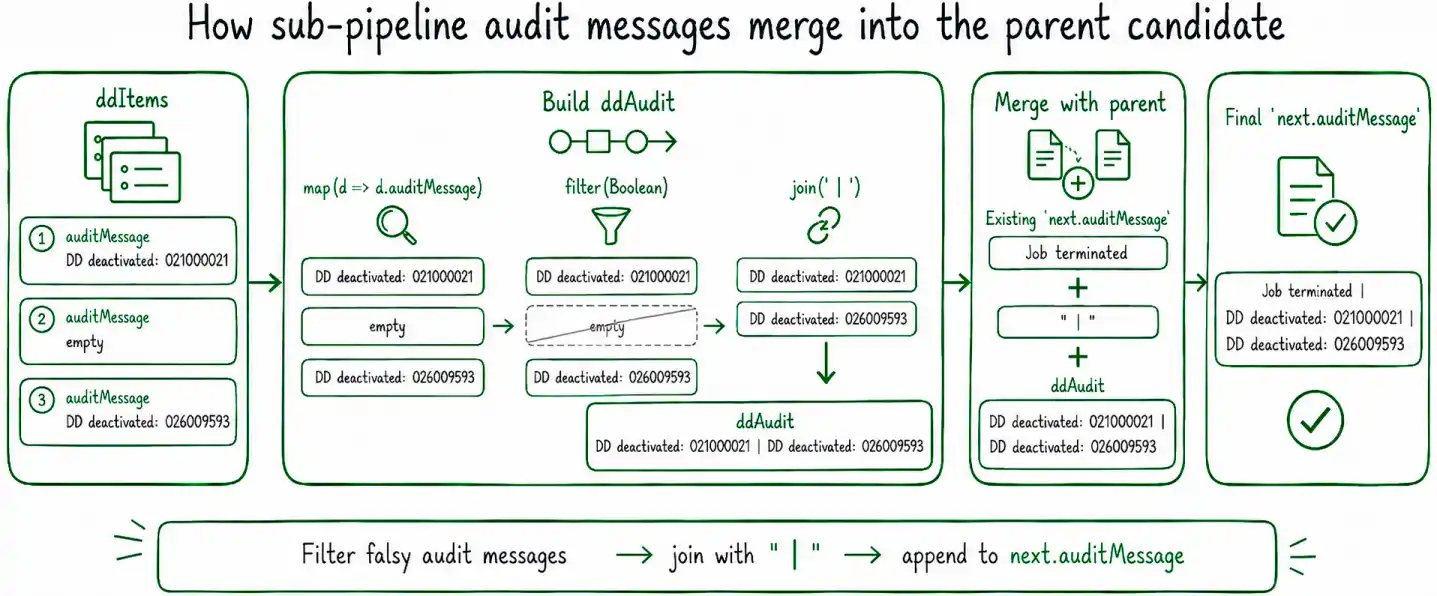
The first part of the code performs three distinct operations.
map(d => d.auditMessage) extracts the audit value from every returned item.
filter(Boolean) removes falsy audit values. In this string-based pattern, that filters out empty or missing messages before they are joined.
join(‘ | ‘) converts the remaining messages into one string using the same separator convention used elsewhere in the pipeline.
For example, sub-pipeline results conceptually like:
DD deactivated: 026009593
become:
The second part then checks whether ddAudit contains anything before adding it to next.auditMessage.
If the parent candidate already contains audit history, another ” | “ is inserted between the parent value and the returned sub-pipeline messages. If the parent has no previous audit entry, ddAudit becomes the beginning of the audit string.
The result is one continuous audit value that can represent work performed both in the parent pipeline and inside the sub-pipeline.
Why use a string instead of an audit array
A natural JavaScript implementation might be to keep audit events in an array:
The source implementation deliberately does not use that pattern. Its final audit information needs to survive the surrounding Data Connect reducer and merge flow and then be usable directly in a report row. For that workflow, a plain string already has the required output shape.
An array would introduce another conversion step before reporting. The pipeline would still have to decide how to serialize or join those individual values before placing them in a single report column.
Using one accumulated string keeps that decision consistent from the beginning:
Each processing step understands the same representation, sub-pipeline results use the same representation, and the reporting stage receives a value that is already ready to write.
The important point is the scope of the pattern. This does not mean JavaScript arrays are unsuitable for logging in general. It means that for the Data Connect reporting workflow described here, the string representation matches the downstream data shape required by the pipeline.
Keep auditMessage usable through reducer and reporting
The audit value is useful only if it remains available after candidate processing has finished.
In this implementation, the string-based auditMessage survives reducer output and can continue with the candidate into later report-processing steps.
That makes the field part of the compact downstream state worth preserving.
For example, when a large Data Connect payload contains temporary API requests and responses that are no longer needed, those intermediate fields can be removed while values such as reportRow and auditMessage remain attached for downstream processing. That cleanup pattern is covered separately in How to prevent JSON.stringify failures with large payloads in Ellucian Data Connect.
Reducer behavior is a separate concern. The reducer determines where iteration results are collected in the resulting message.payload; it does not change the audit accumulation rule itself. For a closer look at that payload structure, see How to access reducer results in message.payload in Ellucian Data Connect.
Keeping these responsibilities separate makes the flow easier to reason about:
- each processing step adds its audit entry;
- sub-pipeline merge logic combines returned audit entries;
- the reducer collects the completed candidate results;
- reporting consumes the accumulated auditMessage.
Update auditMessage at the end of each step
The source implementation follows another useful convention: auditMessage is updated as the final mutation performed for that step.
The business processing happens first. The step determines what happened, updates the relevant candidate state, and only then appends the corresponding audit entry.
Conceptually:
-> Determine the result
-> Update the candidate state
-> Append the audit message
This keeps the audit entry aligned with the state produced by that step.
It also makes each step easier to review. The processing logic determines the outcome first, and the final auditMessage assignment records that outcome using the same accumulation convention as the rest of the pipeline.
The specific message text can vary between operations, but the sequence stays consistent.
Keep the separator convention consistent
Once ” | “ is used as the audit separator, every step and merge operation should follow the same convention.
Mixing different separators or constructing audit text differently in different sub-pipelines makes the final value harder to read and harder to process consistently.
The implementation therefore uses the same separator when:
- appending a new message to a candidate;
- joining multiple audit values returned from a sub-pipeline;
- merging those returned messages back into the parent audit string.
This gives the final report a predictable structure regardless of which processing stages contributed audit information.
For example:
The contents differ by operation, but the representation remains stable.
Key implementation details
- Keep one accumulated auditMessage string for each candidate.
- Append new audit entries instead of replacing messages created by earlier pipeline steps.
- Use ” | “ consistently as the separator between audit entries.
- Add the separator only when a previous audit value already exists.
- When merging sub-pipeline results, collect the returned auditMessage values, remove falsy entries, and join the remaining values with the same separator.
- Merge the resulting sub-pipeline audit string back into the parent candidate without discarding earlier audit history.
- Keep the accumulated audit value in a form that can survive reducer processing and be written directly to a report row.
- In the implementation described here, update auditMessage as the final mutation in each processing step.
Related Data Connect posts
- Ellucian Data Connect tips and implementation patterns
- How to prevent JSON.stringify failures with large payloads in Ellucian Data Connect
- How to access reducer results in message.payload in Ellucian Data Connect
- How to configure output files in Ellucian Data Connect Framework v3.1
Need help with Ellucian Data Connect audit and reporting workflows?
ABCloudz can help design and troubleshoot Ellucian Data Connect pipelines, including audit-state handling, reducer and sub-pipeline processing, report generation, payload management, and reusable integration patterns for production workflows.