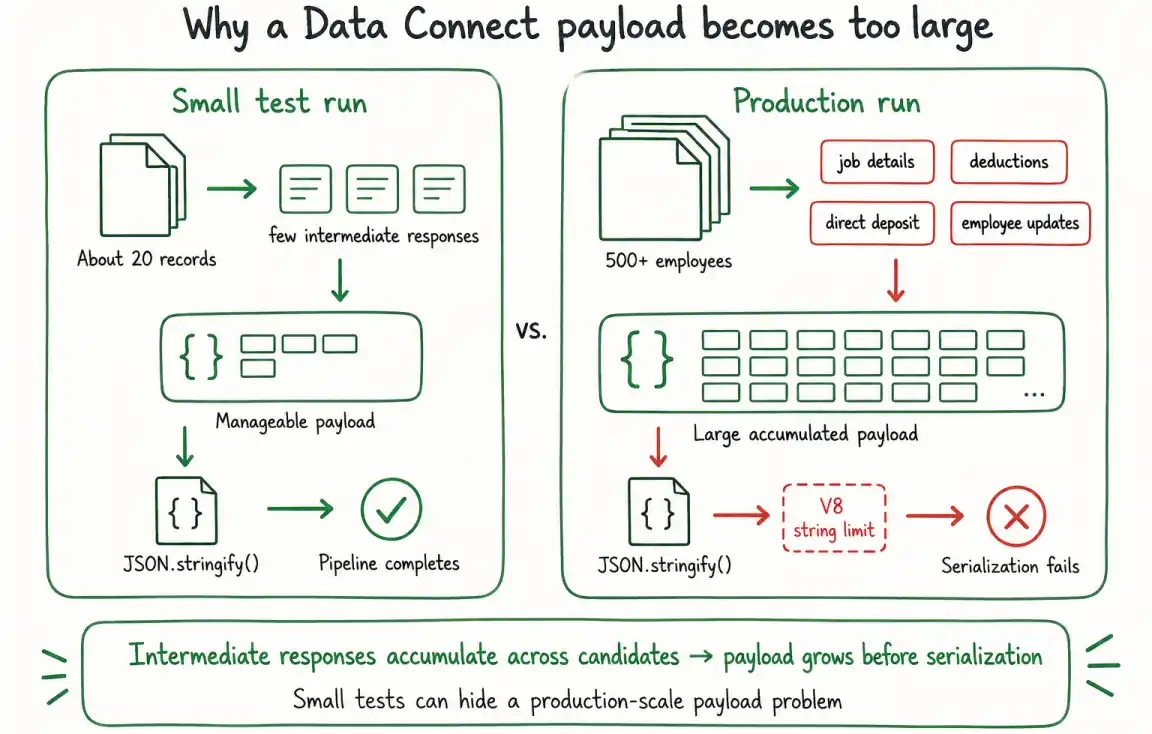
An Ellucian Data Connect pipeline can work normally with a small test dataset and then fail in production when JSON.stringify() processes a much larger accumulated payload. In this production case, processing about 20 records worked as expected, while a production run with 500+ employees could stop with a cryptic V8 engine error and no useful stack trace because intermediate API responses and other processing data had accumulated in the candidate payloads.
The fix is to remove intermediate fields once they are no longer needed, before the pipeline reaches the save-payload or serialization stage. The production implementation uses a CLEANUP_FIELDS array to delete accumulated job-detail, deduction, direct-deposit, and employee-update data while retaining the information still required for reporting and audit processing.
Our Ellucian Data Connect tips and implementation patterns series collects production integration issues and the implementation patterns used to resolve them. This entry focuses specifically on controlling payload growth before JavaScript serialization by removing intermediate Data Connect state that no longer needs to travel through the pipeline.
Why the payload grows during processing
A candidate may begin a pipeline with a relatively small set of values. As processing continues, however, additional data can be attached to that candidate.
In the workflow covered here, candidate processing involves job-detail data, deduction data, direct-deposit data, request bodies, and responses returned by multiple API operations. Fields such as currentJobDetail, jobDetailsResponse, directDepositResponse, and putEmployeeJobsResponse are useful while their corresponding operations are running.
The problem appears when those intermediate values remain attached after the pipeline no longer needs them.
With a small development dataset, carrying those additional fields forward may not create an obvious issue. With hundreds of employees, the same pattern is repeated for every candidate. The resulting payload can therefore contain a large amount of intermediate processing state by the time the pipeline reaches the step that needs to save or serialize it.
What matters here is separating data that must survive downstream from data whose purpose has already been completed. Keeping a final report value or audit message may be necessary. Keeping every request body and API response used to produce that result may not be.
Why JSON.stringify() can fail on a large Data Connect payload
Data Connect JavaScript transforms run on V8. JSON.stringify() is constrained by V8’s hard maximum string length, approximately 500 MB for the runtime described here, with a considerably lower practical ceiling possible in the Data Connect sandbox.
That limitation becomes relevant when a pipeline tries to serialize a payload containing accumulated processing state for many candidates.
In the implementation described here, the difference became visible only when the workload increased:
Development processing:
Pipeline completes normally
Production processing:
Large accumulated candidate payload
V8 serialization failure
The 500+ employee workload is the production case in this implementation. The underlying issue is the amount of data that has accumulated by the time JSON.stringify() runs.
A candidate that carries several large API responses consumes more of that available payload capacity than a candidate that contains only the compact values needed for the remaining pipeline steps. As the number of candidates increases, retaining unnecessary intermediate fields can therefore make a serialization problem that is invisible during smaller tests appear during a production run.
For this reason, testing only with a small sample can miss the problem. The pipeline logic may be functionally correct while the amount of state carried through the workflow becomes too large at production scale.
Reduce the payload before serialization
The cleanup can be organized into three steps:
- Identify intermediate fields that have finished serving their purpose.
- Remove those fields from every candidate before the payload is serialized.
- Continue the pipeline with the reduced candidate state.
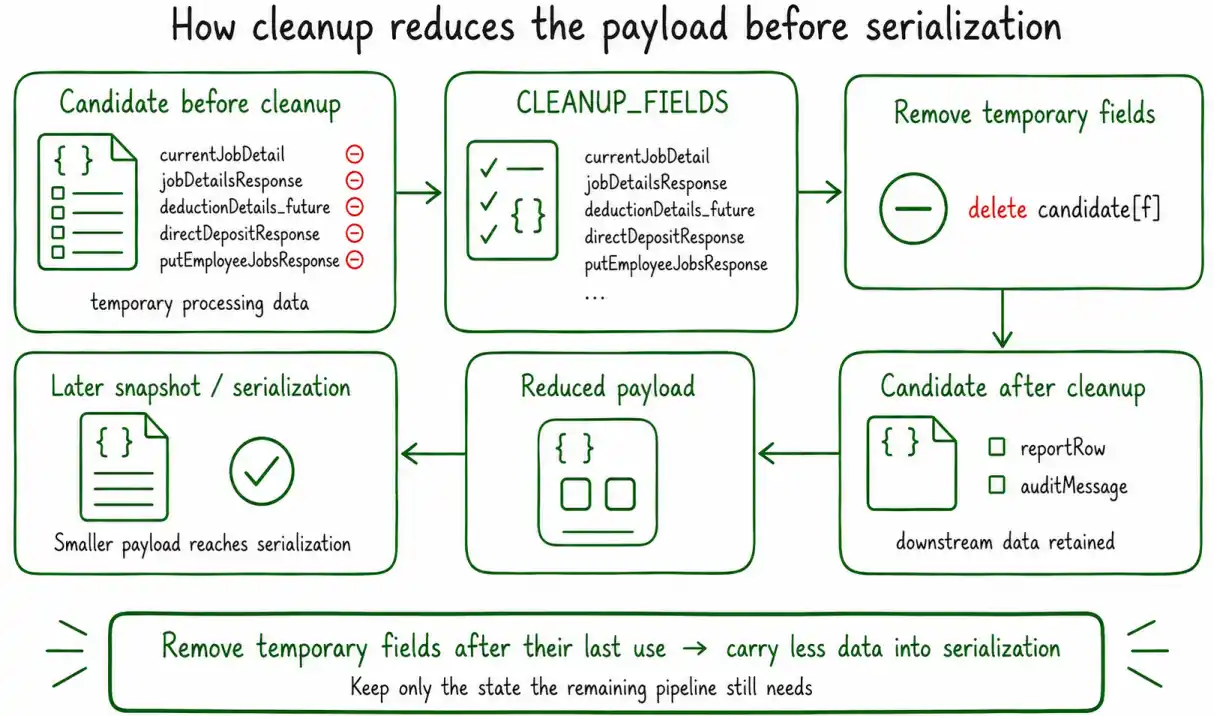
The goal is not to remove data simply because it is large. The goal is to stop carrying temporary processing data after the pipeline no longer needs it.
In this workflow, the cleanup is centralized through a CLEANUP_FIELDS array.
Step 1. Identify temporary processing fields
Start by identifying fields created during earlier API and transformation steps that are safe to discard before serialization.
The production implementation uses the following list:
'currentJobDetail',
'jobDetailsBatchBody',
'jobDetailsResponse',
'deductionDetailsBatchBody',
'deductionDetails_future',
'deductionDetails_future_max',
'deductionDetails_active_current',
'directDepositResponse',
'putEmployeeJobsResponse',
'putEmployeeEmploymentsResponse',
];
These fields represent several types of temporary state used during employee processing. currentJobDetail holds job-detail information needed while processing the current job state. jobDetailsBatchBody and deductionDetailsBatchBody contain request data prepared for batch operations. jobDetailsResponse, directDepositResponse, putEmployeeJobsResponse, and putEmployeeEmploymentsResponse contain results from earlier API calls. The deduction fields contain intermediate deduction data used while the pipeline determines the applicable records. By the time this cleanup runs, those values have already served their purpose in this workflow and are safe to discard.
Centralizing the field names also makes the cleanup explicit. Instead of scattering delete operations across unrelated parts of the transform, the pipeline has one list showing which pieces of processing state should not survive into the later payload.
Step 2. Remove the fields from each candidate
Apply the cleanup to every candidate:
CLEANUP_FIELDS.forEach(f => delete candidate[f]);
});
The outer forEach visits each candidate in the accumulated result set. The inner loop removes every field identified in CLEANUP_FIELDS. This matters because the payload problem is cumulative. Removing one large response from one candidate does not address equivalent temporary data attached to hundreds of other candidates. The cleanup needs to reduce the state carried by the candidate collection as a whole.
After this step, each candidate contains less intermediate processing data, while the values intentionally retained for downstream work remain available. In this implementation, the compact state that needs to survive includes reporting and audit information such as reportRow and auditMessage, rather than the complete request and response history used to produce it.
For the pattern used to accumulate audit information across pipeline steps, see How to accumulate audit messages across Ellucian Data Connect pipeline steps.
Step 3. Continue with the reduced payload
After the temporary fields have been removed, the workflow stores the reduced payload in message.header.payloadOld before the subsequent snapshot or serialization processing:
This assignment preserves the current payload reference in message.header.payloadOld; it is not itself the serialization or snapshot operation. Those operations occur later in the workflow, after the unnecessary candidate fields have already been removed.
The order is important:
-> Use intermediate API data
-> Remove data that is no longer needed
-> Store the reduced payload in message.header.payloadOld
-> Continue to later snapshot / serialization
The cleanup therefore happens before the large accumulated structure reaches the point where JSON.stringify() becomes a risk.
Remove fields only after they are no longer needed
The cleanup list should represent temporary state, not simply a collection of the largest properties in the payload. A response may be large and still be required by a later step. Deleting it too early would change the behavior of the pipeline rather than simply reduce its size.
The safe point for cleanup is after the last operation that depends on a field and before the accumulated payload needs to be serialized. For example, if jobDetailsResponse is needed to calculate another value, that calculation must happen first. Once no downstream processing uses jobDetailsResponse, continuing to carry the complete response adds payload size without adding useful state.
The same reasoning applies to batch request bodies, deduction collections, direct-deposit responses, and employee update responses. This is why the production implementation uses an explicit list of fields known to be safe to discard at that stage of the workflow.
Why the failure may appear only in production
Payload-size problems are easy to miss when development testing uses much smaller datasets than production.
In the case covered here, approximately 20 records completed normally. The issue appeared when the same processing pattern ran for more than 500 employees.
The code path did not need to be different for the payload to become much larger. The same temporary fields were simply being accumulated across many more candidate objects.
Conceptually:
20 candidates
x intermediate processing data
= manageable payload
Compared with:
500+ candidates
x intermediate processing data
= much larger payload
This also explains why the failure can appear late in the run. Earlier API calls and transformations can complete successfully. The problem becomes visible when the accumulated state reaches the serialization stage and V8 can no longer create the required JSON string within the available limit.
The practical lesson is to consider payload growth as part of production-scale testing. A pipeline that processes the correct values for a small sample can still carry more state than necessary when the same workflow runs across the full candidate population.
Choose cleanup fields for the current pipeline
The CLEANUP_FIELDS list shown here comes from a specific employee-processing pipeline. It should not be copied unchanged into every Data Connect integration.
Another pipeline may need one of these values later, may use different response fields, or may retain a different final data structure. The reusable pattern is to identify intermediate state that is no longer required and remove it before serialization.
Likewise, the production example of 500+ employees describes the workload in which this issue appeared in this implementation. The amount of data attached to each candidate also affects how quickly the aggregate payload grows.
The important implementation decision is therefore not to choose a universal candidate-count cutoff. It is to prevent unnecessary processing state from remaining in the payload until the save-payload or JSON.stringify() stage.
Key details for large-payload cleanup
- Data Connect JavaScript transforms run on V8, and JSON.stringify() is constrained by V8’s hard maximum string length, approximately 500 MB for the runtime described here, with a lower practical ceiling possible in the Data Connect sandbox.
- A pipeline can work correctly with a small development dataset and fail when the same processing pattern accumulates significantly more data in production.
- Intermediate API request bodies, responses, and working data can make candidate payloads grow throughout the pipeline.
- Remove temporary fields after their last use and before the accumulated payload reaches serialization.
- A centralized CLEANUP_FIELDS array provides a maintainable way to define the processing state that can be discarded.
- Apply the cleanup to every candidate in the accumulated collection.
- Preserve the compact downstream information that the remaining workflow still requires, including reporting and audit state where applicable.
- Adapt the cleanup list to the actual downstream requirements of the pipeline rather than copying field names blindly from another workflow.
Related Data Connect posts
- Ellucian Data Connect tips and implementation patterns
- How to accumulate audit messages across Ellucian Data Connect pipeline steps
Need help with large Ellucian Data Connect payloads?
For production-scale Data Connect workflows, ABCloudz helps teams reduce unnecessary payload state, troubleshoot JavaScript processing and API-response handling, and design reusable patterns for reporting, audit processing, and Banner integrations.