When an Ellucian Data Connect integration needs to create a new Banner employee job-detail record through the Ethos employee-job-details/batches endpoint, the request still requires an id even though the new record does not yet have a real GUID. This creates a practical implementation question: what value should the batch payload send when the operation is an INSERT rather than an UPDATE of an existing job-detail record?
In the implementation covered here, the batch item uses the nil GUID 00000000-0000-0000-0000-000000000000 for the new-record path. A real GUID identifies an existing job-detail record, while the nil GUID allows the Banner-side processing behind this batch workflow to handle the item as a new record. This post explains where that value belongs in the request, how to build the batch payload, and how to keep the INSERT and UPDATE cases separate.
This article is part of our Ellucian Data Connect tips and implementation patterns series. The series covers practical Data Connect, Ethos, and Banner integration patterns, with each post focused on one implementation problem, why it occurs, and a reusable way to handle it.
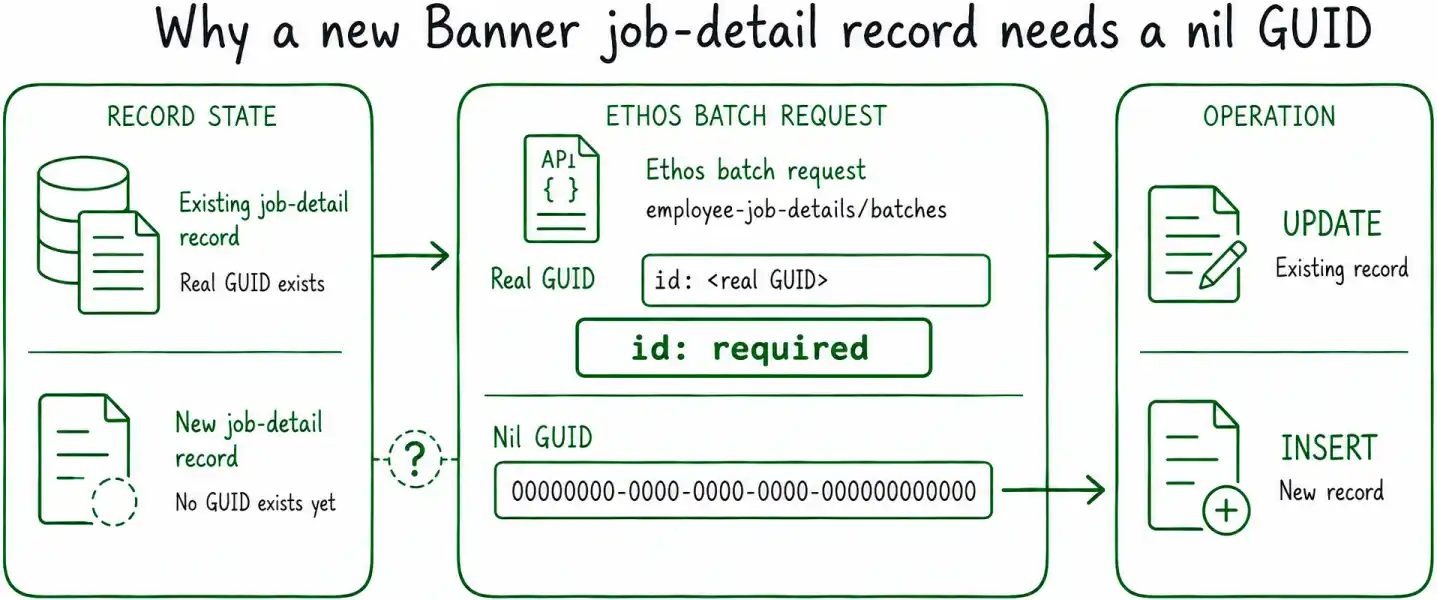
Why a new job-detail record still needs an id
For an existing Banner job-detail record, the id field is straightforward. The integration already has the GUID associated with that record and can send it back when targeting the existing row.
Creating a new record is different. The integration knows the employee, position, suffix, effective date, job status, and other business values that belong in the new job-detail entry, but there is no existing record GUID to provide.
The batch request structure still expects an id, so the integration needs a value that represents the new-record case without pretending that an existing Banner record already exists.
For the employee-job-details/batches workflow described here, that value is the all-zero GUID:
This is commonly referred to as a nil GUID.
How the nil GUID distinguishes INSERT from UPDATE
The important distinction is not whether the request contains an id. Both cases do. The distinction is which value is supplied.
| id value | Operation represented in this workflow |
| Real GUID for an existing job-detail record | UPDATE the existing record |
| 00000000-0000-0000-0000-000000000000 | INSERT a new job-detail record |
The nil GUID should therefore be treated as part of the request semantics for creating the new record, rather than as a permanent identifier that the integration assigns to the record itself.
This distinction also helps keep the application logic explicit. Before building the batch item, the pipeline should already know whether it is creating a new effective-dated job-detail entry or targeting an existing record. The id value then follows from that decision.
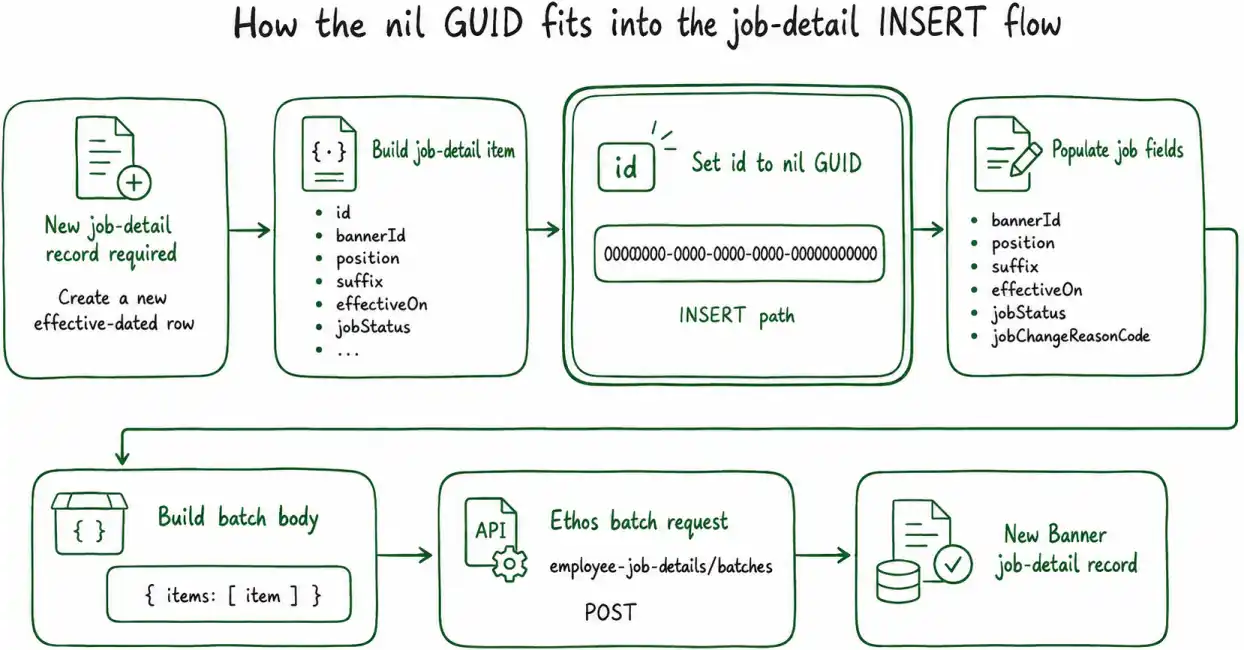
Build the batch payload
The implementation can be separated into three small steps: create the job-detail item, set the new-record identifier, and wrap the item in the batch request body.
The example below comes from a workflow that creates a new effective-dated job-detail entry as part of employee processing. The business fields shown here belong to that specific scenario. The reusable part of this pattern is how the id field is handled when the batch item represents a new record.
Step 1. Build the new job-detail item
Start with the business values that define the new job-detail record.
id: '00000000-0000-0000-0000-000000000000',
bannerId: currentJobDetail.bannerId,
position: posn,
suffix: suff,
effectiveOn: l_new_effective_date,
jobStatus: 'terminated',
jobChangeReasonCode: jobChangeReasonCode,
personnelChangeOn: l_new_effective_date
// Copy or calculate any additional fields required
// by the job-detail operation.
};
The values such as jobStatus, jobChangeReasonCode, and personnelChangeOn are application-specific. They describe the new job-detail entry being created.
The critical field for the INSERT behavior discussed in this post is:
Step 2. Use the nil GUID only for the new-record path
Keep the decision explicit in the pipeline logic:
Existing job-detail record -> existing real GUID
This matters because the two cases represent different operations.
If the pipeline is creating a new effective-dated row, the batch item uses the nil GUID.
If the pipeline is modifying an existing job-detail record, it should use the real GUID associated with that record instead.
The nil GUID is therefore not a replacement for record lookup. The integration still needs to understand whether an existing record is being targeted or whether a new one needs to be created.
In workflows where the new entry is based on a previous Banner job-detail record, that decision often depends on selecting the correct effective-dated source row first. We cover that record-selection pattern separately in How to translate Oracle cursor logic into JavaScript filter/reduce in Ellucian Data Connect.
Step 3. Wrap the item in the batch request body
Once the job-detail item has been prepared, place it inside the items array expected by the batch operation:
items: [item]
};
That object becomes the request body used for the employee-job-details/batches call.
The example contains one item because the focus here is the INSERT signaling pattern. A production workflow may build a larger collection of batch items depending on how the surrounding pipeline processes candidates.
Validate Banner-backed values before building the request
The nil GUID controls the new-record path, but it does not validate the other business values being sent to Banner.
For example, if jobChangeReasonCode comes from a Data Connect parameter or other runtime input, the value may need to be checked against the reference data available in the target Banner environment before the batch request is constructed.
We cover that pattern in How to validate Data Connect parameters against Banner reference data.
Keeping these responsibilities separate makes the pipeline easier to reason about:
- reference-data validation determines whether a business value is valid;
- record-selection logic determines which existing Banner data should be used;
- the id value determines whether the batch item represents the new-record or existing-record path.
Do not reuse the nil GUID for an update
Once an existing job-detail record is being targeted, the integration should use that record’s real GUID.
Using the nil GUID should be a deliberate consequence of the pipeline deciding to create a new job-detail entry. It should not become a default value applied to every batch item.
A simple implementation pattern is to make the decision visible where the request is built:
? '00000000-0000-0000-0000-000000000000'
: existingJobDetail.id;
The exact surrounding logic will vary between integrations, but the intent remains clear:
UPDATE -> existing GUID
That separation is particularly useful in pipelines that process multiple effective-dated Banner records and may perform different actions for different candidates.
Keep the pattern scoped to the applicable batch workflow
The behavior described here comes from the employee-job-details/batches implementation used in this integration.
It should not be generalized automatically to unrelated Ethos resources or other API operations simply because they also contain an id field. Different resources can implement create and update semantics differently.
When adapting this pattern, confirm that the target operation uses the same batch behavior before applying the nil GUID convention.
Key implementation details
- The employee-job-details/batches payload used in this workflow requires an id even when the integration is creating a new job-detail record.
- Use 00000000-0000-0000-0000-000000000000 for the new-record path described in this implementation.
- Use the actual record GUID when targeting an existing job-detail entry.
- Treat the nil GUID as part of the INSERT request semantics, not as the permanent identifier assigned to the new Banner record.
- Keep the INSERT/UPDATE decision separate from the remaining job-detail fields copied or calculated for the new effective-dated row.
- Validate Banner-backed business values independently before sending the batch request.
- Apply this pattern only to an operation whose batch behavior has been confirmed, rather than assuming that all Ethos resources interpret a nil GUID the same way.
Related posts
- Ellucian Data Connect tips and implementation patterns
- How to validate Data Connect parameters against Banner reference data
- How to translate Oracle cursor logic into JavaScript filter/reduce in Ellucian Data Connect
If you are building or modernizing Ellucian Data Connect integrations, ABCloudz can help with Banner and Ethos API workflows, pipeline design, validation logic, effective-dated data processing, and migration of existing integration logic into reusable Data Connect patterns.