Modernizing a Perceptive Content Financial Aid Integration for Banner SaaS
26 Aug 2026
The institution’s planned move from an on-premises Ellucian Banner environment to Ellucian SaaS created a clear modernization requirement for its custom Perceptive Content integration supporting Financial Aid document processing.
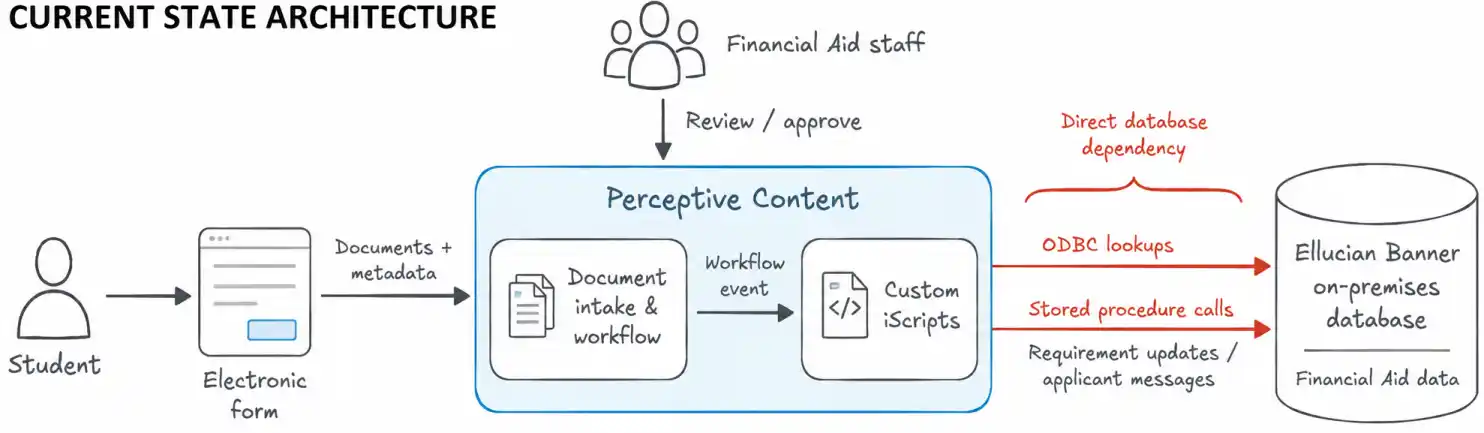
Perceptive Content, Hyland’s content and workflow platform, handled document ingestion, review and workflow processing, while custom iScripts, JavaScript-based automations within Perceptive Content, performed Banner lookups and invoked stored procedures that handled the corresponding Financial Aid updates.
Those database-dependent interactions could not move to the SaaS architecture unchanged. The institution therefore needed to preserve its existing document workflow while replacing the custom Banner database dependencies with supported SaaS integration patterns.
Move the existing Financial Aid integration to supported Banner SaaS APIs while preserving the required behavior of the established document processing workflow.
Why the existing Financial Aid integration could not move to Banner SaaS unchanged
The workflow the institution needed to preserve
Students submitted Financial Aid supporting documents through an electronic form. Perceptive Content ingested and indexed those documents, then routed them through workflow queues for review. After Financial Aid staff approved a document, workflow events triggered custom JavaScript iScripts that synchronized the resulting requirement status with Banner.
The process supported day-to-day Financial Aid operations. Document types were mapped to Banner requirement codes, which identify the Financial Aid documentation requirements tracked in Banner. Workflow metadata determined requirement status, and some document types carried additional fund information. Other scripts retrieved student or academic context for forms, reindexing or bulk document processing.
The modernization therefore had to change how the integration communicated with Banner without redesigning how staff processed documents.
Where the custom integration was tied to the Banner database
The custom iScripts relied on Open Database Connectivity (ODBC), a standard interface for accessing database systems, for Banner lookups. They also invoked institution-specific stored procedures for Financial Aid updates. Those stored procedures did more than persist data. They handled requirement creation or updates, statuses and dates, conditional fund logic and applicant messaging.
That database dependency was the central migration problem. The required business behavior still had to work after the mechanism that implemented it was removed from the SaaS architecture.
Custom Perceptive Content automation depended on Banner database interactions that could not remain part of the SaaS architecture.
Removing the stored procedure dependency was only part of the task. The integration still had to reproduce the Financial Aid behavior those procedures supported.
How do you change the Banner integration layer without redesigning the Financial Aid workflow around it?
Refactoring the integration around supported Banner APIs
Keep the workflow, replace the integration boundary
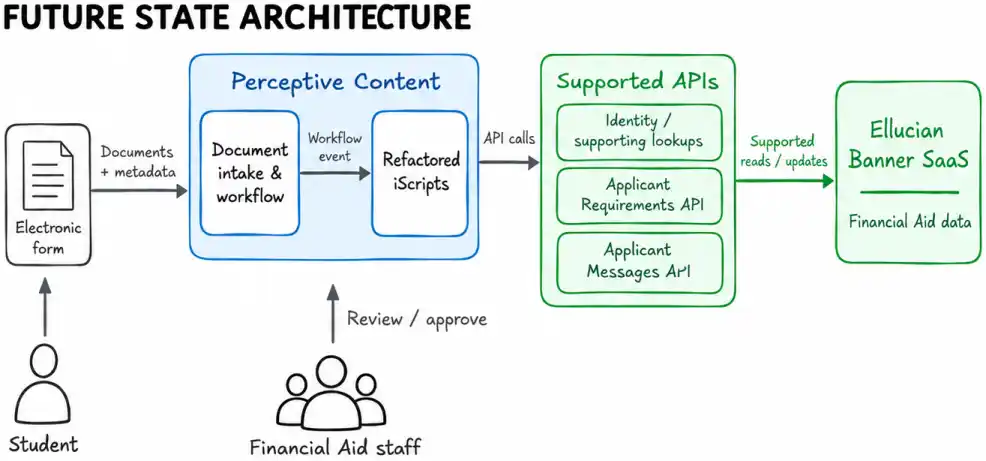
ABCloudz retained Perceptive Content as the system responsible for document ingestion, indexing, routing and workflow processing. Existing workflow events continued to trigger iScripts.
The architectural change occurred at the Banner boundary. The iScripts were refactored so Banner interactions used supported API calls rather than ODBC connections and stored procedure invocation.
This kept the modernization focused on the actual migration constraint. The institution could retain its established Financial Aid document workflow while changing how that workflow reached Banner.
See how the different Perceptive automation paths were refactored
The modernization covered several distinct automation paths rather than a single Financial Aid update.
Automation path
Legacy Banner dependency
Future-state interaction
Financial Aid approval
Stored procedure based requirement update, with related messaging behavior
Requirement API interaction plus applicant message creation when required
Upload and reindex
Banner lookups plus stored procedure based requirement update
API-based supporting lookups plus requirement update
Student-facing lookup
ODBC based Banner reads
API-based supporting lookup
Bulk document import
Banner read-only lookup for student and Financial Aid context
API-based supporting lookup
The approval path handled the main write operation. After Financial Aid staff completed document review, the iScript collected the relevant document and workflow metadata and submitted the corresponding requirement update through the API-based integration.
The upload and reindex path had a broader role. It resolved student context, derived Financial Aid information, assigned document metadata and routed the document into the appropriate Perceptive workflow. For the Financial Aid path, it also participated in requirement processing. Modernizing it therefore required both lookup replacement and API-based update behavior.
The student-facing lookup script did not update Banner. It retrieved information needed by the electronic form. This distinction mattered during the refactor because different scripts depended on Banner for different purposes. Read-only database dependencies had to be addressed along with write operations.
The bulk import process likewise remained primarily a Perceptive Content document creation and routing flow. Its Banner dependency consisted of supporting reads used to derive student and Financial Aid context.
Together, these paths explain why the existing automation had to be analyzed before implementation. Each script used Banner differently, so each dependency had to be replaced without changing the operational role of the surrounding workflow.
Translate document context into Financial Aid updates
When a workflow event requires a Financial Aid update, the integration extracts the relevant context from Perceptive Content. This includes the student identifier, Aid Year, Document Type, Requirement Status, optional Fund Code, processing user and document metadata.
The iScript then translates that context into Banner-facing values. Document Type maps to the corresponding Requirement Code. The Financial Aid status stored in Perceptive becomes the Requirement Status. Fund information is included only when applicable. Workflow context provides processing metadata.
Before submitting the update, the integration verifies that the required values are present and that student identity and requirement mapping can be resolved.
Follow the requirement update from Perceptive metadata to the Banner API
The requirement update follows a controlled sequence of extraction, resolution, mapping, validation and submission.
1. Extract the document and workflow context
The iScript begins with values already available from the Perceptive document or workflow event:
Source context
Purpose in the integration
Student identifier
Correlates the document with the correct Banner student
Aid Year
Identifies the Financial Aid year for the requirement
Document Type
Determines which Banner requirement the document satisfies
Financial Aid status
Supplies the requirement status to be applied
Fund Code
Included only for document types that require fund-specific handling
Workflow user
Provides processing context
Document timestamp and identifier
Supports correlation, auditing, and processing context
2. Resolve student identity when required
The legacy implementation depended on database-oriented identity resolution, including Oracle-specific handling of inbound identifiers.
The refactored flow resolves the inbound identifier through the supported identity layer and obtains the Banner-compatible student identity required by downstream API interactions. This changes the integration mechanism without redefining the institution’s student identity model.
3. Apply the document-to-requirement mapping
The integration retains the institution’s existing mapping between Perceptive document types and Banner requirement codes.
This is simplified pseudocode that represents the confirmed transformation logic rather than source code from the implementation.
4. Validate before submission
The integration checks the values needed to construct a valid requirement update.
A simplified decision flow is:
if student identity cannot be resolved:

    stop requirement processing

    record the failure

    follow the error path


if requirement code cannot be derived:

    stop requirement processing

    record the failure

    follow the error path


if required Financial Aid values are missing:

    stop requirement processing

    record the failure

    follow the error path


otherwise:

    submit the requirement update
This validation prevents an update from being submitted when the document cannot be reliably associated with the correct student or Banner requirement.
5. Process the API outcome
After submission, the iScript evaluates the result.
A successful requirement operation allows the document workflow to continue. A failed operation captures the error information and sends processing into the defined error handling path.
When the business flow also requires an applicant message, that operation is handled separately from the requirement update.
Separate legacy procedure responsibilities into supported operations
One of the main design decisions was to separate the responsibilities previously combined inside custom stored procedures.
In the future state, requirement records are updated through the supported requirement API. Related Banner summary values remain part of Banner’s own processing rather than being set directly by the integration. Applicant messaging is handled through a separate API operation when the workflow requires it.
This preserves the required outcomes while placing each responsibility behind the appropriate supported interface.
See how stored procedure responsibilities were decomposed for Banner SaaS
The legacy implementation combined several Banner-side responsibilities behind stored procedure calls. The API-based design separates them according to how Banner exposes those functions in the SaaS model.
Legacy responsibility
Legacy implementation
Future-state handling
Create or update Financial Aid requirement
Custom stored procedure updated the requirement record
Supported applicant requirement API
Maintain related requirement summary behavior
Procedure processing affected related Banner summary values
Banner recalculates related values through its own business logic
Legacy processing generated short and full descriptions
Full description becomes the authoritative message body used by the API
Resolve student context
Database and Oracle-dependent lookup logic
Supported identity and supporting API lookups
Requirement processing
The requirement operation corresponds to the Banner Financial Aid requirement record. The integration supplies the student, Aid Year, Requirement Code, status, optional fund information and processing context.
An important boundary is what the integration does not map directly. Related Banner summary values, including values maintained in associated Financial Aid records, remain the responsibility of Banner’s internal business processing.
This keeps the API integration from becoming a manual recreation of internal database behavior.
Applicant messaging
Some Financial Aid workflows also generate applicant messages, which are associated with a student’s Financial Aid record and created as part of requirement processing.
The legacy implementation produced both a short description and a full description. The supported applicant message API exposes a single message body for this purpose, so the full description becomes the authoritative content carried forward by the integration.
That full description is constructed from the requirement description, status and relevant document metadata. The resulting message operation also carries the appropriate student, Aid Year, message code, expiration information and processing context.
Because the supported API can carry the required message content, the migration does not require a custom API extension solely to preserve the separate legacy short-description field.
Why this decomposition matters
The migration is more than a field-for-field conversion of database procedures into HTTP requests.
The engineering task is to identify the behavior provided by the customization, determine where each responsibility belongs in the supported SaaS model and preserve the behavior required by the business process.
This allows the legacy customization to be modernized without reproducing the database architecture that originally implemented it.
Handle identity, validation, and workflow outcomes explicitly
The modernization also removes database-oriented supporting lookups from scripts that need Banner context. Student identity and other required supporting data are retrieved through API-based interactions rather than direct Banner queries.
The integration validates required values before attempting an update. If student identity cannot be resolved, a requirement code cannot be derived or an API operation fails, processing records the failure and follows the defined error path. Successful operations allow the existing Perceptive workflow to continue.
Preserve the business behavior that matters, not the database implementation that happened to deliver it.
What the modernization changed for the institution
The resulting integration keeps the institution’s established Financial Aid document process intact while changing how that process interacts with Banner.
Perceptive Content continues to manage document ingestion, indexing, staff review and workflow routing. Existing document-to-requirement mappings remain in place. The iScripts continue to respond to workflow events, but their Banner interactions now use supported APIs rather than ODBC connections and custom stored procedure invocation.
The institution now has a SaaS-compatible integration architecture while retaining the surrounding Financial Aid workflow.
The institution retained its established Financial Aid document workflow while replacing the Banner database dependency with a SaaS-compatible API integration.
Frequently asked questions
Why could the existing Perceptive Content integration not move to Banner SaaS unchanged?
The integration depended on ODBC-based Banner access, custom stored procedures and Oracle-oriented lookup logic. The modernization had to replace those client-specific dependencies while preserving the Financial Aid behavior they supported.
Did the project replace Perceptive Content or change the Financial Aid workflow?
No. Perceptive Content remained responsible for document ingestion, indexing, routing, review and workflow processing. The modernization changed the Banner integration boundary rather than redesigning the user workflow.
What happened to the business logic that had been inside Banner stored procedures?
Its responsibilities were separated across supported mechanisms. Requirement updates moved to the appropriate Banner API, related Banner summary processing remained within Banner business logic and applicant messaging became a separate API operation where required.
How are Perceptive document fields translated into Banner Financial Aid requirements?
The integration uses the student identifier and Aid Year from the document context, maps Document Type to a Banner Requirement Code, maps the Financial Aid status to Requirement Status, includes Fund Code where applicable and carries processing metadata from the workflow context.
How is student identity resolved without the old database lookup path?
The refactored integration uses supported identity-oriented API interactions to resolve the inbound student identifier into the identity needed for Banner processing rather than relying on database and Oracle-specific lookup logic.
How does the integration handle invalid data or an API failure?
Required values are validated before submission. If identity or requirement mapping cannot be resolved, processing stops before the requirement update. API failures are captured and sent through the defined error handling path rather than allowing the workflow to continue as if the update succeeded.
What happens if the same document is processed more than once?
Repeated processing was included in the integration test design. The requirement processing is expected to complete without creating an invalid requirement state, with the outcome recorded for troubleshooting. The project did not introduce a separate duplicate-document prevention capability.
Did this modernization use Ellucian Data Connect?
No. The solution kept the existing Perceptive Content iScript framework and refactored those scripts to communicate with Banner through supported APIs. It was not implemented as an Ellucian Data Connect pipeline.
Did the project add reconciliation, automated retries, or duplicate-document prevention?
Those capabilities were outside the selected solution scope. The modernization focused on replacing database-dependent Banner interactions while preserving the existing Financial Aid document workflow and adding the required validation and error handling around the API-based integration.
Modernizing a custom Banner integration for SaaS?
Legacy Banner integrations often contain more than outdated connectivity. Custom scripts, stored procedures, database lookups and institution-specific mappings may encode business behavior that still matters after the move to SaaS.
ABCloudz helps higher-education institutions identify those dependencies, determine which behavior needs to remain and redesign the integration around supported Banner SaaS patterns without unnecessarily rebuilding the surrounding business process.
If your Banner SaaS transition includes custom integrations or database-dependent automation, contact ABCloudz to discuss how to modernize them.