Some Ellucian Data Connect pipelines need to process two related collections in sequence, but nested forEach loops are not supported. This post explains how to complete the first loop, preserve its payload, run a second loop, and merge the second-loop results back into the original records.
It is part of our Ellucian Data Connect tips and implementation patterns series and belongs to its Pipeline flow and state management section.
A mass employee termination flow illustrates this requirement. The first loop updates employments and closes benefit deductions for each employee. Direct deposit records must be handled separately, so active records are collected and processed in a second loop.
The pattern used in this example is straightforward:
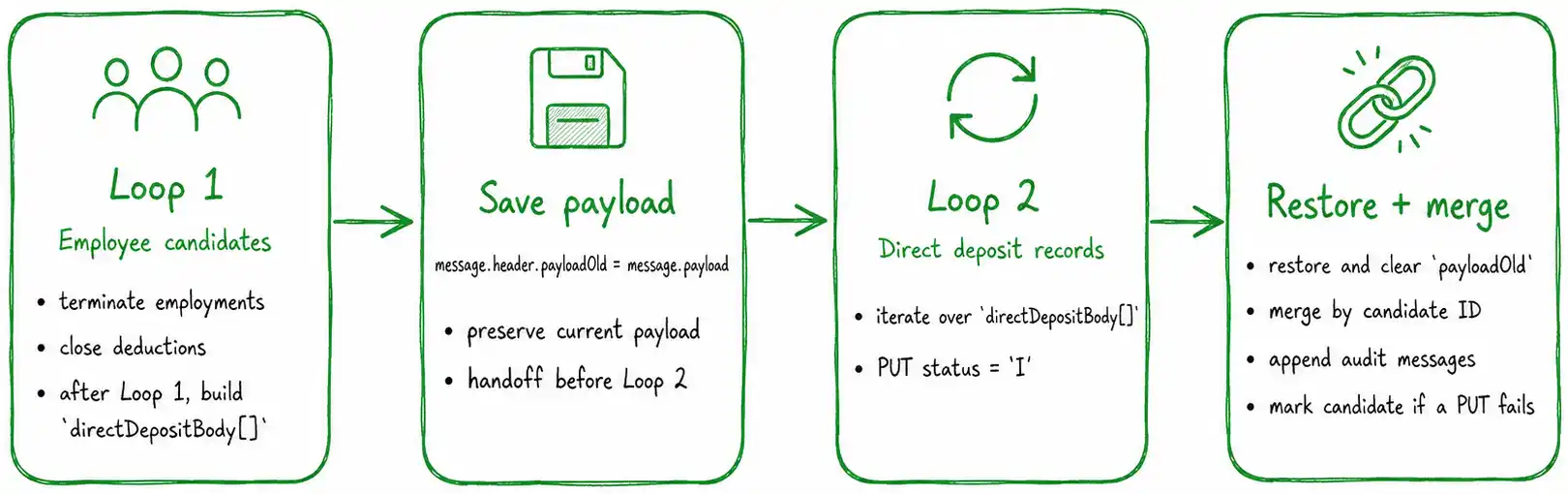
- Complete the first loop.
- Build the input for the second loop.
- Save the current payload in message.header.
- Run the second loop.
- Restore the original payload.
- Merge the second-loop results back into the employee records.
Step 1. Build the input for the second loop
After the employee loop finishes, flatten all active direct deposit records into one array:
const payload = message?.payload ?? {};
const candidates = payload.fullEmployeeCandidates ?? [];
const directDepositBody = [];
<pre><code>candidates.forEach(candidate => {
(candidate.directDepositResponse ?? [])
.filter(record => record.status !== 'I')
.forEach(record => {
directDepositBody.push({
id: candidate.id,
'criteria.bankRoutNum': record.bankRoutNum,
'criteria.priority': record.priority,
bankRoutNum: record.bankRoutNum,
status: 'I'
});
});
});
message.payload = {
...payload,
directDepositBody,
directDepositIsNotEmpty: directDepositBody.length > 0
};
return message;</code></pre>
}
This creates a single collection that can be passed into the second forEach.
Step 2. Save the current payload
When a forEach closes, its reducer replaces message.payload with the loop result. If the second loop needs data produced earlier, that payload must be saved first.
In this pattern, the handoff point is message.header:
message.header.payloadOld = message.payload;
return message;
}
This keeps the full first-loop payload available while the second loop processes the direct deposit records.
Step 3. Run the second loop
The second forEach iterates over directDepositBody and updates each active direct deposit record.
In this example, the PUT request changes the status to inactive:
The reducer then collects those responses into a result array such as fullDirectDeposit.
At this stage, message.payload contains the second-loop output rather than the original employee payload.
Step 4. Restore and merge the results
After the second reducer finishes, restore the saved payload and attach the new results:
const payload = message?.payload ?? {};
const payloadOld = message.header?.payloadOld;
const payloadNew = payload.fullDirectDeposit ?? [];
<pre><code>if (!payloadOld) {
return message;
}
message.payload = {
...payloadOld,
payloadNew
};
delete message.header.payloadOld;
return message;</code></pre>
}
Then merge the second-loop responses back into the related employee records:
const payload = message?.payload ?? {};
const candidates = payload.fullEmployeeCandidates ?? [];
const ddResults = payload.payloadNew ?? [];
<pre><code>const ddByCandidate = {};
ddResults.forEach(result => {
const id = result?.body?.id;
if (!id) return;
(ddByCandidate[id] ??= []).push(result);
});
const merged = candidates.map(candidate => {
const ddItems = ddByCandidate[candidate.id] ?? [];
const next = { ...candidate };
const auditMessages = ddItems
.map(item => item.auditMessage)
.filter(Boolean)
.join(' | ');
if (auditMessages) {
next.auditMessage =
(next.auditMessage ? `${next.auditMessage} | ` : '') +
auditMessages;
}
const errors = ddItems.filter(
item => item.dataMessage || item.putDirectDepositError
);
if (errors.length > 0) {
next.employmentsCanProceed = false;
next.reportRow = {
...next.reportRow,
char_4: 'Error'
};
}
return next;
});
message.payload = {
fullEmployeeCandidates: merged
};
return message;</code></pre>
}
Key implementation details
This pattern depends on four practical rules:
- Flatten related records before starting the second loop.
- Save the first-loop payload in message.header.
- Restore the payload only after the second reducer finishes.
- Merge the second-loop responses through a stable employee identifier.
This approach works well when a DataConnect pipeline needs to process related collections in sequence but cannot place one forEach inside another. It is one of several possible implementation patterns, and the appropriate option depends on the pipeline structure, data volume, and required result handling.
Need help with an Ellucian Data Connect pipeline?
ABCloudz helps institutions design and troubleshoot Data Connect pipelines, API integrations, reducers, validation logic, audit reporting, and error handling.
If a similar pattern is needed in your environment, send us a question through the contact form or reach out through any convenient channel.