How to enable early module registration in Ellucian Banner SaaS before progression is finalized
10 Sep 2026
A higher-education institution needed to open module registration for the next academic year before its Exam Boards had made final decisions on student progression, including whether students would advance to the next year. The timing created a specific Ellucian Banner SaaS challenge: students needed the future-term academic state required to see the right module choices, even though the institution did not yet know whether every student would progress as expected.
The process therefore had to do two things well. It had to create a coherent future-term student state early enough for registration, and it had to make that state reversible once final progression outcomes became available.
Enable next-year module registration before Exam Boards while keeping the resulting student state in Banner SaaS correct after final progression decisions.
Why early module registration could not wait for the normal progression cycle
Banner Structured Progression already supported the normal academic roll. As students progressed, Banner could create future-term general student, curriculum and field-of-study records, update Student Type where required and advance the student’s year-of-study attribute.
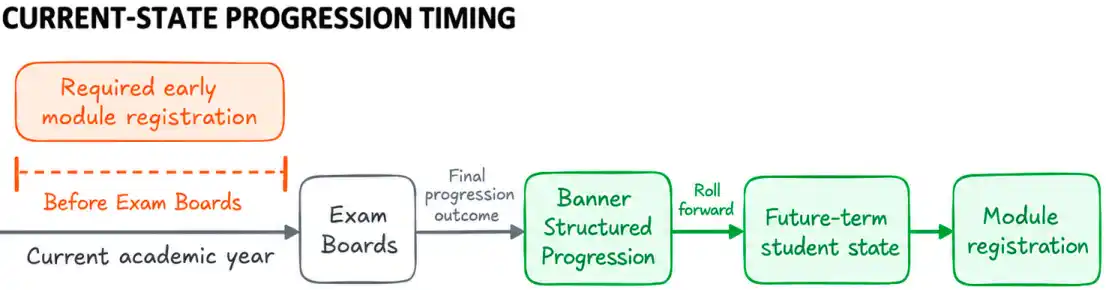
The institution’s problem was timing. Module registration needed to open before Exam Boards, while the normal sequence was effectively:
For early module registration, the future-term state had to exist sooner.
That introduced a second problem. A student provisionally treated as progressing might later be required to repeat the year or might not progress at all. By then, future-year records and module selections could already exist.
The requirement was therefore not simply to create future records earlier. The institution needed a controlled way to create a provisional future academic state and then reconcile it with the authoritative progression outcome.
Create enough future-term Banner state for accurate module selection before progression is final, then correct that state across all affected records when the final outcome differs.
Creating the future-term student state before progression is final
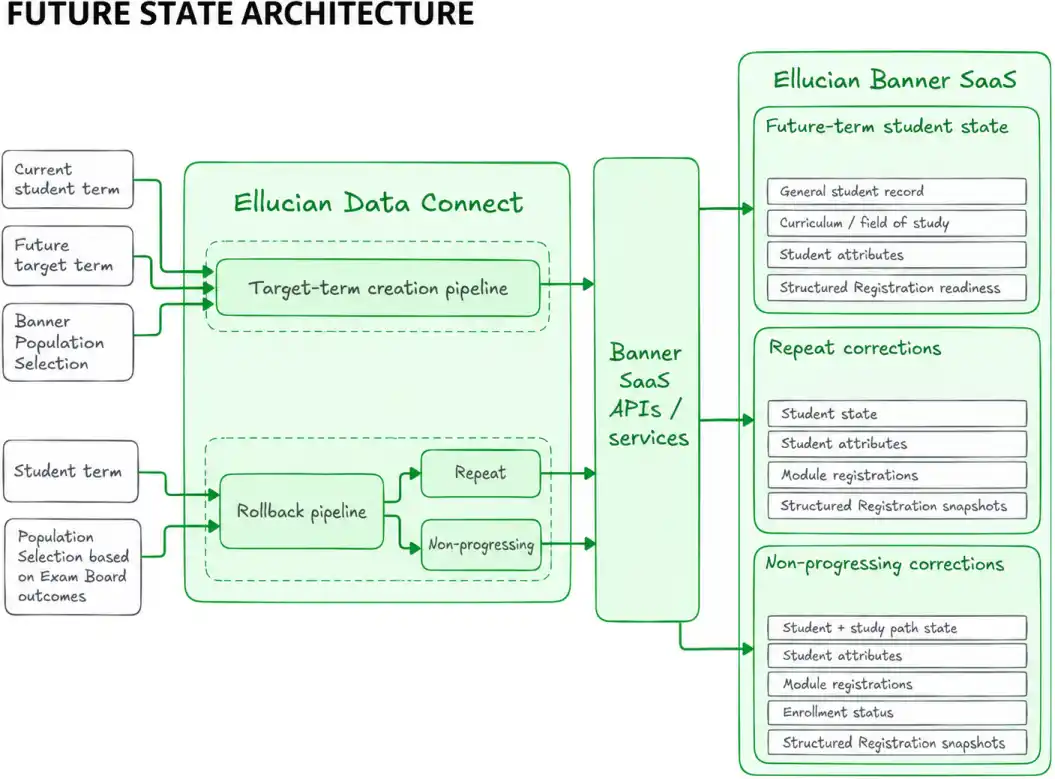
ABCloudz implemented the process for the institution’s Ellucian Banner SaaS environment through Ellucian Data Connect. The solution separated the lifecycle into two coordinated pipelines: one to create target-term records for early registration and another to correct those records when progression outcomes required a different future state.
For the early roll, the process uses the current student term, the future target term and a Banner Population Selection, a mechanism for defining the students to process. Each selected student is then processed individually.
The pipeline creates the future-term general student record and carries forward the academic data required for the next year. Student Type is set to the continuing state where appropriate. Curriculum and field-of-study records are copied forward using Banner’s term-effective model, in which each record version applies from a defined academic term. The prior records are then end-dated.
Student attributes are also carried into the target term, with the year-of-study value advanced for the future academic year.
Together, those changes create the academic context Banner Structured Registration needs to present module requirements for the student’s provisional next-year state.
Opening registration early was not just a scheduling change. Banner first needed a coherent representation of each student’s future academic state.
See how the target-term Banner records are rolled forward
Building a term-effective future state
The early-roll pipeline coordinates changes across several Banner data areas rather than treating the future term as a single record.
Functional data
Banner object
Target-term action
Previous-state action
General student record
SGBSTDN
Create the new term-effective student record and align Student Type with continuing status
Preserve the prior-term record
Learner curriculum
SORLCUR
Create a new target-term curriculum row by carrying forward the applicable values
Set SORLCUR_TERM_CODE_END to the new target term
Field of study
SORLFOS
Create the corresponding target-term field-of-study row
Set SORLFOS_TERM_CODE_END to the new target term
Student attributes
SGRSATT
Copy current attributes into the target term and advance the year-of-study attribute
Preserve the prior-term attribute state
For the general student record, the roll-forward logic normalizes Student Type for the new term:
N → C

C → C

R → C
Here, the codes represent the transition into the provisional continuing state required for the next academic year.
The curriculum records follow Banner’s effective-term model rather than replacing prior data. A new SORLCUR row is created for the target term, while the previous row receives the new term as its end-term value. The same pattern applies to SORLFOS.
Previous-term curriculum

        |

        | copy forward

        v

Target-term curriculum


Previous row:

TERM_CODE_END = target term
Student attributes require another coordinated operation. Current SGRSATT records are copied into the future term, and the attribute representing the student’s year of study is incremented. A custom API handles this attribute processing.
The important point is that the pipeline creates a coordinated future-term state. General student data, curriculum, field of study and attributes advance together so that downstream registration logic sees a consistent academic context.
Rolling back future-term data when progression changes
What happens when the future state was valid for early registration, but the student later does not progress as expected?
After Exam Boards, a Population Selection identifies students whose provisional future state needs to change. The rollback then branches according to the student’s actual progression outcome.
For a student who must repeat, the process changes the future Student Type from continuing to repeating, restores the prior year-of-study value and removes the future module registrations.
It also deletes the Structured Registration snapshot records associated with that future state. This step matters because those snapshots influence the mandatory and optional module requirements presented to the student. Removing them allows Banner Structured Registration to realign the requirements the next time the student accesses registration.
For a student who does not progress, the correction is broader. The future student state becomes inactive, and the study-path state is also made inactive where study paths are enabled. The year-of-study attribute is corrected or removed, future module registrations are dropped, future-term enrollment-status records are removed and the Structured Registration snapshots are cleared.
The rollback therefore reconciles several related Banner functional layers rather than applying a single reverse operation.
See how rollback differs for repeat and non-progressing students
Progression-driven decision logic
The post-Exam-Board flow starts from the progression outcome:
Exam Board outcome

        |

        +-- Progress

        |      |

        |      +--> Retain future state

        |

        +-- Repeat

        |      |

        |      +--> Correct future state for repeat

        |

        +-- Non-progressing

               |

               +--> Deactivate and clean future state
The two rollback branches deliberately do different work.
Banner area
Repeat student
Non-progressing student
General student state
Student Type changes from Continuing to Repeating
Student Status changes from Active to Inactive
Study path
No corresponding status change is required by this branch
Study-path status changes from Active to Inactive
Year-of-study attribute
Restore the previous value
Reset or remove the future-term value as required
Module registrations
Drop/Delete future registrations
Drop/Delete future registrations
Future-term enrollment status
No removal is part of this branch
Remove the relevant EL or ES records
Structured Registration snapshots
Delete
Delete
Repeat branch
The repeat path updates SGBSTDN so that Student Type changes from C to R.
The incremented Programme Year value in SGRSATT is then restored to its previous value.
Future module registrations in SFRSTCR are removed using the Drop/Delete action. The process also deletes the relevant records in SFBSTRH and SFRSTRD.
Banner Structured Registration uses those snapshot tables as part of the student’s structured registration state. When the progression outcome changes, clearing the snapshots allows the module requirements to be rebuilt on the student’s next access using the corrected state.
Non-progressing branch
The non-progressing path changes the future SGBSTDN Student Status from AS to IS.
Where study paths are enabled, the corresponding SGRSTSP study-path status also changes from AS to IS.
The process then:
Corrects or removes the future-term year-of-study value in SGRSATT.
Drops future registrations from SFRSTCR.
Removes the applicable future-term EL or ES enrollment-status records from SFBETRM and SFRENSP.
Deletes the SFBSTRH and SFRSTRD snapshots so Structured Registration can realign with the corrected state.
The distinction between the branches is important. A repeating student still needs a valid future academic state, but that state must represent repetition rather than continuation. A non-progressing student requires a broader deactivation and cleanup of the future-term state.
What the reversible process enables
The resulting process allows the institution to open module registration before final progression decisions while keeping Banner SaaS consistent with the final progression outcome.
Students selected for the early roll receive the future-term academic state for their provisional next-year context. Their year-of-study information advances with the related student and curriculum data, allowing Structured Registration to present the configured module requirements for the new academic year.
When the final progression decision differs, the process can reconcile the affected Banner state rather than leaving provisional records and registrations in place. Repeat students are returned to an appropriate repeating state, while the process deactivates and cleans up the future-term state for non-progressing students.
The institution can support early module selection without treating provisional progression data as irreversible.
Frequently asked questions
Why couldn’t the institution use the normal Banner progression process?
The normal progression cycle creates the future academic state as part of progression. In this case, module registration needed to open before Exam Boards had finalized those progression outcomes, so the required future-term state had to be created earlier.
Does this process replace Banner Structured Progression?
No. The process creates the future-term state earlier for module selection in Banner SaaS, then reconciles it after progression outcomes are known. Banner’s standard progression functionality remains part of the broader academic process.
How does the process determine which students to roll forward?
The early-roll pipeline uses the relevant student term, a future target term and a Banner Population Selection. The selected students are then processed individually.
What happens if a student must repeat the year after early module registration?
The future Student Type is changed from continuing to repeating, the year-of-study value is restored, future module registrations are removed and the Structured Registration snapshots are cleared so the student’s module requirements can realign with the corrected state.
What happens if a student cannot progress at all?
The future student record is made inactive, the study-path status is also made inactive where applicable, the future year-of-study attribute is corrected or removed, module registrations and relevant future enrollment-status records are deleted and the Structured Registration snapshots are cleared.
Why are Structured Registration snapshot records deleted during rollback?
The snapshots reflect the registration state used to guide mandatory and optional module selection. When the student’s progression state changes, removing those snapshots allows Banner Structured Registration to rebuild the requirements against the corrected academic state.
Does Data Connect update Banner records directly?
Data Connect orchestrates the processing and invokes the Banner APIs or services required to create, update or remove the affected records. The exact API implementation varies by operation.
Which Banner records are involved in the process?
The process spans the general student record, learner curriculum, field of study, student attributes, module registrations, study paths and enrollment status where applicable, along with Structured Registration snapshot data. At the object level, those areas include SGBSTDN, SORLCUR, SORLFOS, SGRSATT, SFRSTCR, SGRSTSP, SFBETRM, SFRENSP, SFBSTRH and SFRSTRD.
Need help modernizing a complex Banner SaaS process?
Banner business processes often span multiple records, effective-term rules and downstream behaviors that have to remain aligned as requirements change. ABCloudz helps higher-education institutions design and implement Ellucian integrations and modernization workflows that preserve required business logic and implement it through maintainable, API-driven architectures.
If you are working through a complex Banner SaaS or Data Connect challenge, or a broader Ellucian modernization effort, contact ABCloudz to discuss the process and architecture behind it.