Building an Ellucian Colleague SaaS-to-Symplicity integration for career services
17 Sep 2026
A higher-education institution already relied on an integration between Ellucian Colleague and Symplicity Career Services to supply career-services workflows with current student, faculty, and academic data. As the institution prepared to move to Ellucian Colleague SaaS, that integration also had to be modernized for the new SaaS environment.
The modernization had to do more than recreate file delivery. It needed to move source access into an API-based SaaS architecture while preserving three downstream datasets, the logic used to assemble them, and the outputs Symplicity expected.
Preserve student, faculty, and course schedule delivery to Symplicity during the move to Colleague SaaS while moving source access into an API-based integration model.
Why the existing integration mattered to career services
Career Services already relied on the integration to receive several different categories of institutional information.
Student records provided identity, contact, enrollment, academic program, class level, GPA, and related information used for access, communication, and targeted career services. Faculty data supported coordination with academic departments and instructors. Course schedule data supplied sections, instructors, meeting times, and locations that could be used when planning career fairs, workshops, and employer sessions.
The modernization therefore had to preserve more than a file transfer. These downstream records did not exist as one ready-made dataset in Colleague. The required information lived across multiple functional domains and relationships, and each of the three outputs had its own selection, enrichment, and update requirements.
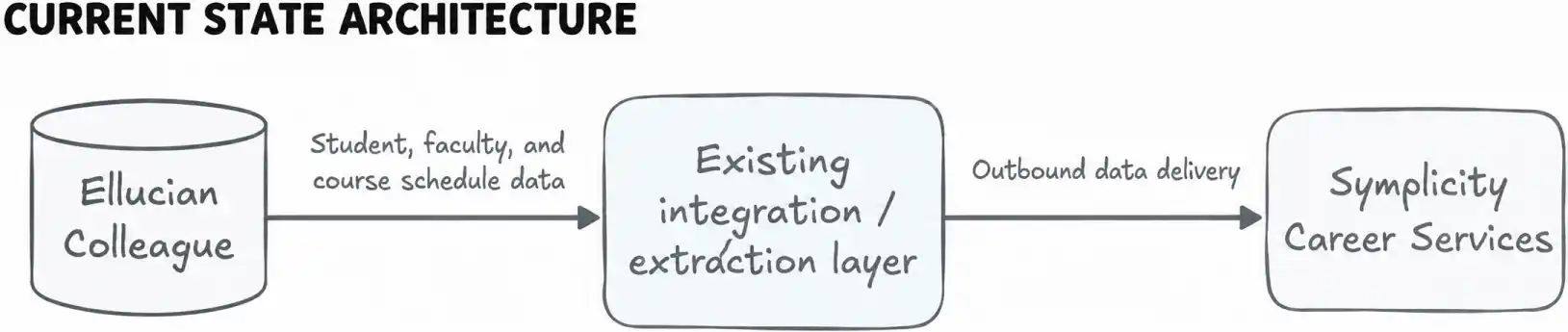
The existing Colleague-to-Symplicity integration had to be adapted for Colleague SaaS without disrupting the downstream data flows it supported.
The integration had to move to API-based processing while preserving three Symplicity-ready datasets and the selection, transformation, and update logic specific to each domain.
Before modernization, the institution already had a Colleague-to-Symplicity integration supporting the required outbound data flow. The transition to Colleague SaaS required that integration to be reworked for the new SaaS environment.
Modernizing the integration with three domain-specific Data Connect pipelines
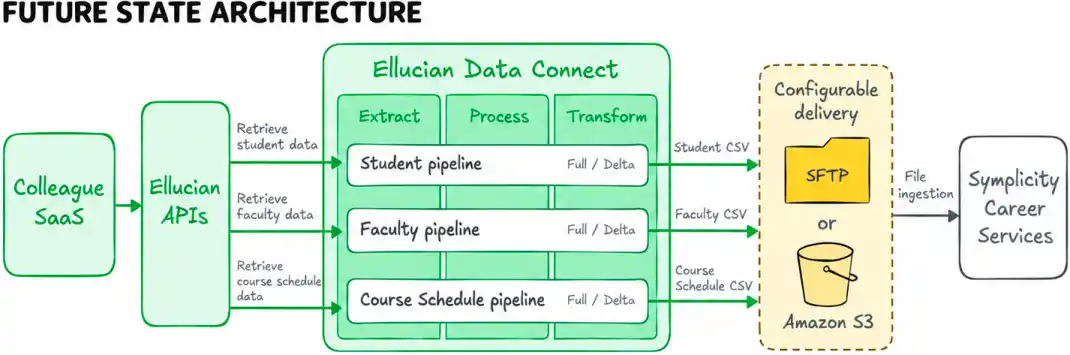
ABCloudz modernized the existing integration for Colleague SaaS through Ellucian Data Connect, using three separate pipelines for student, faculty, and course schedule data.
The modernized design retrieves and assembles the required Colleague information through Ellucian APIs, with Data Connect orchestrating the process.
Each pipeline followed the same high-level Extract, Process, and Transform pattern, but the internal logic remained specific to its data domain. Different Colleague resources, filters, relationships, and transformations were used to construct each output.
The completed solution was intentionally one-way. Data moved from Colleague SaaS to Symplicity through scheduled processing, with each pipeline producing a CSV file for delivery to a configurable SFTP destination or Amazon S3 object-storage destination.
The new architecture separates source access, orchestration, and domain logic. Data Connect provides the common orchestration model, while each pipeline remains responsible for producing the correct downstream representation for its own dataset.
Turning Colleague API data into Symplicity-ready records
The pipelines handled the main data assembly and transformation work.
This API-based assembly provides the source-access model for the modernized integration. Data Connect retrieves related Colleague data through Ellucian-provided APIs, resolves reference data and relationships, applies pipeline parameters and business rules, and combines the results into records designed for Symplicity.
The student flow, for example, brings together person, address, program, classification, GPA, academic standing, and other student-related information before reducing it into one consolidated record. The faculty flow enriches instructor identity with employee, department, phone, and position information. The course schedule flow combines registrations and sections with instructor, meeting, location, and enrollment-related data.
How do you turn data spread across multiple Colleague resources into records that another platform can consume directly?
The answer was not a single mapping step. It was a sequence of selection, lookup, enrichment, transformation, and consolidation operations tailored to each domain.
How the student pipeline assembles one downstream record
Selecting the student population
The student pipeline begins by loading reference information used later in processing, including academic disciplines, student classifications, academic standings, and registration statuses.
It then retrieves section registrations and filters them by the relevant academic period and configured registration criteria. The resulting registrant IDs establish the student population that needs further processing.
Building the base student dataset
The next phase retrieves core person records and related address and academic-level information.
Processing then continues per student. Additional calls enrich each record with data such as:
active or current academic programs and major;
core student status and classification;
username information;
cumulative GPA;
academic standing;
financial aid information where applicable.
The pipeline therefore does not treat any single API response as the final Symplicity record. Each source contributes one part of the downstream model.
Selecting the appropriate GPA
GPA processing includes its own selection logic. A configurable GPA type indicator determines which academic source should be used:
GPA type
Academic source used
I
institution
T
transfer
O
all
If the value is missing or does not match one of these configured cases, processing falls back to the overall all category.
The pipeline then selects the first cumulative GPA entry matching the resolved academic source.
Consolidating the final record
After the individual lookups are complete, a reducer combines the collected person, address, program, classification, GPA, financial aid, academic period, and related information into one student record.
That consolidated object becomes the basis for the final report output and the pipeline’s audit and error structures.
The important architectural point is the fan-out and fan-in pattern: one downstream row is assembled from several related Colleague resources rather than copied from a single source object.
How course schedule data is transformed for Symplicity
The course schedule pipeline performs both relationship resolution and output-specific formatting.
A simplified view of several transformations is shown below:
Colleague data
Processing logic
Symplicity output
Person credentials
Select the Colleague person identifier
STUDENT_ID
Course, section, and term components
Build a composite downstream identifier
Unique course identifier
Instructor roster
Select the instructor whose role is primary
Primary instructor ID
Meeting days
Take day initials, normalize to uppercase, and concatenate them
DAYS, such as MWF
Meeting start and end
Format as HH:MM:SS
Start and end time
Meeting dates
Format as YYYY-MM-DD
Start and end date
Instructional event location
Extract building and room values
Building and room
Section site
Map the site title
Campus
Additional instructors
Extract further instructor identifiers where present
Additional instructor fields
The output also carries the instructional method and section identifiers, including the CRN, which identifies a specific course section.
Enrollment-related fields use configured registration-status criteria rather than simple direct copies. The pipeline evaluates the registration status against configured included and excluded status lists to determine values such as whether the student is considered enrolled for the current term and which enrollment end date should be written.
This produces a schedule-oriented record that Symplicity can consume without having to reconstruct the relationships among registration, section, instructor, location, and meeting objects itself.
Designing full and delta refreshes for different data domains
The modernized solution had to support Full and Delta processing, not just reproduce the downstream fields.
All three pipelines support both Full and Delta processing. Full extracts provide the complete relevant dataset for a term, while Delta runs produce incremental output containing identified changes.
The operational schedule uses weekly Full runs on Monday and Delta runs from Tuesday through Friday.
The key implementation detail is that Delta processing is not identical across all three domains. Student and course schedule processing can use term, status, and date-related criteria. Faculty data requires a different approach because the necessary faculty activity timestamp is not available for this purpose.
Incremental synchronization should follow the behavior of the source domain, not a single generic delta rule.
How the faculty pipeline derives a delta without an activity timestamp
The faculty pipeline uses a snapshot-comparison pattern.
On the initial Full run, the complete faculty report is generated and retained as the reference dataset. On a later Delta run, the pipeline reads that prior report through one of the supported file-reading options, including S3, SFTP, or file upload.
It then performs the current faculty extraction and compares the previous and current datasets using IDs as the comparison key.
A simplified representation of the logic is:
previous = load_previous_faculty_snapshot()

current  = extract_current_faculty_data()


delta = compare_by_id(previous, current)


write_delta(delta)
This pseudocode summarizes the processing pattern rather than reproducing the implementation.
The important engineering decision is that incremental processing is derived from comparison between snapshots rather than from a source activity-date filter.
This preserves incremental delivery for the faculty domain even though its change-detection mechanism differs from the other pipelines.
What the modernized integration delivers for career services
The completed modernization rebuilt the institution’s Student, Faculty, and Course Schedule data flows around the structure and update behavior of each domain while moving source access into the new SaaS architecture.
Colleague SaaS serves as the authoritative source, while Symplicity receives application-ready datasets assembled specifically for career-services use. Full and Delta modes support regular refreshes, and file delivery can be configured through SFTP or S3.
For Career Services, the modernization preserves the institutional data flows its workflows depend on within the new Colleague SaaS integration architecture.
The institution moved its Colleague-to-Symplicity integration to a SaaS-compatible architecture built around API-based Data Connect pipelines while preserving the three required data flows.
Frequently asked questions
How was the existing Colleague-to-Symplicity integration modernized for Colleague SaaS?
The modernized integration uses Ellucian APIs and Data Connect. Separate Student, Faculty, and Course Schedule pipelines assemble the required Colleague SaaS data, generate CSV outputs, and deliver them to Symplicity through configured SFTP or S3 destinations.
Why did the existing integration need to change for Colleague SaaS?
Moving to Colleague SaaS required the existing integration to be adapted to the SaaS environment and rebuilt around an API-based integration architecture.
What Colleague data does the integration send to Symplicity?
The integration sends three main categories of data: student information such as identity, contact, enrollment, and academic attributes; faculty information such as identity, department, phone, and position; and course schedule information such as sections, instructors, meeting times, and locations.
Does the integration support both full and incremental updates?
Yes. Each pipeline supports Full and Delta processing. Full runs produce the complete relevant dataset, while Delta runs produce incremental output containing identified changes. The exact Delta mechanism varies by data domain.
How does the faculty delta process work without an activity timestamp?
The faculty pipeline retains a previous Full dataset, extracts the current faculty data, and compares the two using IDs as the comparison key. The resulting differences are used to form the Delta output instead of relying on an activity-date filter.
Is the integration real time?
No. The implemented solution uses scheduled batch processing rather than real-time or event-triggered synchronization.
Does Symplicity send updates back to Colleague?
No. The modernized integration is one-way from Colleague SaaS to Symplicity. Updates, acknowledgments, or modifications are not sent back to Colleague through this solution.
Can the integration deliver files through SFTP or S3?
Yes. The Data Connect pipelines can deliver files through SFTP, S3, or both, depending on the selected file-sharing configuration.
Need help modernizing an Ellucian integration for SaaS?
If your institution is moving to Ellucian Colleague SaaS and has existing integrations that depend on legacy or direct-access patterns, ABCloudz can help redesign those integrations around APIs and Data Connect while preserving the downstream processes they support.