How a higher-education institution modernized a Banner-to-TeamDynamix integration for Ellucian SaaS
14 Sep 2026
As it moved to the Ellucian SaaS platform, a higher-education institution needed to modernize its existing Banner-to-TeamDynamix integration so it could continue delivering student data without relying on direct Banner database access.
The institution used TeamDynamix to support students through its IT help desk. Student identity, academic, and contact information originated in Banner and was delivered to TeamDynamix so staff could work with current People records during support interactions. In TeamDynamix, People records represent individuals associated with tickets and related service-management work. The existing integration had been built around Banner on-premises and depended on direct database access to extract the required student data. That integration model could not be carried forward unchanged to Banner SaaS.
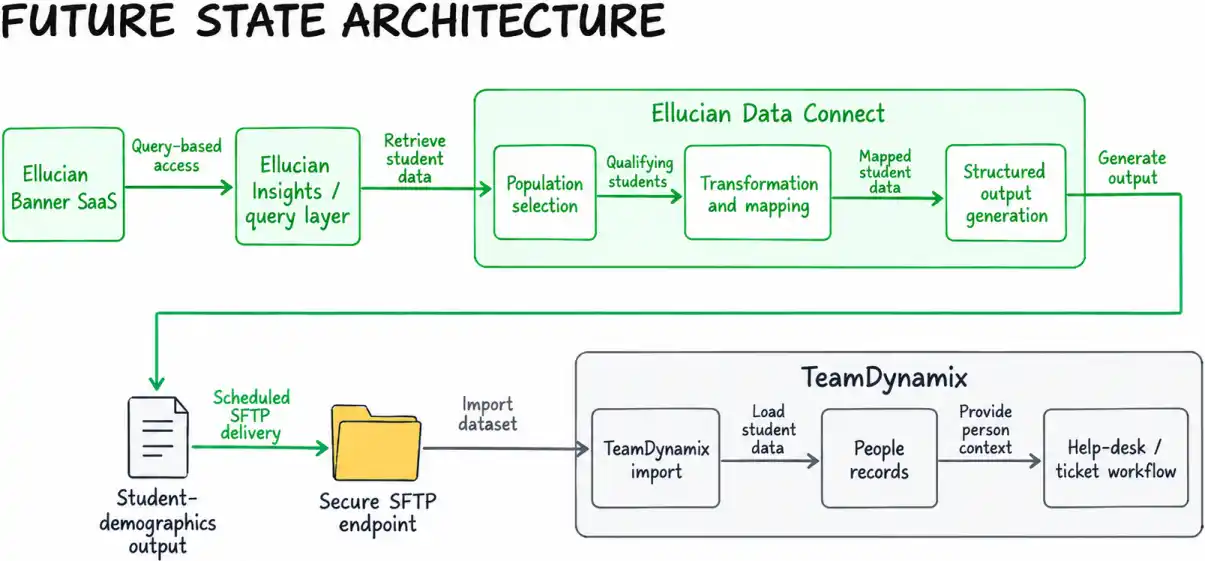
ABCloudz needed to preserve the existing scheduled student-demographics flow and downstream TeamDynamix workflow while replacing the database-dependent architecture with supported Ellucian SaaS integration mechanisms. The team rebuilt the source-side integration around Ellucian Insights, Ellucian’s reporting and analytics layer used here for query-based data access, and Ellucian Data Connect, Ellucian’s data-orchestration layer for building and managing integrations.
Together, they replaced the direct database dependency with a SaaS-compatible integration architecture. The synchronization remains independent of the campus ID card scan, with student data prepared in advance so it is already available in TeamDynamix when the support interaction begins.
Preserve the existing Banner-to-TeamDynamix student data flow while replacing direct Banner database access with a SaaS-compatible integration architecture based on Ellucian Insights and Data Connect.
Why the existing Banner integration had to change for SaaS
The institution already relied on Banner as the authoritative source for the student identity, academic, and contact information used in TeamDynamix. That information was delivered to TeamDynamix and populated its People records so technicians could use it while working with incidents and support tickets.
The challenge was the architecture behind that flow. The existing integration depended on direct access to the Banner on-premises database for student-data extraction and related integration logic. Moving to Banner SaaS meant the institution needed to preserve the business behavior of the integration without carrying forward that database dependency.
The current-state integration met the business need, but its source-side access mechanism had to be replaced.
The existing TeamDynamix feed depended on direct access to the Banner on-premises database, so the integration architecture had to be modernized for Ellucian SaaS without changing the business behavior TeamDynamix depended on.
Rebuilding the Banner-to-TeamDynamix flow for Ellucian SaaS
ABCloudz reimplemented the one-way outbound integration around Banner SaaS, Ellucian Insights for query-based data extraction, and Ellucian Data Connect as the orchestration and processing layer.
On each scheduled run, the modernized pipeline retrieves the source data through the Insights/query layer, identifies the qualifying student population, applies the transformations needed by TeamDynamix, generates the import dataset, and delivers it through the configured secure file-transfer path. TeamDynamix can then use the imported information in its People records before a technician begins working with the student.
The business flow remains familiar to the institution. What changes is the underlying source-side architecture: direct database access is replaced by Insights-based data access and Data Connect processing, while the scheduled downstream TeamDynamix workflow continues to operate independently of the help-desk interaction.
Preserving student selection and data-shaping logic
Modernizing the access mechanism was only one part of the work. The existing integration logic still had to determine which students belonged in each export and how Banner data should be represented for TeamDynamix.
The challenge was to preserve the existing population and mapping rules while replacing the database-dependent implementation that had supported them in Banner on-premises.
The population logic identifies the relevant academic-period range using the current date, registration dates and term dates, then selects the applicable primary student record. Records marked confidential are excluded, and the process also requires an institutional email address.
The modernized pipeline preserves these rules while translating Banner data into the structure expected by TeamDynamix. That work includes preferred-name fallback logic, character cleanup, academic information such as major, direct identifiers, and target values supplied through configuration rather than individual source records.
In SaaS modernization, business rules and integration mechanisms are separate concerns: the rules may need to remain, even when the underlying access pattern must change.
See how the integration determines the current student population
Defining the academic-period window
The extraction does not depend on a single hard-coded term. It derives the relevant academic-period range from registration and term data and evaluates it against the current date.
Conceptually, the logic can be represented as:
Find academic periods where today's date falls between:

    registration begin date

    and

    term end date


For each person:

    locate the primary student record

    within the relevant academic-period range


    exclude the record if confidentiality is enabled


    exclude the record if the required institutional email is unavailable


    include the qualifying demographic record
This matters because “current student” is an integration rule, not simply a field copied from Banner. The export population is derived from several related academic conditions, and those conditions still need to be preserved when the integration is moved to a SaaS-compatible architecture.
Selecting the student record
For each person, the integration logic evaluates general student records within the calculated academic-period range and selects the primary program record. This establishes the student context used for academic attributes such as major.
The pipeline also contains configurable inputs related to program levels and student attributes. In the implemented output logic, program-level configuration contributes to the target value for campus role. The extraction logic also references configurable student attributes, while the qualifying population is determined by the academic period, the primary student record, confidentiality, and required email conditions.
Applying privacy and required-data conditions
The final selection includes an explicit confidentiality check. A person whose confidentiality indicator is enabled is not included in the exported population.
The integration also requires the institutional email value used by the flow. These conditions are applied before the report dataset is generated, so the target file is built from the already-qualified population.
See how Banner data is mapped into TeamDynamix People fields
The target dataset combines several mapping patterns rather than relying on one-to-one field copying.
Mapping pattern
Example behavior
Direct source value
The organizational identifier is taken from the corresponding Banner person identifier.
Preferred-value fallback
Preferred first name is used when available; otherwise the regular first name is used.
Normalized source value
Name fields pass through character conversion and cleanup before export.
Derived value
An alternate email value is constructed from the institutional email identity and a configured email domain.
Configuration-driven value
User type, account or department, time zone, and campus-role-related values can be supplied through pipeline configuration.
Academic value
Major is taken from the selected student-program context and cleaned for the target format.
Preferred-name handling
The first-name transformation applies business logic before formatting:
if preferred first name is available:

    use preferred first name

else:

    use first name


normalize characters

remove formatting characters that conflict with the output
The same general cleanup pattern is applied to other name fields such as last name, middle name, and nickname.
Configuration as part of the mapping
Not every TeamDynamix value comes directly from Banner source data. Some target fields come from pipeline parameters. This allows institution-specific values such as account or department, time zone, and role-related classifications to be supplied through configuration while the core integration logic remains stable.
The alternate-email transformation also combines source and configured information: the integration uses the local portion of the institutional email address and appends the configured institutional domain.
This mixture of direct mappings, transformations, derived values, and configuration-driven values preserves the target-specific TeamDynamix behavior while allowing the source-side implementation to move away from direct database access.
Making the modernized integration operable, not just functional
Moving the integration to a SaaS-compatible architecture also required predictable behavior when a scheduled run encountered conditions such as no qualifying records, failed data retrieval, missing configuration, or delivery problems.
The Data Connect pipeline establishes its execution context, validates required credentials, performs the student-data retrieval and processing, builds the report, and delivers the output. It also records audit or failure information that administrators can use to understand what happened during a run.
The design distinguishes conditions such as an empty population, a failed SFTP connection, an extraction failure, and missing required configuration. Administrators can review the resulting diagnostics, correct the configuration or connectivity problem, and rerun the pipeline or allow the next scheduled run to proceed.
What happens when the scheduled integration has no records to send, loses its delivery connection, or encounters invalid configuration?
See how the pipeline handles delivery, failures, and recovery
1. Establish the execution context
The pipeline begins by setting the execution context used by later stages. Configuration determines which processing paths and output behaviors are active.
The setup logic prepares flags for baseline and custom processing and evaluates the configured output option. The broader pipeline supports file-delivery branches such as SFTP (a secure file-transfer protocol) and Amazon S3 (an alternate object-storage destination), along with preview or no-output behavior. The TeamDynamix flow uses secure file delivery to the configured destination.
2. Validate access before processing
Credential validation occurs before the main delivery flow. Relevant configuration can include SFTP connection information and authentication material, as well as credentials required by supporting Ellucian SaaS services.
3. Retrieve and aggregate the student data
The student-data retrieval executes with the configured population parameters. Returned student records are collected into the dataset used by downstream processing.
If retrieval fails, the pipeline records the failure and stops the run.
4. Build and deliver the report
The processing stage creates the report content in the required field order, formats the student data for the TeamDynamix import, assigns the configured report filename and path, and sends the report through the selected delivery branch.
Audit information is generated alongside the report processing so that administrators have an operational record of the run.
5. Handle exception paths
The solution defines different responses for several operational conditions:
Condition
Pipeline behavior
No qualifying records
Produce the no-data output behavior and audit information for the run.
SFTP connection failure
Mark the job as failed and do not transfer the report.
Data retrieval failure
Capture diagnostic information and fail the pipeline.
Missing required configuration
Stop the run so the administrator can correct the configuration.
Invalid report formatting
The target import can fail, requiring the output to be reviewed and corrected.
6. Recover and rerun
The administrator recovery process is straightforward:
Review the run’s audit and failure information.
Correct the relevant connection, credential, or pipeline configuration.
Rerun the pipeline manually or allow the next scheduled run to execute.
Confirm delivery and the downstream import outcome.
The final pipeline status reflects whether processing completed successfully or encountered an error.
See how configuration controls extraction, transformation, and delivery
The pipeline exposes configuration at several layers of the flow, allowing institution-specific behavior to be separated from the core execution path.
Configuration area
Confirmed role
Extract process method
Selects among Baseline, Custom, or Extend processing modes for extraction logic.
Data processing method
Selects Baseline, Custom, or Extend report-processing behavior.
Data transformation method
Selects baseline or custom transformation behavior.
Audit processing
Controls baseline or custom audit-processing logic.
Error processing
Controls baseline or custom error-processing logic.
File-sharing option
Controls the configured file-output path.
Student-data parameters
Supplies values such as user type, account or department, email domain, time zone, program levels, and student attributes.
Output configuration
Defines report, audit, and related output paths and names.
The configuration separates stable integration behavior from institution-specific context. The core flow retrieves the student population, transforms it into the target structure, creates the report, and delivers it. Institution-specific values such as classifications, domains, output locations, delivery credentials, and processing choices remain configurable rather than being embedded in database-dependent integration logic.
What changed for the institution
The institution preserved its scheduled Banner-to-TeamDynamix student-demographics process while moving the source-side integration to an architecture compatible with Banner SaaS.
The modernized integration retains the population rules, field transformations, target dataset, secure delivery, and operational recovery behavior required by TeamDynamix, but no longer depends on direct access to the Banner database. Ellucian Insights and Data Connect now provide the source-data access and processing layer.
TeamDynamix continues to receive student information before the help-desk interaction, keeping the downstream People-record and campus ID workflow independent of how Banner data is accessed.
The full-file approach also keeps each scheduled export aligned with the qualifying Banner population rather than requiring a separate source-side delta feed.
The institution preserved its scheduled TeamDynamix student-demographics feed while replacing direct Banner database access with a SaaS-compatible integration based on Ellucian Insights and Data Connect.
Frequently asked questions
Why preserve scheduled batch synchronization instead of replacing it with real-time Banner lookups?
TeamDynamix People records are populated from an imported student dataset, and that operating model already supports the help-desk workflow. The modernization therefore preserved scheduled preparation of student information rather than redesigning the downstream process around real-time Banner SaaS lookups.
Why does the integration send a full student file instead of a delta?
The design uses a full export for each scheduled run, meaning the complete qualifying dataset is sent each time rather than only records changed since the previous run. TeamDynamix import behavior can create or update People records as the dataset is processed, so the source-side integration does not need to maintain a separate delta-extraction mechanism.
How does the integration determine which Banner students to include?
It derives the relevant academic-period range from the current date and term-related dates, selects the applicable primary student record, applies confidentiality rules, and requires an institutional email address.
How are Banner fields transformed for TeamDynamix?
The integration uses a combination of direct mappings, normalized values, fallback logic, derived values, and configuration-driven fields. For example, preferred first name can fall back to regular first name, name values are cleaned for the target format, and several TeamDynamix values come from pipeline configuration.
How are confidential student records handled?
Student records marked confidential are excluded by the population-selection logic before the report dataset is generated.
What happens when a scheduled run fails?
The pipeline records diagnostic or audit information, marks the run as failed when appropriate, and gives administrators a recovery path that includes reviewing the run, correcting configuration or connectivity, and rerunning the integration.
Does the campus ID card scan trigger a real-time Banner SaaS integration?
No. The scheduled integration supplies student information to TeamDynamix in advance. The campus ID card is part of the downstream help-desk workflow that uses the student record already available in TeamDynamix.
Why did the existing Banner integration need to change for Ellucian SaaS?
The previous integration depended on direct access to the Banner on-premises database. The modernization preserved the required student-selection, mapping, file-generation, and TeamDynamix delivery behavior while replacing that database dependency with Ellucian Insights and Data Connect.
Modernize your Banner integrations for Ellucian SaaS
If your institution has Banner integrations that depend on direct database access, custom extraction logic, batch exports, or file-based downstream systems, ABCloudz can help move that functionality to a SaaS-compatible architecture using supported Ellucian integration patterns, Data Connect, and maintainable transformation and delivery logic.
Contact ABCloudz to discuss your integration or modernization project.