
On average, 16.5 percent of higher education students have declared a disability. This fact means that every sixth student has special needs or requires campus disability support services. However, declaring a disability is usually a paper-based process, which might be the first insurmountable barrier for a student.
Higher education is a fundamental human right, and universities strive to ensure inclusion and equity for all students. One of our customers, a university in the UK, wanted to automate the disability declaration process. Their goal was to provide students with a clear, transparent, and simple process that doesn’t require any paperwork. The ABCloudz team created a reusable Ellucian Experience card that helps create a declaration and track its status.

In this blog post, we focus on the Experience card and the Data Connect pipeline that prepares and refreshes the data shown in the GUI. In the same reference architecture, Ellucian Workflow handles the orchestration behind each declaration, including review, approvals, notifications, and system updates. We cover that Workflow layer in the companion post on automating disability declaration business processes.
Do you need help with developing Experience cards, automating data flows, or modernizing your Ellucian integrations? Read our blog posts on other higher education projects to see why Ellucian trusts us to deliver the most complex projects for universities around the globe. As an Ellucian Service Partner, we understand your problems and have the expertise to solve them!
Current state architecture
Before the start of this project, the students had to contact the university support to declare a disability and share the medical documents. They printed, filled in, and signed paper forms, bringing them to the support team. At the start of each term, the support team was overloaded with these declarations.
The following image shows the current state of the customer’s architecture.
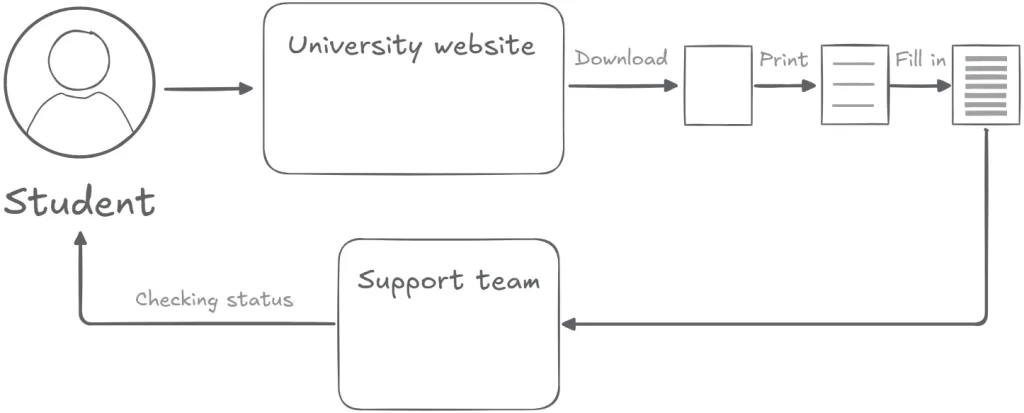
In this example, the students download the declaration from the university website. Filling in this declaration requires knowledge of specific medical codes. After submitting this printed declaration, the students had to wait for confirmation and couldn’t see the status of their disability declaration anywhere online.
Project goals and technology challenges
Our customer asked us to automate the disability declaration process with an Experience card. In this card, the student can add a new disability declaration.
However, the card can automatically pull a disability declaration from the Admissions or Student record. The card gets this data annually during enrollment and starts the same workflow as for manually added declarations.
Finally, the student can track the status of their disability declaration.
This Experience card is part of a reusable implementation pattern we apply across Ellucian SaaS projects. The card focuses on the student-facing interface, while backend automation handles workflow orchestration and data preparation to keep the process consistent and aligned with the system of record.
Designing a reusable Experience card
Before diving into the technical design, it helps to see how the disability declaration card works from a student’s perspective. The following screens show the Experience card as it appears in Ellucian Experience, including the list of declared disabilities, the available support services, and the form for adding a new declaration.
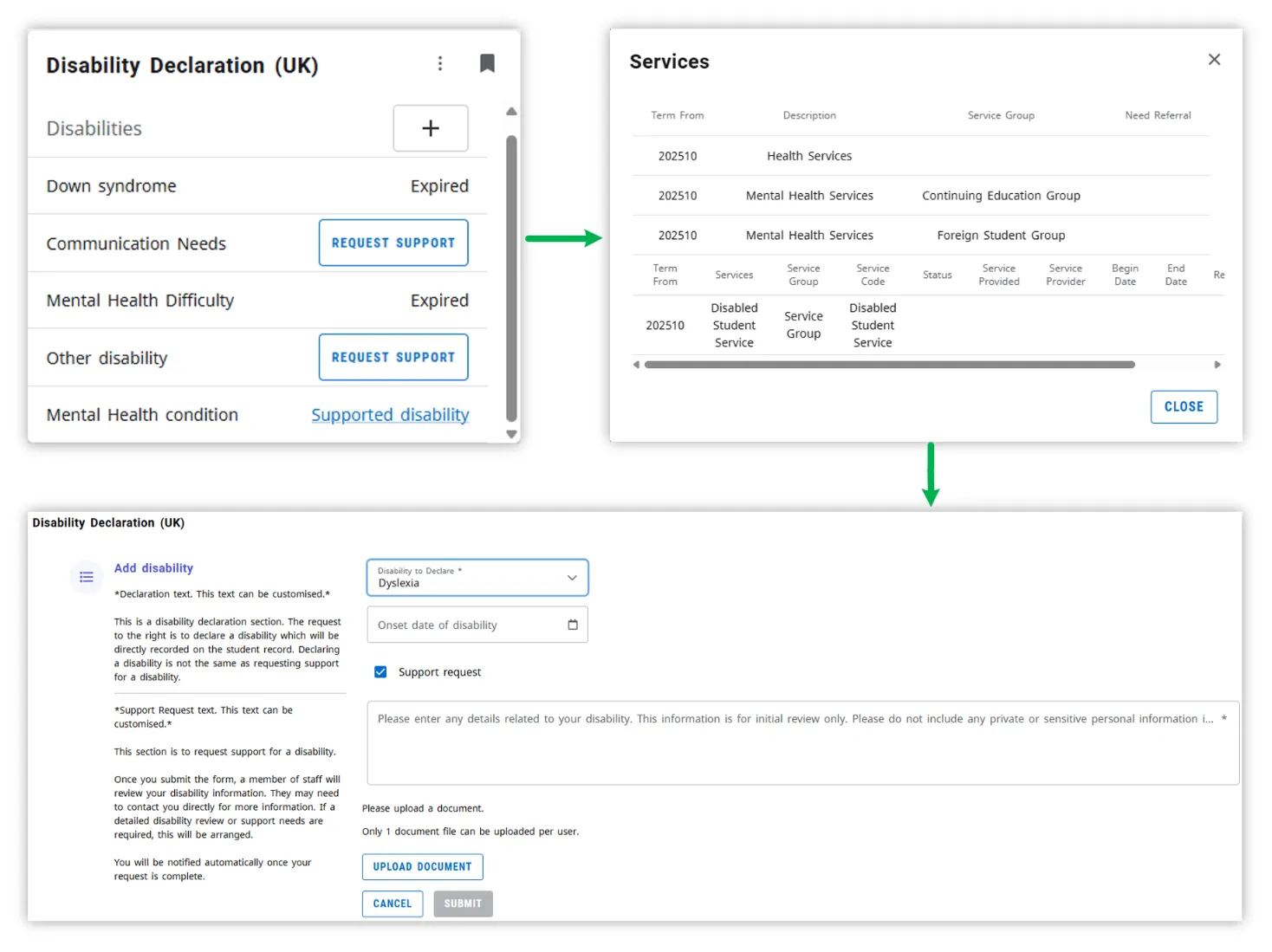
To add a new disability, the student clicks the plus sign on the Experience card. A new page opens, where the student selects the disability type from the list, enters a comment, and uploads a confirming medical document. When the student uploads this document, the card stores it on an Amazon S3 bucket.
Adding a disability starts a workflow, which interacts with the Banner SaaS database to get the relevant information.
In this architecture, the card focuses on capturing input and displaying status, while the workflow coordinates approvals and updates. Data Connect supports the card by preparing and refreshing the data it needs to render the UI reliably.
Initially, the card displays the status as in process. If an issue with the declaration occurs, then the card displays an error status asking the student to contact support. For confirmed disabilities, the student can see a page with the list of available support services, which are specific to each university and each disability type. Students can’t select these services.
For denied or cancelled declarations, the solution cleans up the uploaded documents from the Amazon S3 bucket as part of the same end-to-end process.
Future state architecture
To empower students with the disability declaration card, the ABCloudz team developed a serverless Data Connect pipeline. This pipeline runs during the initial load or refresh and provides all the necessary information.
The following image shows the future state architecture.
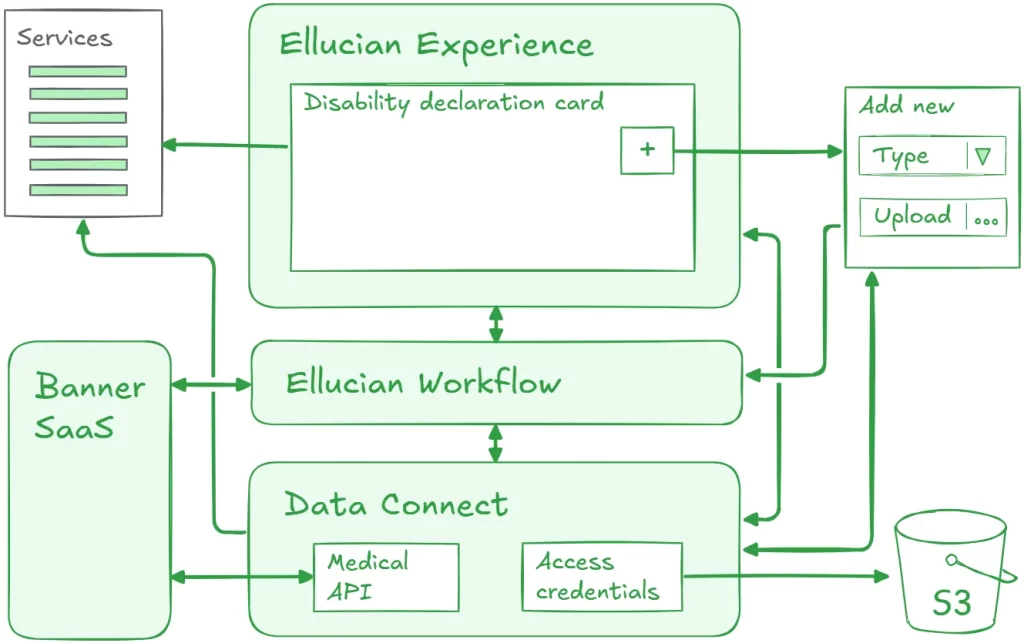
This is the same reference architecture split: the Experience card delivers the GUI, Data Connect prepares and refreshes data, and Workflow manages decisions and updates.
To get the status of an existing disability declaration, the card requests data from the API of the workflow. The medical information API returns the list of all the new disabilities that the Experience card can display. Finally, the pipeline uses the configured access credentials to upload medical documents to an Amazon S3 bucket.
Handling healthcare documents in digital format requires meeting security and compliance regulations. The ABCloudz team knows how to meet the regulations and ensure that the delivered solution complies with all the latest industry standards.
Benefits and results
Making students’ lives easier is not easy. By automating the routine process of submitting disability declarations with an Ellucian Experience card, we made yet another tiny step towards simplifying students’ lives.
Some of the students can’t overcome the very first barrier, which is submitting a printed disability declaration. With the start of the digital era, these students don’t have this introduction barrier and can get help or assistance in a matter of several clicks.
ABCloudz can tailor this reusable Experience card to the needs of other higher education institutions. Let us support you with designing and developing a beautiful card according to the Ellucian Experience best practices. Do you have an idea of what your students want to see on the Experience dashboard? You name it — we’re here to help!
Automate your Ellucian Experience projects with trusted experts!
The ABCloudz team has expertise in designing and developing custom Experience Cards that extend functionality for students, faculty, and staff. You can trust us to deliver role-specific, interactive, and data-driven components with seamless API integration, optimized user experience, and scalable deployment. Check our service offer and learn more about other Ellucian-based projects for higher education institutions that our team successfully delivered. Contact ABCloudz to start your development, modernization, integration, or automation project today!