If you have ever watched students fill out onboarding forms, you know exactly when their expression changes. Emergency contact? Easy. Trusted contact? Suddenly they pause.
That pause is meaningful. It reflects the difference between who should be called in a crisis and who a student trusts to help them navigate sensitive wellbeing concerns. Institutions across Europe have been asking for a way to capture that distinction cleanly.

As part of its broader plan to deliver ready-made, SaaS aligned workflows for the region, Ellucian commissioned ABCloudz to design and build a Trusted Contact Experience card that institutions can adopt before they migrate. We shaped the solution through a real UK university use case, ensuring the card feels natural for students while integrating seamlessly with Banner SaaS through standard APIs.
In this post, we share how that idea became a reusable Experience card, why it matters for student wellbeing, and how institutions across Europe can now rely on a standardized, future ready model for capturing trusted contacts.
Not the challenge you are focusing on today?
ABCloudz is an Ellucian Service Partner with a deep track record in integration, modernization, and automation projects. Explore our portfolio of Ellucian work or browse a wider collection of higher education success stories to see how we support institutions like yours.
The foundation we built on
Once the idea of a dedicated trusted contact was defined, the next step was to understand how it could fit into the existing SaaS ecosystem.
Ellucian SaaS already supported person contact information, and institutions were using an Emergency Contact Experience card that let students add, edit, and remove a contact. Those actions followed a well-established pattern: the card called the appropriate Ethos APIs, and the updates were written into the student’s contact record within Banner SaaS.
The trusted contact scenario, however, needed a few elements that were not part of that setup yet. It required its own relationship value, a place in the interface to explain how the information would be used, and a simple workflow for managing this data separately from emergency details while still relying on the same API model.
That starting point shaped how we designed the new Trusted Contact Experience card and the integration behind it.
How we developed the new Ellucian Experience card
With the foundations set, we moved from defining the trusted contact concept to making it real inside Ellucian Experience.
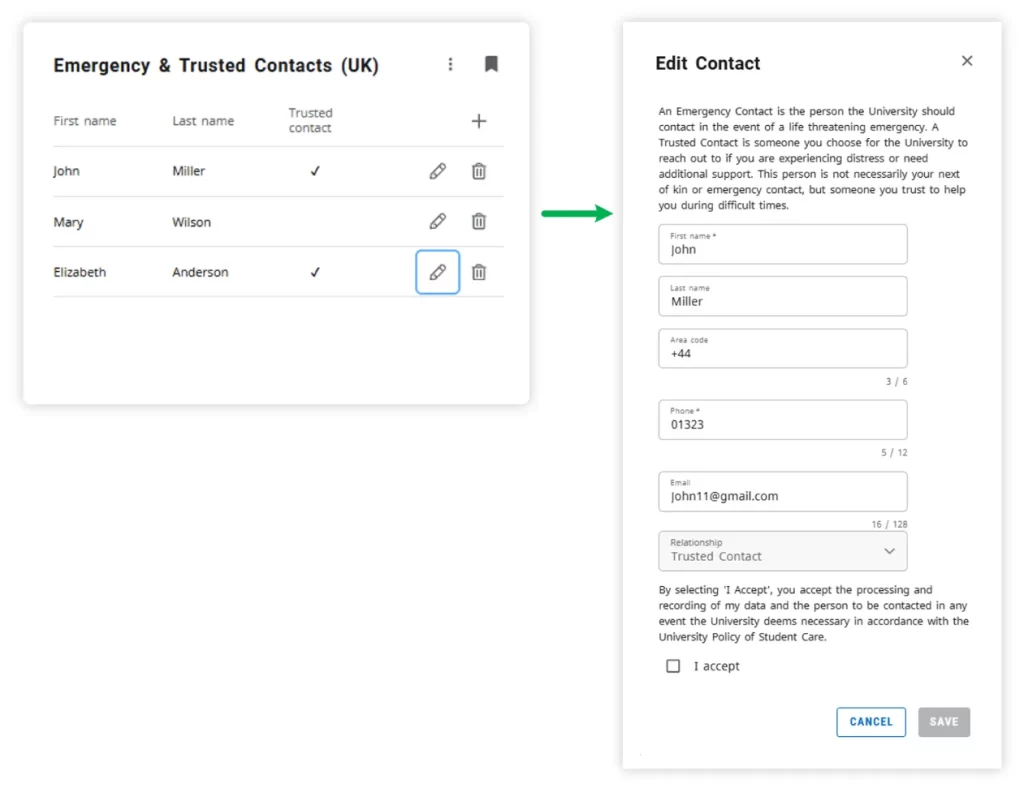
We built the Trusted Contact functionality as a natural extension of the existing Emergency Contact Experience card, delivered through a single Emergency & Trusted Contacts card. Students get a simple interface where they can add, view, update, or remove contacts and explicitly mark which ones are trusted contacts. The main view presents a simple contact list where trusted contacts are clearly indicated, making it easy for students to review and manage their choices at a glance. The fields follow the established person contact model: first name, last name, and phone number as required, with the relationship automatically set to Trusted Contact. Each action calls the same General Person Identification emergency contact API through Ethos, using GET, POST, and PUT operations to read and update the student’s contact record in Banner SaaS.
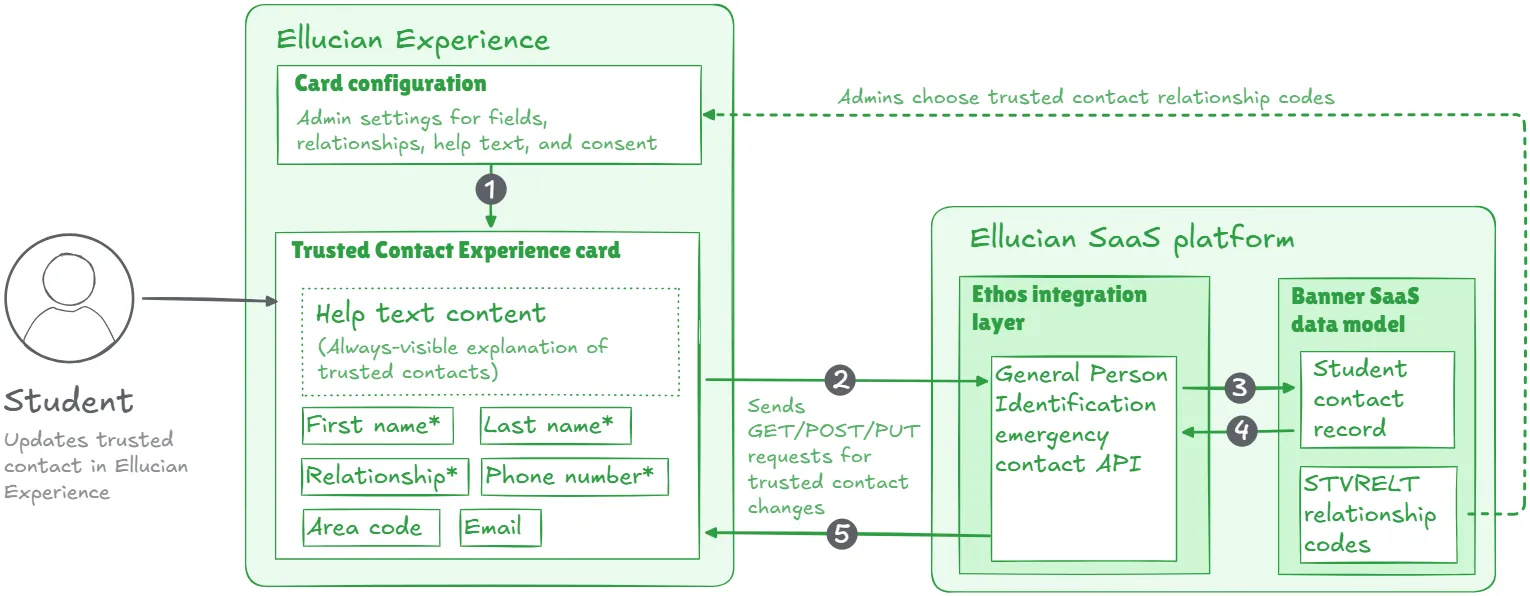
We rely on card configuration to drive the trusted contact specifics rather than embedding these details into custom logic. Institutions assign a dedicated relationship value for trusted contacts through the STVRELT list, the standard Banner table used to define relationship types such as parent, spouse, or guardian. By adding a new trusted contact value, institutions clearly distinguish this role in the student record. They can also exclude any relationship types they do not want students to select on the card.
Card configuration also controls the help text section. Institutions update this HTML capable text whenever they need to, and students always see it on the page. This gives staff a clear way to explain what a trusted contact is and how the institution plans to use that information.
The card captures consent as part of the workflow through an explicit “I accept” confirmation checkbox shown before submission. When students submit a trusted contact, the card can display a confirmation message aligned with institutional wording, and their submission, combined with explicit confirmation, serves as agreement for the trusted contact to be stored on their record, exactly as the requirements specify.
Institutions adjust the wording as needed, while the technical flow stays consistent through standard API operations.
In the future state, the flow stays simple. Students open Ellucian Experience, select the Trusted Contact card, and use a focused interface that applies the institution’s configuration. The card calls the same Ethos endpoint used for emergency contacts but writes the entry with the trusted contact relationship value so Banner SaaS can distinguish it. This keeps the data model and APIs consistent and gives institutions a dedicated, reusable way to manage trusted contacts alongside their existing emergency contact workflows.
What this workflow delivers
For students, the new card separates emergency and trusted contacts in a way that feels obvious. They see a dedicated space with clear help text, know what they are agreeing to, and can update their trusted contact themselves whenever their situation changes.
For institutions, the card arrives as a ready to adopt Experience component that fits straight into their Ellucian SaaS environment. It uses the existing contact data model and Ethos APIs, with relationship codes, wording, and consent managed through configuration instead of custom builds.
For Ellucian, this project creates a configurable trusted contact pattern that can be reused across the region, so other institutions can enable the same workflow as they prepare for or complete their move to Banner SaaS.
Design your next Experience card with ABCloudz
At ABCloudz, we focus on practical projects like this one: Experience cards, Data Connect and Ethos based integrations, and SaaS ready replacements for custom logic that used to live on premises. Our team understands both the technical side of Ellucian SaaS and the day-to-day realities of higher education teams.
If your institution is planning a move to Ellucian SaaS, or if you already made the move and now want specific workflows to feel more connected and modern, we would be glad to talk. Share your use case, and we can explore how an Experience card or a focused integration can turn it into a clear, repeatable workflow on top of the Ellucian platform.