Moving Ellucian Colleague to SaaS does not change what institutions expect their systems to do. It changes how familiar processes have to be expressed once the platform itself moves to the cloud. Integrations are often where this shift becomes impossible to ignore.
This project focuses on the integration between Ellucian Colleague (Ellucian Student) and TeamDynamix in a SaaS environment. TeamDynamix is widely used for IT service management, where up-to-date student demographics are essential for creating tickets, tracking visits, and supporting students efficiently. That data flow already existed before the SaaS transition. It was automated, dependable, and part of daily operations. The underlying logic still matters just as much as before, but it has to be reimplemented using tools that align with Ellucian’s cloud architecture.

In this project, our team at ABCloudz worked with an existing Colleague to TeamDynamix integration and rebuilt it for Ellucian SaaS (Ellucian Student). We examined the established automation, extracted the real user stories behind it, and reimplemented the same behavior using Ellucian Data Connect and Ethos APIs. The result is a SaaS-compatible integration that preserves the original intent, fits cleanly into Ellucian’s supported tooling, and can be reused by other institutions facing the same transition.
We have taken the same SaaS modernization approach across a range of Ellucian Colleague integrations, including projects with Handshake, Rave Alert, Ex Libris Alma, Maxient, T2 Systems, and other third-party platforms where existing on-prem automation was reimplemented using Ellucian SaaS-native tools.
Not the integration challenge you are dealing with right now?
Take a look at our collection of Ellucian SaaS projects or explore our broader Higher Education work to see how institutions approach modernization across campus systems.
The integration pattern that SaaS had to replace
Before the move to SaaS, the Colleague to TeamDynamix integration was already doing its job. Student demographic data flowed automatically from Colleague into TeamDynamix, keeping People records current and allowing IT staff to create tickets, log visits, and support students without manual data entry.
The logic behind that integration was sound and well established. TeamDynamix depends on accurate People records, and the institution had built an automated feed to ensure those records stayed aligned with Colleague. From a functional perspective, nothing was broken.
What changed was the platform. The existing automation relied on on-prem patterns such as direct data access, locally scheduled jobs, and file-based delivery.
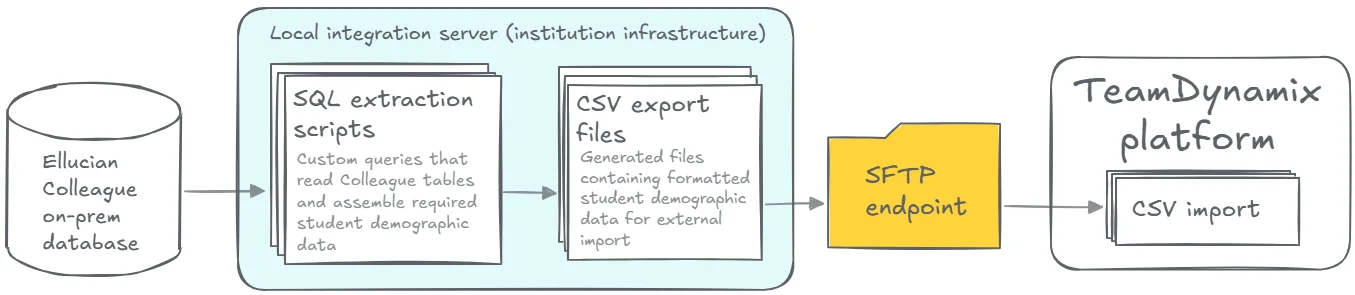
Those patterns do not carry over into Ellucian SaaS. Once Colleague moved to the cloud, the integration could no longer run as designed, even though the underlying requirement remained exactly the same. The next section looks at how we reimplement the same behavior using a SaaS-compatible execution model.
Reimplementing the integration in Ellucian SaaS
We split the work into a few clear stages.
Extracting the real logic from the legacy integration
We started by analyzing the existing on-prem automation to understand the user stories behind the process. Which students belong in the feed. Which demographic fields TeamDynamix relies on. How often data must refresh to support daily IT operations. This logic was already proven and became the baseline for the SaaS design.
Orchestrating SaaS data access with Ethos and Data Connect
In Ellucian SaaS, Ethos APIs define how data can be accessed. They provide secure, authenticated endpoints to Colleague SaaS data and replace the direct database queries used in the on-premises integration. Rather than being a separate layer to manage, Ethos becomes the data access foundation that Data Connect pipelines are built on.
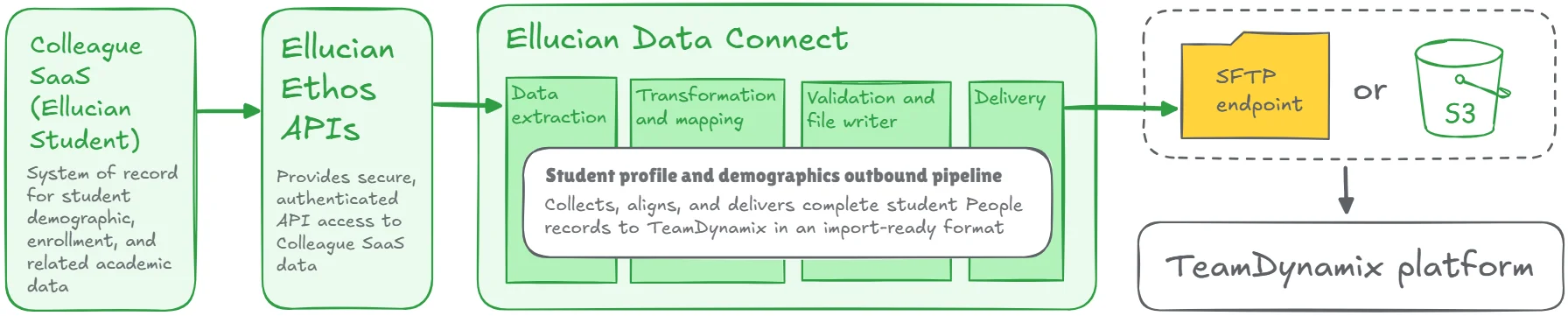
Ellucian Data Connect then takes over as the execution engine. Using Ethos as its source, a scheduled outbound pipeline retrieves student demographic data, applies the same filters and mappings defined in the legacy integration, and validates the results before file creation. The pipeline generates full demographic exports, not deltas, matching the import model supported by TeamDynamix.
Together, Ethos and Data Connect preserve the original integration logic while expressing it in a SaaS-native way. Data access is standardized, execution is managed, and the entire flow runs inside Ellucian’s supported cloud tooling without relying on local infrastructure.
Delivering files without local infrastructure
The generated output is delivered directly from Data Connect to a TeamDynamix SFTP endpoint. No local servers or custom schedulers are involved. Audit files and error logs are produced automatically, and notifications are sent if anything fails or if no qualifying records are found.
Results and impact
The integration now runs entirely inside Ellucian SaaS, using supported tools and well-defined execution paths. The same student People records continue to arrive in TeamDynamix on schedule, but without any dependency on local servers, custom scripts, or undocumented jobs.
For the institution, this means fewer moving parts and clearer ownership. Data delivery is predictable, validation is built in, and failures are visible immediately instead of being discovered downstream. The integration no longer depends on individual system knowledge or environment-specific behavior.
Carry proven integration logic into Ellucian SaaS
This project is a practical example of our integration modernization offering. It shows how we help institutions carry existing Colleague and Banner integration logic into Ellucian SaaS using Data Connect.
If you are preparing for an Ellucian SaaS transition or reviewing integrations that need to be realigned with Ellucian’s cloud architecture, we can help you move them forward with confidence. Let’s talk about how to make your integrations SaaS-ready and keep them working as your platform continues to change.