For institutions moving from Colleague to Ellucian SaaS, the transition can feel like switching from manual transmission to automatic. You still drive to the same places, but the mechanics under your feet are completely different.
For this institution, that difference showed up in an existing Colleague integration with BMTX BankMobile that had been running successfully in an on-prem environment. Colleague was already producing enrollment indicators, student demographics, and disbursement details that BankMobile used to support refund processing and student banking services. The automation was familiar, reliable, and deeply embedded in financial operations.

The challenge surfaced during the transition from Colleague on-premises to Ellucian SaaS (Ellucian Student). The integration itself was still required, but the way it had been built no longer matched the platform it was running on. SaaS removes direct database access and local schedulers, replacing them with governed APIs and managed execution.
In the sections that follow, we show how we reimplemented this integration for Ellucian SaaS by staying focused on the real requirements behind it. We analyzed the existing logic, identified the user stories it expressed, and rebuilt the flow using Ethos APIs and Ellucian Data Connect. The outcome is a SaaS-native outbound integration that delivers Enrollment, Demographics, and Remittance data to BMTX BankMobile in a way that fits Ellucian’s cloud architecture and can be reused by other institutions facing the same transition.
We apply this same SaaS modernization pattern across many Ellucian Colleague integrations, including work with Handshake, Rave Alert, Ex Libris Alma, Maxient, T2 Systems, TeamDynamix, Barnes & Noble, TutorTrac, AdvisorTrac, and other third-party platforms where on-prem automation had to be rebuilt using Ellucian SaaS-native tools.
Not the integration challenge on your plate today?
Take a look at our Ellucian SaaS project library or browse our broader Higher Education work for other real-world modernization examples.
The on-prem integration pattern SaaS had to replace
Before Ellucian SaaS entered the picture, the Colleague to BMTX BankMobile integration was comfortably settled into its role. Colleague produced enrollment signals, student demographics, and disbursement data on a schedule. Three CSV files went out. BankMobile picked them up. Refunds and account setup kept moving without anyone having to think about it too much.

That smooth experience came from an on-premises execution model. The integration lived close to Colleague. It could access data directly, run on local schedules, and push files out using infrastructure the institution fully controlled. In that world, the design made perfect sense.
Once Colleague moved into Ellucian SaaS, the same integration logic no longer had a place to run. There was no database to query directly. No local jobs to lean on. The flow itself was still needed, but the mechanics underneath it had disappeared.
Rebuilding the integration for Ellucian SaaS
Recreating this integration in SaaS was about giving the same logic a new place to live.
We started by treating the on-prem setup as a set of clear user stories rather than a bundle of scripts. Which students qualify. What data BankMobile expects. Why enrollment, demographics, and remittance travel as three separate files. All of that was already defined and working. Our job was to preserve it.
In Ellucian SaaS, data access shifts to Ethos APIs. They become the only supported way to read Colleague data and replace the direct database queries the old integration relied on. On top of that, Ellucian Data Connect takes over execution. Scheduled outbound pipelines pull data through Ethos, apply the same filters and business rules, and produce the same three CSV outputs BankMobile already knows how to consume.
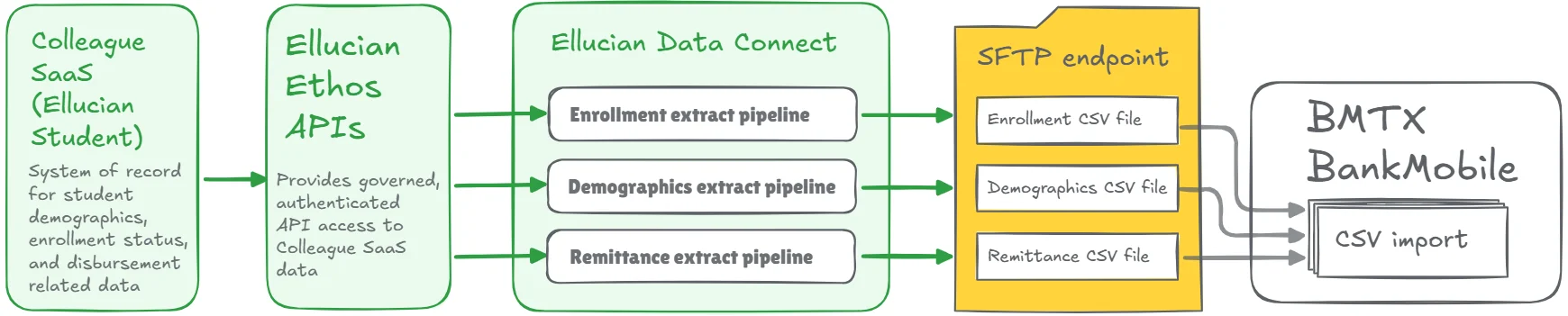
Each file gets its own pipeline. Enrollment, Demographics, and Remittance are generated independently, validated, and delivered through a managed SFTP connection. No local servers. No custom schedulers. No hidden dependencies.
The logic stays familiar. The mechanics become SaaS-native. And the integration finally fits the platform it runs on.
Outcomes
We replaced direct database queries and scheduled scripts with outbound Data Connect pipelines that pull data from Colleague SaaS through Ethos APIs.
Each pipeline handles a specific data domain that already existed in the on-prem flow: Enrollment, Demographics, and Remittance. The pipelines apply the same filtering and business rules and generate the same three CSV outputs BankMobile expects.
The entire process now runs inside Ellucian SaaS, with governed data access, managed execution, and no dependency on institution-hosted jobs or servers.
Make your Colleague integrations SaaS-ready
This project is one example of how institutions can move to Ellucian SaaS without breaking integrations they already depend on. The logic stayed intact, the execution moved into supported SaaS tooling, and the integration now runs where Ellucian expects it to run.
That approach sits at the core of our Modernize integrations with Data Connect practice. If you are preparing for Ellucian SaaS or reviewing integrations that were built around on-prem assumptions, this is the kind of work that helps them survive the transition cleanly.
Let’s talk through your integration landscape and map out what modernization looks like in your Ellucian SaaS environment.