Imagine a world where you don’t need to fill in any forms. No questions asked, no issues found, no retries — all these statements are impossible in the era of paper forms. However, in the digital era, you can pull all the required information from the database and enter it into the correct fields of your form.
One of our customers, a university in the UK, uses Ellucian Banner SaaS to store and manage student data. This customer also uses Ellucian Experience to provide students with a personalized dashboard, where they can access essential information and send requests. Our customer wanted to automate the process of filling in the request letters, and the ABCloudz team used Experience Cards to deliver a reusable error-proof solution.
In this blog post, we show how our team turned this project into a success story for this customer and their students. However, ABCloudz has a proven track record of successful projects with other higher education institutions that use Ellucian software. Having completed hundreds of Ellucian-based projects, we see many options where you can use Experience Cards to add information from third-party systems to the Ellucian Experience dashboard.
Are you looking for a reliable partner to improve your experience with Ellucian software? Read our blog posts on Ellucian projects and see how ABCloudz helps other higher education institutions achieve their goals. Ellucian trusts us to deliver many complex projects for their customers, and so can you!
Current state architecture
Before the ABCloudz team implemented an automated solution for this project, our customer had four templates of request letters. Students need these request letters to apply for the council tax exemption, Schengen visas, medical care, and other cases where they need proof of enrollment.
The following image shows the current state of the customer’s architecture.
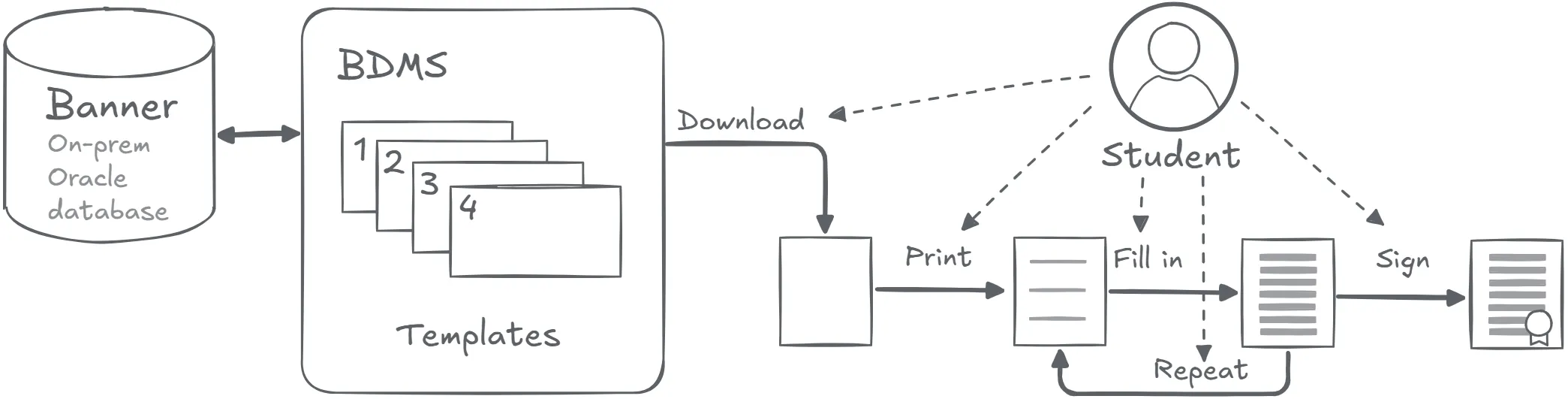
In this example, the creation of a request letter is a manual process with many places for human error. The customer stored PDF files with templates on the Banner Document Management Solution (BDMS). After the student downloads and prints the form template, they need to fill it in correctly. Any minor error or typo means that the student has to print and fill in the form again. And again, in most cases.
Developing a reusable automated solution
The ABCloudz team started by converting all four of the existing templates to the HTML format. This approach makes it possible to automatically insert the correct student information retrieved through Ellucian Data Connect pipeline and Ethos APIs into the template.
The enrollment confirmation letter includes the following information that our team integrates into the request letter template.
- Personal details such as name, date of birth, student number, home and term-time addresses.
- Course details such as school, program of study, academic plan, year of study, and mode of study.
- Start date and expected duration of the program.
For each template, our team configured a Data Connect pipeline that retrieves the required student information through Ellucian Ethos APIs. The pipeline inserts this data into the HTML template, which the Experience Card then uses to generate a ready-to-download PDF file. At this point, all the students need to do is save the file, print it, and use it where needed. Optionally, the student might need to sign this printed document.
For future projects, we can easily customize the HTML template or the API request that retrieves the necessary data from the Ellucian SaaS environment.
Future state architecture
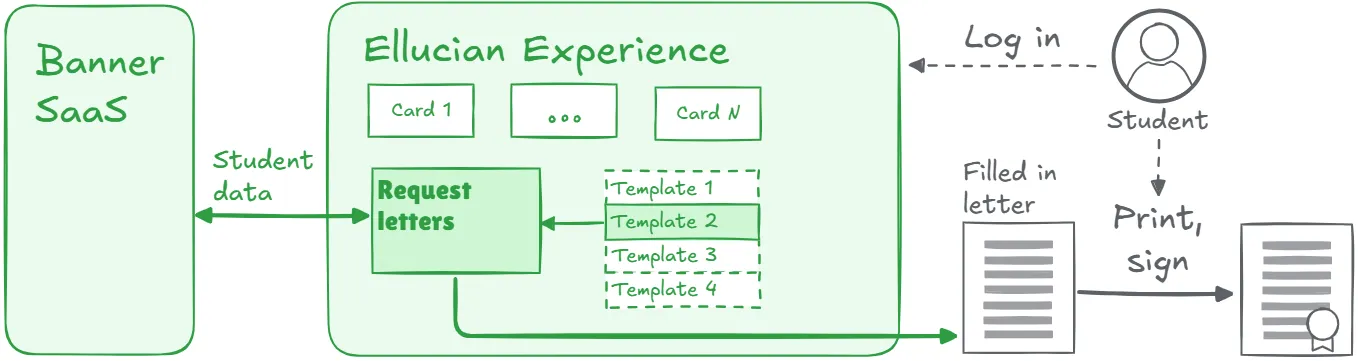
The following image shows the future-state architecture diagram.
From the student’s perspective, the process is reduced to selecting a letter type, previewing the generated document, and downloading a ready-to-use PDF.
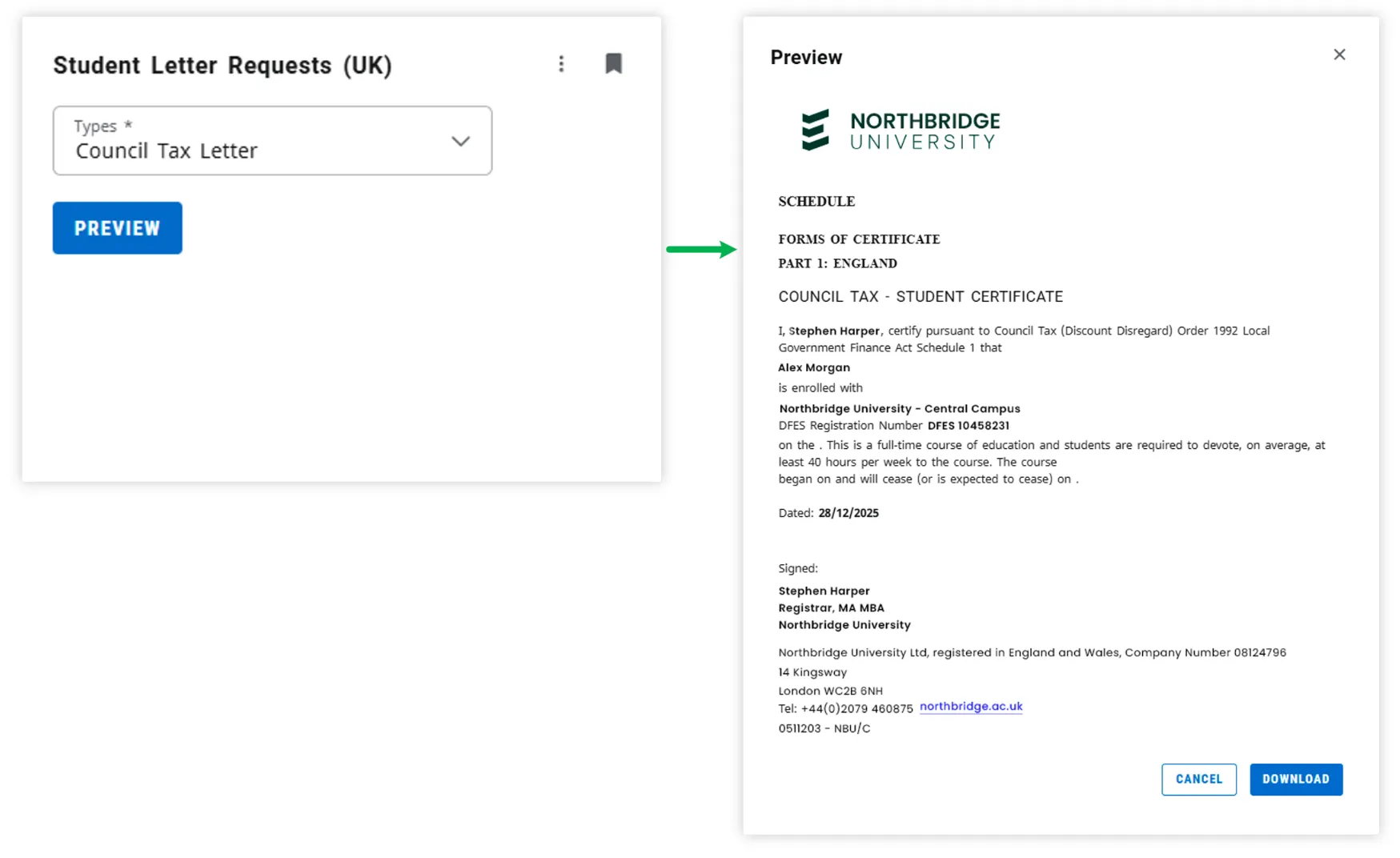
At the first step, the student logs in to the Ellucian Experience platform and selects the card with request letters. Next, the student chooses the type of letter from a dropdown list. In turn, the system uses Ellucian APIs to gather the student information. After receiving the response, the Experience Card generates the PDF file with the request letter that includes the correct data for this student. Finally, the student prints the PDF and signs it, if needed.
Benefits and results
The key result of this automation project is that the students can flawlessly create request letters confirming their enrollment at the university. The ABCloudz team developed an Ellucian Experience Card, which ensures that the student always gets the correctly filled-in request letter. Our team can easily expand this approach to deliver more forms for this customer.
Also, the ABCloudz team can reuse this solution to create Experience Cards for other customers, not necessarily the request letters with proof of enrollment. For example, we can enhance the parking, student conduct, timetabling, or library management integrations with Ellucian Cards for students’ dashboards.
Streamline your Ellucian Experience projects with trusted experts
Ellucian trusts ABCloudz to deliver many projects for higher education institutions because of our extensive experience with Ellucian-based projects. Learn more about our expertise with the Ellucian Banner SaaS integrations and check out our Ellucian Experience service page. Contact us today to get a quote on your Ellucian modernization, automation, or integration ideas!