Not every student passes every exam on the first try. When a student needs a second attempt in the UK, the retake is commonly referred to as a resit. These resit and course-repeat cases trigger exceptions, special checks, and additional communication that typically sit outside day-to-day student processing.
These workflows are not supported out of the box in Banner SaaS, which is why a UK university asked ABCloudz to design and implement a dedicated automated solution using Ellucian SaaS tools.

The ABCloudz team accepted this automation challenge from a university in the UK and created an automated flow for managing students who resit a course or repeat a course. This flow includes an Ellucian Workflow for automating repetitive tasks. To interact with the student, our team developed an Ellucian Experience card. Finally, to get data from the Banner SaaS database, we configured Data Connect pipelines.
In this blog post, we show high-level details of the implementation of this project. In the future, our team can customize this solution to meet the needs of your institution, or even to address a different use case, such as managing cum laude graduates.
Are you looking for a reliable partner to automate a project with Ellucian software? The ABCloudz team is ready to help! Ellucian trusts us to deliver many projects for the higher education institutions in the US and Europe. With hundreds of successfully completed projects, our expert team can bring to life a project of any complexity in a reasonable time.
Project goals and technical challenges
The main goal of this automation project is to help students with failed courses get back on track with their studies.
At the first step, the automated workflow discovers the groups of students that need to resit an exam or repeat the course. At this step, we use the rules that the university defines for each course to identify such students.
Next, the interaction with the student starts. The workflow provides students with a list of the courses or exams they are expected to take. In turn, each student can confirm their intention to do the course, take the exam, or resign from studies.
In turn, the student can choose a suitable time to resit the exam and register for it. Alternatively, students can register for a repeating course. The workflow manages the course reference numbers and the other related data in the student record to ensure proper enrollment of each student to the academic year. But before we dive deep into the details of this automation, let us describe how this process worked befor the ABCloudz automated it.
Current-state architecture
The following image shows the current-state of the processes for resit students.
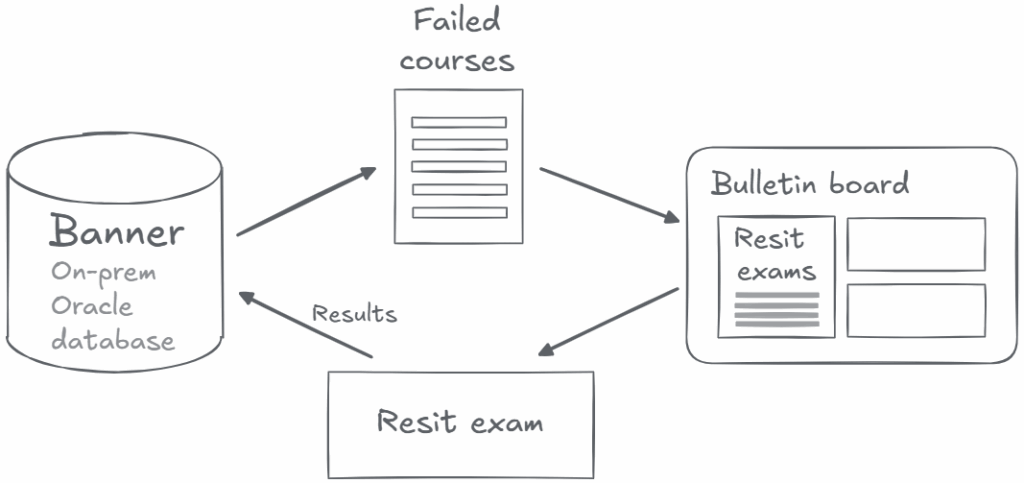
The administrative stuff manually runs scripts to get the list of students with failed courses. They use these lists to schedule resit exams or propose students take a course again.
At the same time, students also know about their failed courses and look for an opportunity to resit exam before the start of the following academic year. The communication through a bulletin board is slightly better than pigeon post, but still far from perfect. Sometimes, proactive students manage to find an opportunity to resit the exam on time. More often, they progress to the next academic year with deficit, and have to negotiate when they can resit an exam.
The results of the resit exam appear in the Banner database immediately. However, to change the status of their student record, the administrator must validate the exam results and manually update the status.
Indeed, this project includes a lot of automation opportunities. So, now is the time to see how the ABCloudz team approached this project in three sure steps.
Creating reusable Data Connect pipelines for seamless data flow
To get the list of students with failed courses from the Ellucian Banner SaaS database, we configured a pipeline that interacts with the database API. To query the results, we use the rules that administrators configure in the workflow. Optionally, administrators can configure different rules for each course, but in real life, they apply a standard rule for most of the courses.
For a group of students with a failed course, the second Data Connect pipeline retrieves the list of courses and exams to retake. Finally, the third pipeline uploads the resit exam results to the Banner SaaS database.
Scheduling these pipelines to run at a certain time doesn’t make sense. Therefore, these pipelines run when the workflow triggers them. Of course, an administrator can run each pipeline manually.
Developing a reusable Experience card for resit students
To interact with resit and repeating students, our team developed an Experience card. This card becomes visible in the Experience dashboard when a student has a failed course. Here, the students can get all the necessary information about their resit exams or repeating courses.
With this card, the student can confirm their intention to achieve the missing credit. Also, they can register for a resit exam at the time that best works for them. Students who need to repeat a course can use the Experience card to register for it.
This card interacts with the workflow API to get data and send information back. In turn, the workflow triggers the necessary Data Connect pipelines to update data on the card and in the Banner SaaS database.
Future-state architecture
The following image shows the future-state architecture that ABCloudz developed for this project.
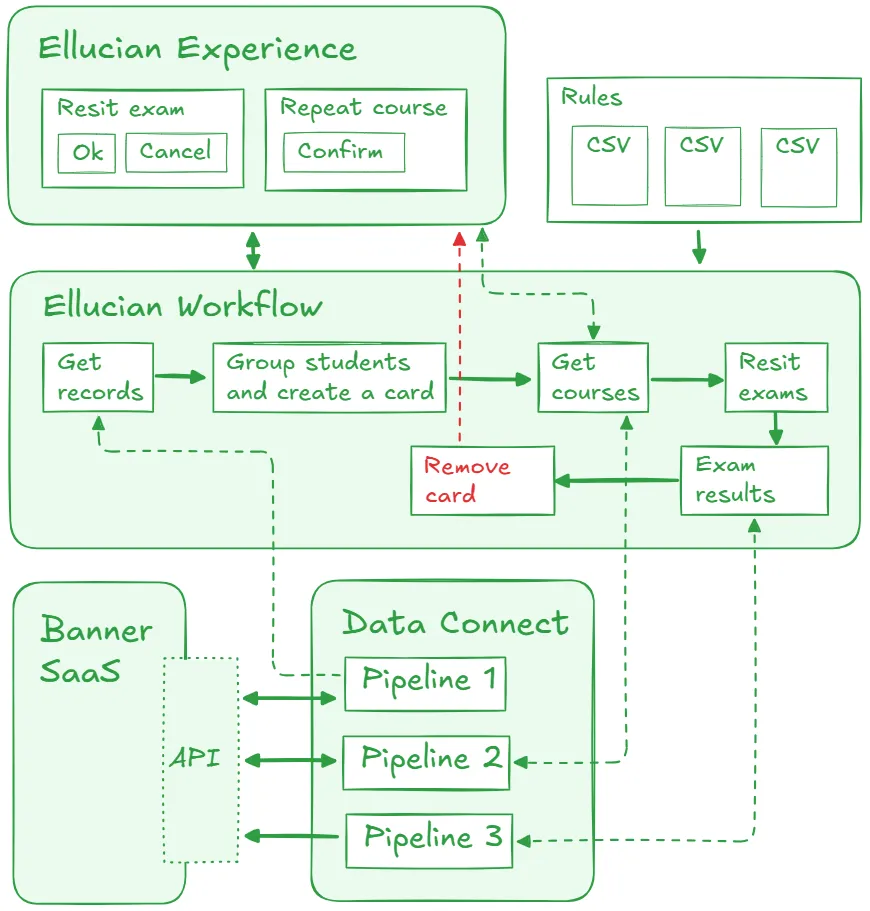
The state-of-the-art automated Ellucian Workflow orchestrates this automation project. The workflow starts when an administrator runs the first pipeline to get a list of students with failed courses.
The workflow applies the rules to select the student records that match the criteria. Next, the workflow groups these students into the following two cohorts. The university can add rules to the workflow that detect resit students and determine in which term they should be assigned to repeat.
- Resit with trailing credit. This student progressed to the next academic year of study without achieving all the credits from the prior year. This student must make up the failed credit while studying in the new year.
- Repeat a course. This student doesn’t progress to the next academic year of study. They must repeat all or some of the courses in the next available academic year.
For each student with a failed course, the workflow generates an Experience card and adds it to the dashboard. After the student confirms their willingness to continue studies, the workflow starts the second pipeline to display available options. Alternatively, the student can start the withdrawal process, which is not part of this workflow.
For resit students who progressed to the next academic term with a deficit, the workflow confirms repeat courses and makes it possible to register. For repeating students, the workflow manages the course reference numbers (CRNs). A university can use the same CRN or assign a new CRN when a student repeats a course. A toggle in the workflow determines which method to use at the site and ensures correct CRN matching.
Finally, after the student resits the exam, the workflow runs the specific Data Connect pipeline to update the exam results. Recently, we developed an Experience card to display exam results, and we reused part of that flow in this project. For a passed exam, the pipeline updates the status for this student record. In this case, the workflow removes the Experience card from the dashboard. Sounds like a happy ending to a sad and complex story for each student with a failed course.
Benefits and results
This whole automation project is a successful ending for all the mess and chaos that usually comes along with the need to resit an exam or repeat a course. Our team delivered a highly customizable automated workflow. The university can configure rules for determining failed courses as well as the proposed options for students.
With this proven approach, students can finally see the light at the end of the tunnel in their battle with failed courses. Students receive a comprehensive overview of their options to continue studies, and can choose the one that fits best. Also, the administrative staff of the university doesn’t need to handle the related tasks manually. We sincerely believe that this automation can help many struggling students regain control of their education process, and we are really proud to deliver this meaningful project.
Automate your business processes with ABCloudz!
This project demonstrates a unique blend of experience with Ellucian software that the ABCloudz team possesses. Our expert developers use a complete and comprehensive approach to all modernization projects and help higher education institutions streamline the delivery of their projects.
Learn more about other Ellucian-based projects that we completed for institutions and universities across the globe. You can trust us to bring your workflow automation ideas to life!