Every assessment framework assumes things go according to plan. Mitigating circumstances exist for the moments when they do not. Late submissions, non-submissions, and requests for mitigation force institutions to balance empathy, consistency, and policy, all while assessments are still in motion.

In that assessment window, the balance needs a real process behind it. Students need a clear way to explain why a late submission, non-submission, or mitigation request should be considered valid, often with supporting evidence attached. Staff need the full context in one place so they can approve, reject, or refer the case, and the outcome needs to be recorded correctly. And the system needs to enforce the rules up front, including whether the request is even allowed at that point in time, before it reaches an approver.
Ellucian has been steadily investing in UK-oriented SaaS solutions that institutions can adopt with confidence. Together with ABCloudz, this work has already produced reusable workflows, integrations, Experience cards, and SaaS-ready alternatives to logic that previously depended on local processes or custom code. The Mitigating Circumstances workflow follows that same approach, focusing on a process that institutions can adopt as-is rather than redesign for every assessment cycle.
In this post, we break down how we built a Mitigating Circumstances workflow for Ellucian Experience in the UK context. You will see how we made the process consistent, SaaS-native, and ready to adopt.
Working on a different student-facing process right now?
Check out our Ellucian projects or explore additional higher education projects built for real institutional needs.
What the workflow had to get right
Mitigating circumstances do not arrive as one neat process. They arrive as a stream of individual cases, each tied to a specific student and a specific assessment moment. So the workflow has to do two jobs well: treat every submission as its own trackable request, and block invalid submissions early if the mitigating circumstances window is not open or permissible, instead of wasting staff time later.
Then there is the detail that makes decisions fair. Staff cannot judge a request without seeing what exactly is affected, which module, which assessment component, and which due date, sometimes more than one. The workflow also needs to support the three request types in scope, late submission with a proposed new date, non-submission, and mitigation, while keeping communication airtight: a proof-of-submission email with the full form details and timestamp, plus a clear outcome message once the case is approved, rejected, or referred for more information.
How the workflow runs in Ellucian SaaS
We built the mitigating circumstances workflow to do one thing really well: turn a student’s “something went wrong” moment into a clean case that staff can decide on fast, with the right updates applied automatically at the end.
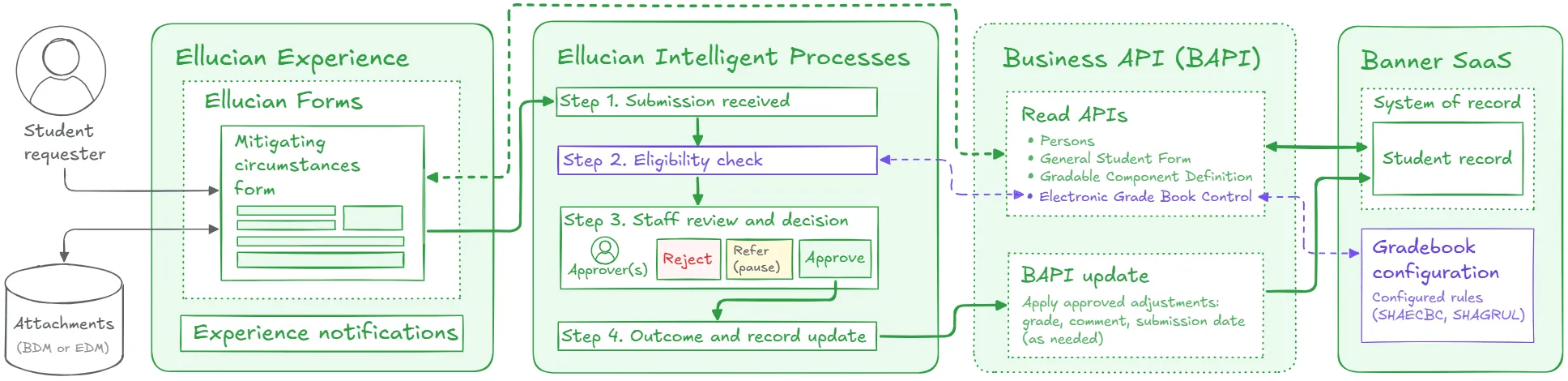
The student starts in Ellucian Experience and submits a request through an Experience form. Most of the context is pre-filled, so the student focuses on what matters: what happened, what it affects, and when. They select the module and the impacted assessment component or components, choose the request type (late submission with a requested new date, non-submission, or mitigation), add dates, pick a reason or use “Other,” attach evidence, and confirm a policy statement the institution can configure.
Before any staff time is spent, the workflow checks eligibility. If the mitigating circumstances window is not open or the request is not permissible, the case is automatically rejected. If it is valid, the student gets a proof-of-submission email with the full details and timestamp.
Then Intelligent Processes routes the case to the right approver based on program of study. The approver can approve, reject, or refer and pause the case for follow-up. Reject closes the loop with an email and an Experience notification. Approve moves straight to the update step, where any required component-level adjustments, such as grade, grade comment, or submission date, are applied back to the student record through Banner APIs, and the workflow ends with a clear outcome message to the student.
Results
Students get one clear Experience flow to submit a case with evidence, receive a timestamped submission receipt, and see the decision by email and notification.
Staff get decision-ready requests with the right module and component context, plus a simple approve, reject, or refer path, with approved adjustments written back to the student record when needed.
Institutions and Ellucian get a SaaS-native workflow that enforces eligibility up front and is ready to adopt across assessment cycles.
Turn institutional processes into Ellucian SaaS workflows
ABCloudz understands the common patterns behind institutional processes, but the build always depends on your specifics: which data you need to capture, which checks apply, who approves, and what must be updated once a decision is made. We lock those details down first, then implement the workflow in Ellucian SaaS using standard components so it is supportable and easy to adopt.
If you want to standardize a process in Ellucian SaaS, contact ABCloudz and share your current flow. We will translate it into a SaaS-native workflow your team can run with confidence.