“Annual review” sounds simple. Until you try to run it for postgraduate research students.
For PGR students, progress is not measured in modules, grades, or tidy end-of-term results. It lives in milestone meetings, supervisor judgement, and decisions that make perfect sense to people but are surprisingly hard to express cleanly in a system. In many UK institutions, that gap shows up every year when it is time to record progression, notify everyone involved, and make sure the student record actually reflects what was decided.

This project focuses on that exact moment. ABCloudz was asked to build a reusable PGR annual review workflow tailored to the UK context. The goal was clear: trigger reviews at the right time, guide students and advisors through a simple, structured flow, and write the outcome back into Banner SaaS using standard SaaS tools. No custom database logic. No one-off institutional builds. Just a workflow that fits how PGR progression actually works.
In the sections below, we show how this process is implemented using Ellucian Experience, Forms, Intelligent Processes, and Data Connect, turning a traditionally manual review into a clear, repeatable SaaS workflow.
Working on a different academic process right now?
Explore our Ellucian projects or browse more higher education projects that tackle other campus workflows.
The situation we started with
UK institutions already store what they need to run PGR annual reviews. Milestones, review requirements, and due dates exist in Banner and are maintained year after year. The challenge was never missing data.
The gap was orchestration. Nothing reliably triggered the review when the milestone approached. Students did not have a clear entry point to submit their review. Advisors handled decisions, but approval paths varied, and outcomes were often recorded manually after the fact. The institution understood the process, but the system did not enforce it.
This is where a SaaS-native workflow was needed. Not to change how PGR reviews work academically, but to turn existing milestone data into a timed review, a guided submission, a traceable decision, and a clean update to the student record.
How the workflow runs in Ellucian SaaS
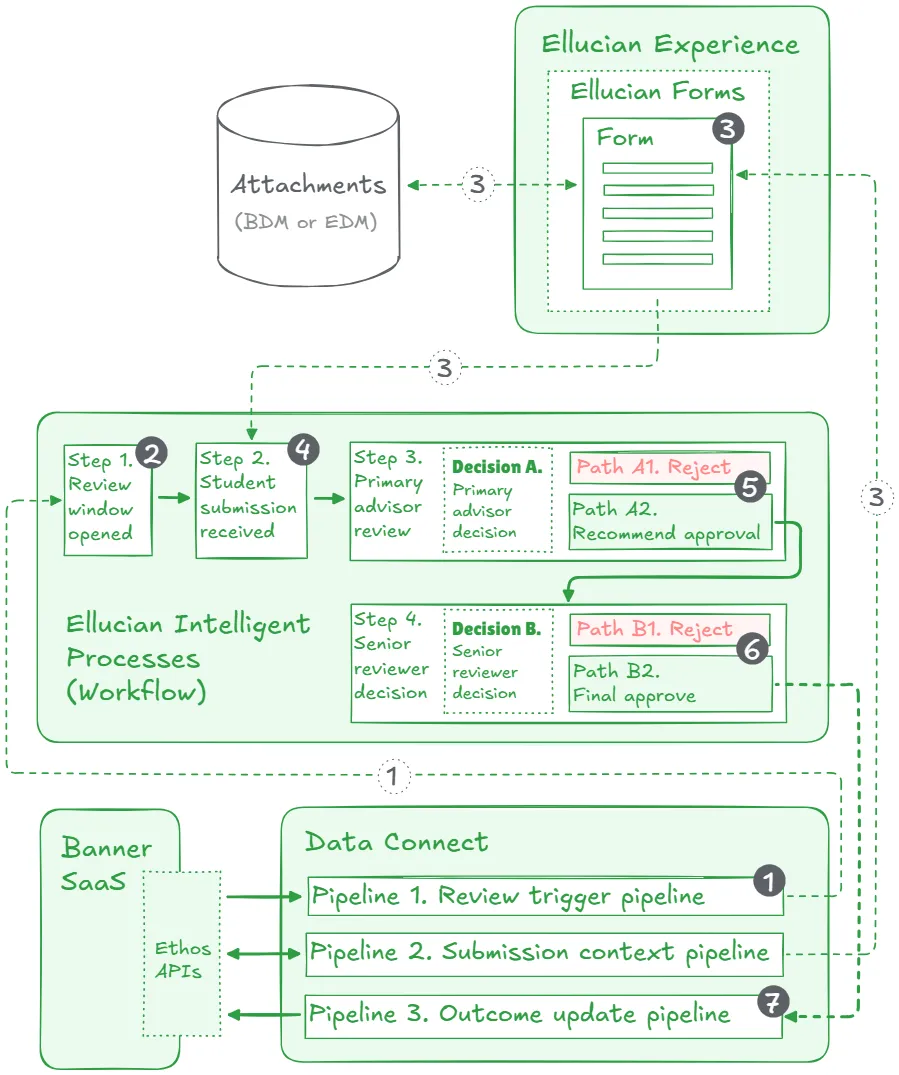
This solution is an integration in the most practical sense: it connects the user-facing SaaS layer (Experience, Forms, Intelligent Processes) with the official Banner SaaS (Ellucian Student) student record, then writes the outcome back through standard APIs. The goal is simple. Make the PGR annual review happen on time, move it through approvals, and record the result without side quests.
The flow is easy to follow:
- Experience is the front door for the student.
- Ellucian Forms collects the submission and documents.
- Intelligent Processes routes approvals and sends emails.
- Automation pipelines write approved outcomes back into Banner SaaS through standard APIs.
Start at the right moment
The workflow needs a reliable “clock,” and we did not invent a new one. We use a data point many institutions already maintain in Banner for PGR milestones.
In Banner, an annual review can be tracked as a non-course requirement. Think of it as a checklist item on the student record that is not a module, not an assessment, and not tied to course enrolment. It represents a formal research milestone or review point that the institution expects the student to complete as part of their progression.
That is what we refer to as an Academic Non-Course requirement. It lives in the Banner student record and includes a complete-by date that represents when the review should take place. That date becomes the natural trigger for the workflow.
From there, Ellucian Data Connect can start the process a configurable number of weeks before that date. This keeps the review timely without turning it into background noise months in advance.
If a true date-based trigger is not available in a given setup, we still keep the timing sane. The student submission in Ellucian Forms can enforce an opening window, so the form only becomes available starting X weeks before the same complete-by date.
Give the student one clean submission flow
The student enters through Ellucian Experience, which acts as the front door. From there, the student opens an Ellucian Form designed to do one thing well: capture progress notes and supporting evidence for the selected milestone.
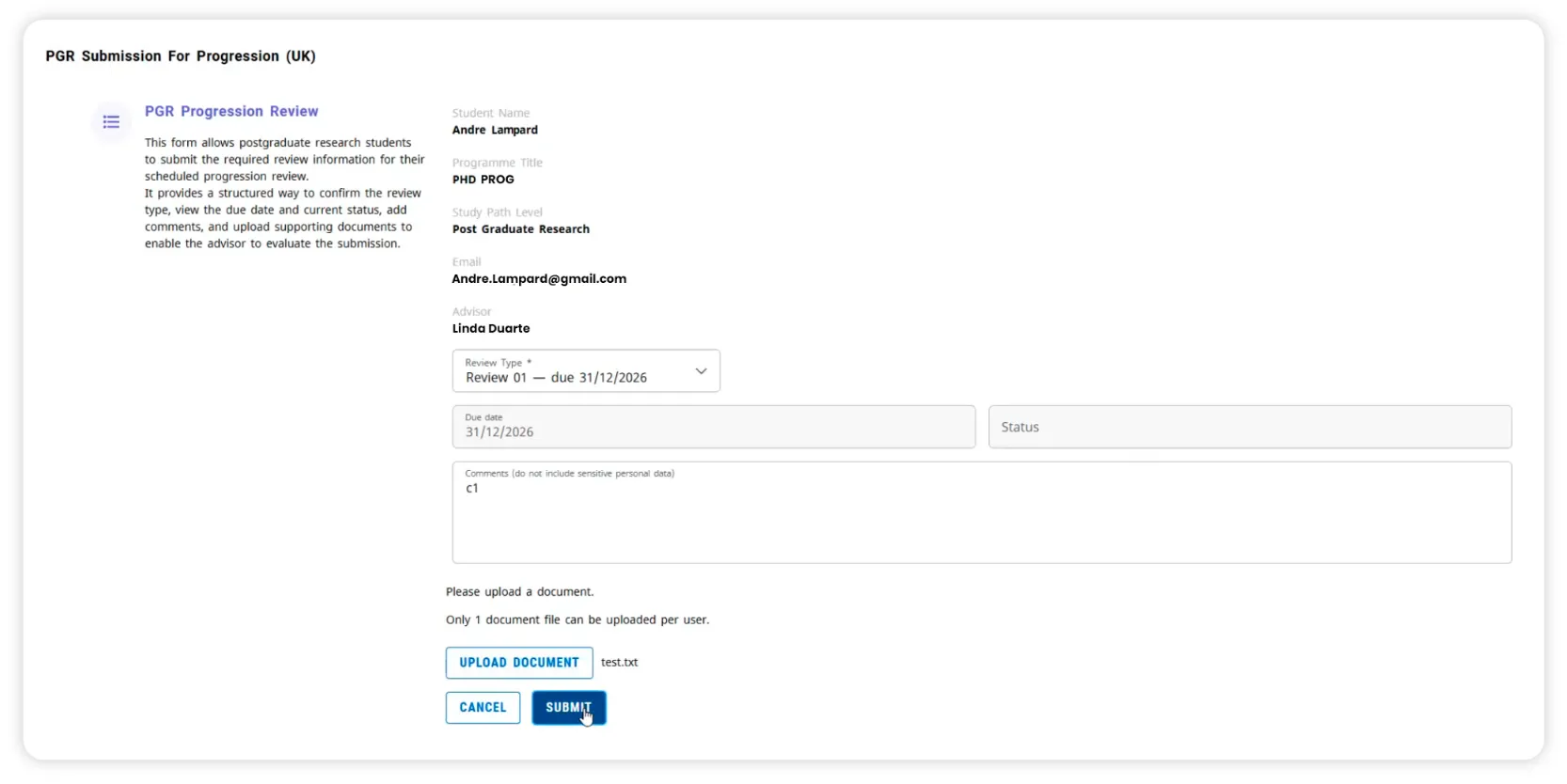
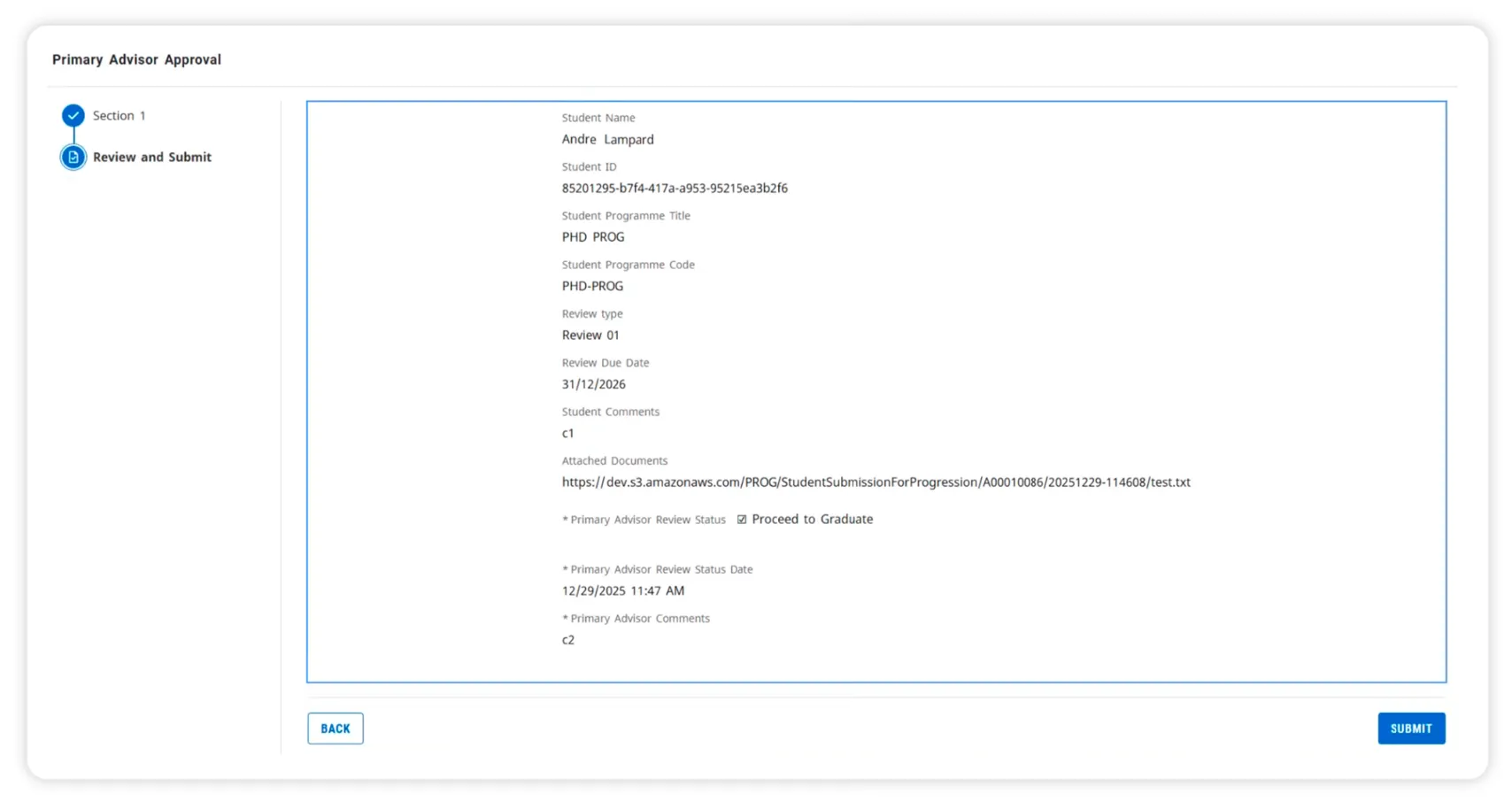
To reduce mistakes and back-and-forth, the form pre-fills key context from the student record, such as the student details, programme context, and contact email. It also pulls the assigned advisor from the same Academic Non-Course requirement. In the API payload that advisor reference is academic-non-course:advrId, which simply means the advisor linked to this specific review requirement. The workflow uses it to send the task to the right person automatically.
The student then selects the relevant review type from a configured list of milestone checkpoints. The form can show the associated due date and the current requirement status, so the student sees what is expected and where things stand today. The student adds comments, attaches supporting documents through the institution’s document management setup (BDM or EDM, Banner Document Management or Ellucian Document Management), and signs and dates the submission.
Route approvals and keep the decision traceable
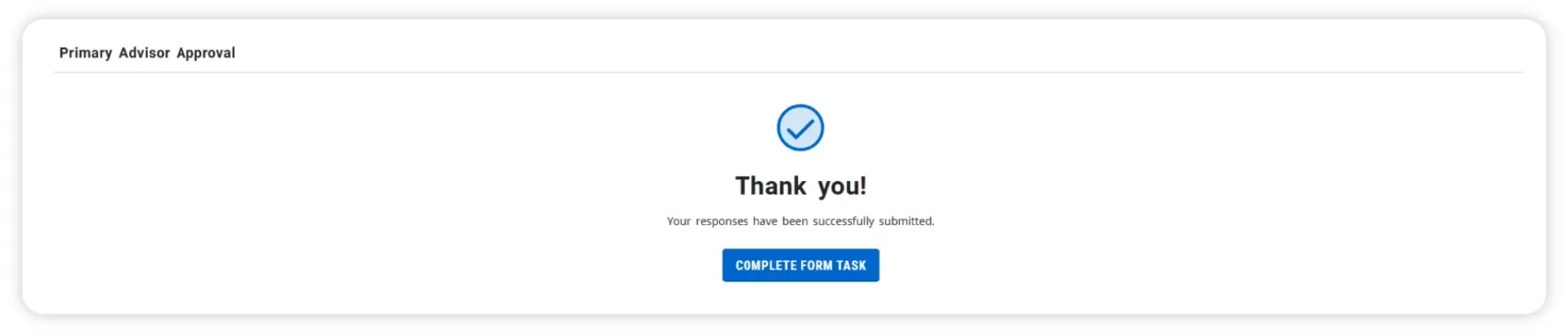
Once the form is submitted, Ellucian Intelligent Processes orchestrates the workflow. This is the piece that creates tasks, routes approvals, and sends the decision emails.
The first approval task goes to the primary advisor identified earlier. The advisor reviews the student’s submission, sees the attached documents, adds comments, and then chooses a path:
- Reject: Intelligent Processes sends the decision email to the student, and the Academic Non-Course requirement is updated to reflect the outcome.
- Recommend approval: Intelligent Processes forwards the review to a senior reviewer for the final decision, along with the advisor recommendation.
If the senior reviewer rejects, the workflow sends an email with comments back to the primary advisor. The requirements note a practical limitation: if a formal loop-back step is not available, the institution may choose to restart with a new student submission after changes.
If the senior reviewer approves, the workflow updates the Academic Non-Course requirement to show the review is completed, including status, status date, and satisfied.
Write the outcome back to the student record
After final approval, Ellucian Data Connect runs automated pipelines to apply the approved updates back into Banner SaaS using standard APIs.
At that point, the workflow does two essential things. It marks the Academic Non-Course requirement as completed so the annual review is officially recorded, and it records the progression decision on the student’s study path so the outcome is available for downstream progression processes.
One boundary is intentional. This workflow records the decision and updates the record, but the separate PGR Progressions run can remain an operational step outside the scope of this design.
Outcomes
Students get one clear place to complete the annual review, submit comments and attachments, and see the outcome once it is decided. Advisors receive a complete review package with the right milestone context, so they can act without chasing details. The result is fewer follow-ups and a smoother handoff on both sides.
For institutions, milestone dates already maintained in Banner reliably turn into review activity at the right time, with a consistent approval path and recorded outcomes. Decisions and comments stay tied to the right review, improving traceability and data quality without adding new admin overhead. The workflow records the decision and status updates while keeping the separate PGR Progressions run outside scope.
At the platform level, the result is a UK-ready, reusable PGR annual review workflow that institutions can adopt rather than rebuild. It is SaaS-native, built on standard components and existing data structures, which makes it easier to support and scale. More importantly, it establishes a repeatable pattern for translating UK-specific academic processes into reliable SaaS workflows.
Building workflows that feel native in Ellucian SaaS
As an Ellucian Service Partner, we help higher education institutions modernize to Ellucian SaaS, rebuild integrations with Ethos and Data Connect, and deliver user-facing workflows through Experience and Forms that still land cleanly in the system of record.
If your institution has a process that currently lives in milestone spreadsheets, email threads, or local habits, we can help you turn it into a clear SaaS workflow that people actually want to use. Bring the process, we will help map it, build it on the right Ellucian components, and make it reusable enough that you only have to solve it once.
Reach out to ABCloudz and tell us what you are trying to standardize.