Mistakes such as typos are part of human nature. As Theodore Roosevelt wrote, the only man who never makes a mistake is the man who never does anything. However, when you see a mistake in your personal student’s record, the first thing you want to do is to correct it immediately.
The student’s self-service system at one of the UK universities makes it possible to change some of the student’s details. At the same time, students can’t edit such information as first name, middle name, last name, date of birth, marital status, and legal sex. Edits in this data are rare and require a special review and approval process.
The ABCloudz team worked with the UK university to develop a reusable workflow that automates the business processes for editing personal student information. Combining such software parts as Ellucian Experience, Data Connect, Ethos API, and Workflow, our team automated the business flow for editing protected student data in the Ellucian Student database.
This blog post covers the success story of our customer and highlights the ABCloudz experience with different Ellucian products and services. We can easily customize this solution by adding new features or components. Also, we can tailor this proven solution to the needs of other customers. This approach mirrors the same reference architecture used in other Ellucian SaaS projects, such as disability declaration solutions, where an Experience card focuses on user interaction and a workflow layer manages the controlled operational process behind it.
Are you looking for a trusted expert for your Ellucian project? The ABCloudz team works as an extension of Ellucian Professional Services and delivers projects for hundreds of Ellucian customers. We perfectly understand the needs of higher education institutions and know all about the Ellucian products and services. Contact us today and let us take care of your project!
Current-state architecture
Without further ado, let’s review the current business flow for editing personal student information. The following image shows the current-state architecture of the existing flow.
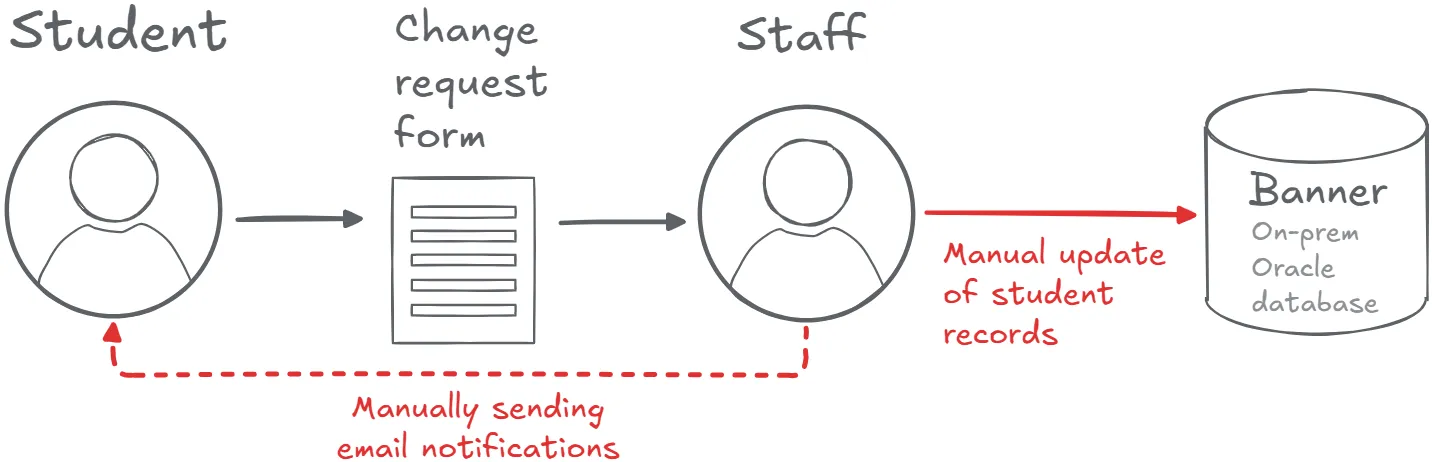
To update information in the Ellucian Student database record, the student must print, fill in, and submit the specific form. Also, the student makes a copy of an evidence document and attaches it to the application form. Following, the administrative staff reviews the request and manually updates the record in the on-premises Banner database by running a SQL script.
If this script fails, for example, during the data validation, then the staff sends an email to the student asking to resubmit the request.
Aiming to reduce the amount of manual work with papers, the university decided to automate the flow for editing personal student information. They migrated to the Banner Student database and wanted to take full advantage of the cloud SaaS solution.
The ABCloudz automation approach
The ABCloudz team implemented a coordinated Experience and Workflow solution, where the Experience card captures and displays student requests, and the workflow layer governs review, approvals, and record updates.
The student starts the workflow by completing the Change of details form in the Experience dashboard. This form includes current information, new data that the student requests, an evidence document, and optional comments.
After the student reviews and submits the change of details form, the workflow assigns a staff member from the student records team to review this change request. The workflow creates a task and adds a notification to the Ellucian Experience dashboard.
Optionally, the reviewer shares comments with the student. In this case, the workflow sends a notification to the student. In turn, the student adds the requested information, answers to the comments from the reviewer, or resubmits the request.
After the reviewer approves the change request, the workflow updates the student’s record in the Ellucian Student database. If the reviewer declines the change request, then the workflow deletes all the related files on the Amazon S3 bucket.
For each status change, the workflow displays the notifications in the Experience dashboard for all involved stakeholders.
At all steps, the workflow checks that the review task progresses as expected. For example, the reviewer and the student must reply to new comments during the configured time. Otherwise, when the review task doesn’t have any actions during the configured time, the workflow sends the notification reminders or marks the request as expired.
Workflow stakeholders and actions
The following list describes the key stakeholders for this workflow and the actions that they perform.
- Students request a change to mandatory details, add the change details, provide any required evidence (by uploading the documents), and see the progress of this request.
- The staff reviews, comments, approves, or declines the request.
- The system reflects all updates in the Ellucian Student database for approved requests.
Workflow configurable parameters
Because other institutions might want to use a similar automation flow, the ABCloudz team created the reusable workflow with configurable parameters. The following list includes the configurable parameters for this reusable workflow. By using these parameters, we ensure that the university can customize this workflow as needed.
- Notification period for sending reminders
- Expiration period for change requests
- Amazon S3 bucket name and access credentials
- Ethos API key to access data in the Ellucian Student database
Workflow limitations
Our team delivered this project keeping the following limitations in mind. Of course, we can improve the workflow later if our customer needs to implement these changes.
With this workflow, the staff members can’t submit a change request for updating student data. Only the student can start the change process, while the staff members can only run a SQL query to manually update data.
Also, this workflow doesn’t update the student’s HESA record outside of Banner.
Future-state architecture
The following image shows the future-state architecture of the workflow for editing personal student information. This future-state architecture follows a clear separation of responsibilities: the Experience card delivers the self-service user interface, Data Connect prepares and synchronizes data, and the workflow orchestrates approvals and controlled updates to the system of record.
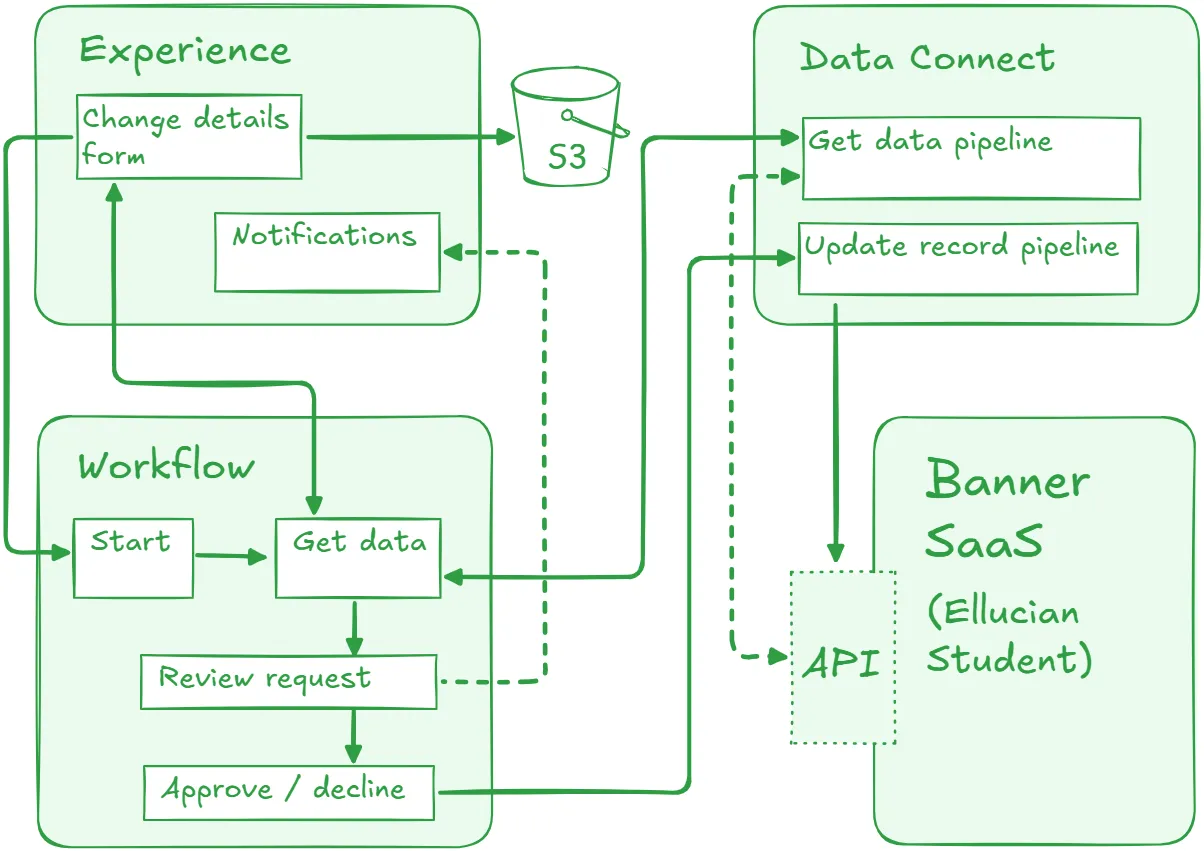
Initially, the Ellucian Student database stores information from admissions and enrollment. The student doesn’t need to enter personal information, and the goal of this workflow is to only update this data, if needed.
The workflow starts after the student opens the Change of details form. The workflow runs the first Data Connect pipeline to get the current data from the Ellucian Student database by using the Ethos API. As part of this pipeline, the workflow populates the marital status and legal sex dropdown lists with supported options.
When the student uploads a confirmation document, the workflow stores this file on an Amazon S3 bucket. To access this bucket, the workflow uses the information from the configuration file.
For an approved request, the workflow runs the pipeline to update the student’s record in the Ellucian Student database. This pipeline sends the changes to the Ethos API and the Student database updates the record accordingly. For historical reasons, the system also stores the comments from the review thread and a reference to the change request form.
Benefits and results
The ABCloudz team delivered an automated workflow for editing personal student information. This workflow enhances data security, implements efficient communication between stakeholders, and ensures compliance with regulations. Finally, the workflow provides a streamlined experience for students and administrative personnel.
By ensuring clear and transparent communication, the institution minimized errors and reduced delays in updating the student records. As a result, students can see their updated details in the Experience dashboard immediately after the request approval.
The ABCloudz team delivered a reusable reference architecture that can be applied to other student self-service scenarios where a guided Experience interface must be paired with controlled approvals and system-of-record updates.
Start your automation project with ABCloudz today!
Ellucian positions ABCloudz as a trusted partner to help customers take full advantage of the Banner Student system. Our team successfully delivered hundreds of projects for institutions and universities across the globe, and we’re happy to help you streamline your automation project!
Take a moment to read other success stories about our expertise with different Ellucian software and products. The ABCloudz team knows how to implement all the latest and greatest Ellucian products in your project. Don’t hesitate and contact us to get started!