The moment an institution moves Banner to SaaS, every integration that quietly depended on database access gets a reality check. Nothing is “broken” in Ellucian SaaS. The rules are simply different, and old assumptions no longer apply.
That was the situation for a large US community college that had long been running Ellucian Banner on-premises alongside SARS Anywhere, a platform used for appointment scheduling, advising activity tracking, and regulatory reporting. When the institution decided to migrate Banner to SaaS, this well-established integration became one of the first areas that needed to be rethought.

The integration between the two systems was not new. It was already automated, reliable, and deeply embedded in daily operations. Student demographics, course context, instructor details, and engagement data were regularly exported from Banner and consumed by SARS to support advising workflows and state reporting requirements.
The challenge came from the architectural shift that accompanies Banner SaaS (Ellucian Student). The existing automation relied on on-premises patterns such as SQL queries and direct database access, which are intentionally replaced in SaaS by secure APIs and managed integration tools. The business need stayed the same, but the technical foundation had to be reimplemented to align with Ellucian’s SaaS architecture.
In this post, we share how our team at ABCloudz helped reimplement the Banner to SARS Anywhere integration using Ellucian SaaS-native tools. By analyzing the original logic, identifying the user stories behind it, and rebuilding the automation with Ethos APIs and Data Connect, we restored the same outcomes in a way that fits Ellucian’s cloud architecture and is ready to evolve with it.
We have taken the same SaaS modernization approach in other Ellucian Banner projects as well, including integrations with BMET, ClockWorks, ProVerify, Remind, and other third-party systems where on-prem Banner logic was carefully reimplemented using Ellucian SaaS-native tools.
Not the integration challenge you are focused on right now?
Browse our Ellucian SaaS project collection or explore more Higher Education stories to see how institutions approach SaaS modernization across campus systems.
The original on-premises integration model
Before Banner moved to SaaS, the integration with SARS Anywhere followed a straightforward on-prem pattern. Banner acted as the system of record and, on a fixed schedule, generated three CSV files with student, course, and section data. Those files were made available through a shared network location and consumed by SARS to support appointment scheduling, advising workflows, and required state reporting.
The integration operated reliably as part of routine, day-to-day workflows. SQL queries joined multiple Banner tables, applied term-based filters, resolved instructor and course context, and enforced eligibility rules that had accumulated over years of operational use. Once generated, the files were transferred through an SMB-based file share, a common on-prem mechanism that allowed both systems to access the same network directory.
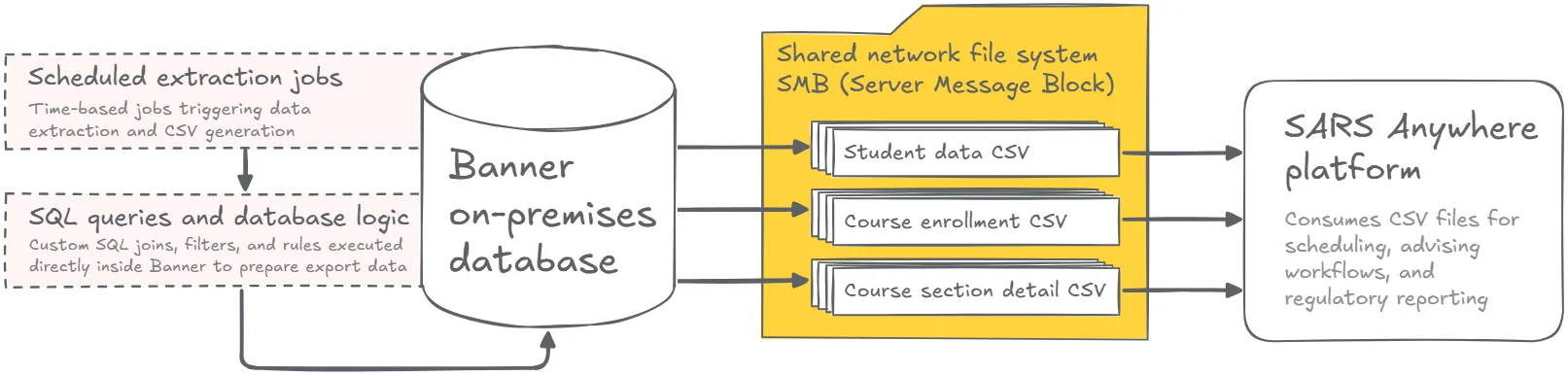
This logic lived directly in the on-premises database and its surrounding infrastructure. It depended on SQL access, internal Banner tables, database-level functions, and shared file system access, all of which are intentionally not part of a SaaS environment. As Banner moved to SaaS, the integration outcome remained just as important, but the underlying logic had to be re-expressed in a SaaS-native form that fits Ellucian’s cloud architecture, without simplifying away the context SARS depends on.
Rebuilding the integration for Banner SaaS
We broke the work into three clear steps.
Extracting user stories from the legacy logic
We started by treating the existing SQL-based automation as a set of user stories rather than code. Each join, filter, and eligibility rule answered a specific question SARS needed Banner to answer. Which students should be included. Which term they belong to. Which courses, sections, and instructors provide the right context. That logic was documented end to end before any SaaS work began.
Reimplementing the logic with SaaS-native tools
From there, the integration was rebuilt using Ellucian’s SaaS-native tools.
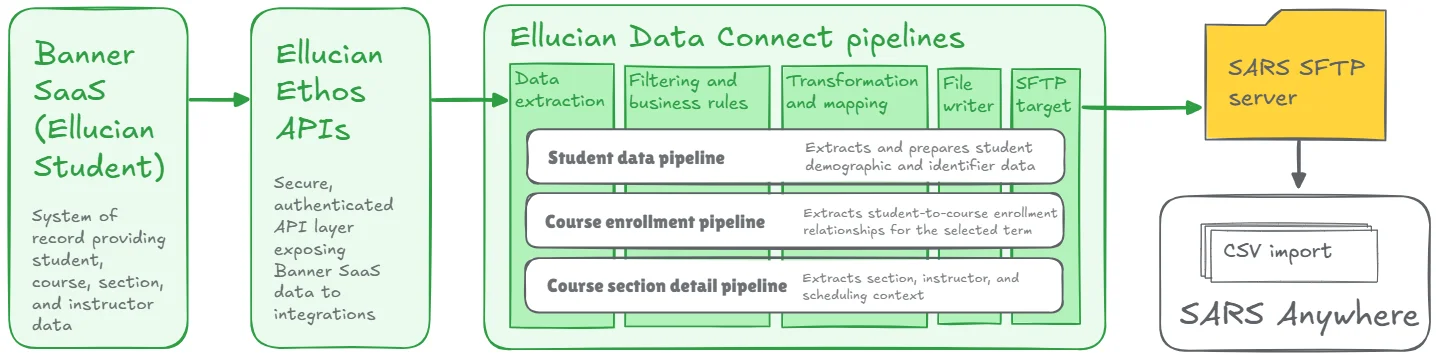
Secure data access moved to Ethos APIs. Orchestration, filtering, and transformation logic moved into Data Connect pipelines. Instead of database queries running inside Banner, the pipelines now retrieve the same data through authenticated APIs, apply the same business rules, and produce the same three CSV outputs SARS expects.
Making the process explicit and observable
The new flow is explicit and traceable. Each pipeline run is parameter-driven, including term-based filtering, and produces deterministic CSV files for student data, course enrollment, and section details. Validation and error handling are built into the process, so administrators can see exactly what ran, what was delivered, and whether anything needs attention.
Results and impact
The integration now runs fully inside Ellucian’s SaaS ecosystem, without relying on any on-prem assumptions. The original business logic remains intact, but it is expressed through supported APIs and managed pipelines instead of database scripts and shared file systems.
For administrators, this means fewer moving parts and no hidden logic. Each run is traceable. Errors are surfaced immediately. The integration no longer depends on local infrastructure or custom database access, and it aligns cleanly with Ellucian’s long-term SaaS architecture.
Bring your Banner integrations into SaaS the right way
This project illustrates our integration modernization offering in practice: we took established automation and reimplemented it to work cleanly within Ellucian’s SaaS architecture.
If your institution is preparing for Banner SaaS or reviewing integrations that were built around direct database access, we can help you identify what needs to be reimplemented and how to do it right from the start.
Let’s talk about how to modernize your integrations for SaaS and keep them reliable long after the migration is complete.